Product customization kicks into high gear in 2026, with customers looking to design their own mugs, t-shirts, jewelry and more. One of the most effective ways for Shopify store owners to maximize profits and offer a complete product evaluation is to utilize already integrated tools or apps like SB Custom Product Personalizer. Using text fields, image upload boxes, and incorporating a live product preview will engage the customer and get them to continue with their purchase. Customization/ personalization can increase sales, loyalty, and brand value while decreasing return rates.
2026 will be the year of personalization. From custom mugs and t-shirts to engraved jewellery and monogrammed accessories, shoppers expect to design products that reflect their style. If you have a Shopify store, adding product customization options is important to stay ahead of your competition.
This guide will show you how to add product customization to your Shopify store. You can do this using built-in features, third-party apps, or custom development.
Key Takeaways
- Personalization Drives Sales: Over 70% of buyers prefer brands that offer product customization, leading to higher revenue and reduced acquisition costs.
- Customization Options Are Expanding: Popular features include text input, image uploads, color/style variants, live previews, and smart pricing.
- Top Apps Make It Easy: Tools like SB Custom Product Personalizer enable feature-rich customization without coding.
- Marketing & SEO Are Critical: Optimizing product pages, leveraging user-generated content, and targeting niche SEO keywords are key to visibility and conversion.
- Real Results, Real Growth: Brands like Casetify and Nike thrive on customization—and now SMBs can do the same on Shopify.
Why Product Customization Matters?
Being personal and specific has become really important in shopping. Recent reports from Deloitte and Shopify Enterprise show that more than 70% of buyers are more likely to buy something if they can change or personalize it. This change is happening because:
- Gen Z’s emphasis on self-expression: Today, people want things that reflect their identity. This could be a hoodie with a unique design, a water bottle with their initials, or a phone case made just for them.
- Millennial gifting culture: Personalized gifts, such as custom mugs, jewelry with names, and photo books, are popular for birthdays, weddings, and holidays.
- Social media influence: Customers love sharing their personalized purchases on social media platforms like Instagram, TikTok, and Pinterest, which helps products become popular fast.
In 2025, AI made personal experiences faster and more interesting with simple design tools and customization options.
Stat Highlight: A 2025 McKinsey study found that brands offering personalization can reduce customer acquisition costs by up to 50%, and increase revenue by up to 15%.
Benefits for Shopify Store Owners
Adding custom options for products in your Shopify store is not just a new feature; it’s a way to help your business grow. Here’s how it pays off:
Higher Average Order Value (AOV)
Customers usually like to pay extra for items that are made just for them. This can include things like adding a name, special colors, or engravings. These little changes can really increase how much they spend.
Example: A standard $16 mug becomes a $29 order when a name and photo are added.
Better Customer Loyalty & Retention
When a customer helps to create a product, they feel a strong bond with it. Personal items are often linked to special memories or important events, which makes the buying experience very special.
Bonus: Personalized products are less likely to be compared on price, making your store more resilient to competition.
Lower Return Rates
Returns can be expensive. However, personalized items are made just for you, so they are returned less often. People think carefully before ordering custom items, which helps them avoid buying things by mistake.
Stronger Brand Identity
Customization makes your brand stand out from others. Adding special features, like real-time views or tools to create your own products, makes shopping more fun and memorable.
Pro tip: Collect and showcase user-generated designs to build trust and community around your brand.
Real-World Insight (2026 Trend)
Top brands like Casetify, Nike By You, and Etsy sellers who make custom items are gaining more customers. This growth is happening because they let shoppers choose how they want to buy products.
Now, even small and medium-sized Shopify stores are using tools like SB Custom Product Personalizer to add new features to their online shops without needing special coding.
Customization Options You Can Offer

In 2026, buyers will want to control how their products look, feel, and work. If you sell clothes, home items, or gifts, letting customers customize their products can make a regular item special. This can lead to happier customers and more sales.
Below are the top customization features successful Shopify stores are offering.
Text Personalization
Allow customers to add:
- Names, initials, or custom messages for a personal touch
- Quotes or taglines that reflect their mood, beliefs, or event
- Date stamps or locations for weddings, anniversaries, or milestones
Example: Add a custom message to a tote bag for +$5.00
Ideal For: Apparel, accessories, gifts, stationery, home decor
Pro Tip: Provide options for choosing fonts, control over text alignment, and limits on character count to make things clearer and improve design.
Image Uploads
Enable shoppers to upload their own:
- Photos or selfies (pets, partners, memories)
- Logos or branding for corporate gifting or events
- Artwork or illustrations for creative customization
Example: Upload a custom image to a canvas print for +$10.00
Ideal For: Wall art, mugs, t-shirts, tech accessories, signage
Pro Tip: Use AI to check image quality (like resolution and format) before sending them in to prevent problems.
Color & Style Variants
Let customers choose from:
- Multiple fabric or material types (e.g., leather, denim, wood grain)
- Text color, font style, and layout options
- Print styles like matte, glossy, holographic, or metallic
Example: Switch to premium material or finish for +$7.00
Ideal For: Fashion, jewelry, packaging, custom print products
Pro Tip: Use clickable color samples that change instantly to show how each choice looks on the product.
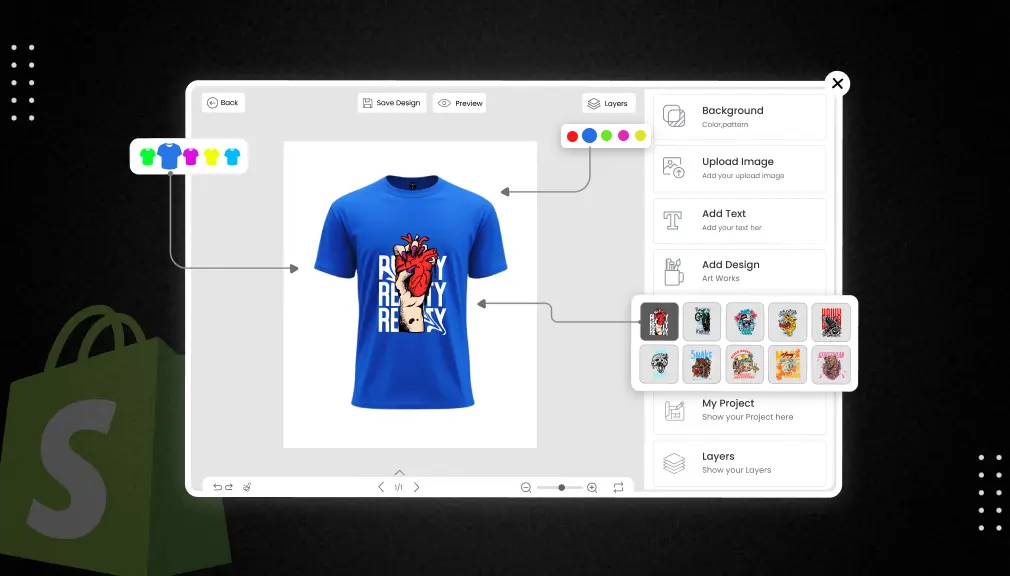
Live Preview (Real-Time Customization)
Give customers the confidence to design with instant visuals:
- Auto-updating preview as users type or upload content
- Side-by-side comparisons of different styles
- Zoom-in and rotate tools for detailed views
Example: “Design your mug” feature with instant rendering of all custom elements
Ideal For: Products where visuals directly affect purchasing decisions
Pro Tip: Provide previews that work well on mobile devices to make sure the experience is smooth on all types of devices.
Smart Logic & Dynamic Pricing
Make customization smarter using built-in logic:
- Conditional fields: Only show advanced options when needed (e.g., image upload appears only if “Add Photo” is selected)
- Auto-calculated pricing based on user selections (e.g., “Add metallic print for +$3.50”)
Example: A custom t-shirt with name, logo, and metallic print totals $32.50
Ideal For: Multi-option products with tiered pricing
Pro Tip: Use product personalizer apps that allow easy customization and adjustable pricing without needing special programming skills.
Methods to Add Customization in Shopify
You can easily change products in Shopify. There are three main ways to do this: use the tools that come with Shopify, use apps made by other people, or make your own special solution. Which way you choose depends on how big your store is, how much money you have, and what skills you have.
Let’s break them down:
1. Shopify’s Native Capabilities (Basic Option)
Shopify has an easy way to customize things using simple code. This feature is called line item properties.
What it allows:
- Simple text input fields (e.g., “Add Name”)
- Dropdowns, radio buttons, or checkboxes
- One-time customization values passed with the order
Limitations:
- ❌ No image upload support
- ❌ No live preview
- ❌ No conditional logic or dynamic pricing
- ❌ Requires manual theme editing (HTML/Liquid code changes)
Who it’s for:
- Budget-conscious sellers with simple needs (e.g., a “Gift Note” field)
- Stores comfortable making minor code changes
- Merchants okay with no visual preview
Example Use Case:
A flower delivery store adds a “Custom Message” field on the cart page using line item properties.
2. Shopify Apps
Many store owners use apps from various companies to modify their products without needing to learn coding. These apps are easy to use. They allow users to change how things appear and provide many options to make products special.
What to Look for in Customizer App:
- Live Preview Functionality: Show real-time updates as users customize text, images, colors, etc.
- Mobile-Responsive Design: Ensure a seamless experience across devices.
- Conditional Logic: Hide or show fields based on selections.
- Dynamic Pricing: Automatically adjust prices based on customization choices.
- Print-Ready Output: High-quality image export or integration with POD platforms like Printful or Gelato.
Top Shopify Apps for Product Customization:
SB Custom Product Personalizer (Recommended)
An easy tool that many sellers trust. It helps you see updates fast, add photos, limit text, use helpful features, set pricing rules, and handle shipping easily. Great for custom clothes, mugs, paper goods, and more.
Zakeke Product Customizer
It’s famous for showing 3D images and working well with services that print products when needed. It’s great for products that need to look good, like shoes, bags, or art.
Zepto Product Personalizer
Provides a simple and quick way to see options with basic features for special conditions. Great for easy tasks like custom jewelry or t-shirts.
Which Shopify Apps Are Best For:
- SMBs and mid-sized brands
- Merchants who want flexibility without coding
- Stores with medium to high customization complexity
Example Use Case:
A custom t-shirt store uses a tool called SB Custom Product Personalizer. This tool lets customers add words and pictures to a t-shirt and see it right away before they buy it. Each change adds a small extra cost and updates the price automatically.
3. Custom Development (For Advanced or Enterprise Needs)
If your business needs a special way to operate, custom development is the best choice. You can partner with Shopify Experts or agencies to create unique solutions for your theme or app.
Best For:
- Complex logic or user flows
- 3D configurators with rotation/zoom functionality
- AR-based customization experiences
- Bulk personalization for B2B or wholesale
- Deep integration with ERP or external inventory tools
Considerations:
- Higher upfront investment
- Longer development time
- Requires ongoing maintenance
- Full creative and functional control
Example Use Case:
A furniture brand builds a 3D product configurator that allows users to choose fabric, leg color, cushion density, and see it rotate in real-time. Integration with their internal ERP system sends specs directly to production.
Step-by-Step: Add Product Customization Using Custom Product Personalizer
Step 1: Install the App
Head over to the Shopify App Store and install SB Custom Product Personalizer.
Step 2: Choose the Product(s) You Want to Personalize
Assign the customizer to specific products like “Custom Mug” or “Engraved Wallet.”
Step 3: Configure Fields
- Add text fields with character limits
- Enable image upload
- Offer font and color selections
- Set up extra charges (e.g., +₹100 for engraving)
Step 4: Enable Live Preview
Let users see exactly how the product will look with their changes.
Step 5: Save & Publish
Review the design, test the flow on desktop and mobile, then publish!
Tips for Better Customization UX
- Keep the customization UI clean and mobile-optimized
- Offer helpful tooltips (e.g., “Max 20 characters”)
- Add visual indicators like font previews or swatches
- Include example previews or templates
- Allow users to reset or clear all customization
Handling Fulfillment for Custom Orders
- Clearly show customization details in admin and email notifications
- For manual production: Use order notes or metafields
- For POD integration: Sync with platforms like Printful or CustomCat
- Build in a 1-2 day buffer for personalized production timelines
SEO & Marketing Tips for Personalized Products
In the busy online shopping world of 2025, just selling personalized products isn’t enough. You also need to promote them smartly. Here are ways to improve how people see, interact with, and buy your custom products through good SEO and marketing strategies.
1. Optimize Titles, Meta Descriptions & URLs with Customization Keywords
Use strong search words on your product pages, like:
- “Custom” (e.g., Custom Phone Case)
- “Personalized” (e.g., Personalized Gift Box)
- “Design Your Own” (e.g., Design Your Own T-Shirt)
- “Make it Yours,” “Add Your Name,” “Photo Upload,” etc.
Example Title:
Custom Ceramic Coffee Mug – Add Name, Quote & Photo (11oz/15oz)
Example Meta Description:
Design your own ceramic mug with name, quote, or photo. Personalized mugs make perfect gifts for birthdays, weddings, or corporate events.
Pro Tip: Use different descriptions for each customizable option instead of copying the same one.
2. Use Structured Data (Schema Markup) to Highlight Custom Variants
Google continues to prioritize rich results in 2026. Add structured data for:
- Product type
- Variant pricing
- Availability
- Review ratings
- Custom attributes (e.g., personalization, color options)
This helps Google see what makes your product special and show better details in search results.
Recommended: Use Shopify apps like “JSON-LD for SEO” or manually insert schema into your theme.
3. Create Social Media Campaigns Featuring Real Customer Designs
Tap into the power of visual content by:
- Showcasing real customer creations using your product customizer
- Posting before/after shots of plain vs. personalized versions
- Using TikTok or Instagram Reels to highlight the “customization journey” (from design to delivery)
Tip: Create series like:
- #MadeWithMyStyle
- #PersonalizedByMe
- #YourNameHere
4. Run UGC (User-Generated Content) Contests like “Design of the Month”
Incentivize your customers to:
- Share their personalized product on social media
- Tag your brand and use a specific hashtag (e.g., #SBDesignStar2026)
- Submit a screenshot of their design made using your customizer
Prize Ideas:
- Gift card to your store
- Free product
- Social media spotlight or homepage feature
User-generated content (UGC) helps people trust brands more and increases sales, especially for personalized products.
5. Add Personalization-Based Filters to Product Collections
Help shoppers quickly find customizable options by:
- Adding filters like:
- Customizable
- Photo Upload Available
- Add Name/Text
- Made-to-Order
- Customizable
- Grouping products under “Personalized Gifts,” “Gifts Under $50 – Customizable,” or “Create Your Own”
Example Category Page:
Gifts for Him → Personalized Gifts for Under $50
Pro Tip: Use Shopify’s native filtering (Search & Discovery app) or custom tags to power smart filters.
6. Create Content That Targets Gift & Use-Case SEO Niches
Capitalize on personalization search intent by writing blog posts and landing pages like:
- “Top 10 Personalized Gifts for Mother’s Day 2026”
- “How to Design Your Own Pet Portrait Canvas”
- “Why Personalized Office Supplies Boost Employee Morale”
Add internal links from these posts to relevant customizable products.
7. Leverage Email & Retargeting with Dynamic Customizations
Send follow-up emails with:
- Saved designs the customer didn’t finish
- Recommendations based on previous customizations
- Seasonal promotions for gifting personalized products
Use ads that change based on what people like (on Facebook or Google Display) and show their saved or personalized designs.
8. Track What’s Working with Customization-Specific Analytics
Use tools like:
- Google Analytics 4 with event tracking for design steps
- Hotjar or Clarity for user behavior in the customization UI
- In-app analytics from your customizer (like SB Custom Product Personalizer) to see most-used options
Refine your UI/UX and marketing messaging based on real usage data.
Conclusion
Customizing products is now essential for making more money and keeping customers happy in 2026. Whether you sell gifts, clothing, or accessories, having the right way to customize can make your store much better.
Ready to get started?
Install the SB Custom Product Personalizer so your customers can design their own ideas directly on your product page.
FAQs
Why should I add product customization to my Shopify store in 2026?
Because consumers now want personalized products. Customization drives engagement, average order value, loyalty, and conversions while lowering return rates.
What are the easiest ways to offer product personalization on Shopify?
You could use Shopify’s native line item properties for simpler needs; install a product customizer app like SB Custom Product Personalizer; or build a custom solution.
What types of customizations can I offer?
Popular offerings include text personalization, image uploads, style/ color choice, live preview, and smart pricing based on choices.
Do I need coding knowledge to add customization?
Not necessarily. Shopify apps like SB Custom Product Personalizer let you add features like image uploads and live previews without any coding.
How can I market my personalized products effectively?
Use SEO-rich titles and meta descriptions, structured data, social proof (UGC), and email and social media campaigns. Showcase customization in product filters and landing pages for gifting occasions.

Shopify Expert
Dipen Panchal, Shopify Tech Lead at Setubridge Technolabs, brings over a decade of expertise as a Shopify Expert. Passionate about e-commerce growth, he specializes in UI/UX design, crafting intuitive, engaging solutions tailored for merchants and B2B clients to enhance user experiences.