Online eyewear in the world is quite flourishing. People like to enjoy the new shopping experience online for eyeglasses and contact lenses. The global online eyewear market is projected to reach around $42 billion by 2030, growing at a CAGR of about 5% from 2025 to 2030, driven by rising demand for prescription glasses, contact lenses, and digital eyewear shopping. This is a great market! If it speaks, it also reveals a serious issue.
Obtaining prescription data over the internet is difficult. Unless the customer is buying a book or shirt, when purchasing prescription glasses, consumers are required to provide detailed health information, including sphere, cylinder, axis, addition, and PD values that most may not be familiar with, and if one number is out of place, their entire lens order is voided.
Key Takeaways
- Multi-step prescription forms break a long, confusing process into small, easy steps, reducing customer errors and cart abandonment.
- Over 70.2% of online shopping carts are abandoned, and a complex checkout is one of the top reasons for eyewear stores.
- A good Shopify prescription form supports single vision, bifocal, progressive, contact lenses, and zero-power options.
- PD (Pupillary Distance) is a critical field; missing it causes incorrect lens orders and costly returns.
- Apps like SB Prescription Eye Lens make it easy to set up multi-step forms without writing a single line of code.
- Mobile optimization is no longer optional, as over 59% of e-commerce sales now happen on mobile devices.
- Prescription upload, real-time validation, and lens customization options all improve order accuracy and customer trust.
Most Shopify stores address this by sticking a big, lengthy prescription form on some part of the product page. It looks like a spreadsheet. It baffles customers. It frightens them away. And it results in enormous quantities of unfilled orders and costly returns.
The best alternative? A multi-step prescription form. Rather than dumping all the fields on the page at once, a multi-step prescription form asks the customer each question individually. It seems easy. It works brilliantly on mobile. And it captures the data correctly.
In this tutorial, you will learn precisely how to add this multi-step prescription form into your own eyeglasses store on Shopify, including the use of an app called SB Prescription Eye Lens that makes it quick to set up.
Why Eyewear Stores Need a Multi-Step Prescription Form
| 70.2% – The average cart abandonment rate across all e-commerce | 59% – E-commerce sales made on mobile devices in 2025 | 86% – Customers prefer easy, guided checkout flows | 3× – More likely to complete checkout with step-by-step forms |
The Challenges of Traditional Prescription Forms
There are a number of major issues with traditional pharmacy formats in Shopify eyewear stores. These issues are costing store owners a lot of money every day.
- Too long and confusing: A complete RX form with between 15 and 20 fields is too overwhelming. Most customers have no idea what “cylinder” or “axis” is without help.
- High cart abandonment: Baymard Institute has found that the average cart abandonment rate for online ecommerce is 70.2%. For eyewear stores, complex prescription entry pushes that even higher.
- Incorrect prescription data: If a customer is baffled, he makes a guess. Wrong values are too expensive for store owners, as the glasses do not work, and they are sent back.
- Poor mobile experience: Completing a lengthy form that has tiny fields on a smartphone screen is frustrating. The vast majority of users will abandon the process before completing it.
- No prescription upload option: They often receive their prescriptions on paper. If there is no option to upload, they have to key in manually each value.
What Is a Multi-Step Prescription Form?
A multi-step prescription form is a web form that takes this general concept of a large form and divides it into multiple, slightly smaller steps. Whereas a web form usually displays 100% ( all the fields from ), a multi-step prescription form might display only 10-15% of the fields for the customer to complete, allowing them to move onto the next step when they are ready to do so.
It’s like a wizard or a questionnaire. You answer one question, and then hit “Next” and see the next one, and the next. Each step has a clearly defined goal with a clear label, so the customer always knows what they’re doing.
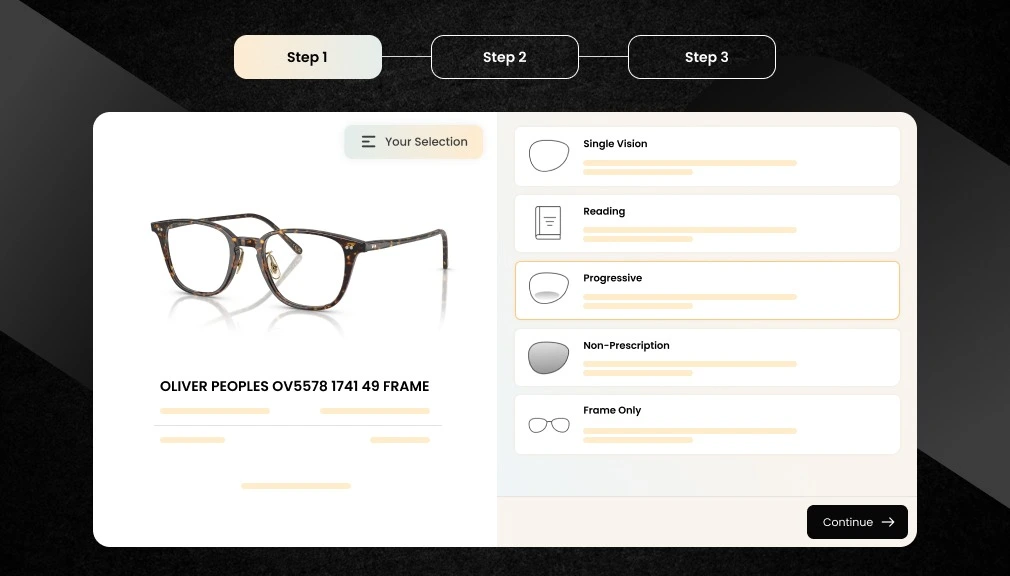
For a Shopify eyewear store, a typical multi-step prescription form might look like this:
- Step 1 – Select Prescription Type: Single vision, bifocal, progressive, reading glasses, or zero power
- Step 2 – Enter Prescription Values: Sphere, cylinder, axis, and add power for OD (right eye) and OS (left eye)
- Step 3 – Add Pupillary Distance (PD): Single PD or dual PD values
- Step 4 – Choose Lens Type: Standard, blue light blocking, photochromic, or polarized
- Step 5 – Select Lens Coatings: Anti-glare, UV protection, scratch-resistant
- Step 6 – Upload or Confirm Prescription: Upload a photo, upload a doctor’s note, or confirm manual entry
Important: The single-page prescription form works well for experienced customers who are well familiar with their prescription. But for the majority of online buyers, especially first timers, a multi-step prescription form is much more effective.
Essential Features of a Good Shopify Prescription Form
However, not all prescription forms are created equal. For your eyewear store to succeed, your prescription form needs to have certain features; here is what to look for when shopping for an eyewear prescription form for Shopify or when creating one:
Prescription Type Selection
Single vision, bifocal, progressive, and reading glasses, zero power allows for different combinations, as not all customers require the same lens type.
PD (Pupillary Distance) Input
Both single PD and dual PD should be supported. Provide a tooltip that explains what a PD is and how the customer can measure it at home with a ruler and mirror.
Lens Customization Options
Navigation for Blue light filter, anti-glare, UV protection, photochromic, and polarized lenses should be part of the form flow, not a page.
Prescription Upload Option
Customers can also upload the image of the doctor’s prescription as a photo or PDF file into the form, and that can be used instead of filling out hundreds of values in the form manually.
Mobile-Friendly UI
Use large tap targets, clear text labels, and one field per page so the mobile shopper can fill out the form without getting annoyed. This is a must since 72% of all e-commerce sales are completed on mobile.
Validation and Error Handling
Real-time validation stops the customer from entering values that are not valid. User-friendly error messages direct the customer on how to rectify their mistake before the order is submitted.

How to Add a Multi-Step Prescription Form in Shopify (Step-by-Step Guide)
The easiest way to add a multi-step prescription form to your Shopify eyewear store is to use a dedicated app. Custom development costs thousands of dollars and takes weeks. A good app takes less than an hour to set up and has all the features you need built right in.
One of the best Shopify prescription lens apps available right now is SB Prescription Eye Lens. It is built specifically for optical stores and supports all types of eyewear, from prescription glasses to contact lenses to prescription sunglasses. Here is how to set it up.
| 1 | Install the SB Prescription Eye Lens App – Go to the Shopify App Store and search for “SB Prescription Eye Lens.” Click “Add app” and follow the installation prompts. The app is compatible with all Shopify plans, including Basic, Shopify, Advanced, and. It connects automatically to your store’s product catalogue. Once installed, you will see a new Lens Configurator dashboard inside your Shopify admin. From here, you can manage all prescription settings, lens groups, prescription flows, product rules, translations, and general settings for every product in your store. [ Shopify App Store ] [ No Coding Required ] [ All Shopify Plans ] |
| 2 | Create Your Lens Groups (Reusable Option Steps) – In the app dashboard, go to the “Lens Groups” tab and click “Create Lens Group.” Lens Groups are the building blocks of your prescription flow. Each group becomes one selectable step for your customers. For each Lens Group, you can set a Name (e.g., “Lens Material,” “Coatings,” “Tints”), Description, Display Style (Cards, List, or Checkbox), and whether the step is Required or Optional. Then add individual options inside each group. Each option can be an Add-on Product, a Lens Option, or a Created Product. Every option supports a tooltip with a title, description, and image so customers can learn more before choosing. [ Cards View ] [ List View ] [ Checkbox View ] [ Tooltips ] [ Custom Pricing ] |
| 3 | Configure Your Prescription Types (Flows) – Go to the “Prescription Flows” tab and create the prescription types your store offers. Each flow defines a complete step-by-step journey that the customer goes through. For each flow, you configure the Name, Description, Image/Icon, and Screens (Steps) by linking your Lens Groups in order. Each screen can have nested sub-screens for advanced branching. You can also set whether the Rx form appears before or after the lens option steps. The screens system supports deep nesting, for example, if a customer picks “Polycarbonate” as their lens material, you can show a different set of coating options than if they pick “CR-39.” This is all configured visually, no code needed. [ Single Vision ] [ Progressive ] [ Bifocal ] [ Contact Lens ] [ Zero Power ] [ Frame Only ] |
| 4 | Enable the Multi-Step Prescription Form – In the flow settings, configure the prescription entry form. The app supports three entry methods you can enable individually or together: Manual Entry: Customers type prescription values directly. The app dynamically generates fields for SPH, CYL, AXIS, and ADD, shown separately for Right Eye (OD) and Left Eye (OS). A “Same Rx for both eyes?” checkbox lets customers fill one side and auto-sync to the other. Prescription Upload: Customers drag-and-drop or browse to upload a photo or scan (JPG, PNG, PDF up to 10MB). The file is stored securely and attached to the order. Email Later: Customers check a box to send their prescription after placing the order. This skips all Rx validation and lets the customer complete checkout without delay. [ Manual Entry ] [ Image/PDF Upload ] [ Email Later ] [ OD/OS Fields ] [ Auto-Sync ] |
| 5 | Add PD (Pupillary Distance) Input – Pupillary Distance (PD) is the measurement in millimetres between your pupils. It is essential to centre lenses correctly in the frame. Without it, glasses can cause headaches and blurred vision. In the prescription form settings, enable PD with two modes: Single PD (one number for both eyes, e.g., 63mm) and Dual PD (separate values for each eye). Customers can toggle between the two modes. You can also enable a tooltip explaining how to measure PD at home. The app also supports an optional PRISM section with Horizontal Prism (Base IN/OUT) and Vertical Prism (Base UP/DOWN). [ Single PD ] [ Dual PD ] [ Prism Support ] [ Measurement Guide Tooltip ] |
| 6 | Add Rx Limits (Prescription-Based Filtering) – This advanced feature automatically filters lens options based on the customer’s actual prescription values. On any lens option, click “Add Rx Limits” and set the valid prescription ranges. Example: A basic plastic lens might only support SPH from -6.00 to +6.00. A high-index lens supports SPH from -12.00 to +12.00. Choose an evaluation mode: Both Eyes Must Match, At Least One Eye Matches, or Strongest Eye (Spherical Equivalent = |SPH| + |CYL|/2). You can also mark options as “Recommended” These get highlighted with a badge and auto-scroll into view so customers see the best option for their prescription first. Note: Rx Limits only apply when the customer enters the prescription manually. [ Auto-Filter by Prescription ] [ Recommended Badge ] [ 3 Evaluation Modes ] |
| 7 | Assign Flows to Products (Product Rules) – Go to the “Product Rules” tab to control which prescription flows appear on which products. Create a rule with a Rule Name, Flows (which prescription types to include), Assignment Mode (All Products or Specific Products), and a Default Flow. Example: Your sunglasses products might only show “Single Vision” and “Non-Prescription.” Your reading glasses show only “Reading.” Your full-rim eyeglasses show all prescription types. The app syncs rules to Shopify Metaobjects automatically, so the storefront knows which flows to load for each product. [ Per-Product Rules ] [ All Products Mode ] [ Default Flow Selection ] [ Metaobject Sync ] |
| 8 | Contact Lens Configuration (Special Mode) – For contact lens products, the app supports a special flow with per-eye quantity selection (separate quantity for Right Eye OD and Left Eye OS), prescription entry (upload + manual form on the same step), and a PDP Layout Mode that renders the form directly on the product page instead of a drawer. Contact lens forms support additional fields: BC (Base Curve), DIA (Diameter), Brand, and Colour alongside standard SPH, CYL, and AXIS fields. The app can optionally create 2 separate cart items (one per eye) with filtered properties. [ Per-Eye Quantity ] [ PDP Layout ] [ Separate Cart Items ] [ BC/DIA/Brand/Colour] |
Key Benefits of Using the Prescription Eye Lens App
If you operate a shop using Shopify, here is why SB Prescription Eye Lens is one of the best tools on the market today.
- Simplified Prescription Collection: Customers can enter prescriptions easily without any confusion. The application provides known labels for each item to help fill out each member.
- Multi-Step Guided Interface: Interfaces that take a huge 20-field form and split it up into 5–6 easy screens. Less error prone and will motivate the customer to finish making the purchase.
- Full Lens Customization Support: Supports every lens type and coatings. Customers can customize the lenses within the form before adding them to the cart.
- PD Measurement Options: Single or Dual PD can be utilized. A tooltip, located in the help section, is included that explains what the PD is and how to measure it.
- Contact Lens and Sunglasses Support: The app supports all categories of eye lenses, not just prescription glasses. Really good application for multi-category optical shops.
- Seamless Shopify Integration: Shopify orders itself going to be the medium for storing all prescription data. No need of 3rd party dashboard to see the submissions.
- Mobile-Optimized UX: Designed for mobile-first. Widely supported and performs flawlessly across iOS and Android for a flawless checkout experience.
- No Coding Required: All is set up with a simple dashboard. You can be live in less than an hour, with no developer needed.
Who Should Use Multi-Step Prescription Forms?
If you are selling any form of vision correction on the internet, you will require a multi-stage prescription form. The following are the main forms of businesses that will gain the most advantage from having this.
- Online Optical Stores: Clearly a great match. Every eye, every prescription for every order. Walk the customer through an order form to cut returns and lab mistakes.
- Prescription Sunglasses Stores: Consumers want a polarized lens with their individual prescription. The form needs to be able to accommodate both the lens customization and the prescription at the same time.
- Contact Lens Stores: Contact lens prescriptions (brand, base curve, diameter, power, and number) are a lot for consumers to consider. Multi-step forms make this intimidating choice less daunting.
- Eye Clinics Selling Online: They already have a customer database with prescriptions, and the form makes re-ordering quick and easy.
- Multi-Category Eyewear Stores: Stores offering glasses, sunglasses, and contacts require one flexible form system that can service all product types.
According to the e-commerce report 2025, Around 70% of customers say they are more likely to return to a store if the checkout process is easy and fast, showing that simplifying checkout significantly increases repeat purchases and customer loyalty.
Why Shopify Apps Are Better Than Custom Development
Similarly, a few store owners contemplate having their developer build a custom prescription form. In reality, this is nearly always a poor decision for small and medium-sized eyewear stores, as illustrated by this side-by-side comparison of custom coding versus a prescription lens Shopify app:
| Feature | Custom Development | SB Prescription Eye Lens App |
| Setup Cost | $2,000–$10,000+ | Affordable monthly subscription |
| Time to Launch | 4–12 weeks | Under 1 hour |
| Shopify Updates | Requires the developer to fix the breaks | Automatic app updates |
| Feature Changes | Expensive and slow to modify | Change settings anytime in the dashboard |
| Mobile Optimization | Depends on the developer’s quality | Built-in, tested on all devices |
| Support | Back to freelancer or agency | Dedicated app support team |
| Maintenance | Ongoing developer dependency | Handled by the app team |
The math is simple. Custom development takes longer, costs more, and is more difficult to maintain. For 98.7% of the Shopify contact lens stores and optical shops, a dedicated app is the obviously better investment.
The Future of Online Eyewear Stores
The online eyewear business is changing rapidly. In this section, we highlight the interesting trends that will influence the direction of the industry over the next 3-5 years and explain why structured prescription forms will continue to be a core component through all of this.
- Virtual try-on technology: Augmented reality (AR) try-on applications are becoming more common. Virtual try-on is projected to be a key feature for most online eyewear vendors by 2026.
- Smart lens recommendations: AI programs are proving to be able to recommend lens types according to the customer’s prescription. This demands clean, well-structured prescription data, which only a good form can collect.
- Automated prescription validation: By the time we work with the robotic band, the AI will flag potentially incorrect prescriptions if an order is sent to the lab by mistake, thereby decreasing return rates significantly.
- AI optical assistants: Some retailers are trialing conversational AI chatbots on-site to have a dialogue with the customer to explain their prescription and recommend lenses.
It all requires one thing all of what is listed here depends on something: clean, accurate, well-structured data. The multi-step prescription form, which is a nice feature today, will be the basis for everything that lies ahead.
Conclusion
Adding a multi-step prescription to your Shopify eyewear store is one of the most significant changes you can implement. It increases conversion rate, cuts down on order mistakes, boosts the mobile experience, and increases customer confidence.
The prescription information you gather is really the core of your whole fulfillment process. Well collected, and it all comes together. Poorly collected, and your time is spent processing returns, answering support calls, and issuing refunds.
And do you even need to hire a developer or spend thousands of dollars to get this right? A custom app like SB Prescription Eye Lens provides you with the multi-step form flow, PD measurement, lens customization, prescription upload, built-in Shopify integration, and mobile-first design, all with zero code.
The eyewear market on Shopify is becoming more saturated. The stores that succeed will be the stores that make ordering prescription glasses online as reliable and easy as buying any other product. A great prescription form is where that sales experience begins.
FAQs
How do I add a prescription form in Shopify?
Install a recommended app such as the SB Prescription Eye Lens, available on the Shopify App Store. Enter your configurations, such as the form you will have to apply to your eyeglasses product.
Can I sell prescription glasses on Shopify?
Yes, it is entirely possible to sell prescription glasses on Shopify. You will require a prescription form app to input lens details efficiently. There are a great many reputable optical stores that sell online using Shopify.
What is PD in eyewear prescriptions?
PD stands for Pupillary Distance. It is the distance in millimeters between your two pupils. It makes sure the lenses are in the middle of the frame correctly. Incorrect PD numbers will give you blurred vision and headaches.
How do customers upload prescriptions online?
Customers can upload a photo or PDF of their doctor’s prescription in the product page form before the shopping cart by using any app with support for file uploads.
What is the best Shopify app for prescription lenses?
SB Prescription Eye Lens. This highly-rated Shopify app is built for optical stores. It includes multi-step forms, all lens types, PD entry, prescription upload, and a fully mobile-enabled version. You don’t need to pay commission on orders on this app. The rest of the apps charge you commissions on each order.
Does a multi-step prescription form work on mobile?
Yes. As long as it is built well. The SB Prescription Eye Lens application is mobile-first. It minimizes the amount of typing needed by displaying only a single screen at a time and having large fields that are likely to be easy to tap.

Shopify Expert
Dipen Panchal, Shopify Tech Lead at Setubridge Technolabs, brings over a decade of expertise as a Shopify Expert. Passionate about e-commerce growth, he specializes in UI/UX design, crafting intuitive, engaging solutions tailored for merchants and B2B clients to enhance user experiences.