




A customer finds the perfect mug for her dad’s birthday. She types his name, picks a font, and watches it appear on screen. She smiles, clicks “Add to cart,” and feels proud of her gift. That small moment is what a product personalizer creates for your Shopify store.
Shoppers now expect that moment. McKinsey research shows 71% of consumers expect personalized interactions, and 76% feel frustrated without them. The right app turns that expectation into real orders. The wrong fit can slowly eat into your margin on every sale.
This guide compares two popular options for US merchants. DORO Product Personalizer by SetuBridge is a Built for Shopify app launched in 2026. Teeinblue Product Personalizer by Teeinblue has served print-on-demand sellers since 2020. If you want a Teeinblue alternative or your first product personalizer, the numbers below will help you decide.
Key Takeaways
- What a product personalizer does, and how it differs from Shopify variants and product options.
- Why personalized products are a growing, high-margin category for US stores.
- A side-by-side look at pricing, free plans, and trials, checked on November 27, 2026.
- A monthly and yearly cost table at 100 to 1,000 personalized orders.
- A guide to matching print file formats with DTG, screen printing, vinyl, and laser engraving.
- A 10-round comparison with a clear result for each round, plus a store-type guide.
- A six-step checklist for switching personalizer apps without losing orders.
What Is a Product Personalizer on Shopify?
A product personalizer is a Shopify app that lets shoppers customize a product before they buy. They can add text, photos, logos, or clipart and see a live preview. When the order arrives, the app creates a print-ready file for production. This saves you from emailing customers back and forth about their designs.
Product Personalizer vs Product Options vs Shopify Variants
These three tools sound alike, but they solve different problems. Shopify variants handle fixed choices like size and color. Product options apps add extra fields, like a text box or a dropdown menu. A product personalizer adds a visual design canvas, a live preview, and production files. If shoppers need to see their design before buying, you need a personalizer.
How a Product Personalizer Works
- You create a template for a product, such as a T-shirt, tumbler, or phone case.
- You choose what shoppers can change: text, fonts, colors, images, or clipart.
- The shopper customizes the product and checks the live preview.
- The shopper places the order and pays for any add-ons they picked.
- The app creates a print-ready file for your printer, engraver, or POD partner.
Why US Store Owners Use a Product Personalizer
Personalized products are a fast-growing category in the United States. Arizton expects the US personalized gifts market to reach $14.56 billion by 2030, up from $9.69 billion in 2024. Grand View Research reports North America held 48% of global personalized gifts revenue in 2025. That makes US shoppers one of the largest audiences for custom products anywhere.
Personalization can also raise what customers are willing to pay. Bain found customers will pay 20% more for customized products than for standard ones. Deloitte found 1 in 4 consumers will pay more for a personalized product or service. That extra margin helps cover blanks, printing, and app costs. Price add-ons let you charge for each upgrade, like back-side printing or gift text.
Corporate buyers are another strong segment for US stores. Companies order branded shirts, drinkware, and gifts for employees, clients, and events. These orders need clean logo files and the same print quality on every item. A personalizer that exports vector files makes these orders much easier to fulfill.
How We Compared These Apps
We used each app’s public Shopify App Store listing as the main source. We checked ratings, review counts, pricing, plan limits, features, languages, and integrations. Where a listing does not mention a feature, we wrote “Not listed” instead of guessing. All facts were checked on November 27, 2026, and prices are in USD.
DORO and Teeinblue at a Glance
DORO Product Personalizer
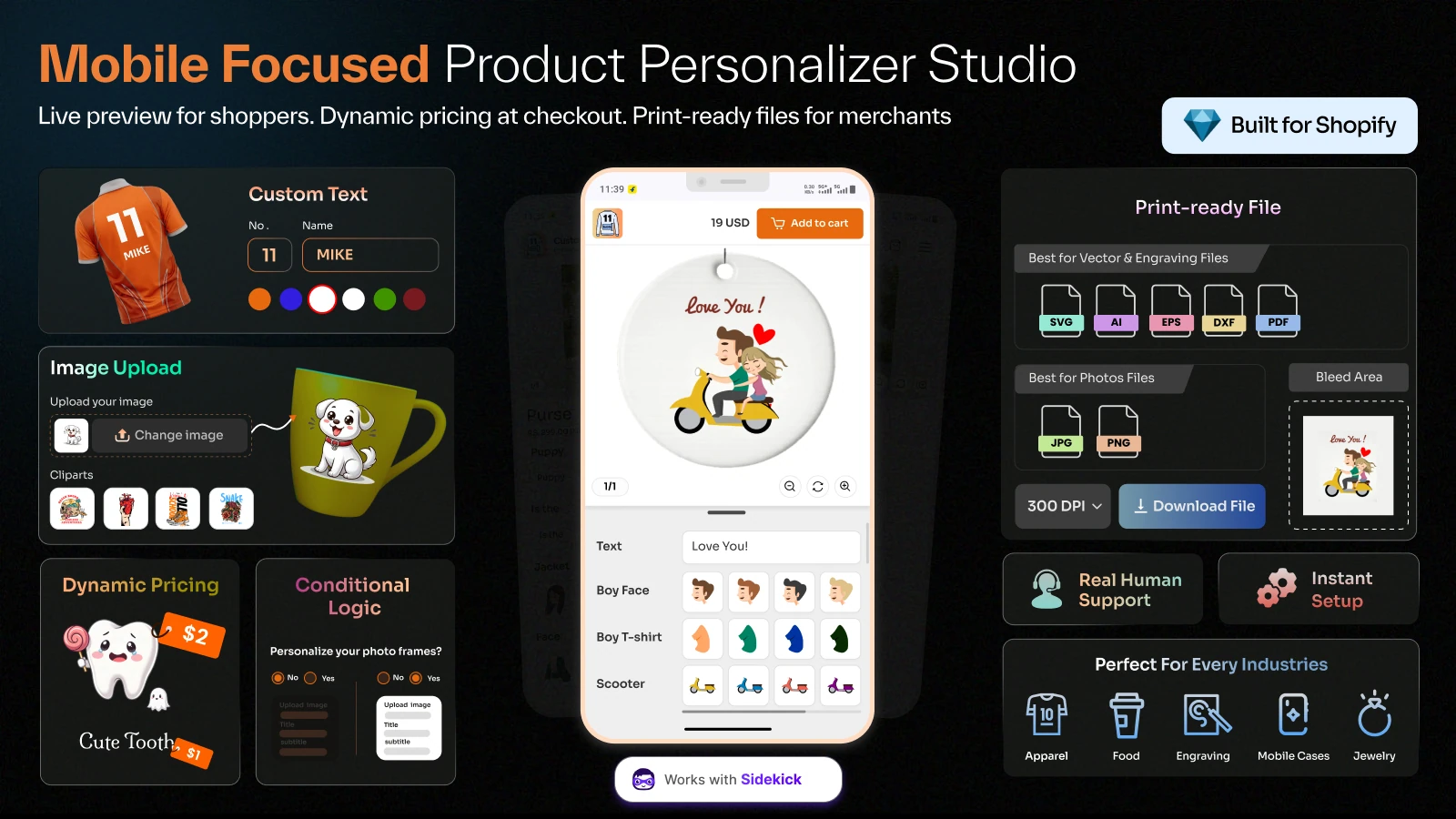
DORO Product Personalizer by SetuBridge launched on the Shopify App Store in January 2026. It carries the Built for Shopify badge, which Shopify gives apps that meet its quality standards. The app holds a 5.0-star rating from 72+ reviews and supports 11 languages. It offers a free plan for live stores and flat paid plans from $7.99 per month.
Teeinblue Product Personalizer
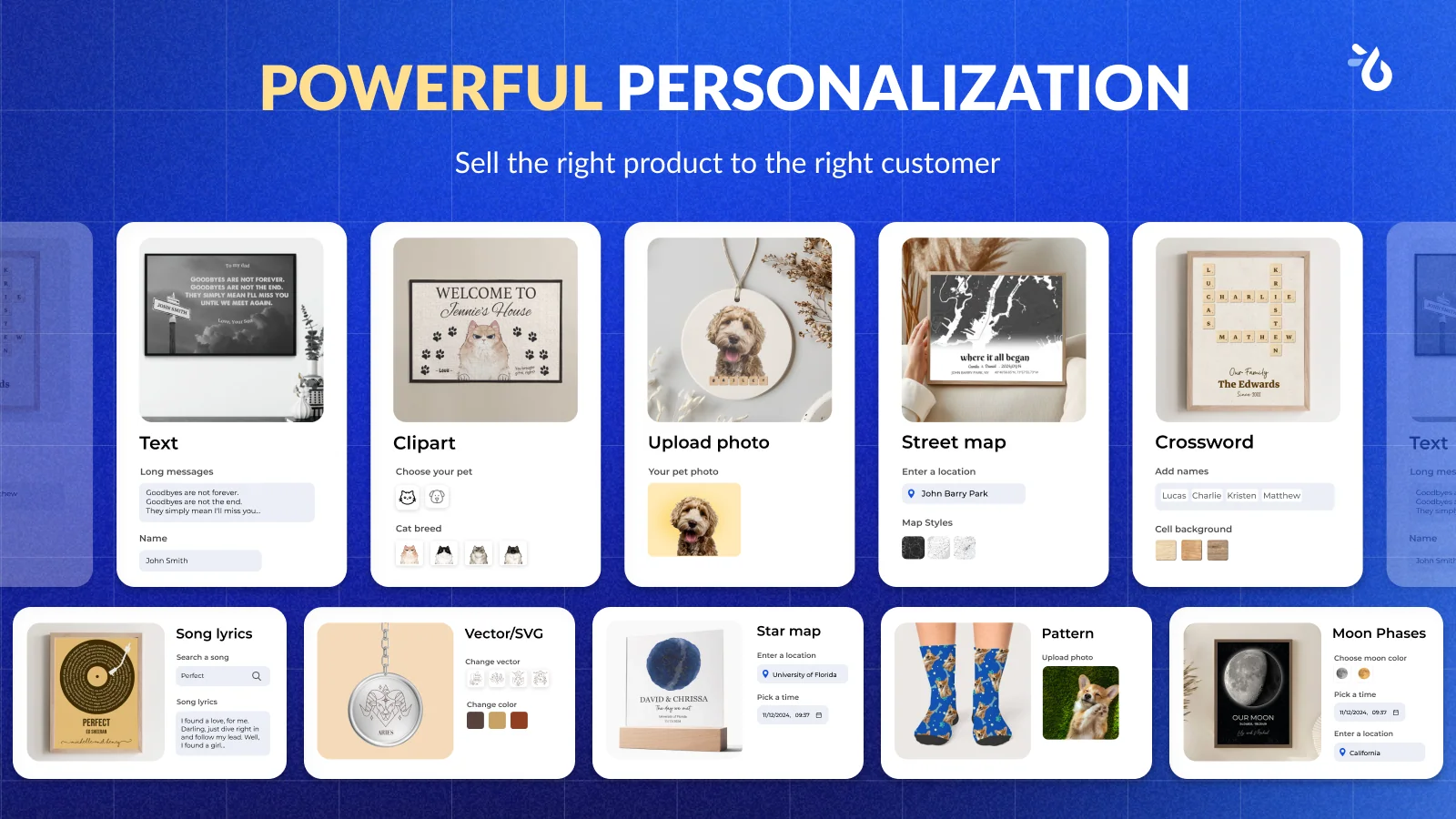
Teeinblue Product Personalizer by Teeinblue launched in April 2020 and focuses on print-on-demand sellers. It holds a 4.9-star rating from 401+ reviews. The Blue plan costs $49 per month, with usage-based fees after 100 order items. Its free plan covers development stores, and live stores get a 14-day free trial.
| Detail | DORO Product Personalizer | Teeinblue Product Personalizer |
| On the App Store since | January 2026 | April 2020 |
| Built for Shopify badge | Yes | Not listed |
| Free plan on a live store | Yes: 5 products, 100 custom orders/month | Free plan for development stores |
| Paid plans | $7.99, $15.99, $19.99 per month | $49 per month |
| Yearly billing | Yes, about 17% off | Not listed |
| Free trial | 7 days on paid plans | 14 days |
| App languages | 11 | English |
| Export formats listed | PNG, JPG, SVG, PDF, AI, EPS, DXF | Auto-generated print-ready files |
| Main strength | Flat-priced personalization for many product types | Personalization plus automated POD fulfillment |
DORO vs Teeinblue: 10-Round Product Personalizer Comparison
We compared both apps across 10 areas that matter most to store owners. Each round looks only at what the App Store listings show. DORO comes out ahead in seven rounds, mostly on cost, file formats, and flexibility. Teeinblue leads in three rounds, mostly on AI photo tools, POD automation, and experience.
Round 1: Pricing and Free Plan
DORO offers four plans, starting with a free plan that works on a live store. The free plan covers up to 5 products and 100 custom orders each month. Paid plans cost $7.99, $15.99, and $19.99 per month, with about 17% off yearly billing. Teeinblue offers one paid plan at $49 per month with a 14-day free trial.
For a new store, this difference matters a lot. You can launch your first personalized products on DORO and sell before paying anything. When sales grow, the $7.99 Basic plan supports 30 products and 300 custom orders. Round result: DORO.
Round 2: Real Monthly Cost as Your Orders Grow
Starting prices only tell part of the story. Teeinblue charges $49 per month, plus $0.10 to $0.40 per order item after the first 100. DORO lists flat plan prices with no per-order fees. The table below shows estimated costs at common monthly order volumes.
| Personalized orders per month | DORO plan (monthly cost) | Teeinblue estimate (monthly) | Estimated yearly difference with DORO yearly billing |
| 100 | Free (up to 5 products) or Basic $7.99 | $49 | About $508 |
| 300 | Basic $7.99 (up to 30 products) | 69–129 | About 748–1,468 |
| 500 | Growth $15.99 (up to 200 products) | 89–209 | About 908–2,348 |
| 1,000 | Premium $19.99 (unlimited custom orders) | 139–409 | About 1,468–4,708 |
Two notes keep this table fair. Teeinblue’s per-item rate depends on its own rules, so we show a low and high estimate. DORO counts “custom orders,” while Teeinblue counts “order items,” so one order can count differently. Even at the low end, flat pricing gives you a bill you can predict. That matters for corporate stores that work from a fixed budget. Round result: DORO.
Round 3: Setup and Support for New Stores
New store owners need the most help in their first few weeks. DORO includes live chat support on every plan, including the free plan. Growth adds premium support, and Premium adds VIP support with a 1-on-1 onboarding call. Teeinblue includes free live training and dedicated support on its Blue plan.
Both apps clearly take support seriously. DORO’s edge is that you can learn the app on a live product with no trial deadline. You can take your time, test designs, and ask questions before spending money. Round result: DORO.
Round 4: Custom Options, Conditional Logic, and Price Add-Ons
Conditional logic shows or hides options based on what a shopper picks. For example, the font picker can appear only after someone adds text. Price add-ons charge extra for upgrades, like a second print side or gift text. Both features keep product pages clean and raise your average order value.
DORO lists unlimited product options, multiple option types, and global or product-specific templates on every plan. Conditional logic and price add-ons start on the $7.99 Basic plan. Teeinblue lists unlimited customized options and products on its Blue plan. Conditional logic and price add-ons are not listed on its App Store page. Round result: DORO.
Round 5: Print-Ready Files, Formats, and Engraving
Your printer decides which file format you need. A file in the wrong format can slow production or need manual fixes. DORO exports PNG and JPG files on Basic, then adds SVG, PDF, AI, EPS, and DXF on Growth. It also lets you set a custom DPI for sharp prints at any size.
DORO also lists an engraving effect for text and images, plus a neon text effect, on Basic. That suits engraved jewelry, tumblers, wood signs, and corporate gifts. Teeinblue auto-generates print-ready files and can send orders straight to POD providers. Use the table below to match file types to your print method. Round result: DORO.
| Print method | Common products | Best file formats | DORO plan that includes them |
| DTG or sublimation | T-shirts, mugs, phone cases | PNG, JPG | Basic ($7.99) |
| Screen printing | Bulk tees, event shirts | SVG, AI, EPS, PDF | Growth ($15.99) |
| Vinyl or heat transfer | Hats, bags, apparel | SVG, PDF | Growth ($15.99) |
| Laser engraving or cutting | Tumblers, jewelry, wood signs | DXF, SVG | Growth ($15.99) |
| Corporate logos and brand merch | Employee gifts, client kits | AI, EPS, SVG | Growth ($15.99) |
Round 6: AI Photo Effects and Design Imports
Photo gifts are one of the most popular personalized categories. Teeinblue offers AI photo tools, including Gen AI effects, background removal, face cutout, and sketch. It also imports designs from Canva and PSD files and includes free ready-to-use designs and mockups. These tools help photo-gift sellers launch new products quickly.
DORO includes AI background removal on Basic, plus image cropping and a clipart library. It also offers advanced text effects like curved and arc text on Growth. For photo-heavy stores that want many AI effects, Teeinblue offers more choices. Round result: Teeinblue.
Round 7: Multi-Language and Multi-Currency
Many US stores sell to Canada, Mexico, and Spanish-speaking shoppers at home. DORO supports 11 app languages, including Spanish, French, German, and Chinese. It adds multi-currency support on Basic and a multi-language personalizer on Growth. Teeinblue’s listing shows English as its app language.
This matters for corporate stores too. Global companies often order branded items for teams in several countries. A personalizer that speaks the shopper’s language reduces mistakes on custom orders. Round result: DORO.
Round 8: Shopify Fit and Mobile Experience
Built for Shopify is a badge Shopify gives apps that meet its standards for speed and design. DORO carries this badge, so it fits naturally inside your Shopify admin. Its listing highlights fast, mobile-friendly personalization with inline or on-page display. It also works with Shopify Checkout and Sidekick AI.
Teeinblue works with Shopify Checkout and Customer accounts extensions. Since most shoppers browse on phones, test any personalizer on mobile before launch. Run your product page through Google PageSpeed Insights and try the design flow yourself. Round result: DORO.
Round 9: Print-on-Demand Integrations and Fulfillment
Teeinblue is built for sellers who run on print-on-demand. It connects with Printful, Printify, Gelato, CustomCat, Dreamship, Merchize, Prodigi, and more. It can submit orders directly to POD providers once a shopper checks out. That saves time for stores that route orders to many printers.
DORO works with Printify, Printful, Gelato, ShineOn, and Zendrop. That covers many popular POD partners for US stores. For hands-off routing across a wide printer network, Teeinblue offers more options. Round result: Teeinblue.
Round 10: Track Record, Specialty Designs, and Multi-Store
Teeinblue has been on the Shopify App Store since 2020 and has 401 reviews. It offers specialty personalization like star maps, maps, and moon phase designs. Its Blue plan also supports unlimited stores in one account. That helps agencies and sellers who run several brands at once.
DORO is newer, with 71 reviews since its 2026 launch. Its 5.0-star rating and 99% five-star share show a strong start. For years of history and multi-store control, Teeinblue leads this round. Round result: Teeinblue.
What Do Merchants Say About Both Apps?
Both apps hold excellent ratings on the Shopify App Store. DORO has a 5.0-star rating, with 70 of its 71 reviews at five stars. Teeinblue has a 4.9-star rating from 401 reviews, with 94% at five stars. Merchants often praise Teeinblue’s POD connections and its helpful support team.
Review count matters as much as the star rating. A larger count shows a longer history, while a newer app’s rating reflects recent work. Read the newest reviews for any app before you install it. Look for comments from stores that sell products like yours.
DORO or Teeinblue: Which Product Personalizer Fits Your Store?
Your best choice depends on what you sell and how you fulfill orders. Use this table to match your store type with the right app. Then test your pick on your best-selling product first.
| Your store | Best fit | Why it fits |
| Brand-new store on a small budget | DORO | Free plan on a live store, paid plans from $7.99 |
| Corporate or branded merchandise | DORO | Vector files, engraving, multi-currency, flat pricing, onboarding call |
| Engraving, laser crafts, or jewelry | DORO | Engraving effect and DXF export |
| Growing store with 300 to 1,000+ orders | DORO | No per-order fees listed, unlimited custom orders on Premium |
| Selling in several languages | DORO | 11 app languages and a multi-language personalizer |
| Photo gifts with AI effects | Teeinblue | Gen AI effects, face cutout, and sketch tools |
| High-volume POD with many printers | Teeinblue | Wide POD network and direct order submission |
| Several stores from one account | Teeinblue | Unlimited stores per account |
Looking for a Teeinblue Alternative? How to Switch Safely
Switching apps can feel stressful, but a clear plan keeps your orders safe. Start with one product so you can test without pressure. Follow these six steps and move at your own pace.
- List your personalized products, fonts, clipart, and option rules.
- Install DORO on the free plan and rebuild your best-selling product first.
- Test the new product on a duplicate theme, on desktop and mobile.
- Place a test order and check the print file with your printer.
- Finish all open orders in your current app before uninstalling it.
- Move the rest of your catalog and watch conversions for two weeks.
Ask the support team for help at any step. DORO’s Premium plan includes a 1-on-1 onboarding call, which helps busy corporate teams. Keep notes on every setting, so your team can repeat the process later.
7 Questions to Ask Before Choosing a Product Personalizer
A quick checklist keeps you from paying for the wrong features. Answer these questions before you install any app. Your answers will point you to the right plan as well.
- What will I pay at 100, 500, and 1,000 orders a month?
- Can I use a free plan on my live store, or only a trial?
- Which file formats and DPI does my printer need?
- Do I need conditional logic or price add-ons?
- Which languages and currencies do my shoppers use?
- Does the app carry the Built for Shopify badge?
- Which support and onboarding options come with my plan?
Final Verdict: DORO vs Teeinblue
Both apps help Shopify stores sell personalized products with live previews. DORO leads in seven of ten rounds, including price, monthly cost, file formats, and languages. Teeinblue leads in AI photo effects, POD automation, and track record. The best product personalizer is the one that fits your products and budget.
For new store owners, DORO’s free plan lets you start selling with no upfront cost. For corporate stores, flat pricing, vector files, and onboarding support make planning easier. High-volume POD sellers who want automated printer routing may prefer Teeinblue. Install your pick, build one best-selling product, and compare the preview and print file yourself.
SetuBridge, the team behind DORO, published this comparison. All app details come from public Shopify App Store listings checked on November 27, 2026. Prices and features can change, so check each listing before you install.
Frequently Asked Questions
What is the best Teeinblue alternative for Shopify?
DORO Product Personalizer is a strong Teeinblue alternative for new and corporate stores. It offers a free plan for live stores and flat pricing from $7.99 per month. It also exports print files in seven formats.
Is DORO Product Personalizer free?
Yes, DORO has a free plan that works on live Shopify stores. It covers up to 5 products and 100 custom orders per month. Paid plans start at $7.99 and include a 7-day free trial.
How much does Teeinblue cost?
Teeinblue’s Blue plan costs $49 per month. After 100 order items each month, it adds $0.10 to $0.40 per item. New stores get a 14-day free trial.
Which product personalizer is better for corporate merchandise?
DORO fits corporate merchandise well. It exports AI, EPS, SVG, PDF, and DXF files for logos and engraving. Flat pricing and a 1-on-1 onboarding call on Premium also help teams plan.
Will a product personalizer slow down my Shopify store?
Every app adds some code, so test your speed before launch. Apps with the Built for Shopify badge, like DORO, meet Shopify’s performance standards. Check your product page in Google PageSpeed Insights after setup.
Can I switch from Teeinblue to DORO without losing orders?
Yes, if you switch in stages. Finish open orders in your current app first, then rebuild products one at a time. Test each print file with your printer before going live.

Shopify Expert
Dipen Panchal, Shopify Tech Lead at Setubridge Technolabs, brings over a decade of expertise as a Shopify Expert. Passionate about e-commerce growth, he specializes in UI/UX design, crafting intuitive, engaging solutions tailored for merchants and B2B clients to enhance user experiences.