Quick Summary: When stockouts occur, it leads to 70% of carts being abandoned. Stop that from happening! Using back-in-stock alerts captures customer interest and immediately notifies them with an email or text message, recovering 15-30% of that sale. Most stores can easily add via apps in a few minutes: customize all buttons, personalize notifications, and add marketing urgency. Try our Top 5 for picks. Review the analytics, and become a smarter store with stocked options. The result? Happier customers and fuller registers.
Have you ever added a cool shirt or gadget to your cart just to discover it’s out of stock? You feel as though the universe laughs at your expense, but don’t worry. This happens to online shoppers often. It is also a hassle for stores. The good news is, you can avoid this website issue with a simple tool: Back in Stock alerts. Back in Stock alerts allow customers to sign up for a quick message notifying them that the item they wanted to purchase is back in stock. It’s like giving a VIP pass to purchase that product first!
In this blog, we will go step by step. We will discuss why stockouts (or running out of items) hurt sales, how to include this alert system in your Shopify store, and how to maximize its effectiveness. New stats from 2025 will allow us to demonstrate real numbers, and some interesting facts along the way will keep it lively and entertaining. By the end of the blog, you will have an idea of the steps you can take to increase sales in your Shopify store using smart solutions, not gimmicks.
Just think of turning a “sorry sold out” look into a “yes, it’s yours!” You will be “stocked up” and ready to go, so let’s dig in and make your Shopify store a customer attraction magnet.
The Hidden Cost of Stockouts: Why Customers Walk Away
Stockouts are not just empty shelves, but are empty cash registers. Not every customer waits around if a product is out of stock. They are not going to come back to your site, and bam, your sale is gone. And in 2026, this problem will be worse with online ordering in every nook and cranny.
The average abandoned cart rate on Shopify stores is generally around 70%. That means 7 out of 10 people who add an item to the cart leave without checking out. A lot (around 13%) of those abandonments are linked to either slow page speed, out-of-stock or inventory challenges, or products becoming obsolete or irrelevant. Globally, e-commerce weekly potential earnings loss is $1.1 trillion from stockouts of products and services. Essentially enough to buy every house in a small suburb! (Source)
In 2020, during the toilet paper craze, 80% of grocery stores (online and off) had stockouts. People panicked and switched brands forever. Today, it is not just paper towels or fashion that face the same rush; tech and toys also do. A YouGov survey showed 65% of shoppers hit an out-of-stock wall in the last year. That frustration? 4% of sales, or 4% lower profit for retailers.
But why do stockouts happen? Sometimes suppliers simply delay shipments for one reason or another, like during storms or factory hiccups. Sometimes it’s because they don’t guess right on how much to bring in. Sometimes it is just human error; every box miscounted adds up. The result? Customers feel let down. They leave a bad review, never come back, or buy less. One study said 28% of unmet demand turns into lost sales forever. (source)
Stockouts aren’t just a lost sale. They are also a loss of trust. Alerts about the product being back in stock help prevent this. Customers sign up, you send the notification quickly, and they make an immediate purchase. Everyone wins! In the next section, we’ll discuss how this will improve the success of your store.
How a ‘Back in Stock’ Alerts Feature Works
Have you ever thought about how Netflix knows which show you’ll binge next? Back in stock alerts are like that for shopping; they identify what shoppers are interested in and deliver it at the right time. But how does this all work?
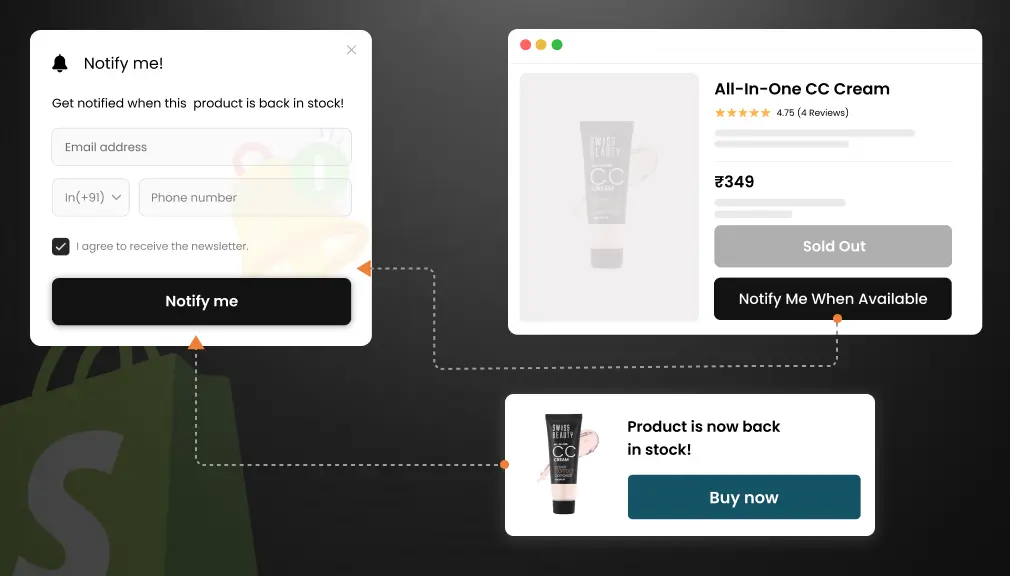
A shopper lands on your product detail page for a limited-edition sneaker. They see that it is out of stock. Rather than just getting an “out of stock” message, they see a friendly-looking button: “Notify Me When Back in Stock.”They click the button, enter their email or phone number, and click submit. Just like that, all of their information has been saved to a simple list associated with that sneaker.
Your system tracks inventory behind the scenes. So, when you restock, it detects the change and immediately alerts the customer. It could be an email that says, “Your sneakers have arrived, buy them now!” Or a text like, “Sneakers are back! Shop in 2 taps.” Some systems even send push notifications to their phone app that pop up like an alert in a game.
The rhythm is automation. You don’t have to check lists anymore. Tools connect with your Shopify inventory, and alerts go out in seconds. Customers get a link back to the product page in a few clicks. If you add a number to the email or text saying “10% off for waiting,” that will be effective.
These alerts can come with smart add-ons, such as recommending matching socks for those sneakers. This easy upsell process essentially converts one transaction into two, right? And, since 70% of these carts are going to get abandoned anyway, the alerts can bring back 10-24% of those lost shoppers. It’s not magic, it’s just smart technology that continues to generate demand. (source)
Simply, the feature captures interest, stores the interest somewhere safe, and releases it once in stock. Next up, let’s point the spotlight to its key features that encapsulate the magic.
Key Features of Back in Stock Alerts
Alerts for back in stock aren’t one-size-fits-all. They are full of features to complement your store’s specific needs. Here are all the features of the best ones, simplified.
First, customization buttons. When an item is sold out, a “Notify Me” shows up on the product page. You can customize the color, text, and where it shows on the page, so it matches your site. You do not need to change anything else on the page if everything matches.
Second, multi-channel alerts. Not everyone is checking their email. You can send via text (SMS), push in their browser, or even via WhatsApp. In 2025, 98% of texts are opened, way more than 20% of the emails you send. Choose whatever works for your audience!
Third, personalization. You have alerts on the page that say “Hey Sarah, your blue sneakers are back!” and include their name and a reminder of the items they viewed. This personalization feels special to the user and improves click-throughs by 14%.
Fourth, building a sense of urgency. Adding things like “Only 5 left!” or a countdown timer. Psychologically, scarcity creates urgency to act. It’s why you see items sold out on Black Friday.
Fifth, analytics dashboards. Track the total number signed up, opened alerts, and bought. Know the hot items to add to your next order (like those shoes).
Sixth, integrations. Integrate with your email provider, like Klaviyo or SMS apps. One integration recovered over $60 million in just three months’ alerts.
These are the fun things, and keep it simple but powerful. No tech headaches, just plug in to use. Let’s now talk about why each of these is a game-changer for sales.
Benefits of Back in Stock Alerts for Your Shopify Store
Why do people care about alerts? They sorta flip the script from “oops, out of stock” to “thanks for waiting, here’s your prize.” Don’t forget, this goes beyond one transaction; it helps you build a loyal group of fans.
Let’s begin with recovered sales. Stockouts take 8% of products on average, while the alert system gets 15–30% of the interested buyers back to recovery. Say your store is making $10,000 a month, well, that’s an additional $1,500 gained without needing to do anything except write new ads.
And then you have happier customers. You know that feeling of refreshing a page over and over for stock status? Alerts show you care and reduce bad reviews. One brand saw a 20% increase in loyalty after adding alerts.
Then, smarter inventory. See who wants what. If 200 people sign up for a lamp, get more lamps! This decreases future stockouts by 25% of the time.
Build your list. Sign-ups build email lists to promote and always provide more free marketing fuel.
Some brands using alerts with discount codes see 490% higher conversions, even! Generally, alerts could save retailers globally a total of $634 billion in lost sales each year (if you think of them as half of the $1.1 trillion).
Long story short, alerts create more money, trust, and smarts. Ready to add one? Let’s discuss.
Step-by-Step: How to Add Back in Stock Alerts to Shopify
Setting up alerts in Shopify is as simple as adding a new app on your phone; it’s a pretty quick process. Shopify does not have alerts built in; however, that’s what apps are for. We will stick with the free or very little to install for our examples, and forget to say the instructions are similar and general. Give it a shot.
Step 1: Log in to your Shopify admin. Go to the App Store (it’s in the left menu, like a shop window).
Step 2: Search “Back in Stock Alerts.” Pick one from our Top 5 list later (like SB Back In Stock). Click “Add App” and follow the prompts. It takes 2 minutes.
Step 3: Set up the button. In the app dashboard, choose where it shows (product pages only?). Pick colors to match your theme. Test its preview on a fake out-of-stock item.
Step 4: Customize alerts. Write the email: “Hi [Name], your [Product] is back! Shop now.” Add a link and maybe a 5% off code. Set for SMS if you want.
Step 5: Connect channels. Link your email sender (like Gmail) or SMS tool. Turn on auto-send for when stock hits 1+.
Step 6: Test live. Set a test product to zero stock, sign up with your email, and restock it. Check if the alert arrives in under a minute.
Step 7: Track results. After a week, check the app’s reports: Sign-ups? Buys? Tweak as needed.
Pro tip: Start small, one product category. Scale up once it clicks. No coding needed, but if stuck, Shopify’s support is free.
Common hiccups? Theme clashes. Most apps fix this auto, but pick one that says “works with all themes.”
There you go, alerts live! Now, let’s compare options to pick the right fit.
Top 5 Shopify ‘Back in Stock’ Alerts Apps
Apps make alerts simple. Here are five app options from the Shopify store, each with a brief description, key functions, details, and user reviews, except for one that has no reviews. Each was selected based on ratings and ease of use.
1: SB Coming Soon ‑ Back In Stock
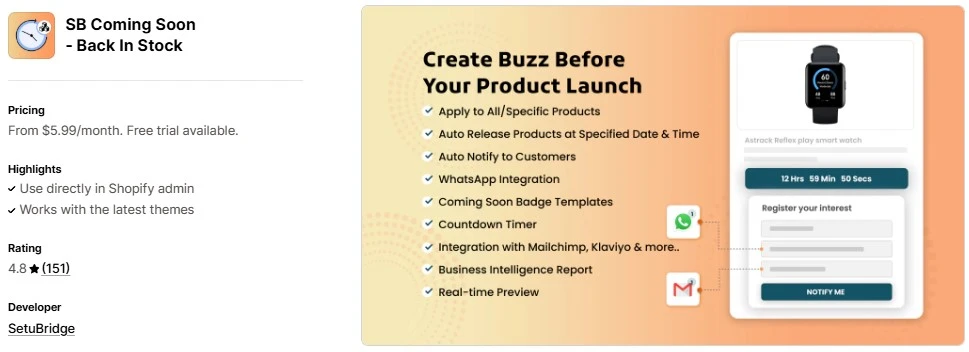
This app creates excitement around out-of-stock inventory by creating “Coming Soon” pages and alerting customers, for both upcoming launches and back-in-stock products. It also allows for pre-orders, so you can sell your product before it hits your shelves.
Features:
- Custom “Notify Me” buttons for products/collections.
- Email/SMS alerts with templates.
- Unlimited alert notification
- Low-stock counters for urgency.
- Integrates with Klaviyo and more for emails.
Reviews: Average rating: 4.9/5 from 150+ reviews.
2. Notify! Back in Stock|PreOrder
This app also works well for pre-orders and adds buttons for alerts, wishlists, and low-stock counts, sending notifications quickly to keep demand high!
Features:
- Limited Email/SMS/push alerts.
- Guest wishlists and partial payments.
- Urgency counters (“X left!”).
- Multilingual support.
Reviews: Average rating: 4.9/5 from 2,609+ reviews.
3. Back In Stock, Notify Me: Kbite
A complete from the standpoint of alerts plus cart recovery! Waitlist functionality, notifications via email/SMS on hot products that sign-ups, notification functionality, plus it does things, such as alerts and returns visitors or previous customer functionality!
Features:
- Limited alert notification
- “Notify Me!!” buttons with custom looks.
- Price drop alerts, too.
- Demand analytics dashboard.
- No branding on paid plans.
Reviews: Average rating: 5.0/5 from 2,926+ reviews.
4. Preorder, Back In Stock – STOQ
Concentrating on pre-selling products that require a deposit is interesting. They automatically send a text message or email to your customers when certain stock hits. They have B2B options, too.
Features:
- Preorder widgets and Limited SMS alerts.
- Klaviyo syncs for lists.
- Multi-location support.
- 24/7 customization help.
Reviews: Average rating: 5.0/5 from 2,259+ reviews.
5. Preorder, Back in stock Duck
For WhatsApp users, this is simple but really powerful. It’ll create waitlists and blast alerts all via SMS or email. It even helps with variants – colors/sizes, etc.
Features:
- Variant-level Limited notifications.
- WhatsApp Business integration.
- Custom forms and no branding.
- Multi-language on pro plans.
Reviews: Average rating: 5.0/5 from 340 reviews.
These apps start with free or low-cost trials to see what fits.
Comparison Table: Top Back in Stock Apps at a Glance
| App Name | Rating (Reviews) | Key Strength | Pricing Starts At | Best For |
| SB Back In Stock | 4.8 (151) | Unlimited Alert Notification | From $5.99/month | Product drops |
| Notify! Back in Stock | 4.9 (2,609) | Pre-orders + wishlists | Free Plan Available | Full-service stores |
| Kbite | 5.0 (2,926) | Cart recovery combo | Free Plan Available | Analytics lovers |
| STOQ | 5.0 (2,259) | B2B pre-sales | Free Plan Available | Multi-location |
| Back in Stock Duck | 5.0 (340) | WhatsApp alerts | Free Plan Available | Mobile-first shops |
This table helps you compare quickly. All integrate with Shopify seamlessly.
Key Takeaways
- Back in stock alerts can increase sales by up to 35% by capturing interested customers when products return
- Over 60% of shoppers want automatic notifications when out-of-stock items become available again
- Setting up restock notifications on Shopify takes less than 30 minutes with the right app
- Email alerts have an average open rate of 65%, much higher than regular marketing emails
- Implementing this feature builds customer loyalty and reduces lost sales opportunities
Conclusion
Stockouts take sales and trust, but back-in-stock alerts provide a second chance to recoup these losses. Cart abandonment rates hover around 70%, and stockouts cost retailers worldwide over $1.1 trillion each year. A simple “Notify Me” button can help recover 15-30 percent of those missing customers, and Shopify makes it easy to install an app, customize it, and then watch customers come back excitedly.
Additionally, it’s not just about recouping the sale; alerts build loyalty, grow your email list, and provide you with smart data about what your customers want. Personal and relevant messages, fast delivery, and a small thank-you discount offer customers delight, as opposed to being forgotten.
Start now – pick one of the top apps, easily set it up in minutes, and you will see the results. Your store will sell more, stress less, and you will see customers coming back again, even when the shelves are empty. This is the power of being ready for them when they are ready.
FAQs
How Do I Set Up Notify Me on Shopify?
Add a back-in-stock app from the app store. Turn on the “Notify Me” widget in your settings, customize the look of the button (to some extent), and add your email and/or SMS. Now, shoppers will see the button right away on out-of-stocks.
How to Track When Something Is Back in Stock?
You can keep an eye on changes to your inventory in your app’s dashboard as it automatically logs any restocks. You can also set up alerts for yourself, or hook your app up to Shopify Analytics dashboards with real-time views on stock and sign-up lists.
How to Schedule a Restock on Shopify?
Use your Shopify admin to edit the product, inventory to zero for now, and set a calendar reminder or app like Stocky to plan the future adds. You can set alerts using an app that auto-notifies stores at your scheduled updates, so it’s managed and no need to send manually.

Shopify Expert
Dipen Panchal, Shopify Tech Lead at Setubridge Technolabs, brings over a decade of expertise as a Shopify Expert. Passionate about e-commerce growth, he specializes in UI/UX design, crafting intuitive, engaging solutions tailored for merchants and B2B clients to enhance user experiences.