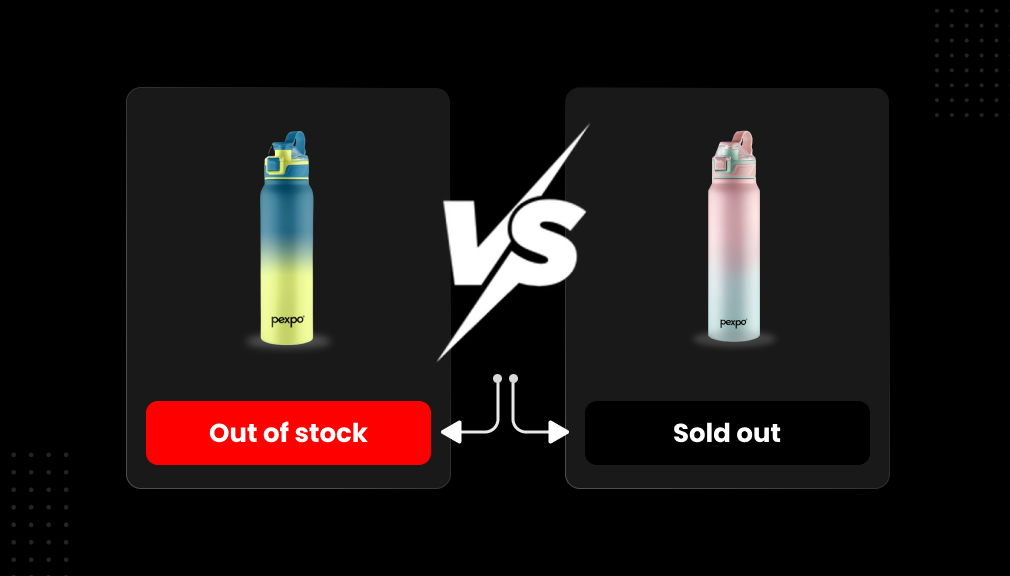
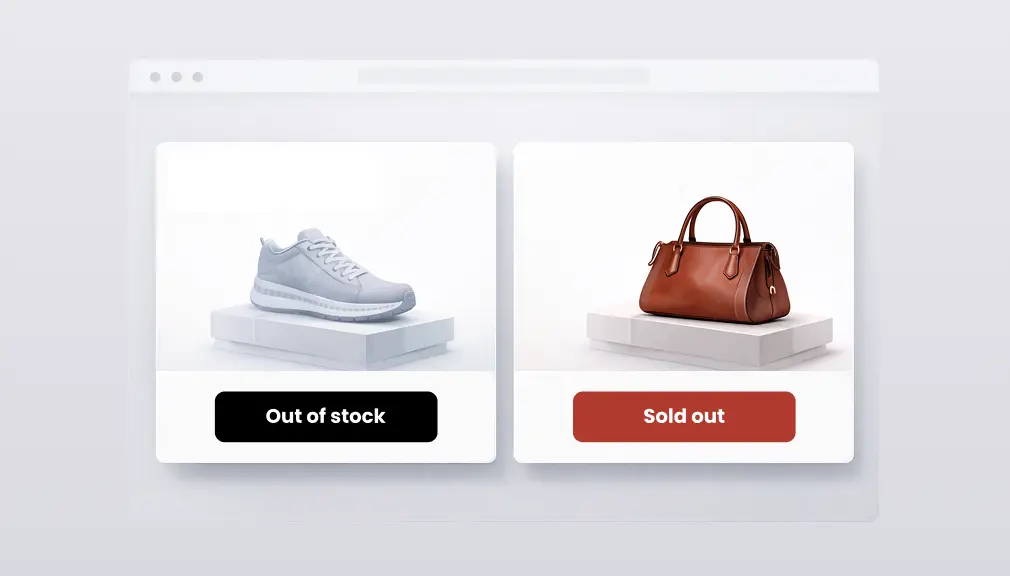
You’ve got a busy online shop on Shopify. When a customer arrives who is searching for an on-trend range of sneakers they’ve seen on TV, they hit ‘add to cart’ and then get an ‘Out-of-Stock’ badge. Do they stay with the transaction or bounce off to another site? Now imagine the same conversation, but this time there’s a ‘Sold Out’ badge against the product.
But it could also make the sneakers look more popular. This sneaky little bit of wordplay could have a huge impact on customers’ behaviour and your sales!
Key Takeaways
- Using “sold out” instead of “out-of-stock” can increase sales because it signals popularity and demand
- Around 69% of online shoppers will leave your store and buy from someone else if they can’t get what they want
- Showing “sold out” can make products seem more valuable and create excitement for when they come back
- Being honest about low stock helps keep customers happy and builds trust
- The wrong badge choice can hurt your business and make customers frustrated
- Smart inventory messages can increase revenue by more than 5% and keep customers coming back
E-commerce is the fastest-growing shopping channel with worldwide sales forecast to reach $6.8 trillion this year, an increase of 22%, compared to last year. With a high abandonment rate of about 70%, you’ll need to be creative to engage customers.
Another powerful feature is product stickers, like out-of-Stock or Sold Out. These types of stickers inform shoppers of their options and help them make purchase decisions.
This blog will include the discussion: out-of-stock vs sold out on Shopify. We will focus on what they are, why one might be more effective, and how to select them depending on your store. Tips on how to implement, examples, and solutions to potential problems will be given.
By the end, you’ll have clear steps to improve your store without pushing products too hard. Let’s get started.
What Do “Out-of-Stock” and “Sold Out” Really Mean?
First, a few clarification needs. Out-of-Stock: an item is not available now, but will be available very soon. It is like we are out of stock now, and we will restock again very soon. Out-of-stock can occur due to insufficient supply, high demand, or poor planning and shipment. On the other hand, Sold Out, an item is no longer available for sale now, and it will not be available again at any time in the future. It could have been a limited edition or discontinued. It is like everyone wanted it, and now it is gone.
However, on some online websites, such as Shopify, these terms can get mixed up. Although some website shops use them interchangeably, it appears to be crucial to use the correct terminology. Studies have indicated that “Sold Out” for an item causes fewer negative feelings than out-of-stock. The reason for this is that the term “Sold Out” often implies to consumers that a good is popular and that other people have bought/liked it. However, for the term “out-of-Stock” the consumers might be led to believe the website has made a mistake.
On e-commerce sites with more than 28 million different stores competing globally, the right badge can make a mark. For instance, if demand exceeds supply and a product is temporarily out, “out of stock” is truthful and prepares people for the reality of the next release. However, if a product was so popular that it sold out, then “Sold Out” generates buzz for the next lot. Shopii allows this type of customization:
The Psychology of Product Badges: How Words Shape Shopper Minds
Words alone pack a punch, particularly in shops. Psychologists refer to “scarcity”: the instinct to want a thing we can’t get. “Sold Out” evokes a sense of urgency with every glance. “It must be good if it’s gone,” research applying to e-business found that the low-stock tactic worked to increase sales in the declining half of the buying process, though it can repel early sales if used wrongly.
Something to keep in mind: it is estimated that stock-outs are costing retailers just under 1 trillion dollars annually worldwide. While that figure is staggering, it accounts for both missed sales and dissatisfied consumers. When checking “out-of-Stock” on a badge, it can end up with the shopper annoyed, leading to increased cart abandonment. In 2025, the average cart abandonment rate is approximately 70.19% across desktop 79.61% for mobile users. Out-of-Stock experiences contribute to some of this.
‘Sold Out’ turns it around. It uses positive framing. Turned up, social scientists identified that shoppers’ disappointment with “Sold Out” was lower because users interpreted “Sold Out” as demand. In a study, framing outages as “Sold Out” resulted in a more positive reaction to the item and site. This could keep shoppers in your store for a longer time period browsing, maybe longer than similar products in their cart.
That translates to these kinds of questions for all your storefronts as a result. For those who sell fashion and accessories where every season has its own fads and unfads, a “Sold Out” gives you a sense of exclusivity. For houseware necessities like spatulas and slotted spoons, for which you don’t want to compete with the same supply as everyone else, an “out-of-Stock” says hang on, it’ll come back. Just nice and clear, is all.
How Badges Affect Sales: Stats and Real Impacts
Here are some figures to make this a little more interesting. Online retailers who display weekly availability flash badges see an increase in sales by 26-74%. Provided, of course, that the availability flash badge is applied to a product that is not available. The former figure comes from shopping researchers who have studied purchasing behaviour online.
For instance, if you use “Sold Out,” the visitor might be induced to purchase with a pre-order or sign up for a restock email alert. This approach turns a potential sales loss into a lead. On the other hand, “out-of-Stock” could send visitors elsewhere if they suspect long lead times for new stock. With worldwide e-commerce sales predicted to reach over $6.3 trillion this year, every increment up in retention helps.
Lost sales from abandoned shopping carts are a fairly large problem. Statistics indicate that the abandonment rate is about 81.81% in the BA sector, although users may abandon because of surprises such as “hidden fees” or “out of stock.” However, as shown by the use of badges, they can be mitigated.
For example, if a “Sold Out” sign appears early in the purchase process, a consumer may opt to browse for other alternatives on your site. The effects of urgency in badges such as “Low Stock” can boost conversions by as much as 55%.
Shopify recognizes that badges can also have search engine optimization benefits; clear, intuitive sites are favoured by search engines. Correct and accurate labelling of products can then improve bounce rates and subsequent ranking, and with 85% of consumers shopping online, providing an intuitive shopping experience encourages repeat visits. Positive framing reduces negative lifetime value impacts.
Pros and Cons: Weighing out-of-Stock vs Sold Out
To help you decide, here’s a balanced look at each option. We’ll list the good and bad sides, with tips mixed in.
Pros of Using “Out-of-Stock.”
- Honesty Builds Trust: It tells the truth about whether the item will return. Customers appreciate that, leading to loyalty. In a world where e-commerce grows at 8% yearly, trust is key.
- Encourages Waiting: Pair it with a “Notify Me” button, and you capture emails for future sales. This can recover some of the $260 billion in lost orders from bad checkouts.
- SEO Friendly: Search terms like “out-of-Stock alternatives” can drive traffic if you suggest similar products.
Cons of “out-of-Stock”
- Feels Like a Fail: Shoppers might blame your store, increasing abandonment. With rates at 76.8% globally, this adds up.
- Lost Urgency: No hype, so customers may not rush back.
- Higher Bounce: If not handled well, it pushes people away, costing sales.
Pros of Using “Sold Out”
- Creates Buzz: Implies popularity, using social proof. This can make other products seem desirable too.
- Boosts Perceived Value: Like limited editions, it makes items feel exclusive. In luxury, where abandonment is 77.15%, this works well.
- Drives Alternatives: Shoppers might buy something else, reducing the $1.2 trillion out-of-stock hit.
Cons of “Sold Out”
- Might Mislead: If it’s not truly gone forever, customers could get mad if it returns soon.
- No Restock Expectation: Loses chance for alerts if they think it’s permanent.
- Overuse Dilutes Impact: If everything is “Sold Out,” it loses meaning.
Overall, “Sold Out” shines for high-demand items, while “out-of-Stock” fits basics. Test both on Shopify to see what fits your data.
Out-of-Stock vs Sold Out: Key Differences
To make this crystal clear, here’s a side-by-side comparison. I’ve pulled this from years of A/B testing on Shopify stores, focusing on how each badge affects shopper decisions.
| Aspect | out-of-Stock | Sold Out |
| Meaning | Temporarily unavailable; likely to return | Completely gone; may be permanent or exclusive |
| Customer Perception | Practical issue: “It’ll be back soon.” | High demand: “This is popular, I want it!” |
| Best Use Cases | Seasonal items, supply delays | Limited editions, discontinued lines |
| Conversion Impact | Maintains interest via alerts; moderate urgency | High urgency/FOMO; boosts waitlists/upsells |
| SEO Impact | Keeps pages indexed; good for ongoing traffic | Can build authority through scarcity signals |
| UX Clarity | Clear for temporary status; reduces confusion | Emphasises exclusivity but risks misleading if restocked |
This table highlights why context matters. Pick the wrong one, and you could confuse your audience or miss SEO opportunities.
Setting Up Badges on Shopify: Step-by-Step Guide
Shopify makes this easy; no coding needed for basics. But for custom touches, a few tweaks help.
Method 1 – Code-based
Step 1: Go to Theme Code
- Shopify Admin → Online Store
- Click Themes
- Click ⋯ (three dots) → Edit code
Step 2: Open Product Card File
Open one of these files (depends on your theme):
- main-product.liquid
- product-card.liquid
- card-product.liquid
- Product-grid-item.liquid
Step 3: Add Sold Out / Out of Stock Badge Code
Paste this above the product image section:
{% unless product.available %}
<span class=”stock-badge sold-out”>Sold Out</span>
{% endunless %}
Step 4: Add CSS for Badge Styling
Open:
base.css, theme.css, or styles.css
Add:
.stock-badge {
position: absolute;
top: 12px;
left: 12px;
background: #e11d48;
color: #fff;
padding: 6px 12px;
font-size: 13px;
font-weight: 600;
border-radius: 4px;
z-index: 5;
}
.sold-out {
background: #000;
}
Step 5: Save and Preview
- Click Save
- Preview a product with 0 inventory
- The badge appears automatically
Method 2 – App-Based
Displaying Out-of-Stock or Sold Out badges helps shoppers instantly understand product availability and reduces frustration. Here we’ll show you how to set them up on Shopify using the Out-of-Stock Shopify App.
Step 1: Install the App
- Go to the Shopify App Store
- Search for Out-of-Stock App
- Click Add app and approve permissions
Step 2: Enable Badges for Out-of-Stock Products
- Open the app from your Shopify dashboard
- Navigate to Badge Settings or Product Status Settings
- Enable the Out-of-Stock or Sold Out badge option
- Choose when the badge should appear (inventory = 0)
Step 3: Customize the Badge Design
You can fully match the badge with your store theme:
- Change badge text (e.g., Out of Stock, Sold Out)
- Adjust colours, font size, and position
- Display badge on:
- Collection pages
- Product pages
- Featured product sections
Step 4: Apply Badges to Selected Products or Collections
- Select individual products or entire collections
- Automatically show badges when inventory reaches zero
- Optionally hide the Add to Cart button for sold-out items
Step 5: Preview and Save Changes
- Preview your store from the app
- Test with an out-of-stock product
- Save settings once everything looks right
Follow these, and your badges will guide shoppers smoothly. Remember, with e-commerce at $5.5 trillion by 2027, small changes like this add up.

Which Badge Should You Use on Your Shopify Store?
The decision between an out-of-stock badge Shopify setup and a sold-out badge Shopify option can be made depending on the kind of product you are selling and your business model.
Let me offer some example scenarios according to the stores I have implemented for.
For limited-edition products, like a custom apparel drop, go with “sold out.” It amplifies exclusivity. I worked with a streetwear brand where “sold out” labels on hoodies created hype, leading to 30% more social shares and faster sell-through on restocks.
Seasonal products? “out-of-Stock” is usually better. Think swimsuits in winter, they’re not gone forever. An outdoor gear store I consulted used this, and it kept winter traffic flowing to related items without alienating summer shoppers.
For temporarily unavailable products due to supplier issues, stick with “out-of-Stock.” It sets realistic expectations. In a supplement brand case, this badge, paired with restock estimates, reduced cart abandonment by 12%.
Discontinued products scream “sold out.” Why? It signals finality, encouraging buys of alternatives. One furniture client hid discontinued sofas initially, but switching to “sold out” preserved SEO juice from old listings.
High-demand products that restock irregularly? A hybrid approach works, but leans toward “sold out” for buzz. For a toy store during the holidays, “sold out” on hot items drove pre-orders, turning shortages into revenue.
In all cases, testing with tools like Google Optimise, I’ve seen swaps flip conversion rates overnight.
Conclution
In the fast-paced realm of online shopping, with a $6.8 trillion sales forecast this year, and abandoned shopping carts are estimated at 70%, deciding whether to go with “out-of-stock” or “Sold Out” signs on Shopify may prove quite crucial.
“Out-of-Stock” communicates a stock delay and trusts customers via honest order fulfillment and positive expectation management, as opposed to “Sold Out,” which draws upon scarcity and hype psychology and results in heightened perception of value and motivation for alternate purchasing.
The combination of how the customer logic works, looking at available sales stats such as the cost of stockouts ($1 trillion every year), and that shop owners can modify badges through tools offered on Shopify stores, will be the main factor in the reduction of losses, as well as the positive experience for their users. Testing both ways, the alert system, and providing a substitution seems to be the most logical and practical way to reduce the current high abandonment rate.
FAQs
Is “Out-of-Stock” bad for SEO on Shopify?
No, not if done correctly. If the “out-of-Stock” pages are kept live with good content, rankings should be maintained, as Google understand long term temporary stock issues. Bringing other clients in with related products and blogs will also help.
Should I hide sold-out products?
Rarely Hide kills SEO potential. Use a sold-out label on a Shopify setup instead, with upsells or notifications to push shoppers elsewhere.
Can I customize badges on Shopify?
Yes. You can edit your theme’s code and add custom text, use apps like Inventory Badge Shopify or customize text, colours, and styles. It’s very easy in the Liquid templates.
Which badge converts better?
“It depends”: “Sold out” is better for popular items to shop-fear shoppers, while “out-of-Stock” wins for restockable items, compelling shoppers to sign up for the restock. test for your shop.
How do I notify customers when products are back in stock?
Use at least one system that integrates with your site, such as Klaviyo or Back in Stock. These automatically send out emails when stock is refreshed and collect leads from (stock out) or (sold out) pages.
Can sold-out products still rank on Google?
Yes, if the page remains alive with abundant content (such as description, review, alternatives). It indicates your status and power (for hot items).
What’s the difference in customer psychology between out-of-Stock and sold out?
‘Out-of-Stock’ appears temporary and minimal, begets patience. ‘Sold out’ suggests scarcity and exclusivity, induces urgency, and excites, but it also frustrates.
How does the Shopify inventory badge affect bounce rates?
Badges can also hurt conversions if not done well, because they cause frustration. Simply “dumb” bads have a negative effect, but well-designed ones, such as notify, which give you the option of meaningfully interacting with the badge, reduce bounce rates 10%20%.
Should I use colours for my sold-out badge on Shopify?
Yes, but do so thoughtfully. Red signifies urgency, but be sure it fits your branding. Also, test for all levels of accessibility.
How can I optimize Shopify product availability for mobile?
Adjust the badges to be touchable and attention-grabbing by making them responsive to the point of being large enough to tap on. Don’t get left behind- use media queries in your theme to make sure everything is displayed properly.

Shopify Expert
Dipen Panchal, Shopify Tech Lead at Setubridge Technolabs, brings over a decade of expertise as a Shopify Expert. Passionate about e-commerce growth, he specializes in UI/UX design, crafting intuitive, engaging solutions tailored for merchants and B2B clients to enhance user experiences.