The customer thought of a custom birthday mug featuring clip art of a golden retriever, a heart design, and cursive text with her friend Sophie’s name. Since your product page requires the customer to input the same in plain text format in a box, she understands that you would not be able to deliver what she needs and leaves the shopping cart, possibly not returning tomorrow or ever.
This goes on all day long in every single Shopify store. Today, visual customization is an essential step in the purchase journey for customers; it results in increased conversions, improved retention, and ultimately drives revenue. If you do not provide a visual way for customers to enter their custom requests, you are leaving the win to your competitors.
In this article, we will have a brief introduction to clip-art/image selectors, their definition, benefits, and installation process.
Key Takeaways
- A clipart or image selector lets customers visually build their product before purchasing.
- Visual personalization reduces purchase hesitation and boosts conversion rates.
- App-based solutions are faster, more scalable, and more merchant-friendly than custom code.
- Custom Product Options – POD combines image selectors, clipart libraries, and text fields on one product page.
- Merchants in gifting, POD, engraving, and apparel benefit most from visual customization.
- Accurate personalization input at checkout reduces support tickets and costly order errors.
What Is a Shopify Clipart & Image Selector?
What is Shopify clipart selector? It’s a field on the product page allowing clients to select pictures from the library of pre-uploaded images or upload their own logos/artwork to personalize products.
Why it matters: Clients need to know what their order looks like before making a payment. Otherwise, they will probably leave the cart. Visuals will help clients transform their thoughts into action.
Best practice: Offer a clipart library and image upload tool together with a real-time preview of the product that the client is personalizing.
Where it goes: Image and clipart selectors belong to product customization tools (text fields, sizes). This allows creating a unique product without getting help from the support team. Real-time overlays make clients sure they have selected the right thing.
Consequence: Visual selectors can reduce the number of revisions, questions, and returns managed by customer service.
Why Shopify Merchants Need Visual Product Personalization
The era of customer personalization is long gone since consumers demand personalized experience nowadays. McKinsey survey demonstrates that 71% of individuals demand brands to engage with them in a personalized manner and hate it when brands do not, which results in an increased number of abandoned shopping carts. The print-on-demand industry continues to grow. According to the latest report from Allied Market Research, the Print-on-Demand (POD) market is projected to reach $64.3 billion by 2032, not $64.3 million. The market was valued at $6.4 billion in 2022 and is expected to grow at a 26.4% CAGR from 2023 to 2032. Therefore, there is an increasing tendency towards the production of products that match customers’ personal identity rather than generic ones.
This trend has its opportunities and challenges for the owners of shops on Shopify. According to studies, shops with the option of visual personalization tend to provide more engaging customer experience and attract more valuable sales in comparison to shops without any options for customization (ability to pick clipart or upload pictures). 73% of customers expect companies to understand their unique needs and expectations. — Salesforce, State of the AI Connected Customer (7th Edition, 2024).
How Clipart and Image Selection Improve Conversion Rates
It is all about the endowment effect. Consumers perceive the product as their own once they change something within it, select an image, upload a picture, or check how the product looks. It becomes much easier for customers to purchase as a result.
According to the latest research from the Baymard Institute, the average documented online shopping cart abandonment rate is 70.22%, meaning roughly 7 out of 10 shoppers add products to their cart but leave without completing their purchase. It happens mainly due to the poor quality of the product page prior to the checkout stage. The image selection feature allows shoppers to visualize their way from the product selection through checkout.
Customers who see the picture they chose on a mock-up become more confident about what they are going to purchase, they feel calmer about their choice, and are ready to shop around if needed. Products with a customized image become more valuable, and that is why their average order value (AOV) increases.
For instance, a mug with a customized image will appear much more expensive than one that is only described in text form. As a result, the products with a customized image attract more repeat customers who are less likely to return them.
Ways to Add a Clipart & Image Selector in Shopify
Option 1: Shopify App-Based Solution (Recommended)
The no-code product options, the variant app will help Shopify merchants to create and manage their stores more quickly.
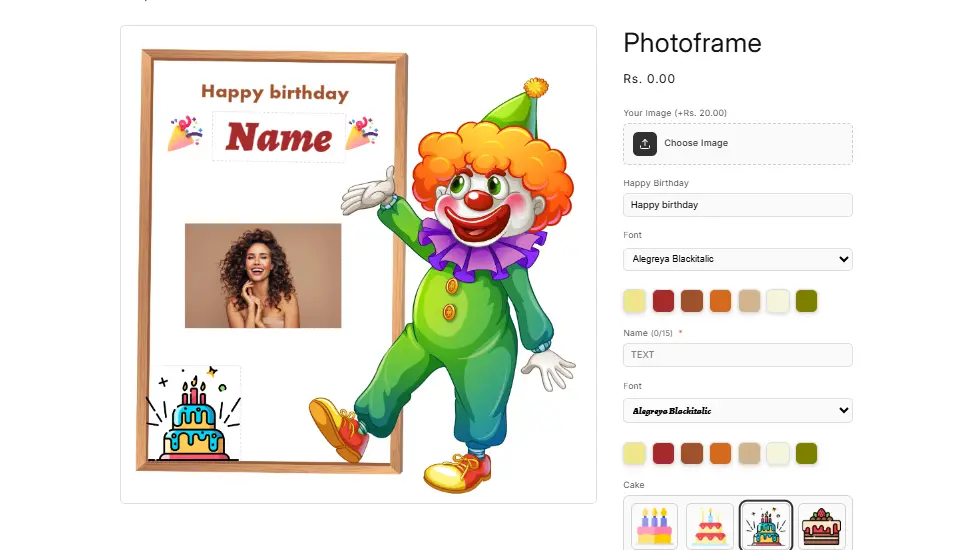
Interaction of customers with styles:
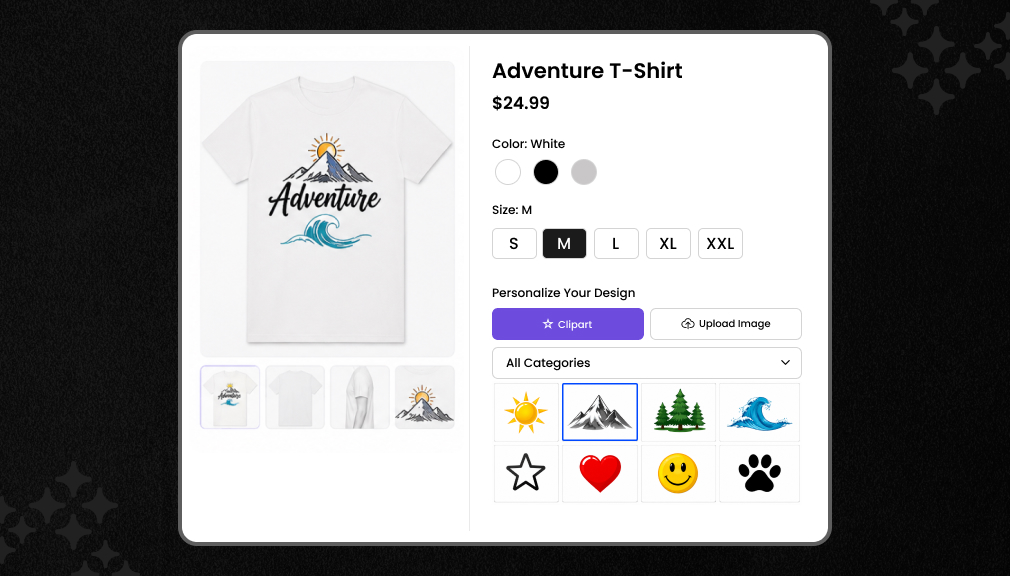
Create a library of clip arts: Load categories such as Sport Icons, Floral Patterns, Animal Images, etc. Customers can browse, choose, and make purchases of those images without any code or developer intervention, directly from the product page.
Image upload options: Customers can upload personal pictures, logos, and images to be used for customization purposes. Uploaded image gets attached to the order to fulfill it accurately.
Live preview functionality: Uploaded or added clip art images instantly appear on product mocks, reducing abandonments while making a purchase of customized product.
Image option with text field: Customers are able to add a name, date, or any kind of message next to the image uploaded. No-code solutions allow adding multiple fields at once to the same product page.
In the SetuBridge Custom Product Options – POD App, customers get a clip art selector, image upload, live preview, and text fields right in the app administration panel that are synchronized with the Shopify line item for easy order management after purchasing.
Example: clip arts, picture uploading, name, and gift message for a product page in a mug store without changing the theme code.
Option 2: Custom Shopify Code Solution
JavaScript, custom snippets, and Liquid templates make it possible to integrate image selectors and clipart libraries directly into themes in Shopify. You’ll have total design freedom without depending on any third party, yet there are some disadvantages that should be considered. Any update to the Shopify theme may render your selectors unusable. For maintaining your clipart library by code, you will require a developer working on it constantly. In case you wish to scale your business or to increase your number of clipart categories, you will have to build everything from scratch.
Consider the merchant’s type when considering the method of implementing custom coding. Custom coding may be a great choice if you are an enterprise-level merchant with special requirements, and you have dev resources available to you. However, in case you are an SMB, spending time building custom code is most likely not worth it.
App vs. Custom Code: Side-by-Side Comparison
| Factor | Shopify App | Custom Code |
| Setup Time | Hours | Days to weeks |
| Maintenance | App handles updates | Ongoing dev required |
| Flexibility | High (config-based) | Full (code-based) |
| Cost | Monthly subscription | High upfront + ongoing |
| Scalability | Instant across products | Manual per product |
| Merchant Friendliness | No code needed | Requires developer |
Due to their speed and efficiency, many Shopify store owners opt to install apps for visual personalization. App installation does not require any coding or testing, and once installed, it is also easy to maintain as updates occur with Shopify or a theme. Apps are preferred for merchants looking for fast implementation with low costs.
Best Use Cases for Image & Clipart Personalization
Visual customization is a popular feature utilized by many Shopify sellers. Some merchants who benefit from visual customization are listed below.
Personalized gifts:
Birthday mugs, custom frames, engraving on keychains, and monogramming on tote bags are among the most popular options. Customers provide artwork for the product initially, and it’s made by the merchant. Thus, customers are able to check the result in advance and know what they ordered.
T-shirts and apparel (POD):
On Print-on-Demand websites, customers are offered to upload clip-art, select the name to write on the t-shirt, and select placement for the print. It is among the most common types of POD, and here, live preview is likely to bring in many conversions from the website visitors.
Phone cases:
The customer uploads his/her picture or selects the style of the phone case. The live preview shows what the phone case will look like. The stores that offer visual customization usually have quite a high Average Order Value since customers add multiple cases during the successful checkout process.
Engraved products:
When selecting the artwork for the ring, bracelet, and pendant, the clip-art picker helps to prevent any confusion. Customer is able to preview the item before placing the order, thus there will be no need for reorders due to mistakes and requests.
Wedding and event products:
People who order custom wedding-related products desire to have full control over the fonts, symbols, and images used. Visual selector makes it clear for the customer what will be used on the product; customers upload their engagement photos or monograms for the product.
Corporate merchandise:
When companies buy branded products, they use the logo upload option to check the image. There will be fewer emails and revision rounds. The logo is attached to the order automatically.
Pet products:
Photos are the main personalization tool for pet lovers for products such as custom pet portraits, pet name tags, and other personalized pet items. There is an online library with illustrations of pet breeds as well.
Conclusion
Personalization on Shopify product pages isn’t something extra anymore; it is a must-have feature for online shops. Customers expect to have visual confirmation of their choice and changes made when buying a gift, a clothing piece with a custom design, or products with an engraving. Clipart and images are the solution.
Such an approach will give customers confidence to purchase. Personalization decreases the friction of the buying process and makes the product more valuable. Besides, it reduces the number of support tickets related to the misunderstanding of the personalization requirements.
For most online stores working with Shopify, the easiest way to achieve such a goal is through an app. Its setup won’t take weeks, but just a few hours. Maintenance is done by the app itself. As the collection grows, the app grows along with its features.
Look at your current product page now. Can your customers specify all their requirements visually? If they can’t, using a clipart library and images will be the next step for your business.
FAQs
Can customers enter custom text on Shopify products?
Yes. Customers enter custom text through product options apps or Shopify line item properties. These fields capture names, messages, or engraving instructions and pass the data directly through to order details for your fulfillment team.
How do I collect engraving text from customers on Shopify?
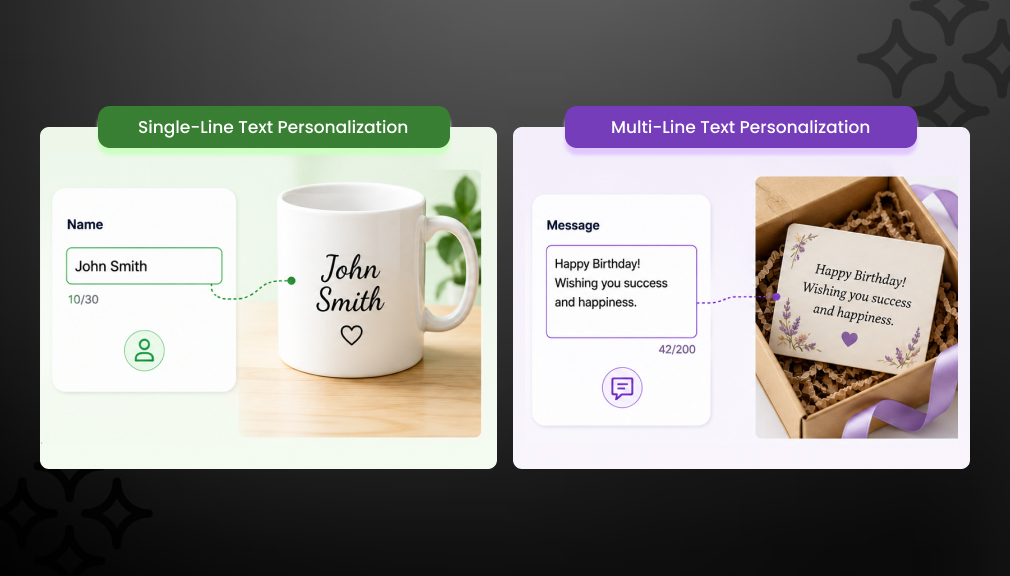
Use a single-line text field labeled ‘Engraving Text’ on the product page. A product options app lets you set a character limit and mark the field as required so customers must fill it before adding the item to their cart.
How can customers add gift messages on Shopify?
Add a multi-line text field labeled ‘Gift Message’ using a product options app. The field appears on the product page and captures the customer’s message at checkout. It passes through to order details as a Shopify line item property automatically.
How do Shopify line item properties work?
Line item properties are key-value pairs attached to a cart item. They store personalization inputs, text, uploaded image URLs, and clipart selections alongside the product. Merchants view them in order details, and they pass through to fulfillment systems and email notifications.
Can I add multiple personalization fields to one product?
Yes. A product options app lets you stack multiple fields on one product. A clipart selector, image upload button, name text field, and gift message box can all appear on the same product page. Each field captures a different part of the customer’s personalization.

Shopify Expert
Dipen Panchal, Shopify Tech Lead at Setubridge Technolabs, brings over a decade of expertise as a Shopify Expert. Passionate about e-commerce growth, he specializes in UI/UX design, crafting intuitive, engaging solutions tailored for merchants and B2B clients to enhance user experiences.