





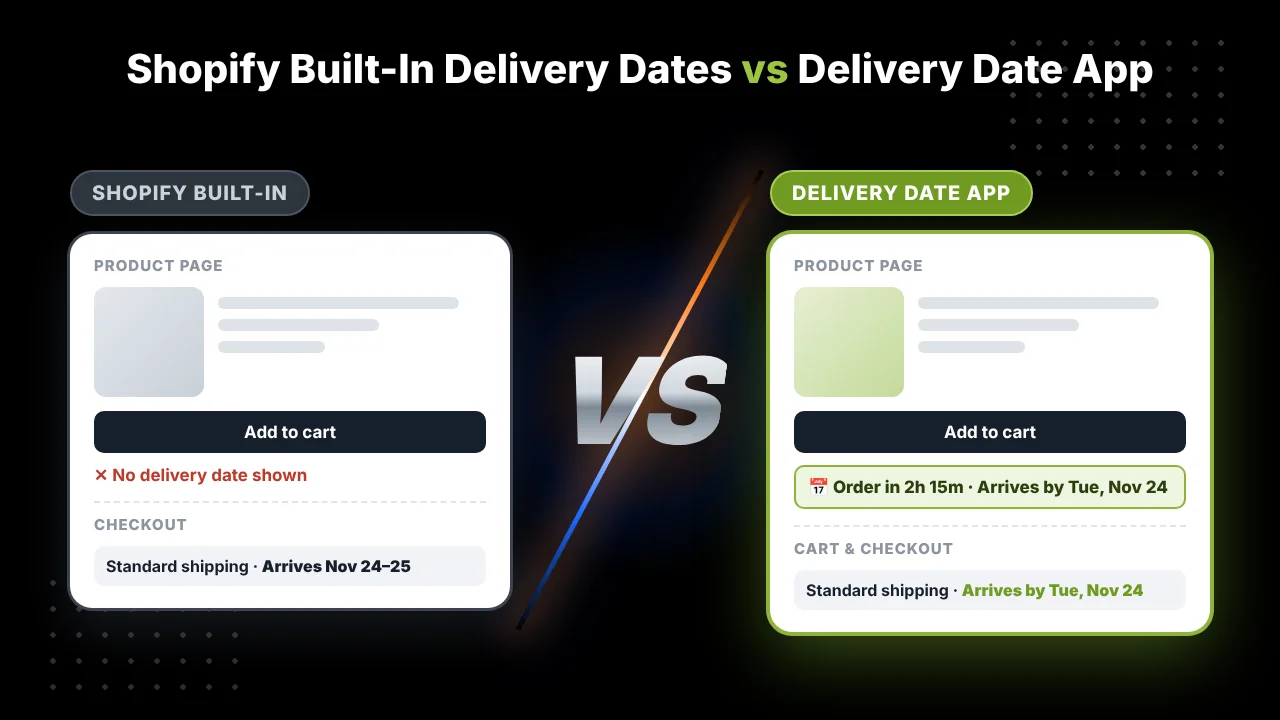
If you’ve looked into showing delivery dates on your store, you’ve probably come across two kinds of advice. Apps tell you that you need an app. Shopify’s help pages show you a setting that’s already in your admin, for free.
So which is right? It depends on your store. Shopify’s built-in delivery dates are genuinely useful, and for some stores they’re enough. For others, they leave big gaps, and those gaps cost sales.
We make a delivery date app, so we’re not neutral, and we’d rather say that upfront. But we’ve also tried to be fair here. Below is what Shopify does on its own, where it stops, and a simple way to decide whether you need anything more.
Key Takeaways
- Shopify can show delivery dates at checkout for free, using either your past shipping performance or the fulfillment and transit times you set.
- The built-in dates mainly show at checkout. By then, the shopper has already decided to buy.
- Your fulfillment time is set for the whole store, so every product gets the same timing.
- Dates don’t show at all with some shipping setups, including rates from third-party apps.
- If all your products ship the same way and you only sell in a few supported countries, the built-in feature may be all you need.
What Shopify gives you for free
In your Shopify admin, go to Settings, then Shipping and delivery. Look for Delivery estimates (some admins still call it Estimated delivery dates). Depending on your store, you can pick one of two ways to work them out.
Automated dates are based on how fast you’ve actually shipped in the past. Shopify looks at your fulfillment history and predicts a date, something like “Estimated delivery Mon, Jun 30”.
Manual dates are based on the numbers you give it. You set a fulfillment time, which is how long you take to get an order to the carrier, and Shopify adds the carrier’s transit time. The customer sees a range, such as “Wednesday, October 27 – Thursday, October 28”.
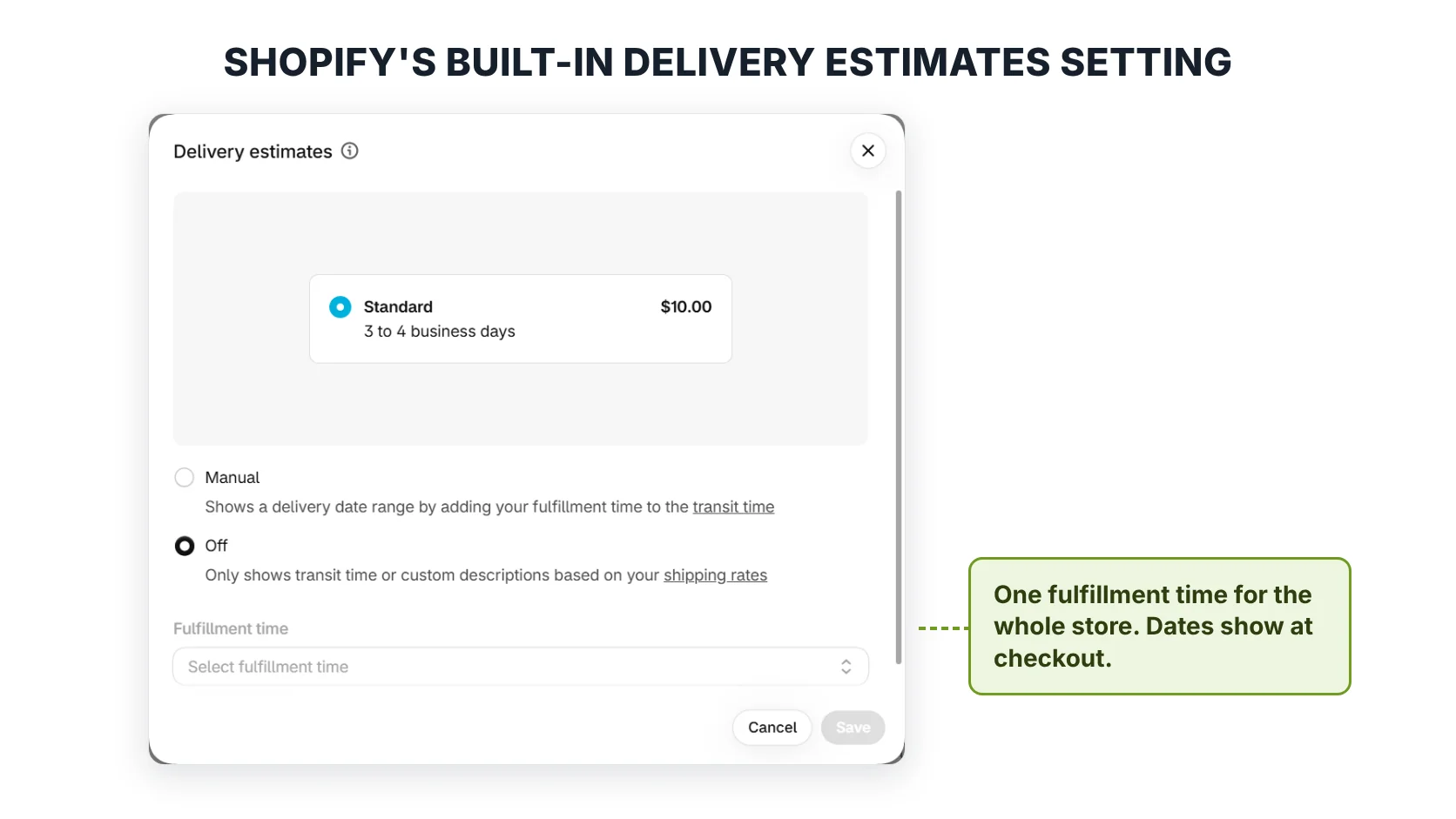
Shopify’s Delivery estimates setting. Note there’s one Fulfillment time box for the whole store. The Automated option only appears for stores that qualify.
There’s also Shop Promise, a free program for stores in the United States. Qualifying products get a badge on the product page. To activate it, Shopify asks for a few things: an active plan, a US location that fulfills to US addresses, Shop Pay turned on, and tracking on at least 90% of eligible orders. One recent change worth knowing: Shop Promise used to give customers $5 in Shop Cash if an order arrived late. That guarantee has been removed. Customers can still claim for older orders until 16 December 2026.
For a free feature, that’s a decent starting point. The question is what happens when your store doesn’t fit the standard setup.
Where the built-in dates fall short
1. The date shows up too late
Shopify says its delivery dates are shown at checkout. That’s helpful, but think about when a shopper actually decides whether to buy. It’s on the product page, usually with their thumb hovering over Add to cart. If they’re buying a birthday gift and can’t see whether it’ll arrive in time, many won’t get as far as checkout to find out.
Shop Promise does put a badge on product pages, but only for US stores that meet its requirements, and only on products that qualify.
2. One fulfillment time for the whole store
Shopify’s fulfillment time is a store-wide setting. There’s no way to say “this product ships tomorrow, but that one takes a week to make”.
For a store selling one type of product from one warehouse, that’s fine. But plenty of stores mix things up. Maybe you sell ready-to-ship mugs and personalised mugs. Maybe some items come from a supplier and take longer. Maybe you have pre-orders. With one setting, you either show the fast date for everything (and disappoint some customers) or the slow date for everything (and lose sales on the fast items).
3. Dates don’t show with some shipping setups
This one catches a lot of stores out. Shopify’s manual delivery dates only work with certain rate types: flat rates with a transit time, Shopify’s label-calculated rates, and some negotiated carrier rates. Shopify’s help page lists a few setups that aren’t supported:
- Shipping rates from third-party apps, including dropshipping apps
- Negotiated FedEx rates
There’s also a less obvious catch. If your checkout shows a mix of supported and unsupported rates, Shopify doesn’t show dates for any of them. So one unsupported rate can switch the whole thing off.
4. Limited countries
Manual dates also depend on where you ship from. Flat rates with transit time work from Canada, the US, the UK, France, Italy, Spain, Germany and Australia. Label-calculated rates work from Canada, the US and Australia. If your store ships from somewhere else, the built-in option may simply not be available to you.
5. Not much control over the details
Shopify’s help page explains that orders placed after 12pm, in your shipping location’s time zone, start counting from the next day. If you can pack orders until 3pm, or your courier collects at 10am, there’s no setting for it in that guide.
Holidays are fuzzy too. Business days are Monday to Friday, but the help page isn’t fully clear on how public holidays are counted. If Christmas or a national holiday falls in the middle of a delivery window, it’s worth placing a test order to see what date customers actually get.
And you can’t really change how the date looks or what it says. There’s no countdown timer, no “order in the next 2 hours” message, and no way to write it in your own words.
What a delivery date app adds
A delivery date app fills these gaps. Different apps do different things, but most good ones cover the basics:
- A date on the product page, next to the Add to cart button, before the shopper decides
- The same date repeated in the cart, at checkout and in the order email
- Different timings for different products, collections or stock levels
- Different dates by country or ZIP code
- Your own daily cut-off time and a countdown timer
- Your own holidays and closing days, so dates skip them
- Control over the wording, design and language
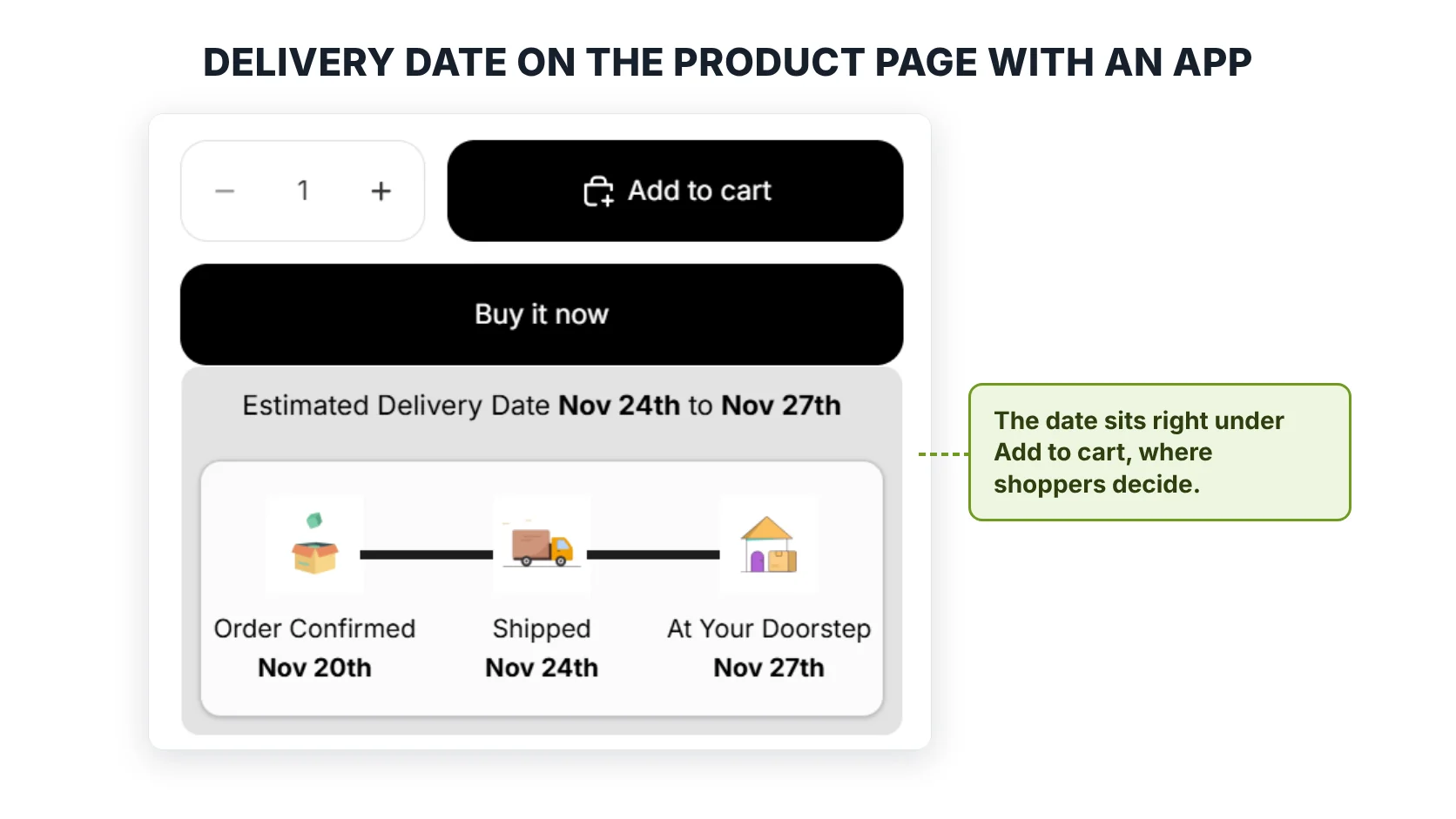
A delivery date shown right under the Add to cart button, with order, ship and delivery dates, made with Estimated Delivery Date ‑ ETA.
Our app, Estimated Delivery Date ‑ ETA, does all of this, and it works alongside your existing shipping setup rather than replacing it. If you want to see how product-specific rules work, our guide to delivery date rules walks through each rule type. If you sell to different regions, there’s also a post on showing different delivery dates by ZIP code.
Side by side
| Shopify built-in | Delivery date app | |
| Cost | Free | Free plan or a monthly fee, depending on the app |
| Date on the product page | Only the Shop Promise badge, for eligible US stores | Yes |
| Date at checkout | Yes | Yes, depending on the app |
| Different timing per product | No, one store-wide fulfillment time | Yes |
| Works with third-party app rates | No | Usually, because the app works out its own dates |
| Cut-off time | Fixed at 12pm, per Shopify’s guide | You choose |
| Your own holidays | Not clearly documented | Yes |
| Countdown timer | No | Yes, in most apps |
| Custom wording and design | No | Yes |
So, do you need an app?
Here’s the honest answer. You probably don’t need one if:
- All your products ship in about the same time
- You ship from one of the supported countries, using supported rates
- You’re happy with dates showing only at checkout
In that case, turn on Shopify’s delivery dates, place a test order, and see how it looks. It’s free, and it’s better than showing nothing.
You’ll probably want an app if any of these sound like your store:
- Some products take longer than others: made-to-order, personalised, pre-order or supplier-shipped
- You use a third-party shipping or dropshipping app for your rates
- You sell gifts or seasonal products, where “will it arrive in time?” decides the sale
- You ship to many countries, or delivery times vary a lot by region
- You want the date on the product page, not just at checkout
- You want a countdown timer or your own wording
A simple way to find out is to try both. Set up Shopify’s built-in dates first. Then look at your product pages through a customer’s eyes. If a shopper on your best-selling product can’t tell when it’ll arrive until they reach checkout, that’s the gap an app fills.
FAQ
1. Does Shopify show estimated delivery dates for free?
Yes. Under Settings, then Shipping and delivery, you can turn on estimated delivery dates at checkout. You can base them on your shipping history (automated) or on the fulfillment and transit times you set (manual).
2. Can Shopify show a delivery date on the product page without an app?
Not in the standard setup. The built-in dates show at checkout. The Shop Promise badge can appear on product pages, but only for qualifying US stores and products.
3. Why aren’t Shopify’s delivery dates showing at my checkout?
The most common reasons are an unsupported rate type, such as rates from a third-party app or negotiated FedEx rates, or a mix of supported and unsupported rates at checkout. Shopify also only shows dates when the product is in stock.
4. Can I set different delivery times for different products in Shopify?
Not with the built-in feature. Fulfillment time is one setting for the whole store. You’ll need an app to give products their own timing.
5. Can I use Shopify’s delivery dates and an app together?
Yes, many stores do. But if both show a date in the same place, customers may see two different dates. Make sure they match, or switch one of them off on that page.
Facts about Shopify’s features were checked against the Shopify Help Center on 20 November 2026. Shopify updates these features often, so check its delivery dates guide and Shop Promise page for the latest. This post is published by SetuBridge, the maker of Estimated Delivery Date ‑ ETA.

Shopify Expert
Dipen Panchal, Shopify Tech Lead at Setubridge Technolabs, brings over a decade of expertise as a Shopify Expert. Passionate about e-commerce growth, he specializes in UI/UX design, crafting intuitive, engaging solutions tailored for merchants and B2B clients to enhance user experiences.