





A shopper lands on your Shopify store wanting a custom mug. She pictures a cute dog clipart, a heart, and a name. She feels excited and ready to order this thoughtful gift. Then she finds only a plain text box to type in. She cannot see her idea, so she doubts and leaves.
This quiet moment plays out on Shopify stores every day. Shoppers want to see their design before they pay for it. When they cannot, that excitement turns into hesitation fast. A clipart and image selector solves this exact problem simply. It lets shoppers build their design right on the page.
This guide shows you how to add that feature with ease. You will learn what an image selector is and why it matters. You will also see two clear ways to set it up. We will cover best practices, AI tools, and common mistakes. Let us help you turn visual ideas into completed sales.
Key Takeaways
- A clipart and image selector lets shoppers design products visually.
- Visual personalization builds confidence and lifts conversion rates.
- Shopify’s native tools cannot build this feature on their own.
- An app is the fastest, easiest setup for most Shopify stores.
- Custom code suits only large brands with special, complex needs.
- AI tools like background removal make personalization even smoother.
- Clear previews and print-ready files reduce returns and support tickets.
What Is a Shopify Clipart & Image Selector?
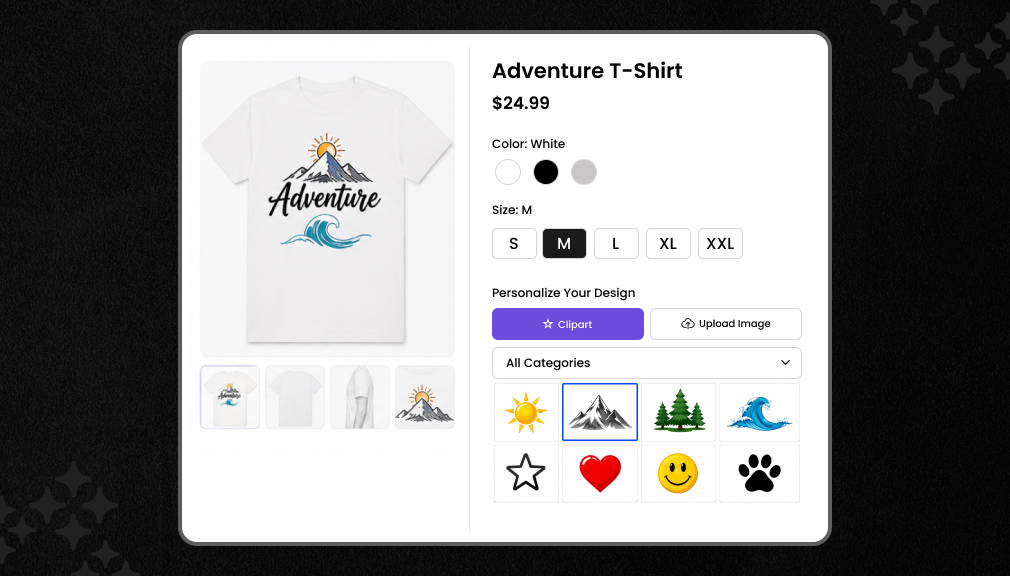
A clipart and image selector is a visual tool on product pages. It lets shoppers pick from a library of ready-made graphics. They can also upload their own photos, logos, or artwork. The chosen image then appears on a live product preview. This turns a plain product into a personal creation.
Think of it as a simple design studio inside your store. Shoppers browse clipart, add text, and see instant results. This visual step removes guesswork from the buying process. It matters because people shop with their eyes first. In fact, 75% of online shoppers rely on product images when deciding.
A good selector pairs clipart with an image upload option. It also shows a real-time preview of every change made. Shoppers then feel sure about what they will receive. That confidence is exactly what pushes them to check out. Visual clarity turns curious browsers into happy buyers.
This tool sits right beside your other product options. Shoppers can add clipart, a photo, a name, and a message. Each field captures a different part of their idea clearly. Together, they let buyers build a full custom product. No support emails or guesswork stand in the way.
Why Shopify Merchants Need Visual Product Personalization
Today’s shoppers expect brands to understand their personal tastes. Generic products no longer excite buyers the way they once did. People want items that reflect their own style and story. Visual personalization meets this demand right on your product page. Stores that ignore it quietly lose sales to rivals.
This expectation is now the norm, not a rare wish. Research shows most people prefer brands that personalize their experience. Around 70% even favor customized products over standard ones. Shoppers feel ignored when stores offer no personal options. A clipart selector shows buyers that you truly value them.
The demand for custom products keeps climbing every single year. When customization is offered, 59% of shoppers are more likely to buy from that store. Shoppers also pay more for that personal touch they love. Around 81% of consumers will pay extra for personalized clothing.
This trend fuels a fast-growing print-on-demand market worldwide. That market may grow past $100 billion by 2034. Custom apparel, gifts, mugs, and phone cases all ride this wave. A clipart and image selector helps you claim your share. It turns your store into a true personalization destination.
How Clipart & Image Selection Improve Conversion Rates
There is real psychology behind visual personalization and sales. When people design a product, they start to feel it is theirs. This is called the endowment effect in simple terms. That sense of ownership makes buyers more likely to check out. A clipart selector triggers this powerful effect naturally.
Cart abandonment is a huge problem for online stores. The average cart abandonment rate sits near 70% today. Many shoppers leave because they cannot picture the final product. A live preview removes that doubt at the perfect moment. Seeing the design boosts confidence and leads to completed orders.
Visual personalization also lifts your average order value nicely. A mug with a custom photo feels more special than a plain one. Shoppers happily pay more for something made just for them. These buyers also return more often and rarely send returns. Clear previews turn one-time sales into loyal customers.
Picture two identical hoodies sitting side by side online. One is plain, while the other shows a shopper’s own design. The custom hoodie instantly feels more valuable and personal. Buyers gladly pay a premium for that unique creation. This is how visual tools quietly grow your revenue.
Ways to Add a Clipart & Image Selector in Shopify
You have two main ways to add this feature today. You can use a Shopify app built for personalization. Or you can build a custom solution with developer code. Each path has clear trade-offs worth knowing first. Let us walk through both options in detail below.
Option 1: Shopify App-Based Solution (Recommended)
For most Shopify stores, an app is the fastest and easiest way to add a clipart & image selector to your Shopify product pages. It handles everything from a built-in clipart library and image uploads to real-time previews, so you can skip custom coding, long development timelines, and expensive developer costs. This makes setup simple, even for non-technical merchants, which is why most Shopify sellers choose this approach.
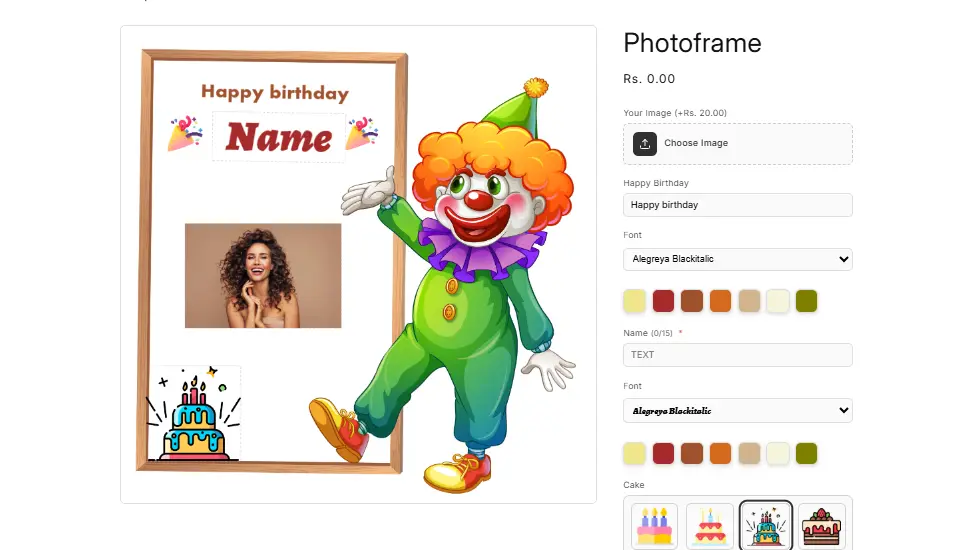
One reliable solution is Custom Product Personalizer by SetuBridge. It helps you easily add a clipart & image selector to your Shopify product pages, allowing shoppers to choose clipart, upload their own images, and personalize products with styled text.
Every change is displayed instantly on a live preview canvas, giving customers confidence before they buy. The app also exports print-ready files in the formats your production team needs, while automatically syncing all customization details with the order for a smooth fulfillment process.
Here are the general steps to set it up inside an app:
- Install a product personalization app from the Shopify App Store
- Open the product you want to make customizable
- Upload your clipart and sort it into clear categories
- Turn on the image upload option for customer photos
- Add text fields for names, dates, or short messages
- Enable the live preview, so shoppers see their design
- Save your work and test the product page as a shopper
After setup, review the page on both desktop and phone. Confirm that clipart loads and the preview updates smoothly. Check that uploads and text pass through to the order. A quick test now prevents messy, confusing orders later. Smooth setup protects both your sales and your reputation.
Option 2: Custom Shopify Code Solution
Custom code gives you full control over the whole design. Developers use Liquid, JavaScript, and custom snippets to build it. This suits large brands with unique, complex personalization needs. But this route demands real time, money, and coding skill. For most merchants, the trade-offs are hard to justify.
Consider these real drawbacks before choosing the custom route:
- Theme updates break things. A theme change can disable your selector.
- Constant upkeep. You need a developer to maintain the clipart library.
- Slow to scale. New categories mean building features from scratch.
- Higher costs. Skilled Shopify developers are expensive to hire.
- More bugs. Custom systems need heavy testing to avoid order errors.
For an SMB, custom code rarely pays off in the end. Save it for enterprise stores with special, large-scale needs.
App vs. custom code at a glance:
- Setup time: Apps take hours; custom code takes days or weeks.
- Maintenance: Apps update themselves; code needs ongoing dev work.
- Cost: Apps use a small monthly fee; code has high upfront costs.
- Scalability: Apps scale instantly; code scales product by product.
- Skill needed: Apps need no code; custom code needs a developer.
App vs. Custom Code: Side-by-Side Comparison
| Factor | Shopify App | Custom Code |
| Setup Time | Hours | Days to weeks |
| Maintenance | App handles updates | Ongoing dev required |
| Flexibility | High (config-based) | Full (code-based) |
| Cost | Monthly subscription | High upfront + ongoing |
| Scalability | Instant across products | Manual per product |
| Merchant Friendliness | No code needed | Requires developer |
How AI Is Improving Clipart & Image Selectors
Artificial intelligence is making visual personalization smarter and faster. AI now removes messy backgrounds from customer uploads instantly. This keeps every design clean and print-ready with no effort. Shoppers get better results without any design skill at all. That ease removes friction from the whole buying journey.
AI can also suggest clipart and layouts that fit a theme. It helps shoppers find the right graphic in mere seconds. Some tools even create fresh artwork from a simple text prompt. This smart help spreads fast as recommendation tools grow popular. AI-driven suggestions also lift average order value naturally.
AI also helps shoppers discover the right clipart faster. Smart search lets buyers type a word to find graphics. This saves time and keeps the design flow smooth. Shoppers stay focused instead of scrolling through endless options. Faster discovery means fewer drop-offs during the design step.
You do not need to build these AI features yourself. Many personalization apps now include AI tools by default. Look for background removal, smart previews, and design help. These features save shoppers time and reduce their doubts. Smart tools make custom products feel easy and fun.
How Personalization Reaches Your Fulfillment Team
A great selector must do more than look pretty. It must also send each design to your team correctly. A good app attaches every choice to the order data. This includes clipart picks, uploaded files, and custom text. Your team then sees exactly what each customer wants.
This clean handoff prevents costly mistakes and delays. Print-ready files arrive in the right size and format. Your printer or supplier can start work with no back-and-forth. This means fewer emails asking customers for their artwork. Accurate order data keeps fulfillment fast and smooth.
This smooth flow also cuts your support tickets sharply. Shoppers rarely email when the preview matches the product. Fewer mistakes lead to fewer refunds and reprints too. Every clear order protects your time and your margins. Good data turns personalization into a real business advantage.
Best Practices for Your Clipart & Image Selector
A good setup is only half of the whole job. How you present the tool shapes your conversions too. A few smart habits can lift your sales noticeably. Use these best practices to get the most real value. They keep your selector clean, fast, and easy to use.
Keep these tips in mind as you build your experience:
- Organize clipart into categories. Group by theme, like animals or holidays.
- Set clear upload rules. Ask for PNG files at 300 DPI resolution.
- Show a live preview. Let shoppers see every change instantly.
- Optimize for mobile. Many shoppers design on small phone screens.
- Watch your page speed. Compress clipart so your pages load fast.
- Use licensed clipart only. Avoid copyrighted graphics to stay legally safe.
Print quality matters as much as the design itself. Low-resolution uploads lead to blurry, disappointing final products. Set a minimum resolution and warn shoppers about weak files. Print-ready exports in the right format keep fulfillment smooth. This care protects both your customers and your reviews.
Mobile shoppers deserve just as much attention here. A large share of buyers now design on their phones. A clumsy mobile tool can undo all your hard work. Test the selector on real phones before you launch it. Smooth mobile design keeps these buyers happy and buying.
Best Use Cases for Image & Clipart Personalization
Almost any store can gain from visual personalization tools. Still, some product types see especially strong results here. Knowing where it shines helps you plan your offers well. Here are the stores that benefit most from this feature.
- Personalized gifts: Mugs, frames, and keychains with names or photos.
- Apparel and POD: T-shirts and hoodies with clipart and custom text.
- Phone cases: Uploaded photos shown on a clear live preview.
- Engraved products: Rings and bracelets with chosen symbols or art.
- Wedding and events: Custom fonts, monograms, and engagement photos.
- Corporate merchandise: Branded swag with uploaded company logos.
- Pet products: Portraits and tags with pet photos or breed clipart.
Apparel and gifts remain the biggest winners in this space. Buyers love designing these items from every angle. If you sell here, a clipart selector is a smart move. It helps you stand out and win choosy shoppers. The right setup can quickly pay for itself.
Common Mistakes to Avoid
Even good merchants make simple mistakes with image selectors. Small errors here can quietly cost you real sales. Knowing these traps helps you sidestep them with ease. A little care upfront saves many headaches later on. Watch out for these common mistakes below.
- Hiding the customization tool low on the product page
- Skipping the live preview, so shoppers must guess blindly
- Allowing blurry uploads that ruin the final printed product
- Offering too many clipart options that overwhelm buyers
- Ignoring mobile shoppers who design on small screens
Fixing these mistakes is usually quick and very rewarding. Keep the tool visible, simple, and easy to use. Show clear previews and set smart upload rules early. Test the full flow on both desktop and phone. These small habits protect your sales and your brand.
Conclusion
Visual personalization is no longer just a nice extra feature. Shoppers now expect to see their design before they buy. A clipart and image selector gives them that confidence easily. It reduces hesitation, boosts value, and lifts your completed orders. For custom-product stores, it is a real growth lever.
Most merchants get there fastest with a simple app. Setup takes hours, not weeks, and needs no coding at all. The app grows with you as your clipart library expands. Look at your product page now with fresh eyes. If shoppers cannot design visually, an image selector is your next step.
FAQs
Can customers enter custom text on Shopify products?
Yes. Customers enter custom text through product options apps or Shopify line item properties. These fields capture names, messages, or engraving instructions and pass the data directly through to order details for your fulfillment team.
How do I collect engraving text from customers on Shopify?
Use a single-line text field labeled ‘Engraving Text’ on the product page. A product options app lets you set a character limit and mark the field as required so customers must fill it before adding the item to their cart.
How can customers add gift messages on Shopify?
Add a multi-line text field labeled ‘Gift Message’ using a product options app. The field appears on the product page and captures the customer’s message at checkout. It passes through to order details as a Shopify line item property automatically.
How do Shopify line item properties work?
Line item properties are key-value pairs attached to a cart item. They store personalization inputs, text, uploaded image URLs, and clipart selections alongside the product. Merchants view them in order details, and they pass through to fulfillment systems and email notifications.
Can I add multiple personalization fields to one product?
Yes. A product options app lets you stack multiple fields on one product. A clipart selector, image upload button, name text field, and gift message box can all appear on the same product page. Each field captures a different part of the customer’s personalization.

Shopify Expert
Dipen Panchal, Shopify Tech Lead at Setubridge Technolabs, brings over a decade of expertise as a Shopify Expert. Passionate about e-commerce growth, he specializes in UI/UX design, crafting intuitive, engaging solutions tailored for merchants and B2B clients to enhance user experiences.