A shopper reaches your Shopify Plus checkout with a deadline in mind. She needs the gift to arrive before Friday, no later. She sees two options: “Standard” and “Express,” with no dates. Which one actually makes her deadline? She truly cannot tell. So she hesitates, doubts you, and leaves for a rival store.
That silent exit happens on Plus checkouts every single day. Shoppers do not want shipping names; they want arrival dates. Each method needs its own clear delivery estimate right there. Shipping-method-wise ETA messages on Shopify Plus checkout fix this fast. This guide shows you how to add them the smart way.
Key Takeaways
- Shipping-method-wise ETA messages show a delivery date per shipping option.
- Shopify’s built-in notice is one static line, not per-method.
- Plus checkout uses Checkout Extensibility, not old checkout. Liquid edits.
- Clear per-method dates lift conversion and reduce cart abandonment.
- Method-based dates also nudge shoppers toward faster shipping.
- An app adds these ETAs on Shopify Plus without custom code.
- Show the longest date for mixed carts to stay honest.

What Are Shipping-Method-Wise ETA Messages?
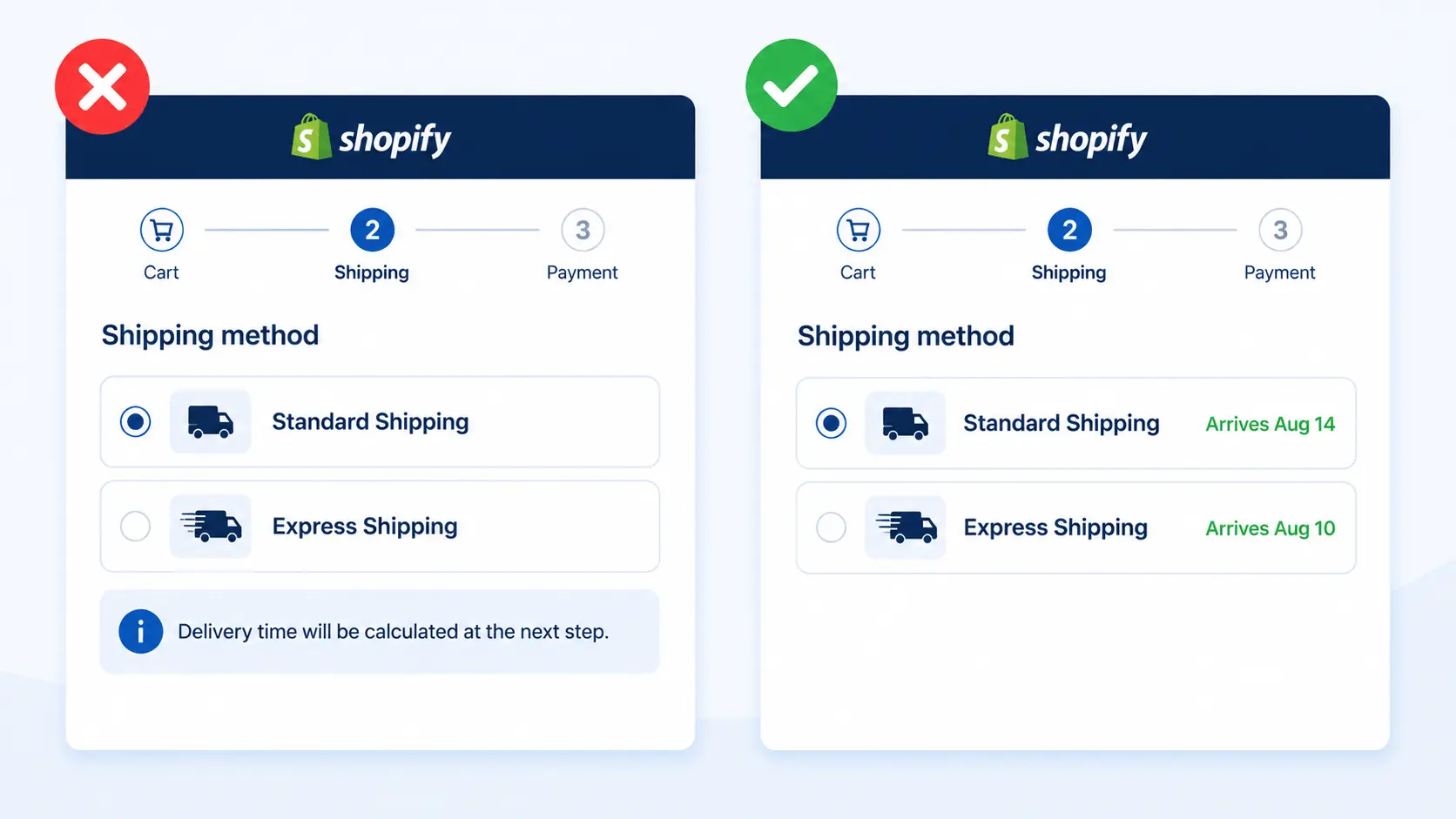
Shipping-method-wise ETA messages show a delivery date for each shipping option. Standard might read “Arrives Aug 14,” while Express reads “Arrives Aug 10.” The date updates live as the shopper switches between methods. So every option carries its own honest, specific promise. This is delivery date ETA by shipping method, shown at checkout.
Think of it as answering “when will it arrive?” per choice. A single generic line cannot do that job at all. A shopper comparing speed and price needs both dates visible. Shipping method-specific ETA gives them that clarity instantly. That clarity is what turns hesitation into a confident purchase.
The key detail is that the date must be dynamic. It should change the instant a shopper picks a method. Standard shows one date, and Express shows a sooner one. A static, shared line simply cannot behave this way. That live, per-method behavior is the whole point here.
Why Generic Checkout Messages Fall Short
Shopify does offer a built-in “Shipping method notice” field. But it shows one shared, static line for all methods. It cannot show a different date for Standard versus Express. It also cannot update as the shopper changes their choice. So it fails the exact job shoppers care about most.
Many guides stop at that single static message. Yet a shared note does not answer the real question. Your shopper still cannot tell which method meets their deadline. True Shopify Plus checkout ETA by shipping method needs more. It needs a dynamic, per-method delivery estimate that actually updates.
The Cost of a Generic Shipping Message
A generic shipping line costs more than it appears. It leaves your biggest question unanswered at checkout. The shopper reaches the final step still unsure about timing. That doubt, at a high-intent moment, is very expensive. One vague line can quietly undo all your marketing spend.
Remember, this shopper already wanted to buy something. They added the item and reached your checkout page. Only the delivery question now stands in their way. A shipping method-specific ETA removes that last barrier. Answering it well is among the cheapest wins available.
Why Shipping-Method-Wise ETA on Shopify Plus Checkout Matters
The checkout is where sales are won or quietly lost. According to Baymard Institute research, cart abandonment sits near 70%. Slow or unclear delivery is a top reason shoppers leave. 2026 checkout research shows 23% abandon over slow delivery options. A clear per-method date removes that doubt at the deciding moment.
Shoppers reward stores that show honest, specific dates. Narvar’s 2025 shopper survey found 73% let a visible date guide their purchase. Even more striking, 40% will not buy without a clear date. Shipping-method-wise, ETA on Shopify Plus meets that exact need. It answers the shopper’s biggest worry right where they decide.
Mobile makes this clarity matter even more today. Most shoppers now reach checkout on small phone screens. On mobile, an unanswered date question ends sales fast. A clear per-method ETA keeps mobile buyers moving forward. That extra clarity matters most where thumbs decide quickly.
The Upsell Advantage: Turning Speed Into Revenue
The payoff shows up clearly in real store results too. Real-world Shopify tests tie clear dates to 12–25% higher conversion. But there is a second win beyond conversion here. Method-based dates nudge shoppers toward faster, paid shipping. A buyer in a hurry sees Express arrive days sooner.
That clear gap makes the upgrade feel worth the cost. Many shoppers happily pay more once the benefit is obvious. So a delivery estimate per shipping method can lift order value. It also cuts “Where is my order?” tickets after the sale. Clear dates protect revenue, trust, and support time together.
Which Stores Need Method-Based ETAs Most
Almost any Plus store with multiple shipping tiers benefits. But some feel the impact far more than others. These store types gain the most from method-based ETAs:
- Gift stores racing against birthdays and holidays.
- Fashion and beauty brands with impulse-driven buyers.
- Stores offering Standard, Express, and Overnight tiers.
- High-AOV stores where each saved cart matters.
- Perishable or event-based products with strict deadlines.
For these stores, the shipping method is a real decision. Shoppers weigh speed against price at the final step. A clear date per method makes that choice easy. It also nudges deadline buyers toward faster, paid options. The result is more completed, higher-value orders.
A Real Example: The Deadline Shopper
Picture a shopper who needs a jacket by Friday. Your checkout shows only “Standard” and “Express” names. Without dates, she cannot tell which one arrives in time. So she guesses, worries, and often abandons the cart. That lost sale was completely preventable with clear dates.
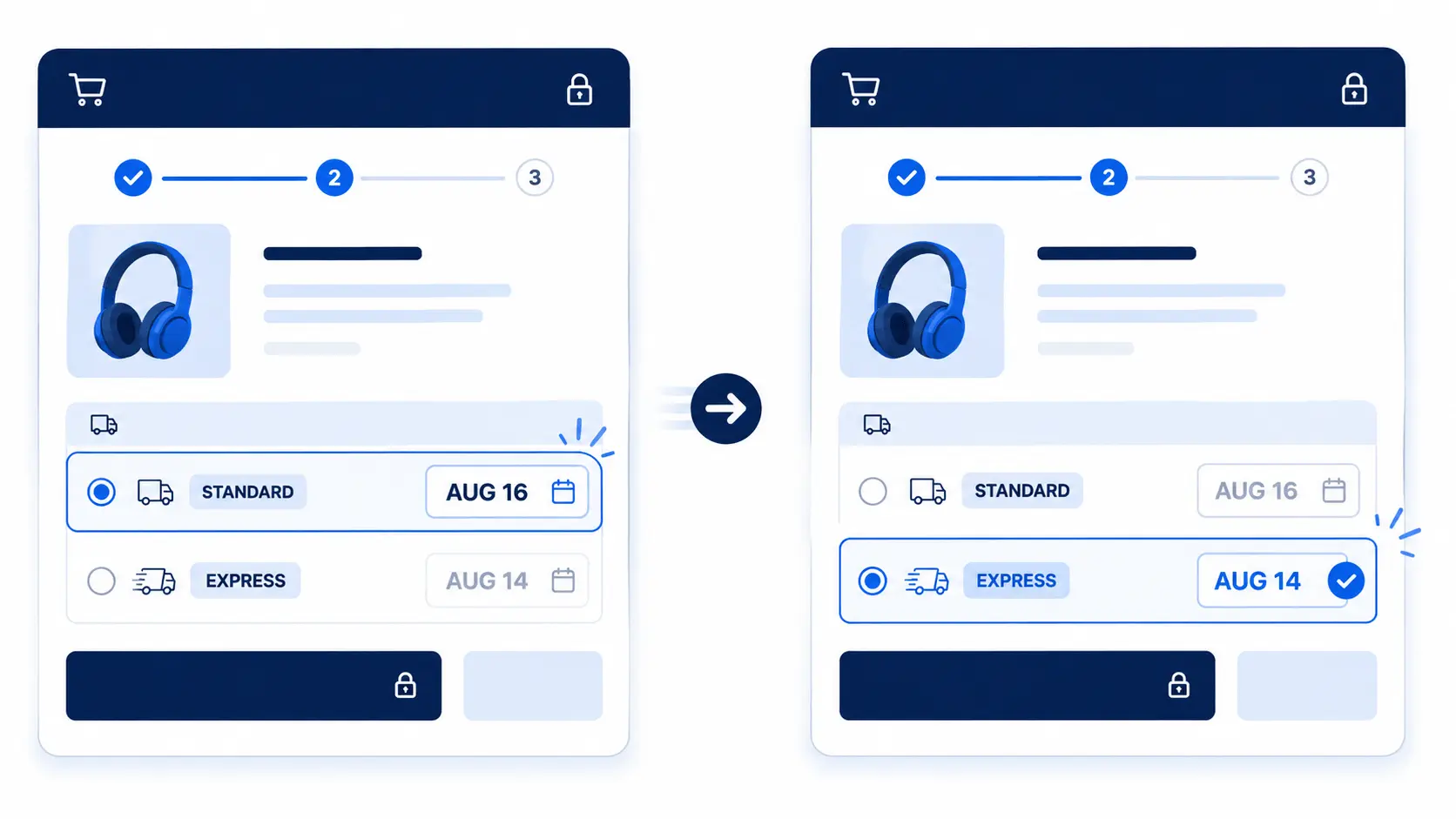
Now add a distinct ETA to each shipping method. Standard shows “Arrives Aug 16,” just past her deadline. Express shows “Arrives Aug 14,” right on time for her. She confidently picks Express and completes the order fast. One clear date per method saved that sale instantly.
Why Shopify Plus Checkout Is Different
Shopify Plus gives you deeper control over the checkout. That control matters for shipping-method-wise ETA messages. Older stores once edited checkout .liquid to add such text. But Shopify has phased out checkout. liquid for these customizations. Modern checkout customization uses Checkout Extensibility instead.
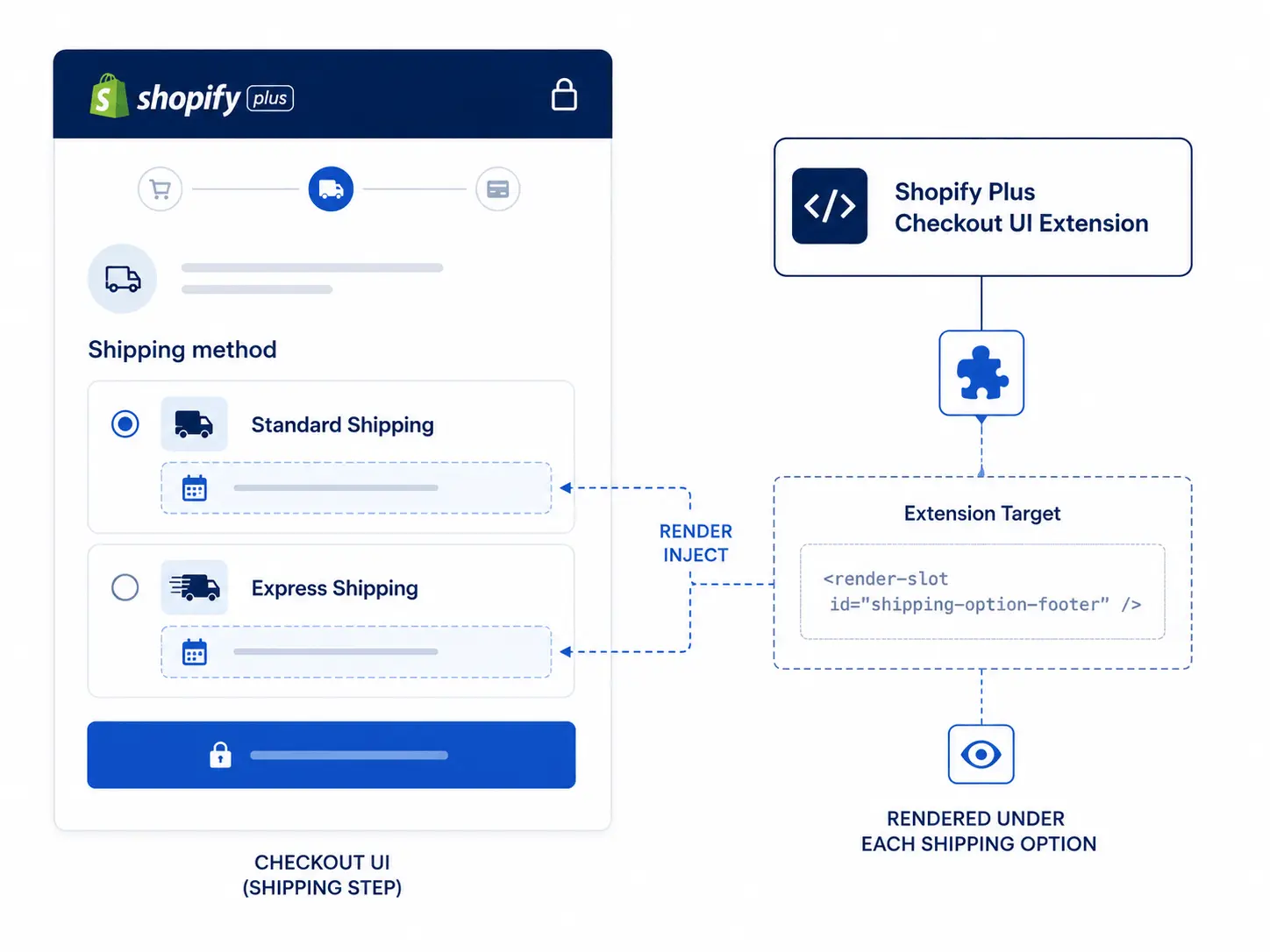
Checkout Extensibility relies on Checkout UI extensions and app blocks. These let approved apps inject content into the checkout safely. An extension can render a date under each shipping option. It uses a specific target near the shipping-option area. This is how per-method ETAs appear on a Plus checkout today.
This shift is genuinely good news for merchants overall. Extension-based content is upgrade-safe and supported by Shopify. It will not break when Shopify updates the checkout. So you avoid the fragile hacks of the old days. It does, however, require an app or custom extension.
The extension renders content at a defined checkout target. For shipping ETAs, that target sits by the options. It appears right under each shipping choice cleanly. This keeps the date close to the decision itself. Placement near the option is what makes it work.
How to Show Shipping-Method-Wise ETA Messages on Shopify Plus Checkout
Here are two ways to set this up. The app-based route is recommended for most merchants.
Option 1: Shopify App-Based Solution (Easy & Recommended)
The easiest way to Show Shipping-Method-Wise ETA Messages on Shopify Plus Checkout is with the Estimated Delivery Date app. It offers a no-code setup, lets you create shipping-method-specific ETA rules, and provides flexible display options for different delivery scenarios. This helps customers see accurate estimated delivery dates based on their selected shipping method, improving transparency, reducing confusion, and increasing confidence before they complete their purchase.
Follow these steps:
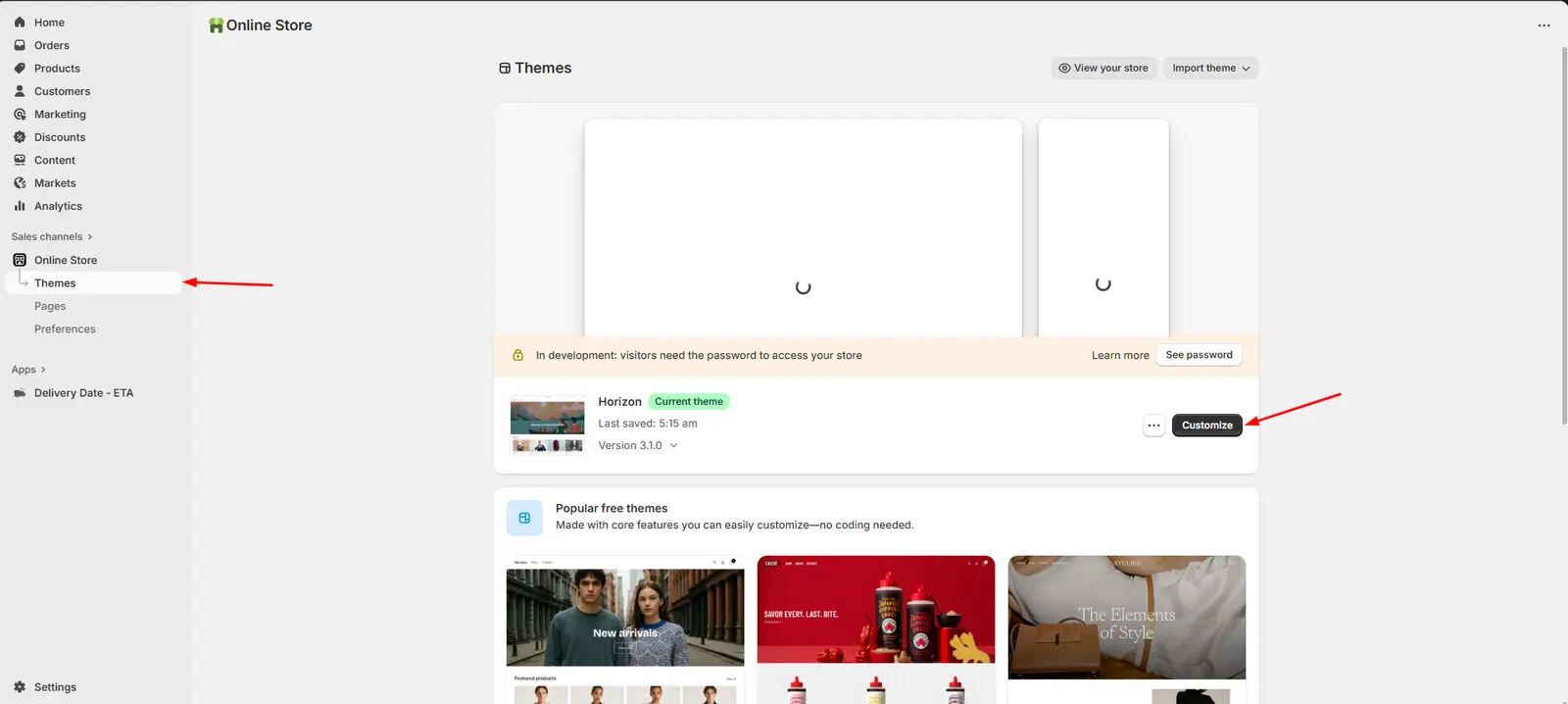
Open Theme Customizer: From your Shopify admin, go to Online Store → Themes, then click Customize on your active theme.
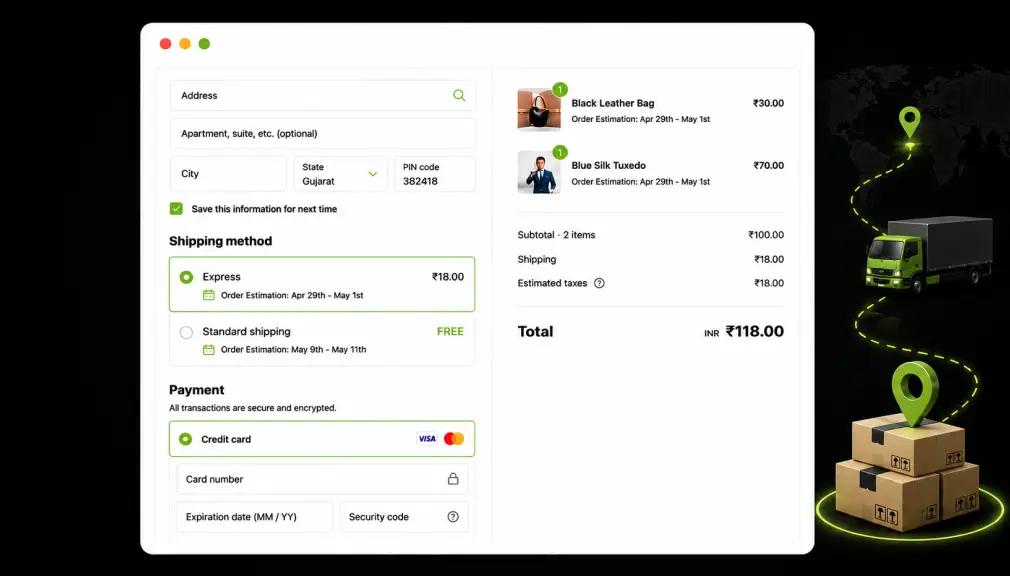
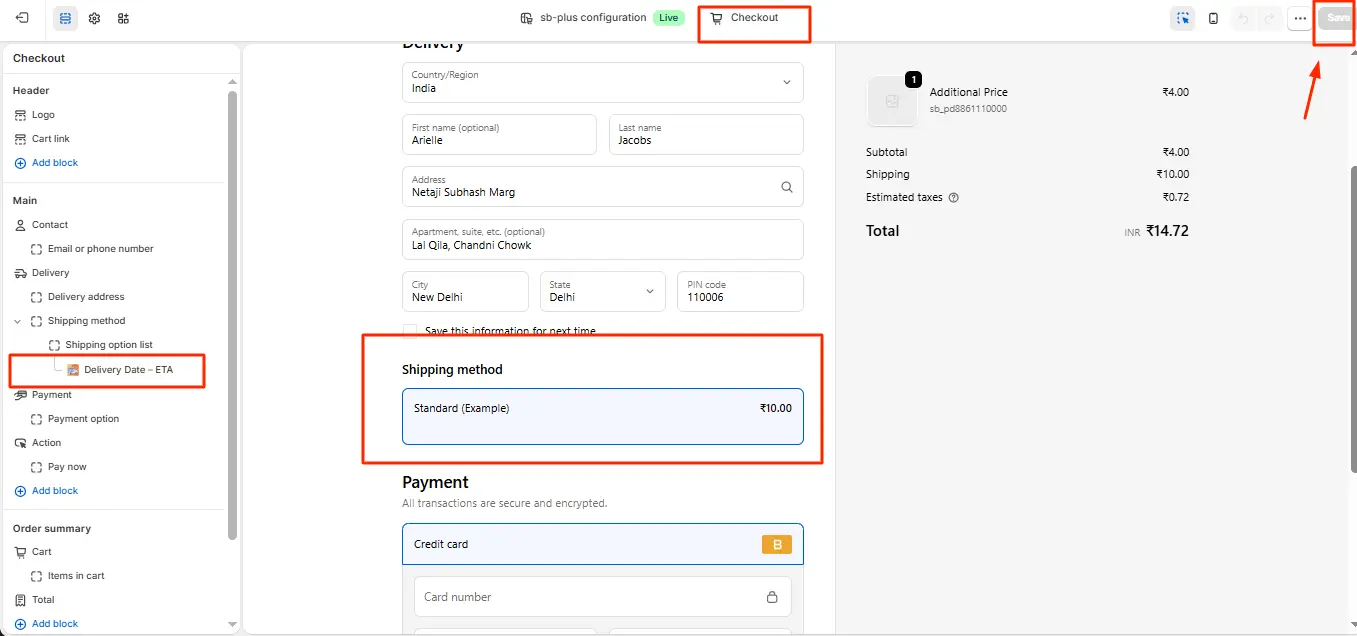
Add the ETA Widget to Checkout: Navigate to Shopify Admin → Checkout Customization → open the Checkout Editor → go to the Shipping Method section → click Add Block → select Delivery Date – ETA → position the widget → click Save.
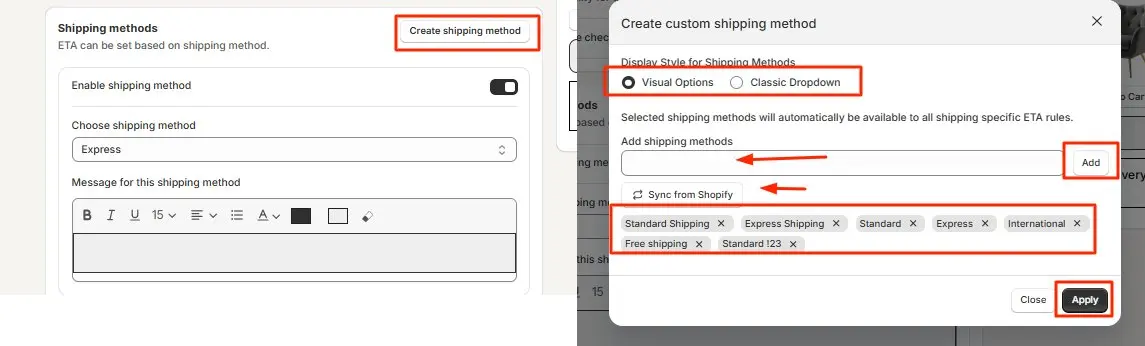
Create and Configure Shipping Methods: Inside the app, click Create Shipping Method. A pop-up opens. Choose a display style: Visual Options or Classic Dropdown. Add your methods by typing and clicking Add, or use Sync from Shopify to import existing methods. Select the methods to display (Standard, Express, Free Shipping, etc.) → click Apply → then link each method to its ETA rule using the dropdown.
Save and Test on Your Storefront: Save your settings. Open your live store, add a product to cart, proceed to checkout, and enter a shipping address. Confirm the ETA appears under each shipping method option. Once verified, the widget is live.
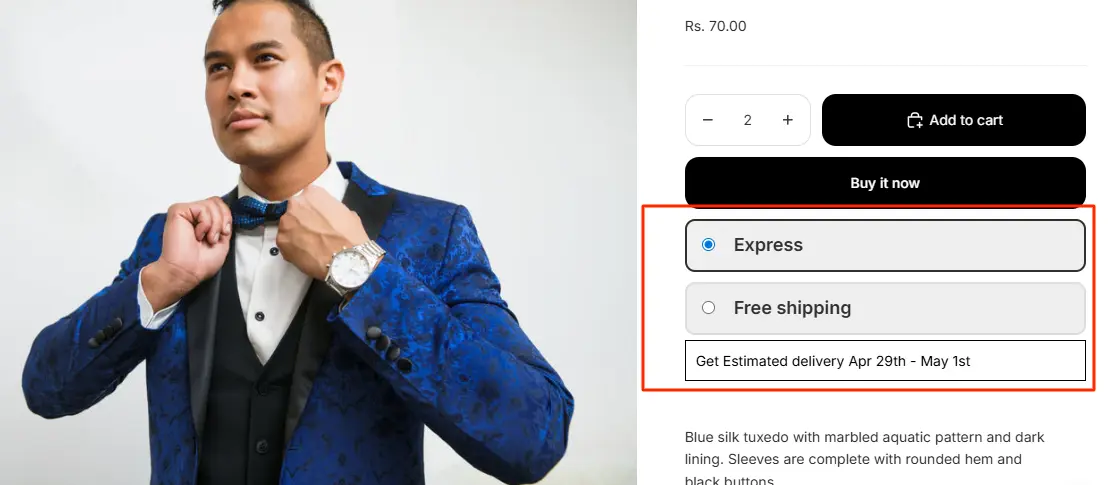
View ETA in Checkout Page:
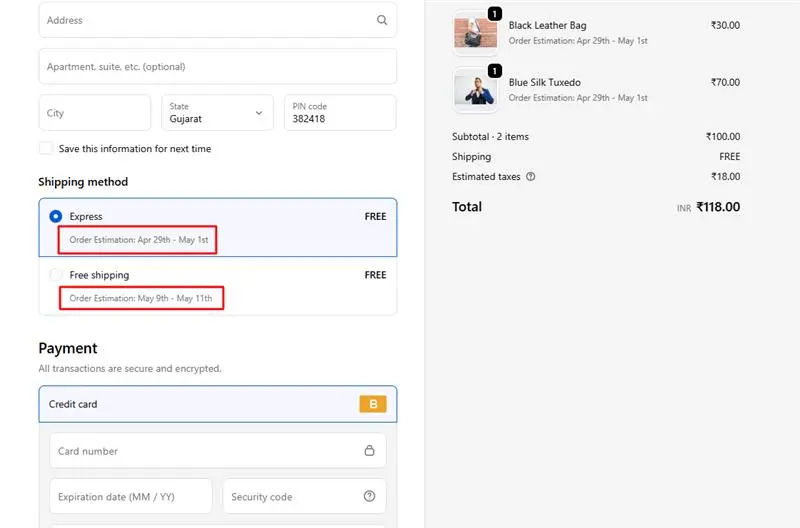
Once configured, customers can instantly see delivery estimates for each shipping option, helping them choose with confidence while reducing checkout hesitation, support requests, and delivery-related uncertainty.
Option 2: Custom Shopify Code Solution
Shopify Plus checkout customization through code is possible via Checkout UI Extensions using the @shopify/ui-extensions package. Build a custom extension that will read shipping rates and apply additional logic or calculations, then display a text block below each option.
However, this route has significant limitations that merchants should weigh carefully:
- Requires an experienced developer familiar with Shopify Checkout Extensibility
- ETA logic must be hard-coded; any change to carriers, cutoff times, or holiday exclusions requires a developer update
- Does not support dynamic ZIP/postcode-based delivery logic or holiday calendars out of the box.
- Testing, deploying, and maintaining the extension adds ongoing overhead
- For most stores, the custom code route costs 5–10x more over time compared to an app-based setup
Only consider this code path if your ETA needs are extremely specialized, and your developers are already within your checkout extension flow. For nearly all Shopify Plus merchants, the app-based approach is faster to implement, easier to maintain, and more capable of handling a wide variety of real-world ETAs automatically.
Which Option Should You Choose?
So which route fits your store best right now? For most merchants, a proven app wins on speed and safety. It stays upgrade-safe without any fragile custom code. A custom extension suits only very unique, complex needs. Match the tool to your team and your real goals.
Cost and time also weigh heavily on this choice. An app usually starts free or cheap and launches today. Custom extension work brings developer fees and slow testing. Both can show the same date beside each method. The difference is the effort you spend building and maintaining it.
Handling Mixed Carts
Mixed carts raise one tricky question about the date. What if items have different prep or transit times? Showing the fastest date would quietly break your promise. The honest choice is to show the longest ETA. That way the whole order truly arrives by that date.
A good app applies this longest-ETA logic automatically. It scans every item and picks the latest arrival. So the shopper sees one honest, cart-wide date instead. This prevents confused “where is the rest?” tickets later. Honesty about mixed carts protects trust more than speed.
ETA Message Examples by Shipping Method
The right wording makes each method clear and trustworthy. Keep every message short, specific, and tied to a date. Here are simple examples you can adapt per method:
- Standard: “Standard — arrives by Aug 14.”
- Express: “Express — get it by Aug 10, order within 3 hours.”
- Overnight: “Overnight — arrives tomorrow if you order by 5 PM.”
- Free shipping: “Free shipping — arrives Aug 15–17, no extra cost.”
Notice how each line pairs a method with a real date. That pairing is what builds instant trust at checkout. A gentle cutoff line adds honest urgency for faster options. Shoppers then see the trade-off between speed and price. Clear wording is half the power of a good message.
Where Method-Based ETAs Should Appear
The checkout is powerful, but it is not the only place. Show delivery dates earlier in the journey too. A shopper who already saw the date feels reassured. Then the checkout simply confirms what they expected. This repetition reduces doubt at every single step.
Aim to show delivery timing in three key spots:
- Product page, so buyers see timing before adding to cart.
- Cart page, as they review their order once more.
- Checkout, with a distinct ETA per shipping method.
Consistent dates across all three build strong trust. The shopper never meets a surprise or a mismatch. That steady clarity is what quietly lifts your conversions. Each touchpoint reminds them the order will arrive. Repetition, done well, turns doubt into confidence.
Common Mistakes to Avoid
A few common mistakes quietly weaken method-based ETAs. Each one breaks the trust you are trying to build. Watch out for these traps as you set things up:
- Showing one shared date for every shipping method.
- Using a static date that never updates on switch.
- Promising a fast date your fulfillment cannot meet.
- Ignoring cut-off times, weekends, and public holidays.
- Hiding mixed-cart timing instead of the longest date.
Each mistake turns a helpful promise into a broken one. The fix is honest, per-method, and always accurate. Match each date to the real shipping option chosen. Then keep the logic current as your rules change. Accuracy is what makes speed believable to shoppers.
Best Practices for Method-Based ETAs
Great shipping-method-wise ETA messages are honest and specific. Always show a real date, never a vague day range. Make the date update the moment a shopper switches methods. Respect cut-off times, weekends, and holidays in the math. Never promise a speed your fulfillment cannot actually meet.
Keep your dates consistent across the whole shopping journey. Show delivery dates on product, cart, and checkout pages. That repetition answers the question before checkout even loads. Test the display on mobile, where most shoppers buy today. These small choices make your checkout clear and trustworthy.
Measure the Impact
Adding these messages is the start, not the finish. Track how the change affects conversion and cart abandonment. Note whether more shoppers now choose your faster options. Watch whether delivery-related support tickets begin to fall. These simple checks show whether your ETAs are working.
Modern tools make this tracking easier than before. Industry data shows 77% of eCommerce pros now use AI daily. AI can even predict transit times more accurately now. Use that data to refine each method’s ETA rules. Steady, small tweaks keep every promise fast and believable.
Set one clear goal and review it each month. Watch conversion and the share choosing faster shipping. Confirm each promised date still matches real arrival. Adjust your rules as carriers and seasons change. This steady rhythm keeps every method’s ETA trustworthy.
Final Thoughts
That deadline-driven shopper deserved a clear answer, not silence. Shipping-method-wise ETA messages on Shopify Plus checkout give it. They turn plain method names into honest, specific delivery promises. That clarity builds trust, lifts conversions, and reduces support tickets. In today’s market, this is expected, not just a nice extra.
You do not need a big team to make this happen. An app can add per-method ETAs in just minutes. A custom extension stays an option for enterprise teams. Either way, the goal is the same: a clear date per method. Add them to your checkout, and watch more carts convert.
Frequently Asked Questions
1. Can Shopify Plus display different delivery estimates for different shipping methods?
Yes. Shopify Plus can display unique delivery estimates for Standard, Express, Next-Day, or any custom shipping method. This helps customers choose the option that best matches their delivery needs.
2. Do I need Shopify Plus to customize shipping method ETA messages at checkout?
Yes. Checkout customization through Checkout Extensibility is currently available only on Shopify Plus, making Shopify Plus a requirement for shipping-method-specific ETA displays.
3. Can I show different ETA messages based on shipping method and destination?
Yes. Many ETA solutions allow delivery estimates to vary by shipping method, country, region, or ZIP code, providing more accurate delivery expectations for customers.
4. Is an app-based solution better than custom checkout code for ETA messages?
For most Shopify Plus merchants, yes. App-based solutions are easier to implement, require less maintenance, and support advanced delivery rules without ongoing developer involvement.

Shopify Expert
Dipen Panchal, Shopify Tech Lead at Setubridge Technolabs, brings over a decade of expertise as a Shopify Expert. Passionate about e-commerce growth, he specializes in UI/UX design, crafting intuitive, engaging solutions tailored for merchants and B2B clients to enhance user experiences.