A shopper in Germany finds your store and loves a product. She adds it to her cart with real excitement. Then she sees a vague “ships in 5–7 days” message. A quiet worry forms: “Will this even reach Germany on time?” That single doubt is enough to make her leave.
This happens on global Shopify stores every single day. Shoppers abroad want one simple thing: a clear arrival date. A generic estimate ignores where each buyer actually lives. Country-specific estimated delivery dates fix this with local clarity. This guide shows you how to set them up the smart way.
Key Takeaways
- Country-specific estimated delivery dates show a local window per country.
- Geolocation lets you detect visitor country and show the right date.
- Shopify’s native dates cover only the US and select Europe.
- You need origin, transit, prep, holidays, and a customs buffer.
- An app is the best, no-code way to set these up.
- Show delivery estimates in checkout, plus product and cart pages.
- Always set a global fallback and add honest customs buffers.
What Are Country-Specific Estimated Delivery Dates?
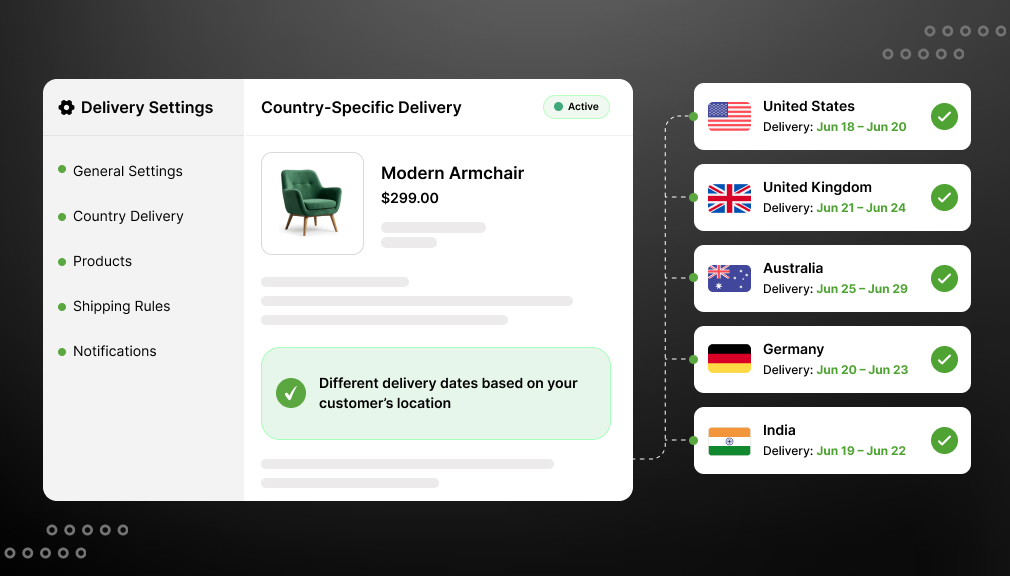
Country-specific estimated delivery dates show a delivery window per country. A visitor in the US sees one date, and Germany sees another. Each estimate reflects the real transit time to that place. Instead of a vague global message, buyers get a local promise. This makes your store feel built for their part of the world.
The date appears automatically, based on the visitor’s location. The store detects the country and shows the matching window. No typing or guessing is needed from the shopper. Country-specific estimated delivery dates on Shopify feel personal and honest. That honesty is what turns browsers into confident buyers.
Why Country-Specific Delivery Dates Matter for Global Stores
Selling worldwide is a huge, growing opportunity today. Cross-border demand keeps rising as buyers shop beyond their borders. Cross-border shopping research shows 59% buy from foreign retailers. It also finds 75% want to buy in their native language. Local delivery dates are part of that same local feeling.
But international shoppers carry higher expectations before buying. According to Baymard Institute research, cart abandonment sits near 70%. Slow or unclear delivery is a top reason shoppers leave. DHL’s 2025 e-commerce report found 81% abandon without their preferred delivery.
The payoff is real and measurable for global stores. Narvar’s 2025 shopper survey found 73% let a date guide their purchase. Real-world Shopify tests tie clear dates to 12–25% higher conversion. Country dates also cut “Where is my order?” tickets sharply.
A Real Example: Three Countries, Three Dates
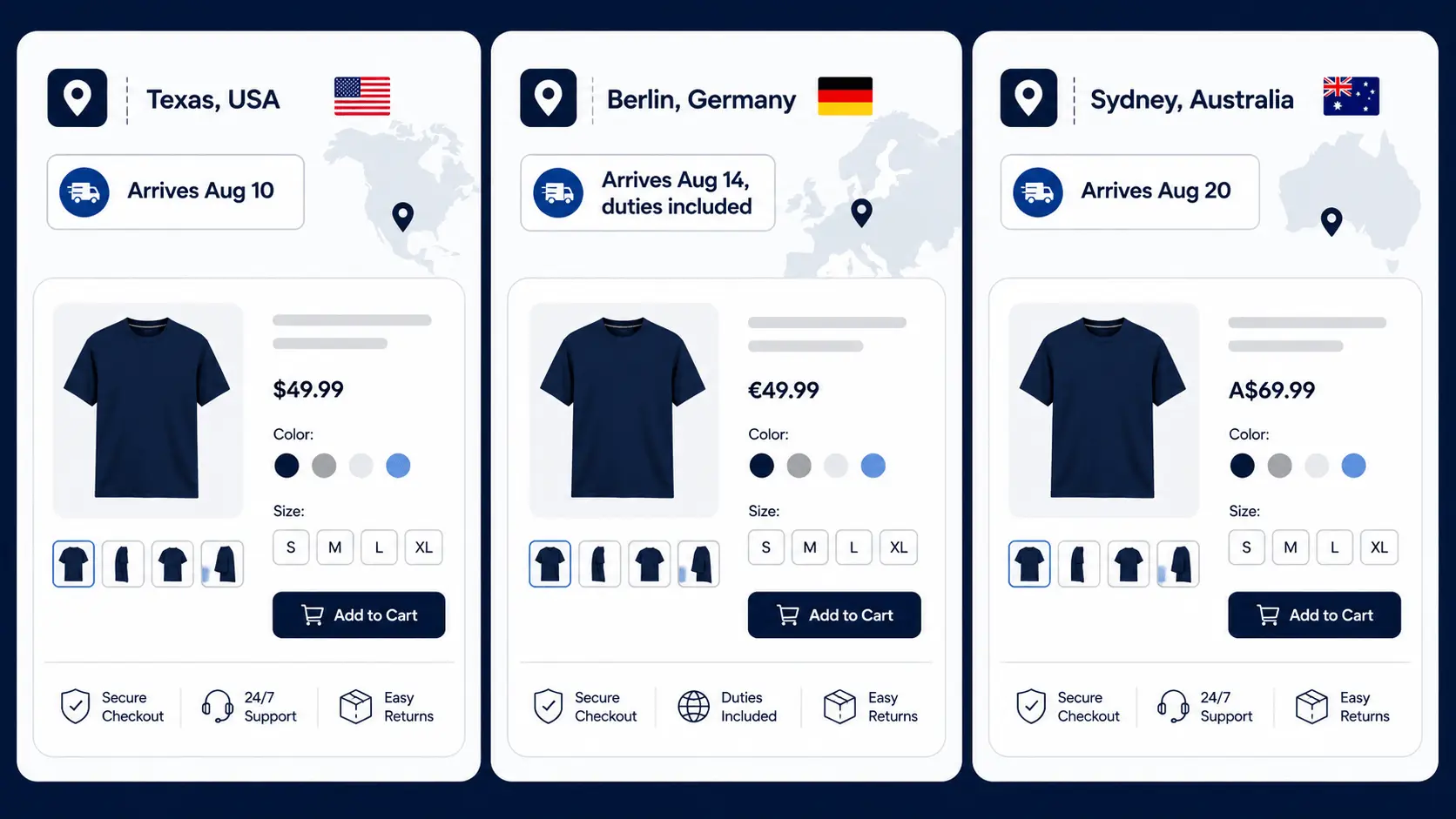
Picture three shoppers landing on the same product today. One is in Texas, one in Berlin, one in Sydney. A generic “5–7 days” message misleads at least two of them. Texas may get it in three days, quite easily. Sydney may honestly need twelve days across the ocean.
Now give each shopper their own local date instead. Texas sees “Arrives Aug 10,” fast and reassuring. Berlin sees “Arrives Aug 14,” with duties noted clearly. Sydney sees “Arrives Aug 20,” honest about the distance. Each buyer trusts you, and each one completes the order.
Why Shopify’s Native Delivery Dates Fall Short Globally
You might expect Shopify to handle this on its own. Sadly, its native delivery dates have real global limits. They work only for the US and select European countries. They also ignore shipping rates from many third-party apps. So most global stores cannot rely on native dates alone.
Native tools also skip customs buffers and per-country nuance. They rarely show a distinct window for every market you serve. For true country-specific delivery dates on Shopify, you need more. A dedicated tool fills that gap cleanly and reliably. This is where an app or custom code comes in.
How Geolocation Detects the Visitor’s Country
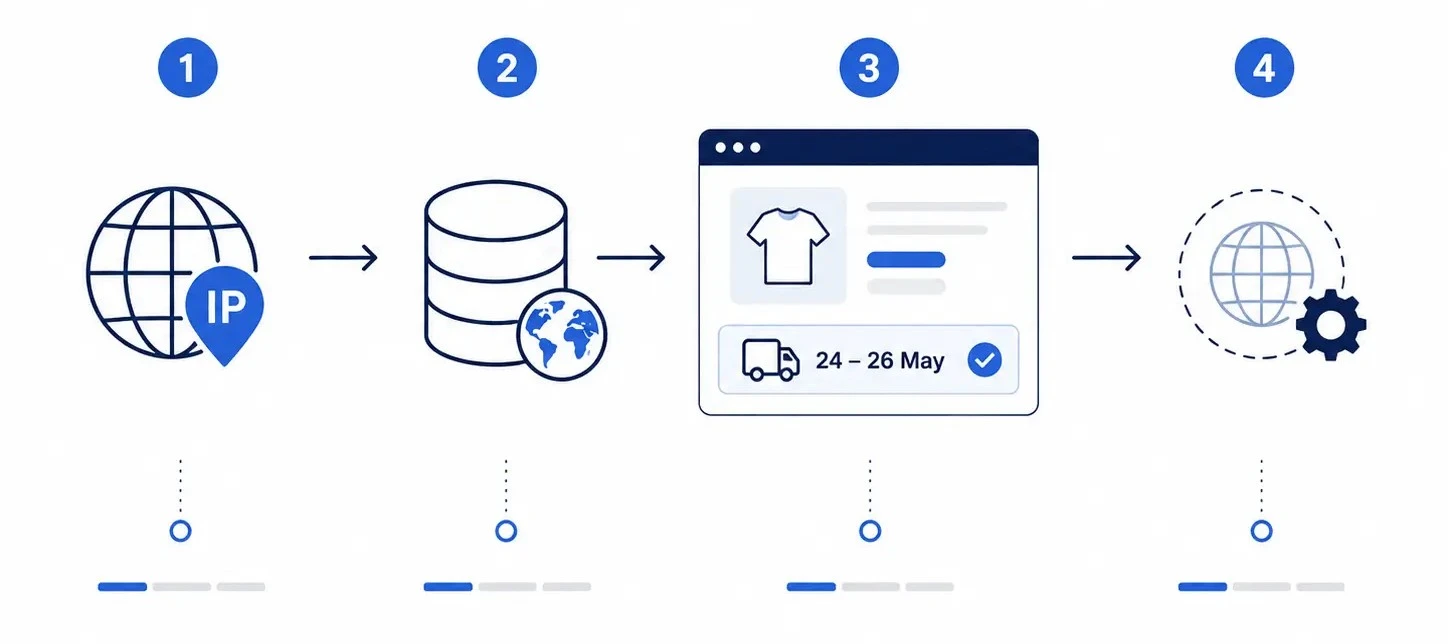
Most tools detect the visitor’s country using IP-based geolocation. Every visitor arrives with an IP address tied to a region. The tool checks that IP against a GeoIP database instantly. It then maps the visitor to their most likely country. This is how stores detect visitor country without any input.
Shopify also has built-in geolocation and Markets features. These can suggest a country and currency to each shopper. A good ETA app reads that signal or runs its own lookup. It then auto-selects the matching country delivery rule. So the right date appears with no action from the buyer.
You should always set a fallback rule for safety. If detection fails or a country has no rule, show a default. That global rule keeps an estimate visible for every visitor. Shoppers never see a blank space where a date belongs. Automatic detection plus a fallback covers every case cleanly.
This answers “how to automatically detect and select visitor country.” The flow is simple: detect, match, display, then fall back. Buyers get a local date without typing anything at all. That seamless experience is what builds instant trust. It also removes friction at the most important moment.
IP geolocation is accurate, but not perfect every time. A VPN or a traveler can occasionally show the wrong country. That is exactly why a fallback rule matters so much. Some apps also let shoppers switch their country manually. Together, these keep the date right for nearly everyone.
What Data Do You Need, and How Do Platforms Implement It?
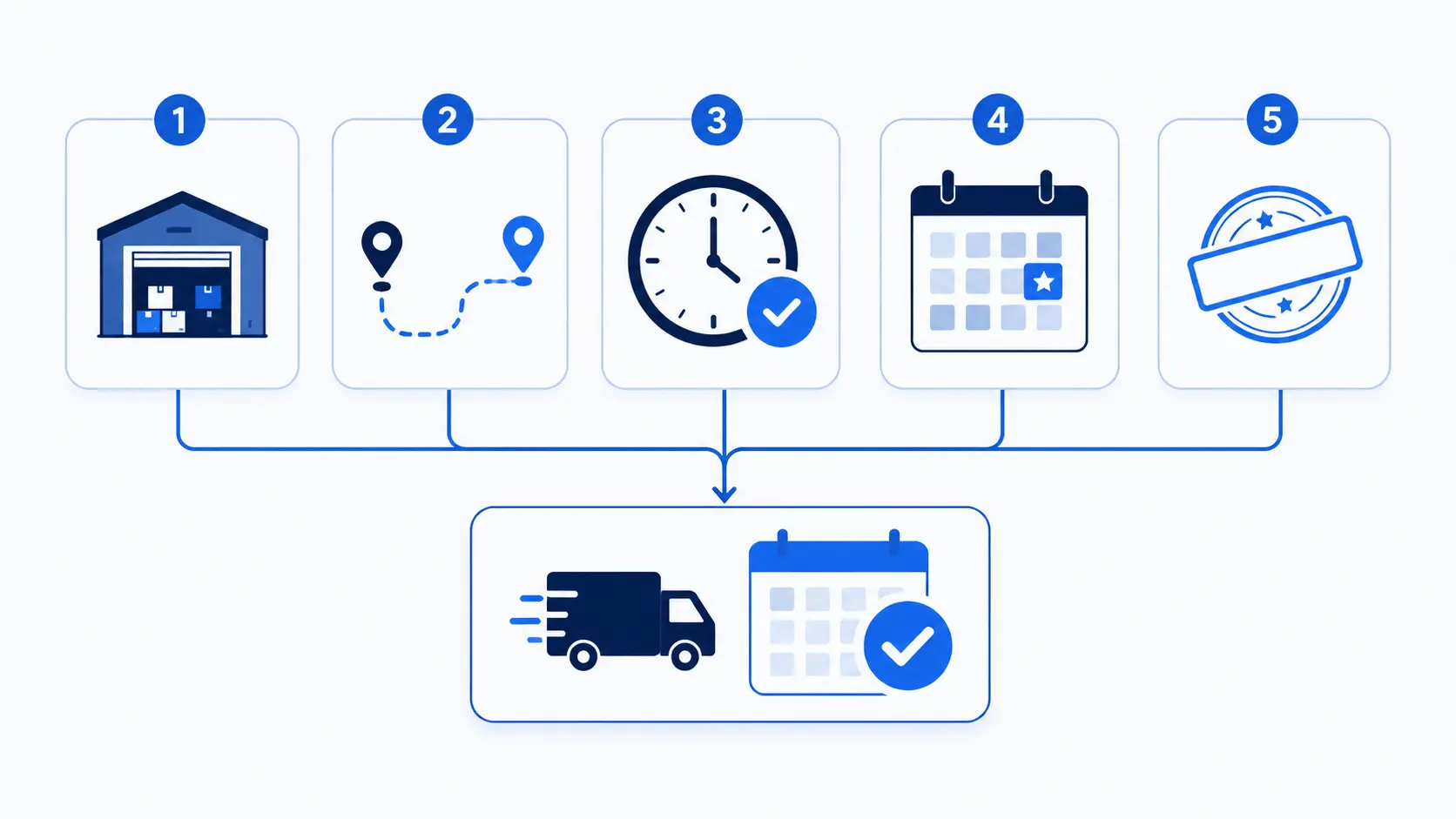
Accurate country-specific estimated delivery dates need a few key inputs. Gather these details before you build your delivery rules:
- Your shipping origin, the warehouse each order ships from.
- Transit time to each country or shipping zone.
- Prep or processing time before an order ships.
- Cut-off time, weekends, and local public holidays.
- A customs buffer for international, cross-border orders.
Platforms then combine these inputs into one clear date. They add prep time to transit time from your origin. They skip weekends and holidays in the business-day math. They add a customs buffer for distant, international routes. The result is an honest arrival window for each country.
Most apps store these rules once, then apply them automatically. They match each detected country to its saved window. They recalculate the date live for every single visitor. So you set the data once and let the platform work. That automation is how platforms typically implement it at scale.
Where do you find accurate transit times per country? Start with your carrier’s published delivery estimates first. Then adjust them using your own past shipping data. Real delivery history is your most reliable source here. Blend carrier estimates with reality for the best windows.
How to Set Up Country-Specific Estimated Delivery Dates on Shopify
There are two approaches. One is fast and flexible. The other is technical and limited. Here is an honest look at both.
Option 1: Shopify App-Based Solution (Recommended)
The easiest way to Set Up Country-Specific Estimated Delivery Dates on Shopify is with a dedicated Shopify ETA app. The SetuBridge Estimated Delivery Date ETA app lets you create country-specific ETA rules without coding or technical skills. You can display accurate delivery estimates based on each customer’s shipping destination, helping set clear expectations, reduce delivery-related questions, and improve the overall shopping experience.
Step-by-Step Setup:
1 – Access the App Settings: Go to your Shopify Admin dashboard and open the Estimated Delivery Date app settings.
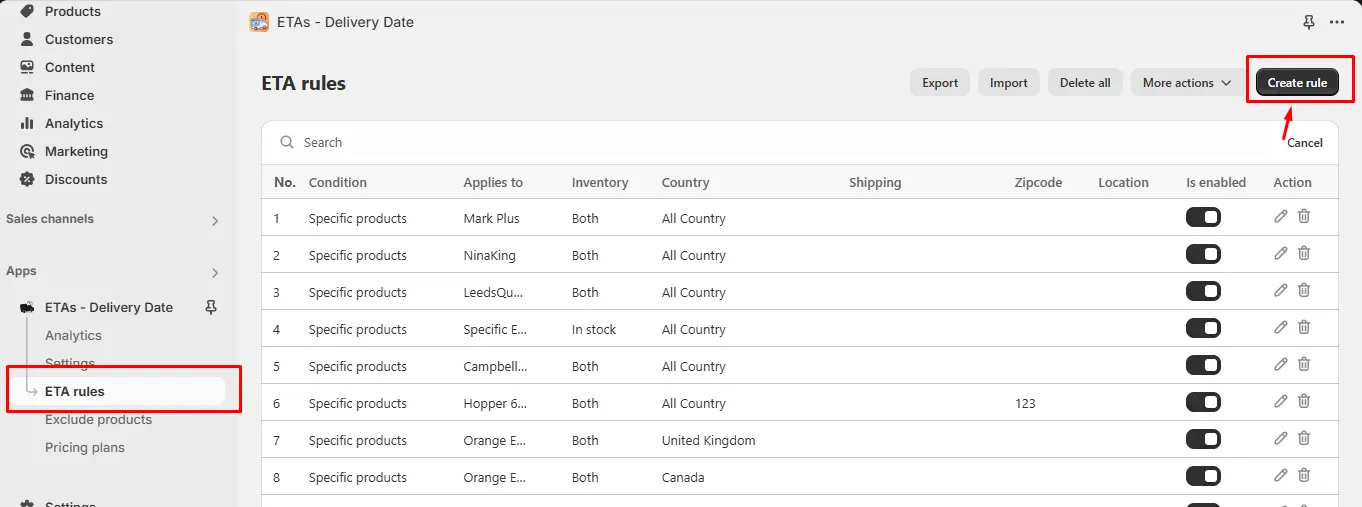
2 – Navigate to ETA Rules: Click on ETA Rules in the app menu, then click Create Rule to open the rule editor.
3 – Configure Your Delivery Message: Write your delivery message and use shortcodes to auto-insert dates or day counts. For example: “Estimated delivery by {delivery_date}.” This keeps messages accurate without manual updates.
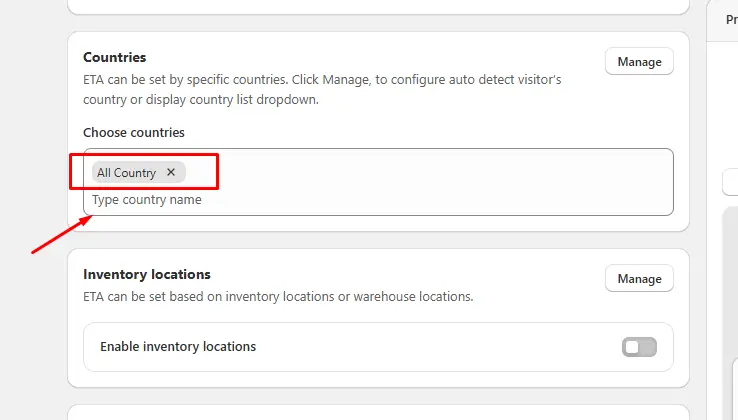
4 – Select the Country: From the country dropdown, choose the country (or countries) this rule applies to. You can assign one message to a single country or group multiple countries under one rule if they share the same delivery window.
5 – Apply Product Conditions (Optional): Layer conditions based on specific products, collections, vendors, or tags. For example, show a different ETA for heavy furniture shipping to Canada versus standard apparel.
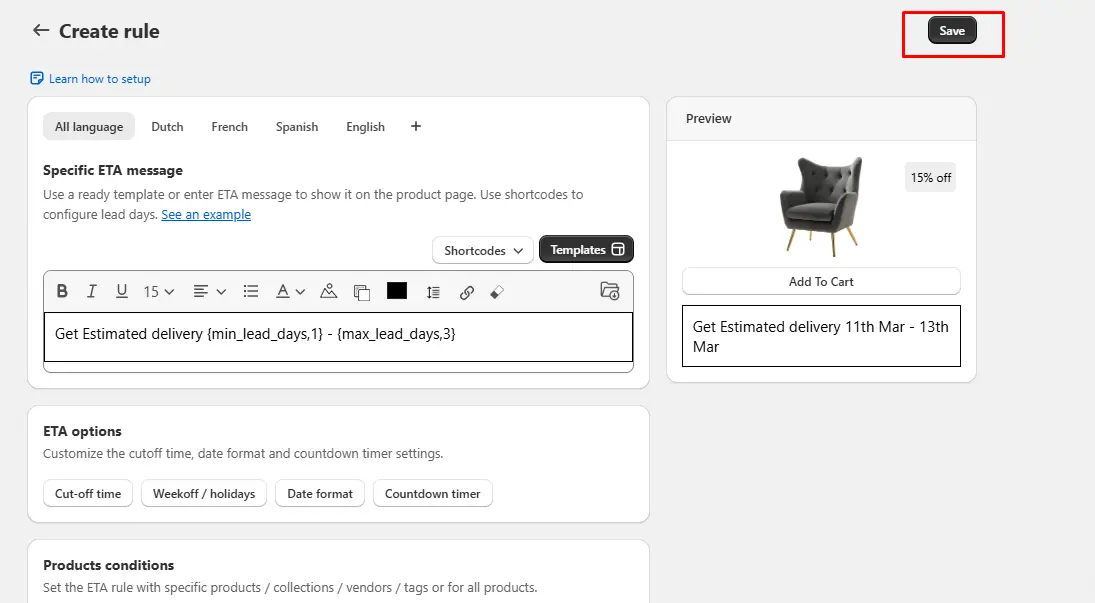
6 – Save and Test: Click Save. Then test by viewing your product pages using a VPN to simulate a visitor from each target country. Clear browser cookies before each test for accurate results.
Why this approach works better for most merchants:
- No Liquid or JavaScript coding required
- Works across product pages, cart pages, and checkout
- Rules update automatically, no manual maintenance
- Supports combining country rules with product-level rules
- Handles edge cases like public holidays and order cutoff times
- Scales easily as you expand into new markets
For Shopify merchants managing international shipping across multiple regions, this is the most practical and scalable path to accurate Shopify delivery date customization by country.
Option 2: Custom Shopify Code Solution
On the other hand, if a merchant is looking to build a customized solution, theoretically you could create country-specific ETA logic in Shopify’s template language, Liquid, and integrate it with JavaScript and geolocation APIs.
Fundamentally, the system would call a third-party geolocation API to identify the visitor’s country, save that information in either a Liquid variable or a JavaScript data object, and make the shown message conditional on the country.
However, this approach comes with serious limitations:
- Requires developer skills: Writing and debugging Liquid + JavaScript geolocation logic is not beginner-friendly
- Shopify’s native geolocation tools are limited: You will likely need a paid third-party API, which adds ongoing cost and a dependency to maintain
- No built-in UI to manage rules: Every time you add a new country or update a delivery window, you are editing theme code directly
- No product-level layering: Combining country rules with product or collection rules in pure code gets complex very quickly
- Shopify theme updates can break your customization: Any time you update your theme, the custom code may need to be re-integrated manually
The code route is an option, but for most merchants, the maintenance burden outweighs the flexibility. The app-based approach gives you more features with far less risk.
Which Option Is Best?
So which option is best for most Shopify stores? For nearly everyone, Option 1, the app, wins clearly. It handles geolocation, fallbacks, and updates all for you. It launches in minutes and stays upgrade-safe over time. Custom code only fits rare, highly unique enterprise setups.
Cost and time also point to the app choice. An app usually starts free or cheap and launches today. Custom work brings developer fees and slow, careful testing. Both can show the same local date to your shoppers. The difference is the effort you spend building and maintaining it.
Showing Delivery Date Estimates in Checkout
Many merchants ask exactly this, and it is smart. The checkout is the final, high-stakes moment before payment. A country-specific date there removes last-second doubt. It confirms the promise your product page already made. That consistency quietly lifts your checkout conversions.
Show the date in three key places for the best results:
- Product page, so buyers see timing before adding to cart.
- Cart page, as they review their order once more.
- Checkout, to confirm the local date before paying.
A good app shows the same country date across all three. So the shopper never meets a surprise or a mismatch. That steady clarity is what builds real trust globally. Repetition across the journey turns doubt into confident action.
Don’t Forget Customs and Honest Windows
International orders often pass through customs on the way. That step can add days you cannot fully control. So build a small customs buffer into distant windows. An honest, slightly longer date beats a broken promise. Shoppers forgive longer waits, but they never forgive broken ones.
Be truthful about which countries take longer to reach. A nearby country may arrive in three days easily. A far one may honestly need ten days or more. Country-specific dates let you tell each truth clearly. That honesty protects your reviews, refunds, and reputation.
You can also note duties or taxes in the message. Cross-border buyers often worry about surprise customs fees. A short line like “duties included” removes that fear early. Clear, honest wording keeps international shoppers calm and confident. Small reassurances like this quietly lift cross-border conversions.
Country Delivery Message Examples
Short, local wording works best for each market you serve. Keep every message clear, specific, and honest. Here are simple examples you can adapt per country:
- United States: “Arrives by Aug 10 — fast domestic shipping.”
- Germany: “Delivered by Aug 14 — duties included.”
- Australia: “Arrives Aug 18–20 — honest overseas transit.”
- Canada: “Arrives by Aug 13 — customs already handled.”
Notice how each line names a real date and a reassurance. Mentioning duties upfront removes a common cross-border fear. Honest overseas windows prevent angry “where is it?” messages. Each market feels seen, and each buyer feels safe. That local touch is what lifts global conversions.
Best Practices for Country-Specific Delivery Dates
Great country-specific estimated delivery dates are honest and local. Detect the visitor’s country early to show the right date. Always set a global fallback so no one sees blank space. Localize the message and date format for each market. Match each promise to what you can truly deliver.
Keep your dates consistent across the whole shopping journey. Show them on product, cart, and checkout pages together. Update country rules as transit times or carriers change. Test both nearby and distant countries before going live. A living, accurate system stays trustworthy across every market.
Final Thoughts
That hesitant shopper in Germany deserved a clear, local answer. Country-specific estimated delivery dates give every buyer that comfort. They replace vague global guesses with honest, local promises. That clarity builds trust, lowers abandonment, and lifts global sales. In today’s borderless market, this is expected, not optional.
You do not need a big team to set this up. An app can detect visitor country and show dates fast. Custom code stays an option for large, unique teams. Either way, the goal is the same: local delivery clarity. Set them up, and watch more global carts become orders.
Frequently Asked Questions
1. How do I show country-specific estimated delivery dates on Shopify?
Use a dedicated Shopify estimated delivery date app like SetuBridge, which lets you create ETA rules per country directly from your admin no coding required.
2. Can Shopify display different delivery dates for different countries?
Shopify does not offer this natively out of the box, but the Estimated Delivery Date app makes it straightforward to configure different delivery messages per country.
3. Why should Shopify stores use country-based ETA rules?
Country-specific delivery estimates reduce cart abandonment, cut delivery-related support inquiries, and build customer trust, all of which directly improve sales and repeat purchase rates.
4. Can I create different shipping ETA for different countries in Shopify?
Yes, the SetuBridge delivery app allows you to create separate ETA for individual countries or group multiple countries under one rule if they share the same delivery window.

Shopify Expert
Dipen Panchal, Shopify Tech Lead at Setubridge Technolabs, brings over a decade of expertise as a Shopify Expert. Passionate about e-commerce growth, he specializes in UI/UX design, crafting intuitive, engaging solutions tailored for merchants and B2B clients to enhance user experiences.