It is 7:40 on a Saturday morning, and your bakery phone won’t stop ringing. One customer wants to know if the birthday cake is ready. Another drove across town for a pickup planned for tomorrow. A third paid for delivery to a postcode your driver never covers.
None of these problems started in the kitchen. They started at checkout, where the customer had no clear way to say when and how they wanted the order. A missing date field looks tiny, yet it quietly creates refunds, wasted stock, and tired staff.
The fix is rarely a bigger team. It is a clearer checkout step for pickup or delivery: a date and a time slot. Here are five Shopify local delivery and store pickup apps that handle it well.
Key Takeaways
- Shoppers hesitate when they cannot predict delivery timing. A visible date and time picker removes that doubt.
- Cut-offs, prep times, and slot limits protect your real capacity.
- Each app solves the same problem but focuses on different things, from product rules to driver routes.
- Show real slot limits only, and start small before expanding.
Quick Picks at a Glance
| App | Developer | Best for | Starting price |
| Pickup Delivery Date Pickeasy | Logbase | Food and flower shops needing product-level rules | Free plan |
| Zapiet ‑ Pickup + Delivery | Zapiet | Multi-location stores with high order volume | $49.99/month |
| Bird Pickup & Delivery Date | BirdChime | Pickup, delivery, shipping, and subscriptions in one calendar | Free plan |
| D: Local Delivery Date Picker | DingDoong | Fresh goods sellers needing zone-based prep times | Free plan |
| Local Delivery + Pickup Date:S | Scrollengine | Stores running their own drivers and routes | $19/month |
Top 5 Shopify Local Delivery and Store Pickup Apps
1. Pickup Delivery Date Pickeasy
Pickup Delivery Date Pickeasy by Logbase adds a delivery and pickup calendar to your Shopify store. Customers choose pickup or local delivery, then pick a date and time slot before paying. The app carries the Built for Shopify badge, a sign that it meets Shopify’s standards for performance and design. Setup covers order cut-offs, blackout holidays, and minimum order values.
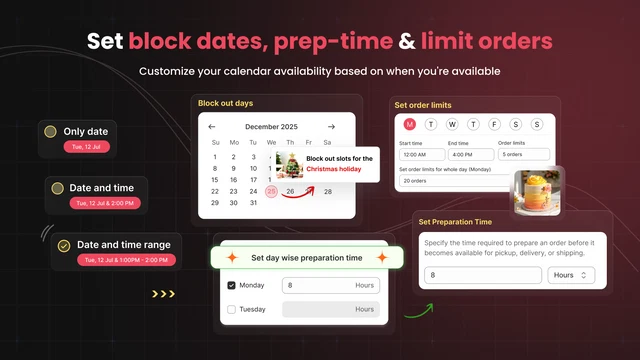
Its real strength is product-level control. You can set prep times, cut-off times, and available days for each product, not just the whole store. Delivery rates can follow zip code, weight, cart value, or time slot. It also connects with Shopify POS, Google Calendar, ShipX, and Appstle for subscription orders. Staff can see every scheduled order on one calendar.
Key Features
- Clear pickup versus delivery choice cuts customer mix-ups.
- Delivery notes are saved on every order, so fewer follow-up calls.
- Different rates for different postcodes inside one city.
- Daily product limits stop overbooking on busy days.
- Product-specific time overrides for longer-prep items.
- Closing days and holidays are quick to update.
- Google Calendar sync keeps prep schedules visible.
- Hands-on setup through live chat, calls, and screen-share.
Ratings and Reviews: 4.9 out of 5 from 1,330+ reviews on the Shopify App Store.
Pricing
- Free: 10 orders/month, 1 location
- Starter: 9.99/month(107.99/year)
- Smart: 19.99/month(215.99/year), up to 4 locations
- Premium: 29.99/month(323.99/year), 5–20 locations
- 14-day free trial
Best For: Bakeries, florists, and butchers needing product-level prep times and daily limits.
Use It Wisely: Match daily limits to real kitchen capacity. Limits set too low show false full days, and shoppers leave.
2. Zapiet ‑ Pickup + Delivery
Zapiet ‑ Pickup + Delivery by Zapiet gives shoppers pickup, local delivery, or shipping with a chosen date and time. It holds the Built for Shopify badge and is listed as a 2026 Shopify Build Award winner. The app has served Shopify merchants since 2015. Shoppers can see their options on the product page before reaching checkout.
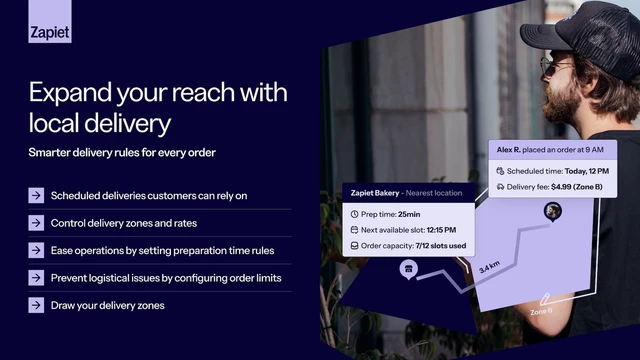
Zapiet suits stores with several branches and many daily orders. You manage pickup, delivery, and shipping orders from one dashboard and sync them with Shopify POS. Orders export to CSV, Google Calendar, Zapier, Klaviyo, or Shopify Flow. It also connects with last-mile delivery partners such as Roadie for courier handoffs. Telephone orders can also be scheduled from the same tools.
Key Features
- Handles many locations, each with custom time slots.
- Coordinates preorder pickups for bakeries and food shops.
- The date picker cannot be skipped, so every order has a date.
- Clean checkout that does not feel cluttered.
- Manages complex rules, zones, and delivery fees.
- Supports multi-language storefront setups.
- Weekend support, with video uploads accepted in chat.
- Public Changelog that records regular updates.
Ratings and Reviews: 4.9 out of 5 from 1,891+ reviews on the Shopify App Store.
Pricing
- Essential: 49.99/month(539.89/year), 1 location, 250 orders
- Advanced: 79.99/month(815.90/year), 1–10 locations, 1,000 orders
- Professional: 179.99/month(1,835.90/year), 1–100 locations, 2,500 orders
- 14-day free trial
Best For: Multi-location retailers running pickup, delivery, and shipping together.
Use It Wisely: Pick a plan by real monthly orders and locations. Sketch zones and fees on paper before building rules.
3. Bird Pickup & Delivery Date
Bird Pickup & Delivery Date by BirdChime is a calendar date picker for store pickup, local delivery, and shipping. It works in the cart, at checkout, and inside Shopify POS. The app holds the Built for Shopify badge. Customers can also see nearby stores with stock before they choose a pickup branch.
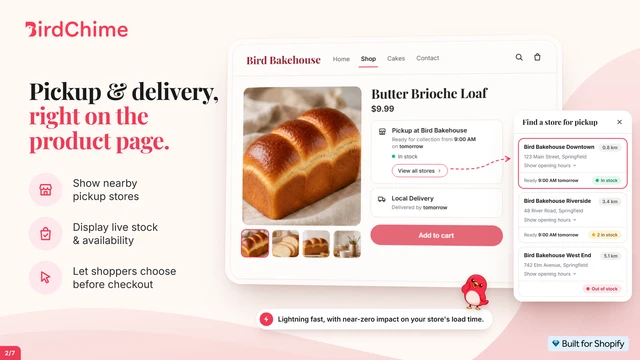
Bird stands out for flexible fee logic and subscription support. You can charge by zip code, driving distance, weight, or cart value. Surcharges can apply to same-day or peak periods when your costs rise. It schedules subscription deliveries with Recharge and Appstle, and includes SMS alerts, email, and Google Calendar sync. Pickup QR codes help staff verify orders at the counter.
Key Features
- Customers pick from times you set, so no one-on-one scheduling.
- Blackout dates for vacations and closed days.
- Multi-branch pickup with branch, date, and time selection.
- Clean widgets that match the store’s look.
- The team builds features merchants request.
- Support explains why an issue happened, not just the fix.
- Smooth Shopify POS and Google Calendar sync.
- Public Changelog that records regular updates.
Ratings and Reviews: 4.9 out of 5 from 507+ reviews on the Shopify App Store.
Pricing
- Free: 10 orders/month, 1 location
- Essential: 19.99/month(215.89/year), 250 orders
- Growth: 49.99/month(539.89/year), 1,000 orders, 1–4 locations
- Scale: 99.99/month(1,079.89/year), 2,500 orders, 1–20 locations
- 14-day free trial
Best For: Stores mixing pickup, delivery, shipping, and subscription boxes in one calendar.
Use It Wisely: Add same-day or peak surcharges only when costs truly rise. Show the reason beside the slot, not at the total.
4. D: Local Delivery Date Picker
D: Local Delivery Date Picker by DingDoong adds delivery and pickup scheduling to your product page, cart, or cart drawer. It is designed for fresh goods sellers such as bakeries, florists, caterers, and meal prep brands. The app holds the Built for Shopify badge and has been listed since 2018. The date picker can also be translated for local shoppers.
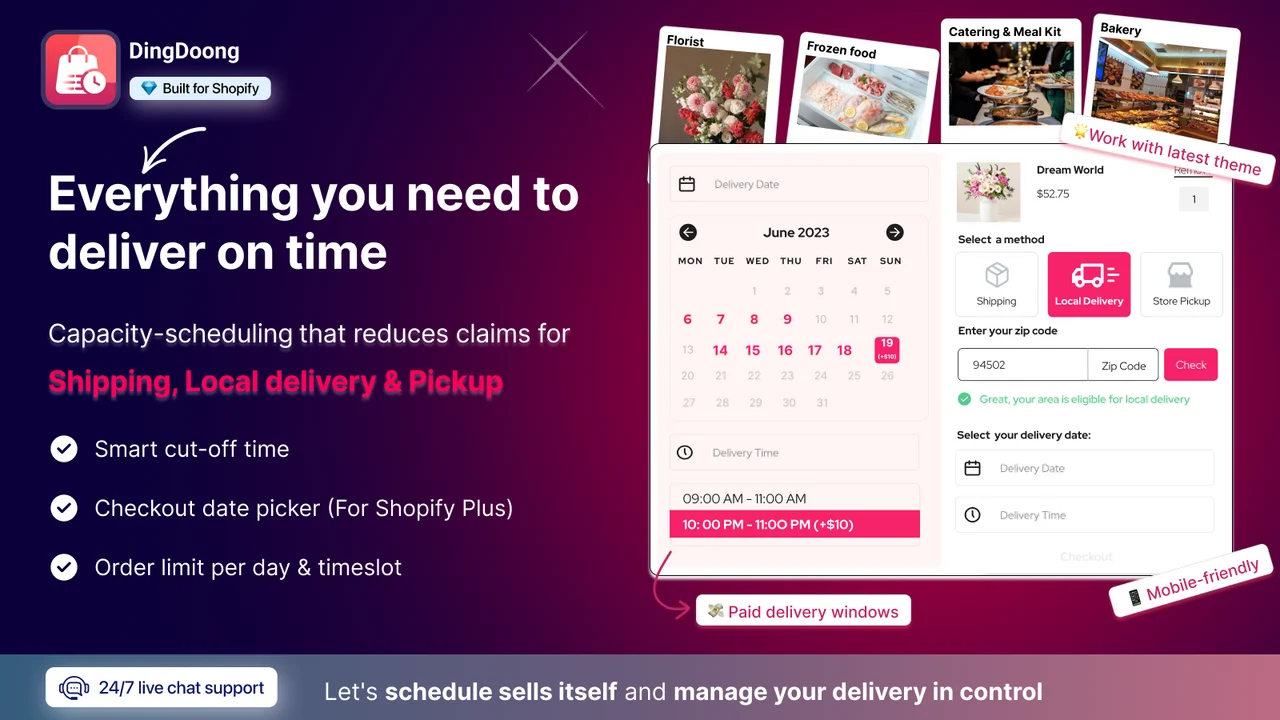
Its focus is lead time based on your business hours. You can set same-day cut-offs, pre-order dates, and daily order limits for each location. Delivery areas follow ZIP codes, states, or a distance radius. Paid plans add recovery for missing dates, order rescheduling, and surcharges that cover delivery fees. Shopify Flow and Klaviyo connections come with the Smart plan.
Key Features
- Stops customers from choosing unavailable options.
- Pickup and delivery inside one widget.
- Prep times set by delivery zone.
- Holiday blocking for closed dates.
- Smooth connection with Shopify POS and EasyRoutes.
- Widget design customized to match the website.
- Custom features built for unusual delivery models.
- Public Changelog that records regular updates.
Ratings and Reviews: 4.9 out of 5 from 310+ reviews on the Shopify App Store.
Pricing
- Free to install: 20 scheduled orders/month; $5 per location, $4 per 10 zones (one-time)
- Essential: 24.99/month(224.88/year), unlimited scheduled orders, 3 locations
- Smart: 49.99/month(449.88/year), 10 locations; $3 per extra location, $28 per 25 zones (one-time)
- 7-day free trial
Best For: Fresh food and flower sellers needing zone-based prep times and early cut-offs.
Use It Wisely: Set lead times from your normal prep pace, not your best day. A slot customers cannot trust hurts more than none.
5. Local Delivery + Pickup : SE
Local Delivery + Pickup Date: SE by Scrollengine is a built-for-Shopify app that manages the entire local delivery and store pickup workflow directly within Shopify. It covers pickup and delivery date slots, then continues after checkout with routes and drivers. Slots support cut-offs, prep times, blackout days, and per-slot limits. The app interface is listed in eleven languages, including Arabic, Hindi, and Japanese.
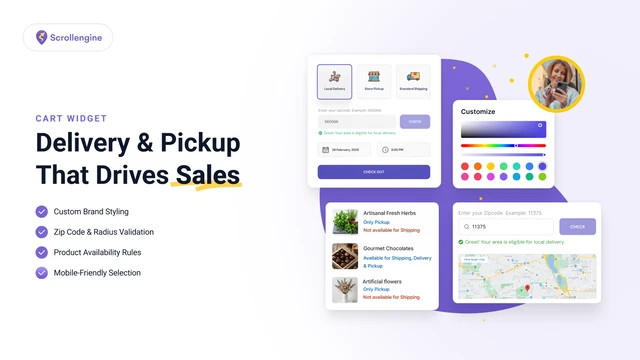
Its main difference is what happens after the order is placed. An AI route planner suggests the delivery order, and a driver app tracks live status. Customers get branded tracking links plus SMS, WhatsApp, and email updates. Drivers can capture photos and e-signatures as proof of delivery at the door. Barcode scanning and picklists help staff pack orders without missing items.
Key Features
- Lists pickup locations without needing inventory tracking.
- Delivery zones by postal code or drawn on a map.
- Accurate location-based delivery charges.
- Route planning and courier management together.
- Works with themes that carry heavy custom code.
- Guided setup through calls and screen-shares.
- Fast replies, even late at night.
Ratings and Reviews: 5.0 out of 5 from 129+ reviews on the Shopify App Store.
Pricing
- Essential: 19/month
- Growth: 49/month
- Pro: 99/month
- Scale: 299/month
- 7-day free trial
Best For: Stores running their own drivers who want routing and proof of delivery.
Use It Wisely: Enable only the alerts customers need. Too many texts per order train people to ignore the important ones.
Side-by-Side Comparison: Details Merchants Usually Miss
Listing pages show features. This table pulls out details merchants usually check only after installing.
| App (Developer) | Free option | First paid plan | Trial | Notable connections |
| Pickup Delivery Date Pickeasy (Logbase) | Up to 10 orders/month | $9.99/month; save 10% yearly | 14 days | ShipX, Hulk Apps, Appstle, Google Calendar |
| Zapiet ‑ Pickup + Delivery (Zapiet) | Trial only | $49.99/month; 250 orders | 14 days | Zapier, Klaviyo, Roadie, Recharge, Exportify |
| Bird Pickup & Delivery Date (BirdChime) | 10 orders/month | $19.99/month; 250 orders | 14 days | Stuart, EasyRoutes, Recharge, Order Printer |
| D: Local Delivery Date Picker (DingDoong) | 20 scheduled orders/month | $24.99/month; unlimited scheduled orders; save 25% yearly | 7 days | ShipStation, Klaviyo, Appstle, public API |
| Local Delivery + Pickup Date:S (Scrollengine) | Delivery and pickup widget | $19/month; up to 10 locations | 7 days | Bold, Recharge, Zapier, WhatsApp alerts |
Read it as a fit check, not a ranking.
What Is a Shopify Local Delivery and Store Pickup App?
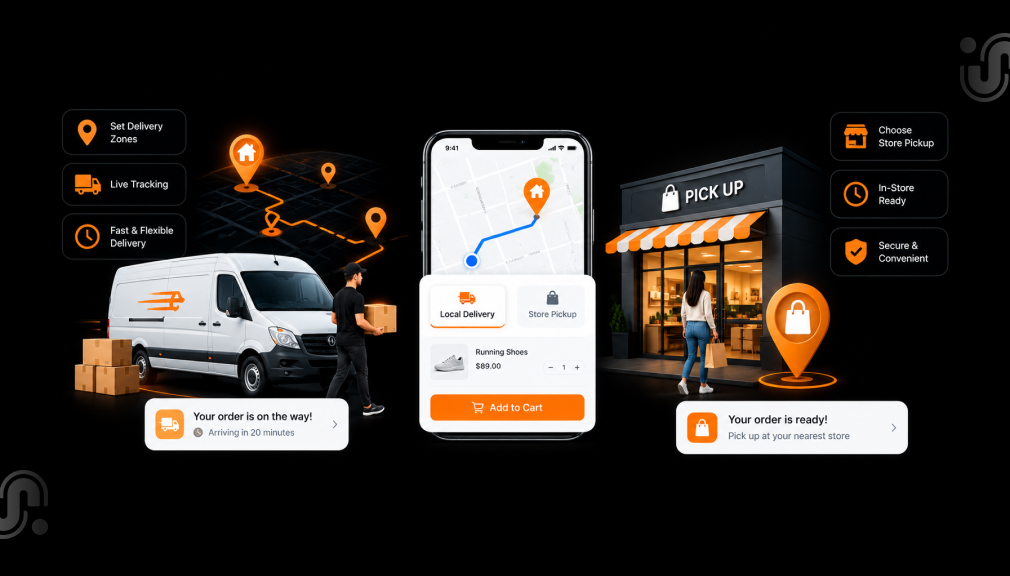
A local delivery and store pickup app adds a scheduling step to your Shopify checkout. The customer picks pickup or delivery, then a date and time you approve. The app applies your rules for cut-offs, prep time, zones, and slot limits. Shopify’s built-in pickup and delivery settings cover the basics, and these apps add scheduling on top.
Why a Date Picker Changes How Shoppers Decide
People avoid choices when the outcome feels unclear. A shopper buying Friday flowers wants proof they arrive Friday, not a vague window. Baymard puts average cart abandonment at 70.22%, and 20% of non-browsing shoppers left because delivery felt too slow. A chosen date replaces that doubt with a fixed plan.
Picking a slot also changes the customer’s role. A self-chosen pickup time becomes their plan, not your rule. People tend to keep plans they made, which often means fewer missed pickups. Shopify cites eMarketer data showing 44% of click-and-collect shoppers buy at least one extra item while collecting.
Where to Place the Pickup and Delivery Picker
Put the choice where doubt starts, usually before payment. Baymard’s checkout research notes that shoppers overlook store pickup when it is not shown as a delivery option. Start with these placements:
- Cart or cart drawer: the pickup versus delivery choice.
- Product page: prep time for made-to-order items.
- Checkout: final date, slot, and fee.
- Confirmation emails: repeat the chosen slot.
When to Add Local Delivery and Store Pickup Scheduling
You need scheduling when your phone starts doing checkout’s job. Pickup options also shape where people buy. A Doddle survey found 50% of shoppers chose where to buy online based on pickup availability. Watch for these signs:
- Customers keep asking when orders will be ready.
- Orders compete for the same oven, van, or florist.
- Holiday-day orders arrive while you are closed.
- Fees differ by area, but checkout shows one rate.
When Scheduling Can Backfire
Scheduling helps only when it reflects reality. Twenty slots a day can slow shoppers, because too many options make choosing harder. A “2 slots left” note works only when true. Track missed slots for two weeks, then adjust.
Conclusion
Late pickups, wrong-postcode deliveries, and constant “when will it arrive” calls usually trace back to one checkout gap. Customers had no clear way to choose how and when to get their order. A pickup and delivery scheduler closes that gap with dates, slots, cut-offs, and honest limits.
Start with your busiest pain point and keep every slot real. Place the choice where doubt begins, then repeat it in every confirmation. Your checkout handles the coordinating, and your team gets back to the work customers pay for.
Frequently Asked Questions
Does Shopify offer local delivery and pickup without an app?
Yes, Shopify has built-in local pickup and delivery settings. Apps add date and time slots, capacity limits, and prep rules.
Can I limit orders per time slot?
Yes. All five apps here support order limits for slots or days. Base limits on real staff and kitchen capacity.
Do these apps work with Shopify POS?
Yes, all five list Shopify POS support. Check which plan includes it before installing.
Can I charge different delivery fees by area?
Yes. These apps support rates by zip code, distance, or zone. Some also use weight, cart value, or time slot.
Is there a free way to start?
Three apps here list a free plan, and one is free to install. Free tiers have order or feature caps, so compare them with your volume.

Shopify Expert
Dipen Panchal, Shopify Tech Lead at Setubridge Technolabs, brings over a decade of expertise as a Shopify Expert. Passionate about e-commerce growth, he specializes in UI/UX design, crafting intuitive, engaging solutions tailored for merchants and B2B clients to enhance user experiences.