Picture a shopper on your Shopify store eyeing a hoodie. She wants a logo on the front and a name on the back. She also dreams of a small design on one sleeve. She is excited and ready to pay right now. Then she learns your store cannot do all three.
That excitement fades into quiet frustration within seconds. She closes the tab and buys from a competitor instead. This scene plays out on many Shopify stores every day. Shoppers crave custom products, but stores often cannot deliver them. That gap quietly costs real sales and loyal customers.
The good news is that you can fix this problem. Front, back, and side product customization is easier than you think. This guide walks you through the whole setup step by step. You will learn what Shopify can and cannot do here. Let us turn curious browsers into happy, paying customers together.
Key Takeaways
- Shoppers increasingly expect front, back, and side product customization.
- Shopify’s native tools cannot handle true multi-side customization alone.
- A product customization app is the fastest setup for most stores.
- Custom code suits only large brands with complex, special needs.
- Live previews and mobile-friendly design boost customization conversions.
- Personalization lifts revenue, loyalty, and repeat purchases over time.
- Clear customization reduces cart abandonment, returns, and support tickets.
Why Front, Back & Side Product Customization Matters
Today’s shoppers want products that feel truly their own. They want to design the front, back, and sleeve their way. Personalization has shifted from a nice extra to a real expectation. When stores ignore this, they lose sales to bolder rivals. Meeting this demand can set your Shopify store apart.
The numbers behind custom products are honestly hard to ignore. When customization is offered, 59% of shoppers are more likely to buy from that store. Around 70% even prefer customized products over standard ones. Shoppers also happily pay more for that personal touch. In fact, 81% of consumers will pay extra for personalized clothing.
This rising demand is fueling a booming print-on-demand market. That market may grow from about $13 billion in 2025 to over $100 billion by 2034. Custom apparel, gifts, and merchandise all ride this fast wave. For merchants, this is a huge and growing opportunity. Multi-sided customisation helps you claim your share of it.
Good customization also protects your store from costly problems. Without previews, shoppers must guess how their design will look. Wrong guesses lead to returns, reprints, and unhappy buyers. Clear front, back, and side previews reduce these expensive mistakes. Happy customers leave better reviews and come back again.
Customization builds an emotional bond between buyer and product. People value items they helped create far more deeply. That feeling turns a simple purchase into a proud keepsake. It also makes your store memorable in a crowded market. Emotional connection is one of your strongest selling tools.
What Shopify Can and Cannot Do Natively
Shopify is a strong platform, but it has clear limits here. Its native tools were not built for deep product customization. Knowing these limits helps you pick the right setup fast. You avoid wasted time and frustrating dead ends this way. Let us look at both sides of this honestly.
Shopify does handle some basic options right out of the box. Here is what the platform supports natively today:
- Standard variants like size, color, and material choices
- Simple text fields through line item properties
- Basic file uploads using certain third-party workarounds
- Metafields for storing extra custom product data
These features work fine for simple, single-side products. But they fall short for true multi-side customization needs. Shopify cannot show separate design zones for each area. It also cannot render live previews as shoppers make changes. These gaps matter a lot for custom apparel stores.
Here is what Shopify cannot do on its own:
- Separate print zones for front, back, and sleeves
- Real-time previews that update as customers design
- Conditional logic that shows options based on choices
- Multiple file uploads tied to different print areas
- Print-ready files with correct bleed and dimensions
These missing features are exactly what custom products need most. This is where a dedicated solution becomes truly essential.
How to Set Up Multiple Sides (Views) for Product Customization
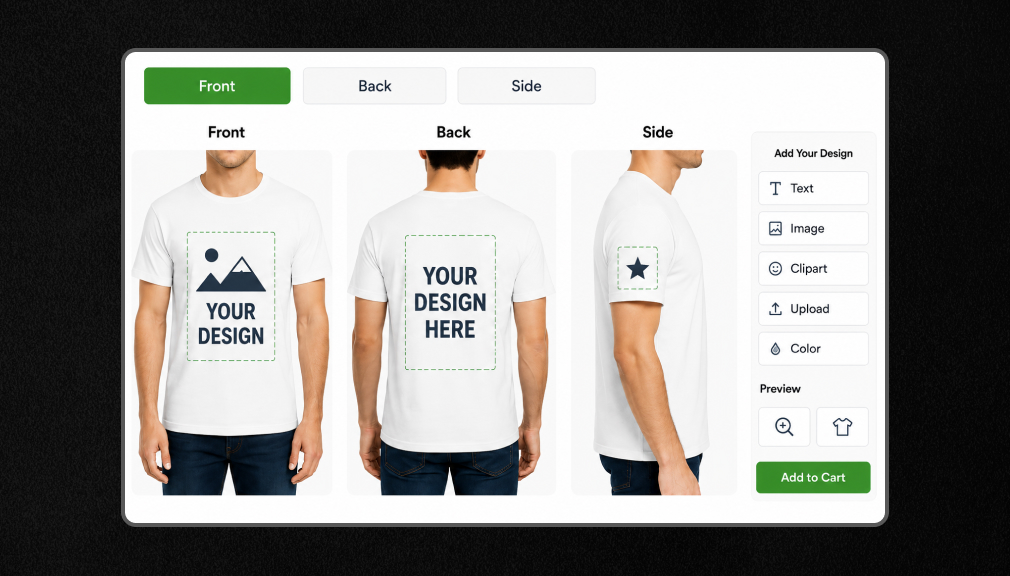
To offer front, back, sleeve, or other print areas on a single product, you have two setup options. You can build a custom Shopify solution, which requires coding, ongoing maintenance, and developer support, or use a Shopify product customization app, which lets you create multiple views with live previews, separate print areas, and customer-specific options without coding. For most merchants, an app-based solution is the faster, simpler, and more scalable choice.
Option 1: App-Based Solution (Recommended)
The easiest way to set up front, back, Back & Side Product Customization on Shopify is by using a dedicated app. Instead of building everything yourself, the app automatically manages multiple print areas, live previews, text options, file uploads, and detailed order information.
AI Custom Product Personalizer is built specifically for print-on-demand Shopify stores, allowing merchants to offer front, back, and side product personalization without writing a single line of code, making the setup fast, flexible, and easy to manage.
Follow these steps inside the app to create separate customization views for the front, back, sleeves, or any other area:
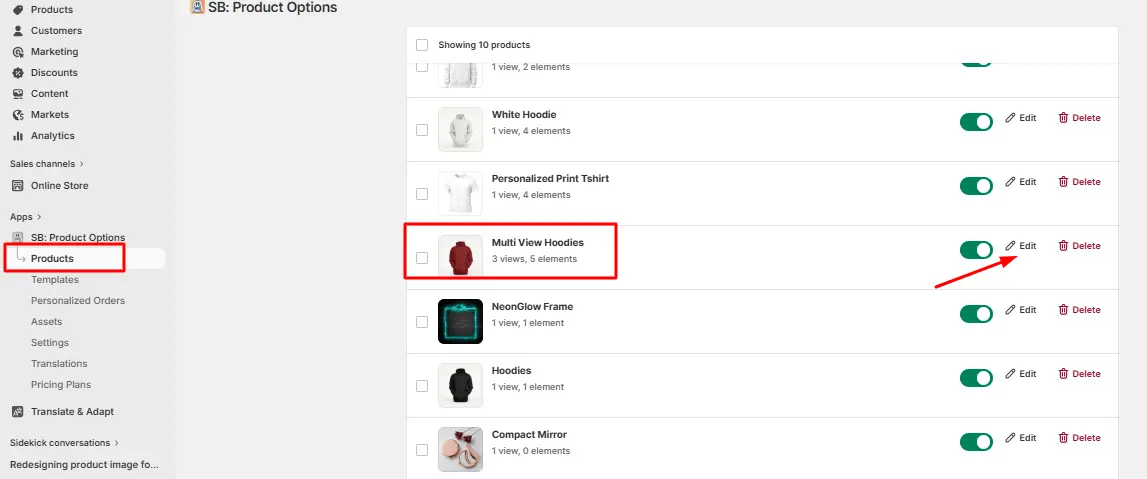
1 – Select the product:
Open Product Customization: Product Options → click Products from the left sidebar → select the product you want to configure → ensure it is enabled → click Edit.
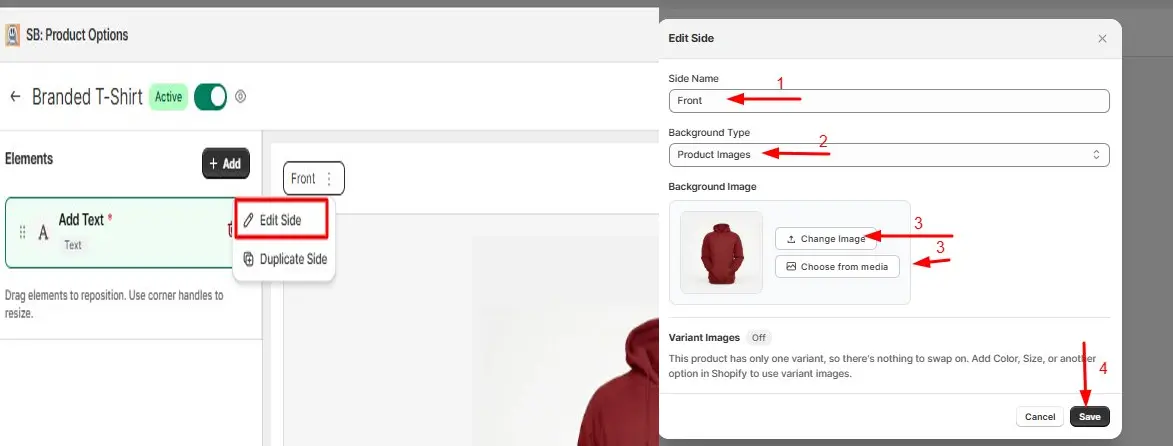
2 – Edit side settings:
Click the three-dot menu on the side tab → select Edit Side → enter a side name (e.g., Front, Back, Left Sleeve) → choose Product Images from the Background Type dropdown → upload or select the background image for that side → click Save.
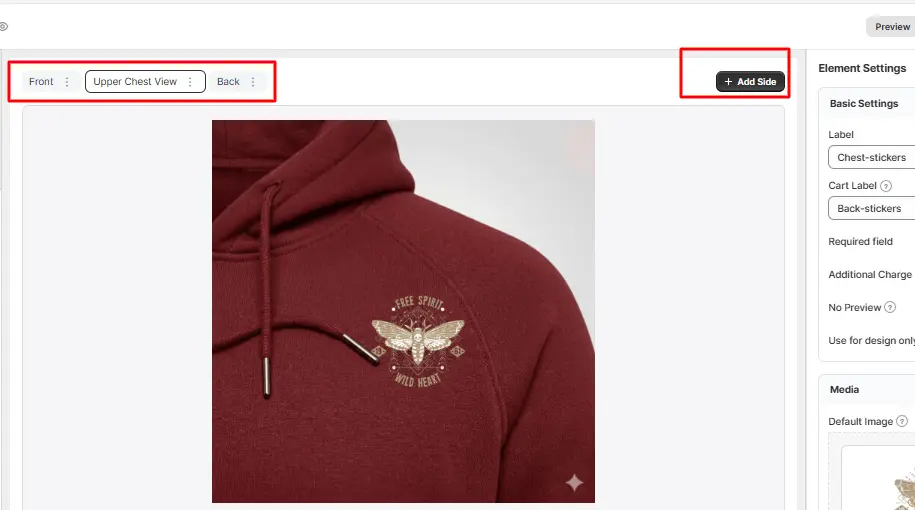
3 – Create additional sides:
Click Add Side → enter a side name → upload the corresponding background image → add the required customization elements → click Save. Repeat this for every side you want customers to customize.
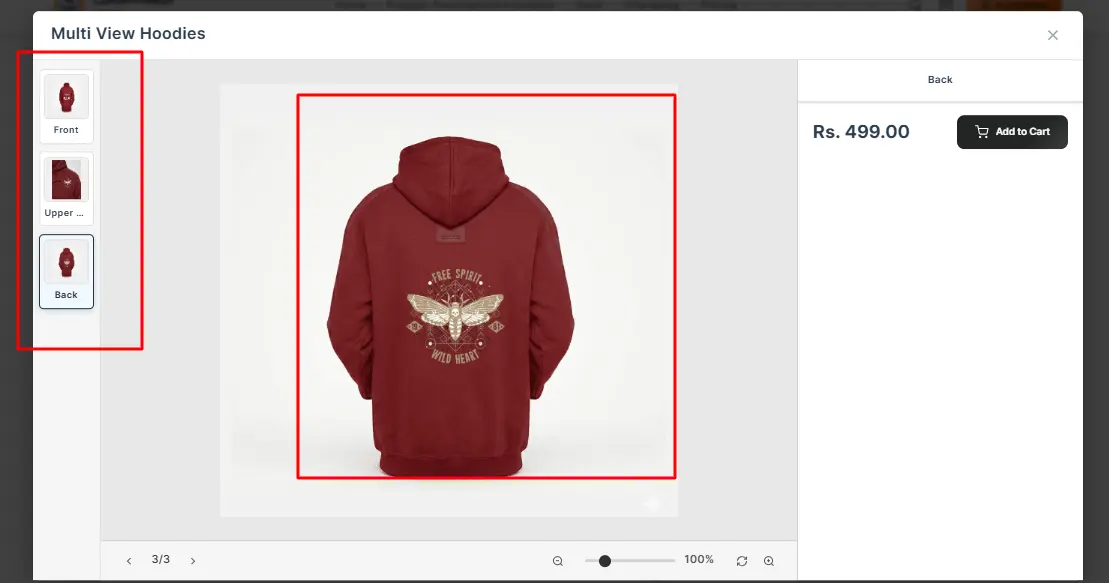
4 – Verify on the storefront:
After saving, open the product page on your live store → select the customizable product → switch between the available sides (e.g., Front and Back) → confirm that each side and its elements display correctly.
Option 2: Custom Shopify Code Solution
A custom-built solution gives you full control over the customer experience, but it requires significant development time, ongoing maintenance, and higher costs. Features like multi-side customization, live previews, file management, and mobile compatibility must be built and maintained from scratch. For most Shopify merchants, this approach can slow down launch timelines and increase long-term complexity.
Here are the real limitations of a custom Shopify code solution that create a natural contrast with an app-based approach:
- High development costs: Building multi-sided customization from scratch often requires experienced Shopify developers and a significant upfront investment.
- Longer launch timelines: Development, testing, and bug fixing can take weeks or even months before the feature is ready for customers.
- No built-in live preview: Real-time product visualization must be developed separately, adding complexity and cost.
- Ongoing maintenance required: Shopify theme updates, API changes, and platform updates may require continuous code adjustments.
- Higher risk of bugs and order errors: Custom-built systems need extensive testing to ensure customer inputs are captured correctly.
- Mobile compatibility challenges: Creating a seamless customization experience across all devices requires additional development effort.
- Limited scalability: Adding new print areas, products, or customization features often requires further development instead of simple configuration changes.
Best Practices for Product Customization on Shopify
A good setup is only half of the whole battle. How you present customization shapes your conversion rate too. Small design choices can lift your sales in a big way. These simple best practices help you get real value. Use them to turn customization into steady revenue.
Keep these tips in mind as you build your experience:
- Show clear live previews. Let shoppers see their design update instantly.
- Guide the customer. Use simple labels for front, back, and sleeve.
- Set upload rules. Ask for the right file type and resolution.
- Optimize for mobile. Many shoppers customize products on their phones.
- Test your page speed. Previews add weight, so keep loading fast.
Mobile care matters more than many merchants ever realize. A large share of shoppers now buy on small screens. A clumsy mobile flow can undo all your hard work. Smooth previews and easy uploads keep mobile buyers happy. This attention to detail protects your conversions everywhere.
AI tools can make your customization even smarter today. Some apps use AI to suggest designs or clean uploads. AI-driven recommendations also help shoppers find matching products. This kind of smart help is spreading fast across stores. These tools make personal experiences feel effortless and modern.
Clear customization also builds trust that lifts long-term loyalty. Personalization leaders earn around 40% more revenue than their slower-moving rivals. After adding personalization, 47% of retailers reported higher sales. Buyers return to stores that make them feel understood. Great customization turns one sale into a lasting relationship.
Which Stores Benefit Most From Multi-Side Customization
Almost any store can gain from smart product customization. Still, some product types see especially strong results here. Knowing where it shines helps you plan your offers. You can then focus your effort on the best opportunities. Here are the stores that benefit most from it.
- Custom apparel: T-shirts, hoodies, and caps with front and back art.
- Personalized gifts: Mugs, bags, and keepsakes with names or photos.
- Corporate merchandise: Branded uniforms and swag with logos on many sides.
- Sports and teams: Jerseys with names, numbers, and sleeve badges.
- Print-on-demand shops: Stores selling unique designs without holding stock.
Apparel remains the largest category for custom products today. Buyers love designing shirts and hoodies from every angle. If you sell in these spaces, customization is a must. It helps you stand out and win price-sensitive shoppers. The right setup can quickly pay for itself.
How AI Is Changing Product Customization
Artificial intelligence is reshaping how shoppers design custom products. AI now powers live previews, smart suggestions, and cleaner uploads. It can even fix low-quality images before they reach print. This smart help spreads fast as the recommendation engine market grows quickly. That market may leap from $8 billion toward $83 billion by 2034.
AI also personalizes what each shopper sees on your store. It suggests matching colors, designs, and related custom products. These nudges lift average order value in a natural way. Shoppers enjoy a smoother, more guided design experience overall. This modern touch keeps your store competitive and fresh.
You do not need to build these AI tools yourself. Many customization apps now include AI features by default. Look for previews, design help, and smart product suggestions. These features save shoppers time and reduce their doubts. Smart tools make custom products feel easy and fun.
Common Customization Mistakes to Avoid
Even good merchants make simple customization mistakes quite often. Small errors here can quietly cost you real sales. Knowing these traps helps you avoid them with ease. A little care upfront saves many headaches later on. Watch out for these common mistakes below.
- Hiding the customization tool low on the product page
- Skipping live previews, so shoppers must guess blindly
- Allowing blurry uploads that ruin the final print
- Ignoring mobile shoppers who design on small screens
- Adding too many options that confuse and overwhelm buyers
Fixing these mistakes is usually quick and very rewarding. Keep your tool visible, simple, and easy to use. Show clear previews and set smart upload rules early. Test the whole flow on both desktop and phone. These small habits protect your sales and your reputation.
Reduce Cart Abandonment With Better Customization
Missing customization quietly drives many shoppers away for good. When people cannot design freely, they simply leave your store. This adds to an already high cart abandonment problem online. The average cart abandonment rate sits near 70% today. Clear customization gives shoppers one less reason to leave.
Good multi-side customization removes doubt from the buying journey. Shoppers see exactly what they will get before they pay. That confidence pushes more of them to finish checkout. Fewer surprises also mean fewer returns and refund requests. Every smooth customization flow protects your hard-earned traffic.
Think of customization as part of your conversion strategy. It is not just a fun feature for shoppers to enjoy. It answers doubts, builds trust, and lifts completed orders. Pair it with clear pricing and simple checkout steps. Together, these steps turn interest into steady, repeat sales.
Conclusion
Shoppers who want custom designs are ready and eager to buy. They already picture the front, back, and sleeve they love. Your job is simply to make that vision easy to create. Shopify alone cannot deliver this rich experience very well. But the right app closes that gap with little effort.
Front, back, and side product customization is a real growth lever. It meets rising demand and sets your store apart clearly. It also reduces returns, support tickets, and cart abandonment together. Start with a trusted app, add your sides, and test carefully. Give shoppers the custom products they want, and watch sales grow.
Frequently Asked Questions
1. Does Shopify support multiple file uploads for different print areas natively?
No. Shopify’s default product form does not support multiple file uploads tied to separate print areas. You would need either a third-party app or custom development to achieve this. Apps designed for print-on-demand handle this by creating separate upload fields for each print zone and passing the files through to the order.
2. How do I make sure print files meet my supplier’s requirements?
Set file format and resolution requirements at the upload level. Most professional print providers require PNG or PDF files at 300 DPI. A good product customization app lets you specify these requirements and warn customers if their upload does not meet the minimum standard, before the order is placed.
3. What is the difference between product variants and product customization on Shopify?
Product variants are predefined options like size, color, and material. They are chosen from a fixed list. Product customization lets customers input their own data, such as uploading a design, entering a name, or choosing an artwork placement. Variants are static. Customization is dynamic and unique to each customer.
4. Will multi-side customization slow down my product page?
A well-built app is optimized to load efficiently. The live preview rendering and file upload components do add some page weight, so you should test page speed after implementation. Most dedicated POD apps are designed with performance in mind and should not cause significant load time issues on modern Shopify themes.
5. How does multi-sided customization work with print-on-demand fulfillment?
When an order is placed, the app captures each design file and text input alongside the order data. Your print-on-demand partner or in-house fulfillment team can then access the order, see the files for each print area (front, back, sleeve), and process them correctly. This eliminates the need for follow-up emails requesting artwork and reduces production errors.

Shopify Expert
Dipen Panchal, Shopify Tech Lead at Setubridge Technolabs, brings over a decade of expertise as a Shopify Expert. Passionate about e-commerce growth, he specializes in UI/UX design, crafting intuitive, engaging solutions tailored for merchants and B2B clients to enhance user experiences.