If you are shopping for a hoodie on the web, find exactly what you want, pick your size and color… and then… just as you are about to click on add-to-cart, you see this: “Estimated Delivery: 2–4 Days”. Do you feel confident? Do you buy it? That one line just closed a sale.
Now, flip it. You’ve selected a size, seen that it will be shipped in a few days, purchased the item, and it arrives two weeks later. You’re more than likely to be confused and irritated, and it’s unlikely that you’ll return.
This very situation occurs thousands of times every single day in countless Shopify stores all over the world. The reason for this? Presenting the same delivery date for all of the variants, even if those variants are not actually available.
According to Baymard Institute’s latest ecommerce research, the average documented online shopping cart abandonment rate is 70.22%. Additionally, 21% of shoppers abandon their purchase because delivery is too slow, highlighting the importance of displaying accurate delivery estimates before checkout. Clearly, delivery dates are critical.
Here’s one of the hardest things to do. Not all versions of a product will ship at the same time; a Black XL T-shirt may ship in 2 days while the same shirt in Blue-XL is a backorder for 2 weeks. But if you say your store will “Ship in 2-4 days” no matter which version you show this person, you’ve told a lie.
Key Takeaways
● Modern customers expect accurate delivery information before they buy.
● Product variants often have different inventory levels and fulfilment timelines.
● Showing identical ETAs across all variants can directly undermine trust and sales.
● Variant-wise delivery dates improve transparency, conversions, and customer satisfaction.
● Accurate delivery expectations reduce support tickets and create a better shopping experience.
● Stores that provide clear delivery information are more likely to earn repeat customers and long-term trust.
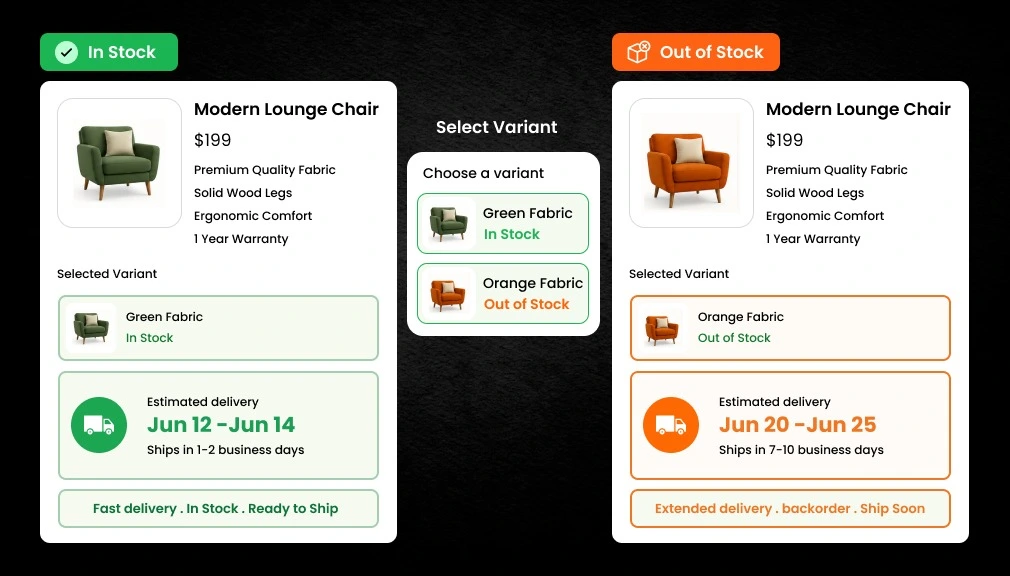
Here is a simple example of what variant-wise delivery dates look like in practice:
| Variant | Inventory Status | Estimated Delivery |
| Blue T-Shirt | In Stock | Delivery in 2–4 Days |
| Black T-Shirt | Out of Stock | Delivery in 10–14 Days |
This is the tutorial where you will discover the simple process of displaying different delivery dates for variants in stock and variants out of stock in Shopify. You will learn what its benefits are, the technology behind it, and how to implement it without using any coding.
Understanding Product Variants in Shopify
Before diving into the solution, let’s quickly understand the problem from a technical angle.
What Are Product Variants?
In Shopify, a product variant is any unique version of the same item. A single product can have dozens of variants based on:
● Size: Small, Medium, Large, XL, XXL
● Color: Red, Blue, Black, White, Navy
● Material: Cotton, Polyester, Linen, Wool
● Style: Classic, Slim Fit, Regular, Oversized
Shopify treats each variation as a completely separate inventory item. So, in your store, you may have 50 Red-Small and 0 Black-XL. This is standard practice, and precisely what erodes your customers’ trust when all variations show the same delivery date.
Why Inventory Levels Differ Between Variants
Inventory differences between variants happen for several common reasons:
● Popular sizes and colors sell out faster than others
● Seasonal collections and limited editions go out of stock quickly
● Supplier availability varies for specific materials or colors
● Different warehouses hold different quantities of each variant
● Promotional campaigns deplete specific variants faster
Real-World Variant Inventory Example
Here is how a typical apparel product might look across variants when inventory status and delivery timelines differ:
| Variant | Inventory Status | Expected Delivery | Messaging |
| Red – Small | In Stock | 2–3 Days | Ships Today |
| Red – Large | Out of Stock | 8–10 Days | Back Soon |
| Blue – Medium | In Stock | 1–2 Days | Ships Today |
| Black – XL | Preorder | 14–21 Days | Pre-order Now |
This table shows exactly why a one-size-fits-all delivery message doesn’t work. Each variant lives in a different inventory reality. Your delivery date should reflect that reality accurately.
Why Showing the Same Delivery Date for All Variants Hurts Sales
If every variant at a Shopify store has the same delivery date even though the stock varies, it will cause lower conversions, more support tickets, and less trust from customers.
- Customers feel misled when promised delivery dates are inaccurate, which can damage trust and long-term relationships.
- Incorrect delivery estimates often lead to more “Where Is My Order?” support tickets, increasing the workload for customer service teams.
- Unclear or unreliable delivery timelines can increase cart abandonment because shoppers hesitate to complete their purchase.
- Deliveries that arrive later than expected frequently result in negative reviews and can harm your store’s reputation.
- Trust is difficult to rebuild, and even a single missed delivery promise can reduce customer loyalty and repeat purchases.
Common Shopify Delivery Date Challenges Store Owners Face
This is actually more difficult than it sounds to get the right delivery dates set up. Here are the top difficulties encountered by most Shopify store owners:
Multiple Variants with Different Inventory Levels
So, for example, a 3-color by 5-size product would have 15 different varieties, each one totally distinct in offers, inventory levels, and lead times. That information cannot be consolidated into a single delivery message.
Products Shipped from Different Warehouses
Brands with several fulfillment centers have another level of complexity. One product shipped from Mumbai may take 2 days to reach Delhi, and the same product shipped from a Bengaluru warehouse may take 4 days. Variant-wise ETA Shopify configuration needs to specify warehouse location as well.
Seasonal Inventory Fluctuations
Holiday collections, limited editions, and seasonal restocks cause unpredictable inventory fluctuations. Restock dates that are reliable in January can be off in December.
Supplier Delays
Manufacturer-stock pieces are, as described, reliant on the supplier. If the supplier delays a restock, your ETD must be adjusted accordingly. Lacking searchable live inventory data and supplier commitment makes your ETD outdated.
Managing Delivery Expectations at Scale
A small store like 2 has 10 products; delivery notification can be handled manually. A 500+ SKU store can not do that. So an automated, scalable ETA feature is a necessity as your product has million titles.
What Is Variant-Wise ETA in Shopify?
Variant-wise ETA is a feature that provides each variant a separate delivery date. Instead of setting a common date to be shown under all sizes/colors, it would reflect the true delivery date based on the availability, processing time, and shipping settings for that specific variant.
This is also known as Shopify ETA variant-wise, variant-by-variant delivery date, or show delivery date per product variant in Shopify.
How Variant-Wise ETA Works Step by Step
The customer experience looks seamless, but behind the scenes, a precise workflow drives it:
- Customer visits the product page and selects a variant (e.g., Black T-Shirt – XL)
- Shopify checks the live inventory status of that specific variant
- ETA rules assigned to that inventory status are triggered
- The delivery estimate updates instantly on the product page
- Customer sees the accurate delivery date without needing to refresh the page
Step-by-Step Guide: Setting Up Delivery Dates Based on Product Variant Stock in Shopify
Shopify merchants can display different delivery dates for product variants based on their stock availability. While this can be achieved through custom coding, managing variant-specific delivery estimates often requires advanced development skills and ongoing maintenance. Additionally, Shopify’s native functionality provides limited support for showing expected delivery dates at the variant level.
A more practical approach is to use a dedicated Shopify delivery date app that automatically adjusts delivery estimates based on each variant’s inventory status. Follow the steps below to configure variant-wise expected delivery dates directly from your Shopify admin using the Shopify Delivery Date app.
Step 1 – Access the ETA Rules Section
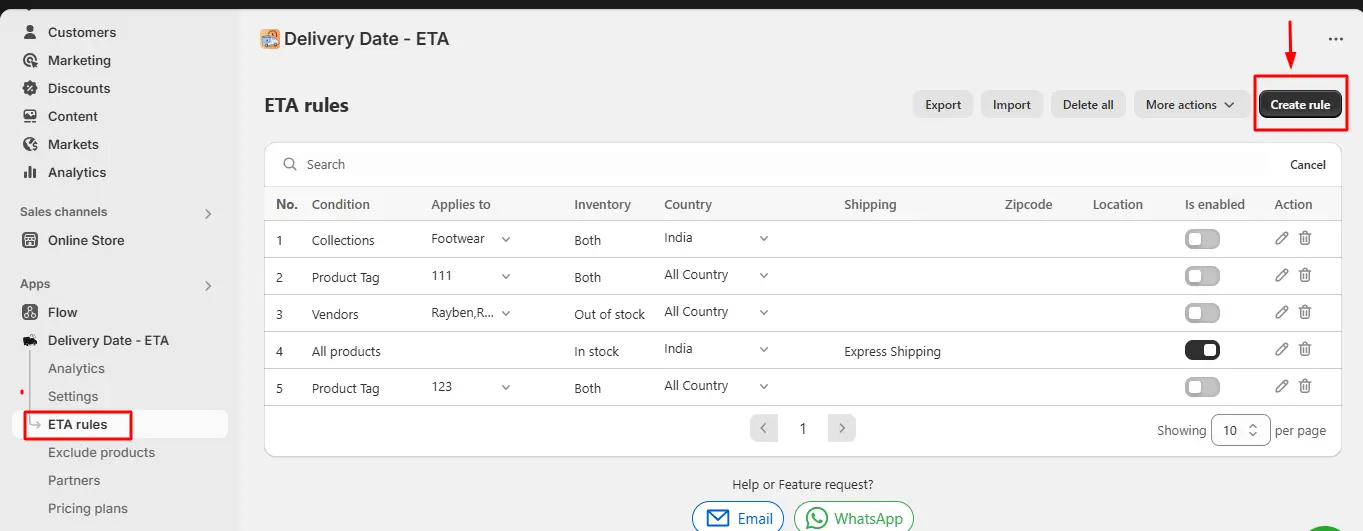
Log in to your Shopify Admin dashboard and open the Delivery Date app. From the app backend, navigate to the ETA Rules section and click the “Create Rule” button to begin setting up a new delivery date rule.
Step 2 – Customize Your ETA Message
In the ETA Creation section, write and format your delivery message according to your requirements. Include relevant lead times that match your fulfillment reality. For example:
● “Delivery in 2–4 Days.”
● “Ships in 7–14 Days.”
● “Available for Preorder — Ships by [Date].”
Tailor the message tone and details to match each inventory scenario you plan to cover.
Step 3 – Select the Product Type
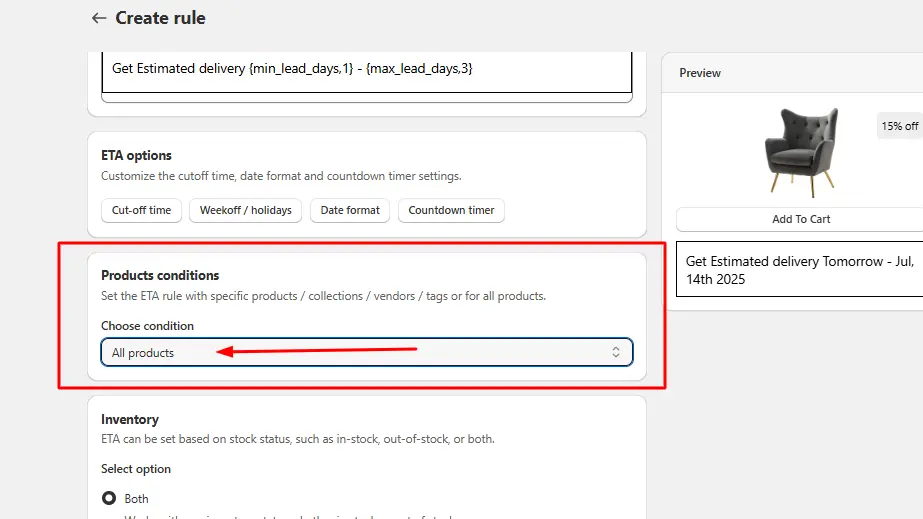
Choose the Product Type for which this ETA rule should apply. This lets you scope the rule to specific products or collections rather than applying it store-wide, giving you precise control over which items display which delivery message.
Step 4 – Choose the Inventory Status
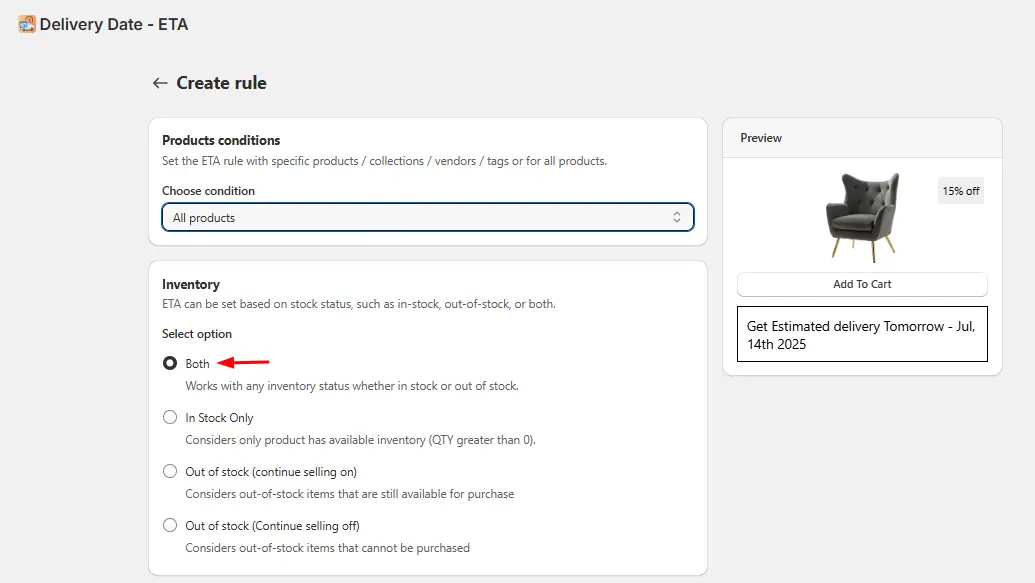
This is the core of variant-wise delivery date configuration. Under the Selection field, pick the Inventory Status that should trigger this rule. You have four options:
● Both: The ETA message displays regardless of whether the product is in stock or out of stock. Use this for a universal delivery message that applies to all variants.
● In-Stock: The ETA message only appears when the variant has available inventory. Ideal for showing a fast-shipping promise (e.g., “Ships in 1–3 Days”) only when stock is confirmed.
● Out of Stock (Continue Selling: ON): The ETA message still displays even when the variant has zero inventory, provided that Continue Selling is enabled for that product in your Shopify backend. Use this for preorder or backorder variants where customers can still purchase. Make sure Continue Selling is enabled for the relevant products from the Shopify product settings.
● Out of Stock (Continue Selling: OFF): The ETA message will not display when the variant has no stock and Continue Selling is disabled. This prevents misleading delivery promises on fully unavailable variants.
Repeat Steps 2–4 to create separate rules for each inventory scenario (in-stock, low-stock, out-of-stock, preorder, etc.).
Step 5 – Verify App and Embed Block Are Enabled
Before testing, confirm that:
● The ETA app is enabled in your app settings
● The App Embed Block is turned on in your Shopify theme editor
Both must be active for the delivery date app to render on your storefront. Without the embed block enabled, no ETA messages will display even if your rules are correctly configured.
Step 6 – Test Every Variant on the Storefront
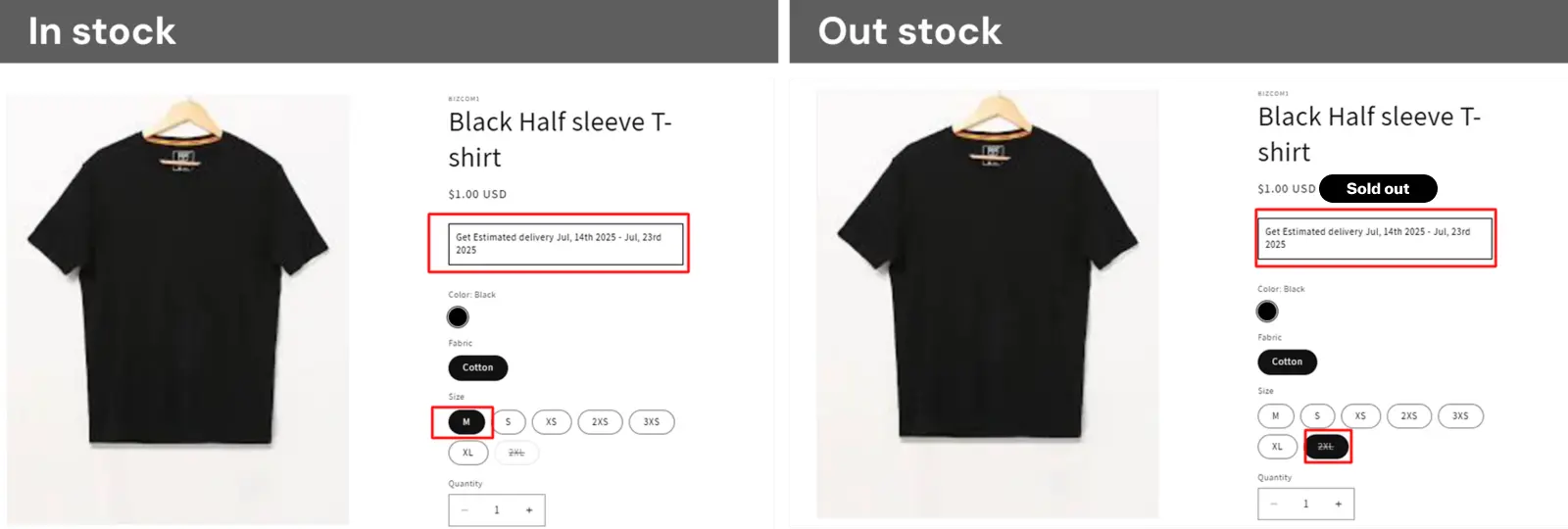
Open your product pages and click through each variant combination: size, color, style, etc. Verify that:
● The correct ETA message appears for each inventory status
● Out-of-stock variants with Continue Selling ON still show their delivery message
● Out-of-stock variants with Continue Selling OFF show no ETA (as expected)
● The widget displays correctly on both desktop and mobile
Step 7 – Maintain and Update Rules as Inventory Changes
Your Inventory and Supplier Lead Times change every now and then. Regularly check back on your ETA rules to update restock dates, change seasonal demand messages, and ensure that Continue Selling remains switched on on your products in accordance with your rules. Well-built rules are what makes your delivery date automation trustworthy to your customer.
Best Practices for Displaying Variant-Wise Delivery Dates
Show ETA Near the Add-to-Cart Button
The delivery date should be displayed in the customer’s decision area of your site’s pages, which is right above or next to the Add to Cart button. This is where the purchase decision is made. Don’t hide the delivery time in your tabs or footer.
Use Clear, Human Language
Please don’t use confusing technical jargon.”Fulfillment lead time: 7–10 business days” should be written as “Ships in 7–10 days; arrives by [date]”… On 7 th grade English… The more well-worded, the more confident we are.
Update Dates Instantly When Variants Change
Ensure switching from a Size Small to a Size Large in a customer’s order updates the delivery date immediately (no page refresh). Every second lost, or any delay at all, derails a customer’s faith in the system.
Never Overpromise
It is always better to be on the safe side and give a slightly conservative estimate even if it means throwing in an early delivery and a happy customer into the mix. Under-promise and over-deliver is a doctrine even in eCommerce that finds application when you give information about the delivery date.
Include Holiday Adjustments
Update your ETA rules before each big holiday. If your date doesn’t show “Ships Tomorrow” during the peak holiday season (a week of festivals, Christmas, Navratra, etc.), your customers’ trust will be shot. Create a holiday calendar in your delivery date automation setup in Shopify.
Show Delivery Dates at Every Customer Touchpoint
Reinforce the delivery expectation at every stage of the purchase experience: product page, cart page, checkout, and order confirmation email. Repeating the same message repeatedly inspires maximum confidence and precludes any last-minute surprises.
Final Thought
Accurately presenting variant-by-variant delivery estimates is no longer a “perk”. It is the minimum that the modern online consumer journeys with before they are halfway through any product page. Amazon has conditioned a billion+ consumers to want this, and it travels with them.
If your shop shows the same shipping date for every variant, whether you have stock for that variant or not, you’re creating a friction point that is potentially costing you sales, trust, and lifetime revenue. There’s a great solution.
Create variant-level ETA rules based on the actual inventory status of the variants. Keep these up-to-date and test them on a monthly basis. Put the base ETA rules close to the Add to Cart button. Roll the same messaging out to the cart page, checkout, and order confirmation emails.
Retailers who make the effort to improve the transparency of delivery: these numbers keep on rising: good conversion rate, very low cart abandonment, not too many support tickets, and a loyal customer base. In this highly competitive eCommerce space, displaying the right delivery date for the right variant at the right time is one of the best conversion tools available and costs much less than most marketing initiatives.
Begin with an easy inventory audit today. Build your ETA rule groups. Play with the customer experience on your storefront. Then see what happens to your numbers.
Frequently Asked Questions (FAQs)
1. How can I display ETA based on inventory availability in Shopify?
You can create conditional ETA rules tied to inventory thresholds. For example, show “Ships in 2 days” when stock exceeds 5 units, and “Ships in 7–10 days” when stock drops to zero for that specific variant.
2. Can delivery dates update automatically when a customer changes variants?
Yes. With a variant-aware ETA app, the delivery date on your product page updates instantly every time a customer selects a different size, color, or style. No page refresh is needed for the update to appear.
3. What is the difference between preorder and out-of-stock delivery dates?
Out-of-stock means the item is temporarily unavailable but will be restocked soon and shipped then. Preorder means the product has not yet been released. Both require different messaging, different timelines, and different customer expectations.
4. Can variant-wise delivery dates help reduce customer support requests?
Yes. When customers see an accurate delivery date before completing their purchase, they rarely need to contact support asking about order status. This significantly reduces inbound support volume and lowers operational costs.
5. Do I need a Shopify app to show variant-wise delivery dates?
Shopify’s default product pages offer limited native ETA support. Most stores use a dedicated estimated delivery date Shopify app to create accurate variant-level rules that display and update dynamically across all product pages.
6. What happens if my inventory changes after displaying a delivery date?
Your ETA system should be connected to live Shopify inventory data. When stock levels change, a variant sells out, or gets restocked, the displayed delivery date should update automatically to reflect the new fulfillment timeline instantly.
7. Should I show delivery dates on cart and checkout pages too?
Yes. Reinforcing the delivery date at every stage of the customer journey product page, cart, checkout, and order confirmation email reduces anxiety and sets consistent expectations throughout the buying process.

Shopify Expert
Dipen Panchal, Shopify Tech Lead at Setubridge Technolabs, brings over a decade of expertise as a Shopify Expert. Passionate about e-commerce growth, he specializes in UI/UX design, crafting intuitive, engaging solutions tailored for merchants and B2B clients to enhance user experiences.