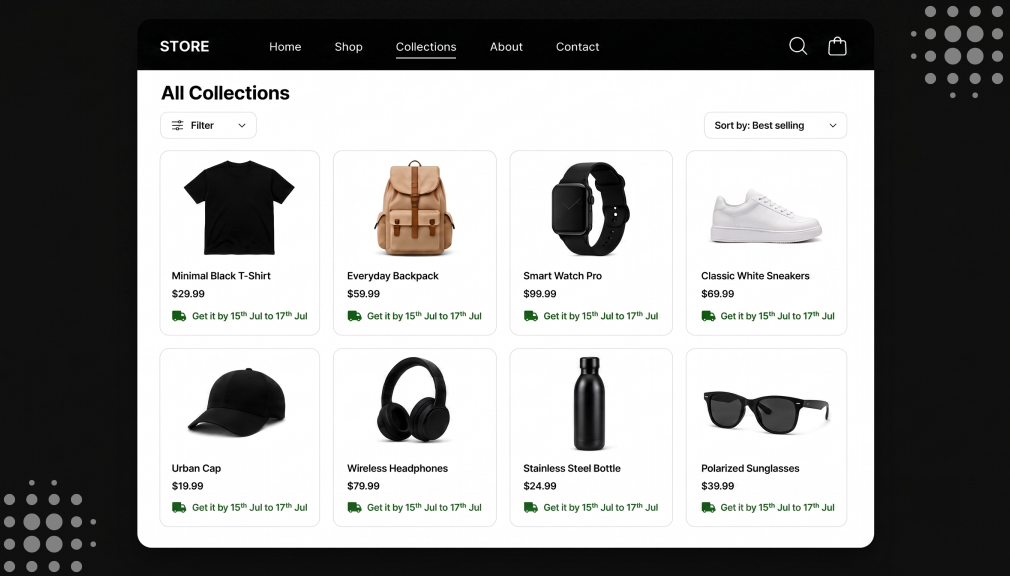
A shopper opens your collection page, hunting for a gift before the weekend. The grid shows twenty products, all looking great side by side. But not one card tells her when it will arrive. So she clicks into a product, checks the date, then goes back. After three slow round-trips, she gives up and leaves.
That tired exit happens on Shopify collection pages every single day. Shoppers compare products in the grid before they click one. Yet most stores hide the delivery date deep on product pages. Delivery dates on Shopify collection pages fix this at the browsing stage. This guide shows you how to add them the smart way.
Key Takeaways
- Delivery dates on Shopify collection pages show an ETA on each card.
- Collection pages are where comparison shopping actually happens.
- Weak product lists can see 67–90% abandonment, per Baymard.
- Grid speed matters, so dates must load asynchronously.
- An app renders accurate collection page delivery dates without code.
- Custom code works but is fragile, slow-risking, and hard to maintain.
- Match the grid date to the product page date for trust.
What Are Delivery Dates on Shopify Collection Pages?
Delivery dates on Shopify collection pages show an arrival estimate on each card. As shoppers scan the grid, every product displays its own date. A coat card might read “Arrives by Aug 12” right there. Shoppers see the timing before clicking into any single product. It brings delivery clarity to the browsing and comparison stage.
This differs from the usual product-page-only delivery date. A collection page lists many products together in one scrollable grid. Each card needs its own accurate date, based on that item. Collection page delivery dates reflect stock, prep time, and shipping per product. That per-card clarity is the heart of this whole approach.
Most of the estimated delivery date apps that power these dates on product pages can extend the same logic to collections.
How Collection Page Delivery Dates Work
It helps to see how these dates actually appear. The tool reads each product’s delivery rule first. It checks stock, prep time, cut-off, and shipping speed. Then it calculates an honest date for that specific product. Finally, it renders that date right on the product’s card.
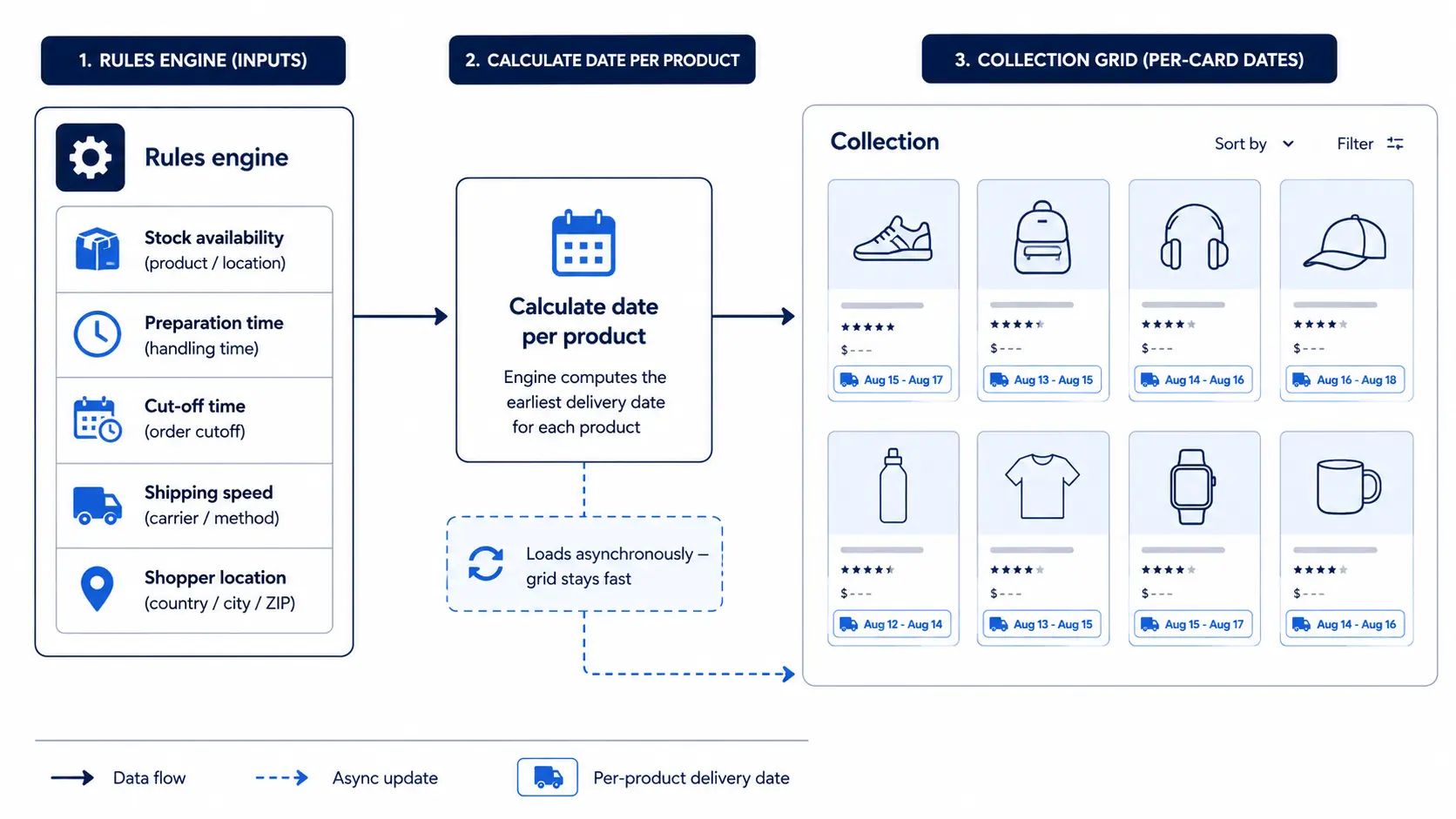
This happens for every card in your grid at once. Each product gets its own accurate, individual date shown. The tool respects holidays, weekends, and the visitor’s time zone. It can also detect the shopper’s country or region. So the grid shows dates that feel local and true.
The best tools do all of this without slowing the page. A strong Shopify collection page delivery time estimator loads dates after the grid. That keeps browsing fast while still showing clear timing. This is how collection page delivery dates stay quick and accurate. Speed and clarity work together, not against each other.
Accurate collection dates depend on the delivery date rules behind each shown date being set up correctly.
Delivery Dates vs Shipping Rates: A Key Difference
Many merchants confuse two very different features here. Shipping rates set the price of each delivery option. Delivery dates show when the order will actually arrive. On a collection page, the date is what shoppers crave. It answers “when,” not just “how much.”
Shopify can show shipping rates, but not per-card dates. Its native tools stop short of a real grid-level ETA. So delivery dates on Shopify collection pages need a dedicated tool. Do not expect native settings to cover this need. Knowing the difference saves you real time and confusion.
Why the Collection Page Is the Missing Piece
The collection page is where real comparison shopping actually happens. Shoppers weigh several products side by side before choosing one. Price, photos, and reviews all guide that quick grid decision. Delivery timing belongs in that comparison, yet it is often missing. Adding it there answers a key question much earlier.
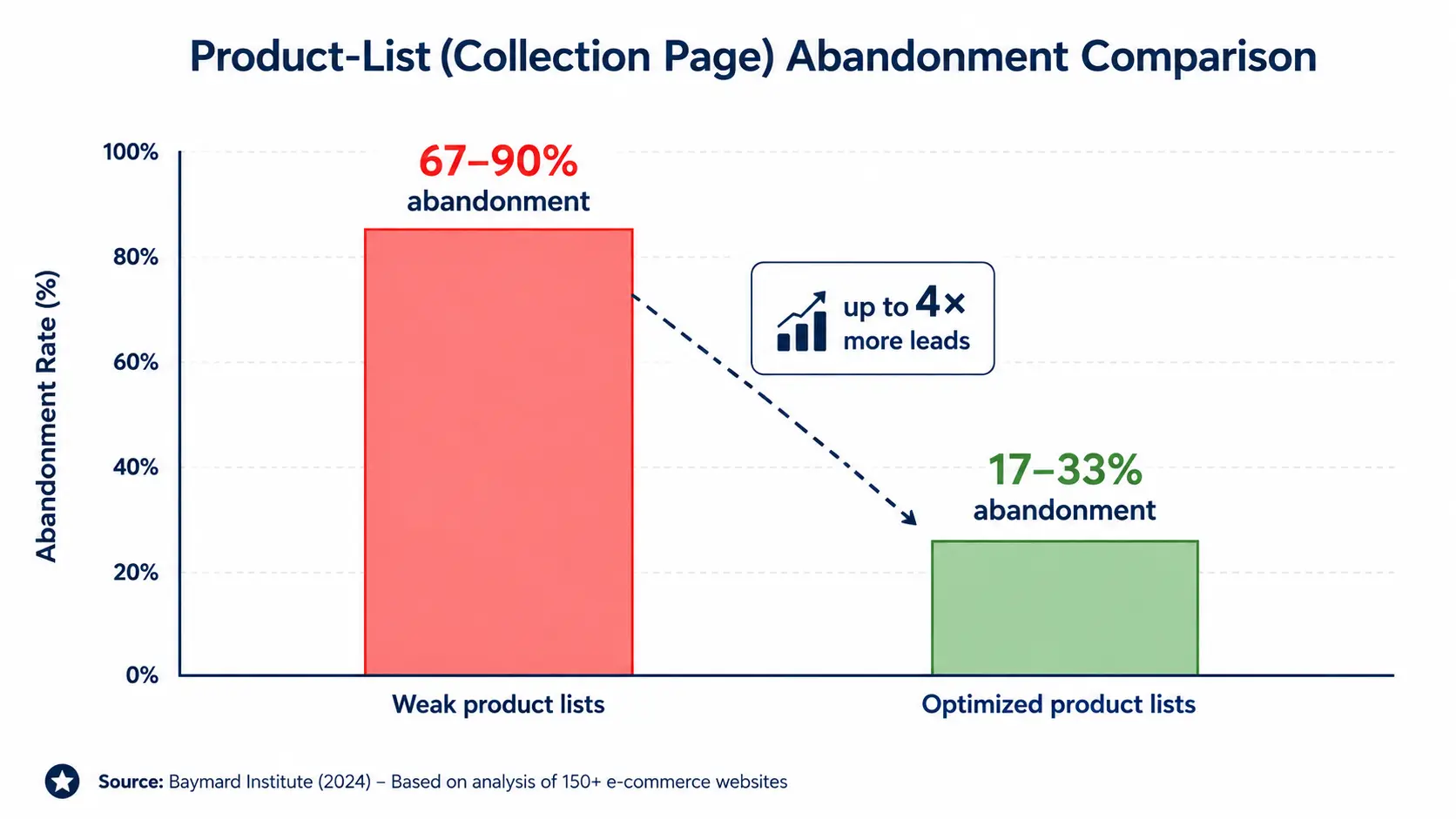
The stakes on this page are higher than many realize. According to Baymard Institute’s product-list research, weak product lists see 67–90% abandonment. Well-designed ones see only 17–33% for the same task. That gap can mean up to four times more leads.
Showing the date only on the product page has a hidden flaw. Shoppers who never click a product never see the date. Many leave the grid before opening any single item. A card-level date reaches those browsers you would otherwise lose. That is why the collection page is the truly missing piece.
To keep grid dates honest, include preparation time in the displayed date for items that aren’t ready to ship.
The Speed Factor: Why Collection Pages Are Different
Collection pages carry a special technical challenge: speed. A grid already loads many images and product details at once. Adding slow delivery dates on top can hurt load time. That matters more than most merchants ever realize. Speed on this page directly shapes how many shoppers advance.
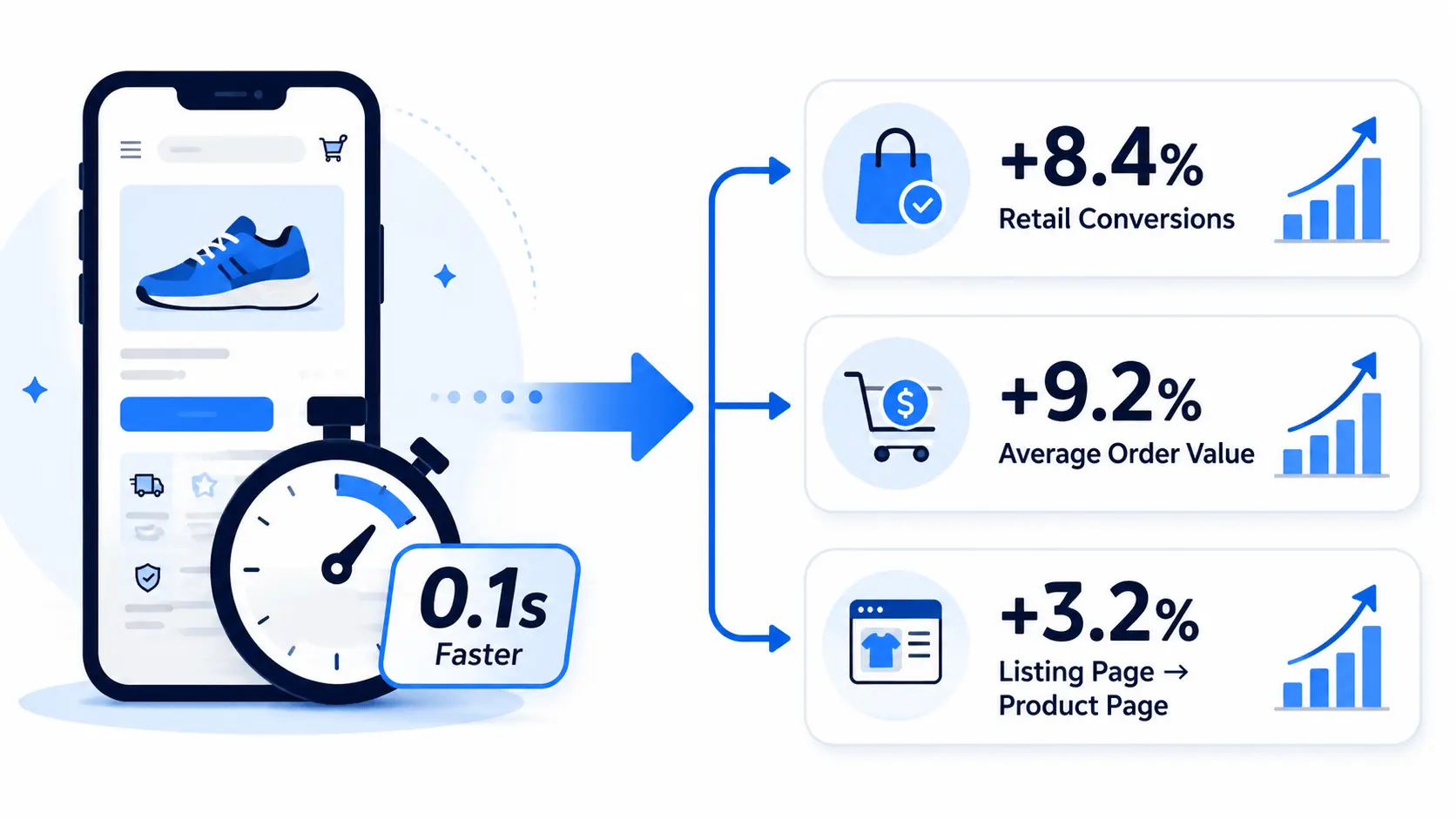
The data here is striking and comes from trusted research. A Google and Deloitte study isolated mobile site speed as a metric. A 0.1-second speed improvement lifted retail conversions by 8.4%. It also raised movement from listing pages to product pages by 3.2%. So a fast collection grid quietly sends more shoppers forward.
The lesson is simple but important for this feature. Delivery dates must load without slowing the grid at all. A good tool loads them asynchronously, after the page appears. That way shoppers get clarity and speed at the same time. Never trade grid performance for a delivery date.
Alongside a delivery date, you can add an order-by countdown to the same view to turn information into urgency.
The AI-Browsing Angle
There is a fresh reason this matters even more now. Shopping is increasingly guided by AI assistants and agents. These tools scan pages and summarize options for busy shoppers. Gartner predicts AI agents will handle most routine tasks soon. Clear, structured dates on your grid help them choose you.
Both humans and AI agents skim the collection grid fast. Neither wants to open twenty products to compare timing. Structured collection page delivery dates make your products easy to read. That readability helps you surface in AI-assisted product picks. Clear grid dates are quietly future-proofing your store.
Why This Is Harder Than the Product Page
Adding a date to a collection page is trickier than it looks. A product page shows one product, so one date is simple. A collection page loops through many products in a grid. Each card needs its own accurate date inside that loop. Getting every card right is where the real challenge begins.
Each product may carry different stock, prep, and shipping rules. The date on every card must reflect that product’s reality. Theme grids also vary widely from one store to another. Code that works on one theme may break on another. This complexity is why the method you choose matters so much.
Delivery dates help most on well-organized pages, so it’s worth working to improve how shoppers navigate large collections at the same time.
Two Ways to Show Estimated Delivery on Shopify Collection Pages
There are really only two methods of doing this through Shopify, which would be either to write custom code for your theme or to use an app designed for the purpose.
While both could theoretically accomplish what you need done, neither of these options would work equally well for the vast majority of merchants.
Option 1: Shopify App-Based Solution (Recommended)
An app-based setup is the more reliable path for most merchants because it handles the parts that are genuinely hard to get right: business days, cutoff times, holidays, product-specific processing time, and rules that differ by collection or shipping zone.
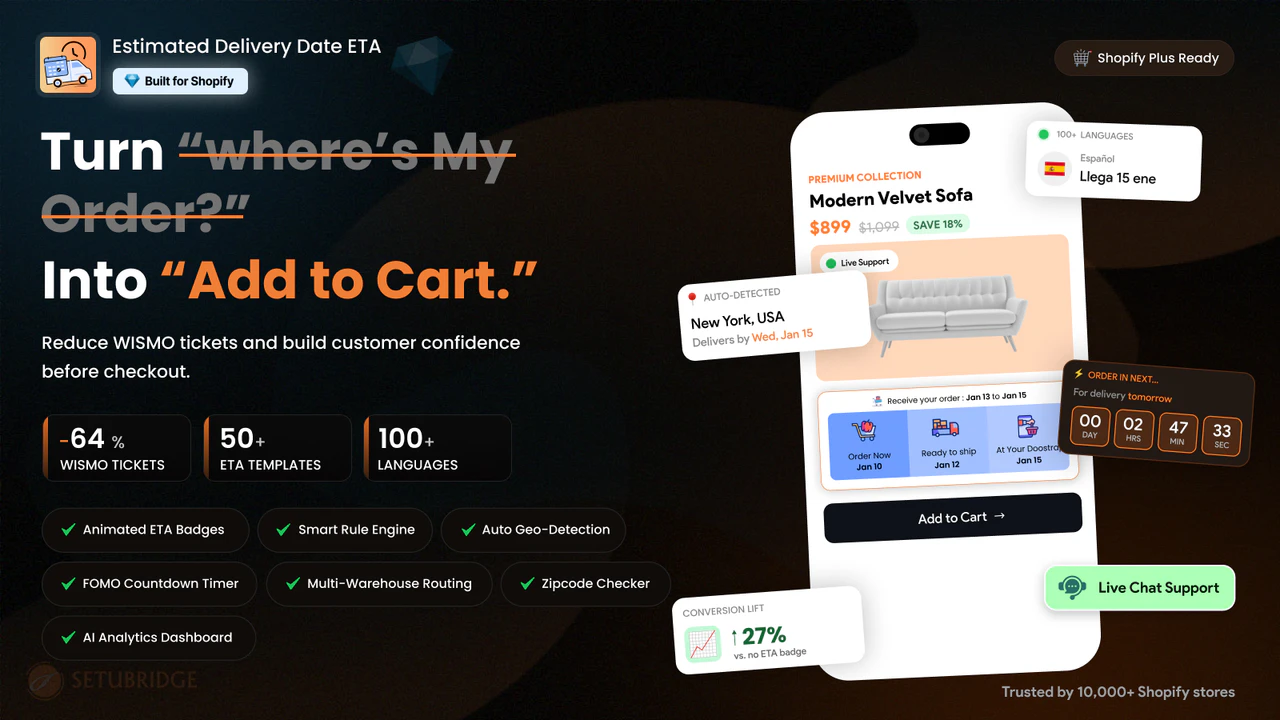
The Estimated Delivery Date (EDD) app is built specifically to show delivery dates on Shopify collections and product pages without needing a developer for every rule change.
- Install the delivery app from the Shopify App Store.
- Set your general delivery rules: processing time, cutoff time, and business days.
- Create exceptions for holidays, weekends, or out-of-stock delays so dates stay accurate.
- Enable the collection page widget so every product in the grid shows its own estimated delivery date.
- Customize the date format and placement to match your theme, without editing Liquid code.
As the entire delivery logic is controlled by the app, when you make any modifications, such as the introduction of public holidays or modification of processing times for any particular collection, the modification becomes automatic throughout the app without requiring changes in the collections individually or in the theme file.
This is especially helpful for sellers who have seasonal or flash collections or more than one shipping zone where delivery window changes become frequent.
Option 2: Custom Shopify Code Solution
A Shopify collection page delivery time estimator can be accomplished through Liquid, JavaScript, and metafields. A developer would be able to retrieve the processing time from a metafield, compute the date range, and then inject the date range into the collection page template.
This approach works, but it comes with real limits that are worth knowing before committing to it.
- Business-day and holiday logic has to be coded and maintained manually, and it breaks silently when a new holiday isn’t added in time.
- Every theme update risks overwriting the custom collection template, so the feature has to be reapplied and retested.
- Cutoff times, per-product processing days, and shipping zone rules require separate custom logic for each one.
- Any future change, like adding a new collection or adjusting a delivery window, needs a developer again.
This may work for a store that has just one shipping rule, which is simple and never changes. However, this solution is only applicable for small stores because the costs involved will be higher than the initial development cost. That is why a Shopify delivery date app for collection pages becomes a preferred option.
What to Look for in a Delivery Date App for Collection Pages
Not every delivery date app for collection pages is equal. The right one saves time and protects your grid speed. Look for these features in a strong, reliable app:
- Renders a date on each collection card automatically.
- Loads asynchronously, so the grid stays fast.
- Supports per-product, collection, and vendor rules.
- Handles cut-off times, holidays, and local time zones.
- Offers a compact, mobile-friendly card style.
A good Shopify collection page delivery time estimator does all of this cleanly. It should also match the product-page date exactly. Consistency across pages is what quietly builds shopper trust. Choose a Shopify delivery date app for collection pages that scales with you. The right tool makes the whole feature effortless.
Where to Place the Date on a Product Card
Placement on a small product card takes real care. The card already holds an image, a title, and a price. Your date must fit without crowding that tight space. These spots tend to work best on a product card:
- Just below the price, where the eye naturally lands.
- Under the product title, as a small line.
- As a subtle badge on the product image.
Keep the styling light so the grid stays clean. A small icon or soft color can help it stand out. Avoid bold blocks that fight with your product photos. The date should support the card, not overwhelm it. Balance keeps the grid both clear and attractive.
Collection Page Message Examples
Short, specific wording works best in a busy grid. Keep each card message tight and easy to scan quickly. Here are simple examples you can adapt per product:
- In-stock: “Arrives by Aug 10.”
- Made-to-order: “Ships in 2 weeks.”
- Fast option: “Order today, arrives Friday.”
- Preorder: “Ships on release, Sept 1.”
Notice how each line stays short and very concrete. A grid has no room for long shipping explanations. One clear date or window is all a card needs. Shoppers read it in a glance and keep browsing. That quick clarity is what a good grid date delivers.
A Real Example: The Grid That Converts
Picture a store selling both in-stock and made-to-order lamps. Its collection grid shows twenty lamps with no dates at all. Shoppers cannot tell which lamp ships today or in weeks. Many click a slow item, feel let down, and leave. The grid quietly pushes buyers toward the wrong products.
Now add a delivery date to each lamp card instead. In-stock lamps show “Arrives Aug 10” and draw quick clicks. Made-to-order lamps show “Ships in 2 weeks” and set expectations. Shoppers then self-select the option that fits their timeline. The same grid now guides buyers toward a confident purchase.
Which Stores Gain the Most
Every store with a product grid can benefit here. But some gain far more from collection page delivery dates. These store types tend to feel the biggest lift:
- Fashion and apparel stores with large seasonal grids.
- Big catalogs where shoppers browse dozens of items.
- Mixed stores selling in-stock and made-to-order goods.
- Seasonal or gift stores with tight delivery deadlines.
For these stores, the grid is the main shopping stage. Shoppers rarely open every product just to compare timing. A card-level date does that comparison work for them. It guides them to the right item in fewer clicks. The bigger your grid, the more this clarity helps.
Why Delivery Clarity Converts Browsers
Delivery doubt is one of the top reasons shoppers abandon. Baymard’s checkout research puts average cart abandonment near 70%. Slow or unclear delivery is a leading cause of that. A clear date on the grid answers the worry early. It removes a big reason to hesitate before buying.
Answering that question sooner changes the whole journey. A shopper who trusts the timing browses with real confidence. She clicks the right product and moves toward checkout. Collection page delivery dates plant that confidence at the start. Early clarity is what turns browsers into buyers.
Best Practices for Collection Page Delivery Dates
Great collection page dates are short, clear, and per-product. Keep each card message brief and honest to build trust. Match the grid date exactly to the product page date. Test the display on mobile, where most browsing happens. Confirm the dates never slow your grid’s load time.
Keep your rules updated as transit times or stock change. Show accurate dates by region and product where possible. Lead with speed where your delivery is genuinely fast. Stay honest where an item is slower to arrive. A living, accurate grid stays trustworthy across every visit.
The evidence on why early delivery info lifts conversion supports moving dates up to the collection stage.
Final Thoughts
That hurried shopper should never have to click and go back. Delivery dates on Shopify collection pages answer her question upfront. She sees the fastest option in the grid and buys confidently. That clarity turns tiring comparison into a quick, sure choice. Bringing the date to the grid is a quiet growth lever.
You do not need a big team to make this change happen. An app can show delivery dates on Shopify collections easily. Custom code stays an option for large, technical teams. Either way, the goal is the same: clear timing while browsing. Add dates to your grid, and watch more browsers become buyers.
Frequently Asked Questions
Can I show delivery dates on Shopify collections without slowing down my page speed?
Yes, as long as the delivery date app or script loads asynchronously instead of blocking the page render. A well-built app typically adds negligible load time to a collection grid.
What’s the difference between showing a delivery date on a collection page versus product page only?
Collection pages are where comparison shopping happens, so a visible date there influences the click-through decision earlier. Showing it only on the product page means shoppers who never click through never see it.
Will an ETA on a collection page work across different shipping zones?
Yes, if your delivery rules are configured by zone, not just by store-wide default. Most apps let you set separate rules per shipping zone, while custom code requires this logic to be built manually.
Is a delivery date app for collection pages worth it for a small catalog?
Yes, because even a small catalog benefits from consistent, accurate dates, and manual updates become error-prone as soon as holidays or promotions change your timelines. The setup time is usually recovered quickly in reduced support tickets.

Shopify Expert
Dipen Panchal, Shopify Tech Lead at Setubridge Technolabs, brings over a decade of expertise as a Shopify Expert. Passionate about e-commerce growth, he specializes in UI/UX design, crafting intuitive, engaging solutions tailored for merchants and B2B clients to enhance user experiences.