Maria hand-pours every candle in her small Shopify shop. An order arrives, and Shopify cheerfully promises delivery in three days. But each candle needs two full days to cure before packing. The buyer waits by the door on day three, then feels let down. That gap between promise and reality just cost Maria a loyal customer.
This story plays out whenever a store forgets one key step. The order does not ship the instant a customer clicks buy. There is real work first: making, packing, and preparing each order. That step is your preparation time before shipping, and it matters greatly. This guide shows you how to add it the right way.
As for why this matters, the data on how delivery accuracy affects buyers makes the case for getting lead times right.
Key Takeaways
- Preparation time before shipping is the gap before an order ships.
- An accurate date needs prep time, cut-off, non-working days, and transit.
- Ignoring preparation time makes every delivery promise too optimistic.
- Custom and hand-made stores need honest prep time the most.
- Shopify’s native setting is storewide and mostly shown at checkout.
- An app adds per-product prep time without any custom code.
- Honest prep time cuts late-order complaints and builds real trust.
What Is Preparation Time Before Shipping?
Preparation time before shipping is the gap before an order leaves your door. It covers everything from order verification to making and packing. Shopify also calls this processing time or fulfillment time. It ends the moment you hand the parcel to the carrier. Only then does the shipping, or transit, time actually begin.
Many stores skip this step when they show a delivery date. They quietly promise as if every order ships out instantly. For simple, in-stock items, that gap may be very small. For custom or hand-made goods, it can span several days. Ignoring it makes every delivery promise too optimistic to keep.
Preparation time works best when you fit preparation time into your wider delivery date rules rather than treating it in isolation.
The Delivery Date Formula
An honest delivery date is really a simple sum of parts. It combines your preparation time with the carrier’s transit time. A daily cut-off time and non-working days also shape the result. Miss any one piece, and the promised date turns out wrong. Getting all of them right is the whole goal here.
Here are the parts of an accurate delivery date:
- Preparation time: days to make, pack, and ready the order.
- Cut-off time: the daily deadline for same-day processing.
- Weekends and holidays: non-working days that push dates later.
- Transit time: the carrier’s days in transit to the door.
Leave out preparation time, and the whole formula quietly breaks. The date will always land earlier than the order can arrive. That single missing detail causes most delayed-order complaints. Adding preparation time before shipping fixes the math at its root. It turns a hopeful guess into a promise you can keep.
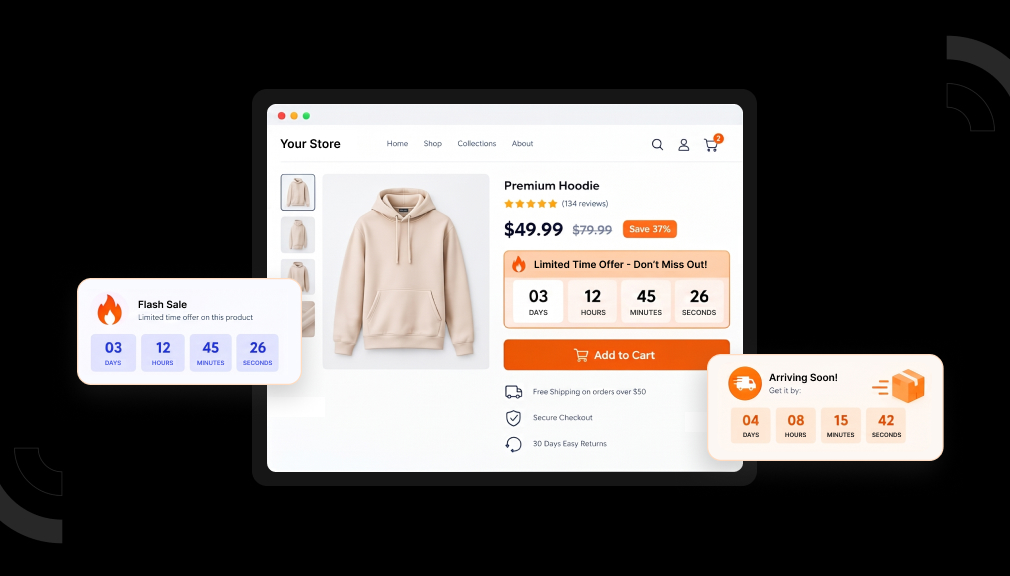
The point of adding prep time is to reflect processing time in the estimated delivery date shoppers see before they buy.
A Worked Example: Prep Time in Action
Let us turn the formula into a real, concrete date now. Say your prep time is two business days for candles. Your cut-off is 2 p.m., and transit takes three days. A shopper orders at 4 p.m. on a Friday. That order missed Friday’s cut-off, so prep starts on Monday.
Prep then runs Monday and Tuesday, since weekends do not count. The candle ships Wednesday and travels three days after that. So the honest delivery date lands the following Monday. Without prep time, the store would have wrongly promised Wednesday. That five-day gap is exactly what breaks a buyer’s trust.
This is essential if you sell made-to-order and personalized products, where every item needs production time.
Why Ignoring Preparation Time Hurts Your Store
The damage from a missing prep time is quiet but very real. Your store promises a date the fulfillment team cannot meet. The order then arrives late, even when nothing actually went wrong. According to Baymard Institute research, unclear and slow delivery drives lost sales. A broken promise turns a happy buyer into a frustrated one.
The pain does not stop once the late order finally arrives. Frustrated buyers email support, asking why their order is late. Delivery-experience data shows nearly 70% buy less after an uninformed delay. Some request refunds, and others leave a harsh public review. One missing prep-time step can quietly cost many future sales.
Honest dates, by contrast, protect trust and even lift your sales. Narvar’s 2025 shopper survey found 73% let a visible date guide their purchase. Real-world Shopify tests link accurate dates to 12–25% higher conversion. A realistic date that includes prep time feels believable and safe.
Which Stores Need Preparation Time Most?
Preparation time before shipping matters more for some stores than others. Any product that is not simply picked and shipped needs it. These sellers feel the gap the most in daily life:
- Custom or engraved items made after the order arrives.
- Hand-made goods like candles, art, or jewelry.
- Print-on-demand products printed only once ordered.
- Made-to-order furniture or clothing with real build time.
- Dropshipped goods with supplier-driven handling delays.
For these stores, prep time is not a small rounding detail. It can be the biggest part of the whole delivery window. Showing it honestly sets the right expectation from the very start. That honesty prevents the “why is it late?” email later. Accurate prep time is simply good business for these sellers.
After building in processing days, you can show the adjusted dates on collection pages, so browsers see realistic timing.
Notice these stores often sell a mix of items too. A ready-to-ship mug and a custom sign share one cart. Each one needs its own prep time to stay honest. One global setting cannot serve both products fairly here. Per-product prep time is what keeps mixed carts accurate.
What Shopify’s Native Setting Does and Doesn’t
To be fair, Shopify does offer a native processing time setting. You set it under Shipping and delivery, in Expected delivery dates. It can range from a couple of days up to several weeks. Shopify then shows a delivery date range at checkout. For a simple, uniform store, this basic setting can help.
But the native setting has real limits worth knowing about. It is a single, storewide value, not a per-product one. So an in-stock item and a custom item share one prep time. The daily cut-off is fixed and cannot be changed by you. Custom holidays and weekly days off are hard to reflect too.
Accurate processing time also helps keep order-by countdowns honest, since the cutoff depends on real lead time.
There is one more gap that surprises many merchants here. Native dates mostly appear at checkout, not on the product page. Yet the product page is where the buying decision truly happens. Shoppers often want the prep-time answer before they add to cart. For per-product prep time on the page, you need another tool.
Some merchants try to note prep time in the product description. Sadly, most shoppers skim and miss that buried line entirely. Others add it only to the shipping policy page instead. Almost no one reads that page before they buy something. A visible, calculated date works far better than hidden text.
Two Ways to Add Preparation Time Before Shipping in Shopify
Either the Shopify store will go for an application built especially for the task, or the merchant will code something custom. While both approaches will work, they’re not equally feasible.
Option 1: Shopify App-Based Solution (Recommended)
App integration is the most reliable way to Add Preparation Time Before Shipping in Shopify and accurately display delivery dates. Unlike custom code, it can handle real-world complexities such as different preparation times for each product, order cut-off times, holiday schedules, and multiple store locations all without modifying your theme files.

The Estimated Delivery Date app has been created for precisely such a procedure. Usually, configuring the Shopify preparation time in the app happens in the following manner:
- Install the app from the Shopify App Store and open its dashboard from Shopify admin
- Create a delivery rule and choose which products, collections, tags, or vendors it should apply to
- Set a preparation time in days for that rule, for example, two business days for engraved or made-to-order items
- Add a daily cutoff time so orders placed after a set hour automatically roll into the next preparation day
- Exclude weekends, holidays, or vacation days from the date calculation so promised dates stay realistic
- Layer on the shipping or lead days needed for carrier transit, on top of the preparation time
- Choose a display template and preview exactly how the estimated delivery date will look on the storefront
- Publish the rule so it shows on the product page, cart, checkout (on Shopify Plus), and order confirmation emails
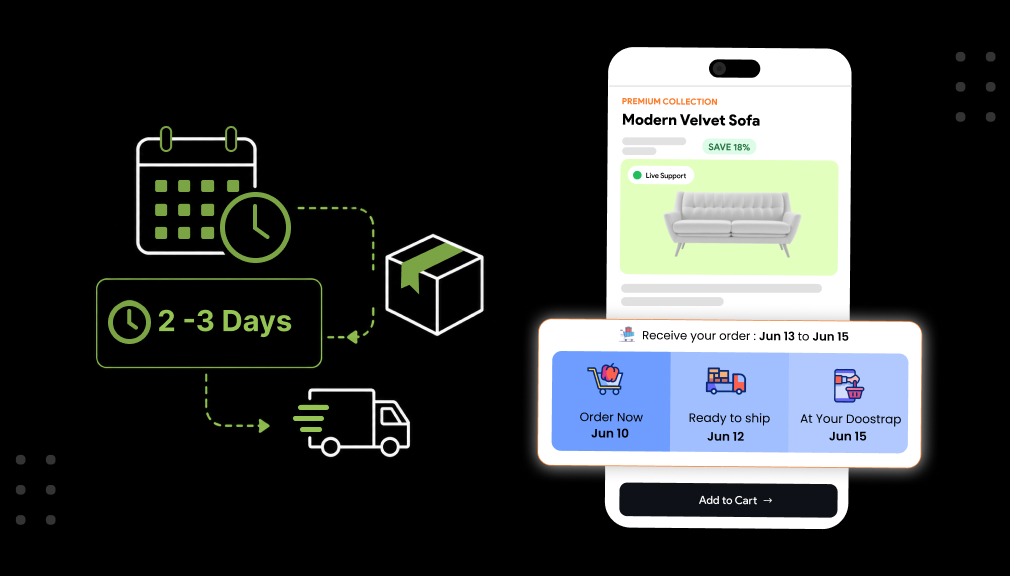
Once published, the product page shows something specific, like “Ships in 2 business days, arrives Jun 14 – Jun 17,” instead of a vague “3-5 day delivery” claim that quietly ignores the production step.
Because the app-based setup lives outside the theme code, updating a rule for a new product line, a holiday closure, or a busier season takes minutes, not a developer ticket.
Option 2: Custom Shopify Code Solution
A developer can build this manually using a product metafield to store prep days, then a Liquid snippet or JavaScript that adds that value to today’s date on the product page. This can work for a single product or a very small catalog.
The catch is that this approach is tricky to build correctly and limited in what it can actually do once a store grows past a handful of products. Common gaps include:
- No built-in cutoff time logic, so an order placed at 11:59 p.m. is treated the same as one placed at 6 a.m.
- No holiday or vacation calendar, so the date keeps counting through days the warehouse is closed
- Custom Liquid often breaks or gets overwritten during theme updates
- Reaching cart and checkout requires deeper checkout extensibility development, usually limited to Shopify Plus
- Every new rule a new product type, a new holiday, a new prep time – needs a developer to update the code
- Scaling across hundreds of SKUs with different prep times becomes difficult to maintain accurately
Custom code is a reasonable way to test the concept on one product page. For anything beyond that, it tends to turn into an ongoing maintenance project rather than a one-time fix, which is why most growing stores move to an app-based setup instead.
Getting Preparation Time Right: Cut-Off, Weekends, Holidays
A correct prep time is honest, specific, and easy to trust. Base it on your real average, not your best-ever day. If candles take two days to cure, then say two days. Add a small buffer for busy periods and surprises. An honest buffer beats a broken promise every single time.
The cut-off time is where many stores slip up quietly. Orders placed after the cut-off should start prep the next day. Make that rule clear so late orders still feel fair. Weekends and holidays must also push the date later. Skipping these makes a “2-day” prep secretly take much longer.
Keep your prep time updated as your store keeps changing. Raise it during peak seasons when your order queue grows long. Lower it again once your workflow speeds back up. Set different prep times for in-stock and made-to-order items. A living, accurate prep time keeps every promise believable.
The same lead-time thinking applies when you manage preorder and coming-soon fulfillment timing for items not yet in stock.
Where to Show Your Preparation Time
A correct prep time only helps if shoppers actually see it. Show the resulting date where buyers make their real decisions. These spots work best for clear prep-time messaging:
- Product page, so buyers see the date before adding to cart.
- Cart page, as they review their order once more.
- Checkout, to confirm the promise before payment.
- Order confirmation email, to reassure them after buying.
The product page matters most for prep-heavy, custom items. Buyers of handmade goods expect a wait, if you are honest. Seeing “Made to order, ships in 3 days” builds trust early. That honesty upfront prevents disappointment and refunds later on. Clear prep-time messaging turns a longer wait into a fair promise.
Common Preparation Time Mistakes to Avoid
Even careful stores make a few avoidable prep-time mistakes. Each one quietly turns an honest promise into a broken one. Watch out for these common traps as you set things up:
- Counting prep in calendar days instead of business days.
- Forgetting that orders after cut-off start prep the next day.
- Using one prep time for both stock and custom items.
- Ignoring holidays and weekly days off in the math.
- Promising your best-day speed as your normal speed.
Each mistake makes a “fast” promise you cannot always keep. The fix is honest math that respects real working days. Count business days, add cut-off logic, and skip the holidays. Then set a realistic prep time you can meet every time. Accurate math is what keeps prep-time promises believable.
Measure and Adjust Your Preparation Time
Adding preparation time before shipping is the start, not the finish. Track how your promised dates compare to real ship dates. If orders ship later than promised, raise your prep time. If they ship sooner, you can safely lower it a little. This simple check keeps your dates honest over time.
Modern tools make this tracking simpler than ever before. Industry data shows 77% of eCommerce pros now use AI tools daily. Many apps reveal your fulfillment timing on a clear dashboard. Use that data to fine-tune prep time by product and season. Steady, small tweaks keep every delivery promise realistic.
Set one simple rule: promised dates must match reality. Review your prep time every month as a healthy habit. Watch it closely right before and during peak seasons. A prep time that fits today may not fit tomorrow. Regular checks keep your delivery promises honest all year.
Final Thoughts
Maria’s candles never changed, but her delivery promise finally did. Adding preparation time before shipping fixed the gap she once missed. Now her buyers see an honest date that includes curing and packing. They wait with calm confidence, and their orders arrive on time. That one small fix turned frustration into loyalty and repeat sales.
You do not need a big team to make this change happen. An app can add preparation time before shipping in just minutes. Custom code stays an option for teams with strong developer support. Either way, the goal is the same: honest, realistic delivery dates. Add your prep time, and watch trust and repeat orders grow.
Frequently Asked Questions
What is Shopify preparation time and why does it matter?
It’s the time your team needs to pick, pack, or produce an order before it ships. Skipping it in your delivery date promise is one of the most common causes of “where is my order” complaints.
Can I show processing time on my Shopify product page?
Yes. Most delivery date apps let you display a combined message, such as “Ships in 2 days, arrives by [date],” directly on the product page, cart, and checkout.
What’s the difference between shipping lead time and Shopify production time?
Shipping lead time is how long the carrier takes in transit. Production time is the amount of time your team needs to make or personalize the item before it’s ready to ship.
Do I need custom code to add shipping preparation time in Shopify?
No. Custom code is possible but tricky to maintain, especially for cutoff times and holidays. An app-based setup covers these cases without ongoing developer work.

Shopify Expert
Dipen Panchal, Shopify Tech Lead at Setubridge Technolabs, brings over a decade of expertise as a Shopify Expert. Passionate about e-commerce growth, he specializes in UI/UX design, crafting intuitive, engaging solutions tailored for merchants and B2B clients to enhance user experiences.