Imagine one shopper buying a ready-to-ship mug from your store. Beside them, another buys a made-to-order sofa that takes weeks. Your store shows both the same delivery date. One promise is true, and the other is completely wrong. That single mismatch quietly costs you sales and trust every day.
Most stores sell many products with very different delivery times. A flat, one-size date cannot serve all of them well. This is exactly what Shopify delivery date rules solve. They let each product show its own honest, accurate date. This complete guide walks you through every rule type in depth.
You will learn what Shopify delivery date rules are and why they matter. You will see how each rule type works with real examples. You will also learn which rule wins when several apply at once. By the end, you can build a clean, accurate system. Let us turn one vague date into many honest promises.
Key Takeaways
- Shopify delivery date rules show each shopper an accurate, honest date.
- When several rules match, the most specific rule always wins.
- Product-wise rules and collection-wise rules cover most catalog needs.
- Product tag-wise rules and vendor-wise rules handle mixed, multi-brand stores.
- Inventory and stock status rules keep promises honest as stock changes.
- Country-level delivery rules and zip code delivery dates Shopify rules add local precision.
- Warehouse-specific ETA rules and shipping method-based rules reflect real fulfillment.
- Multi-language display rules make global stores feel truly local.
- Start with one default rule, then add a few lean exceptions.
What Are Shopify Delivery Date Rules?
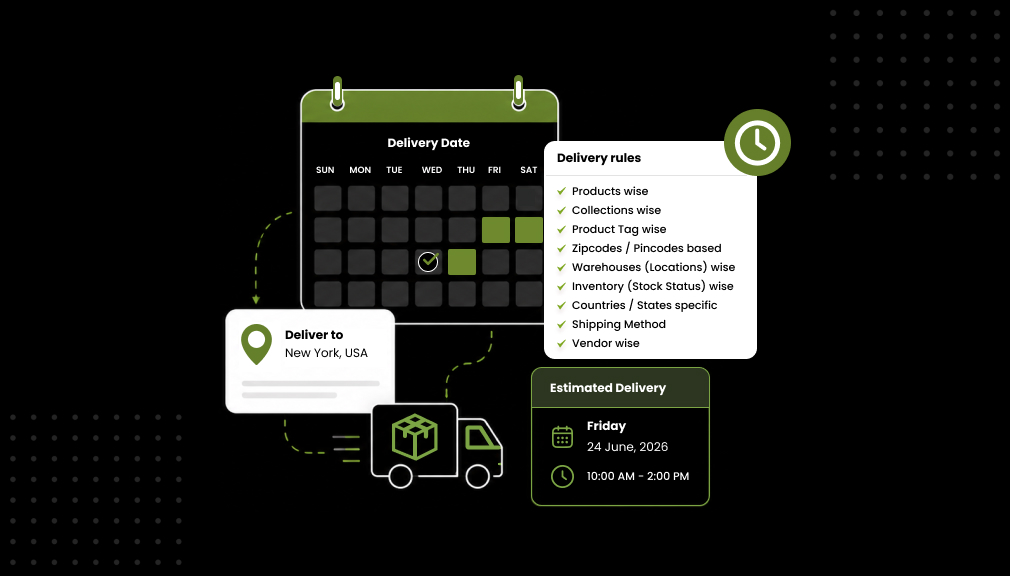
Shopify delivery date rules are conditions that decide the date each shopper sees. Each rule links a target, like a product, to a delivery window. The store then shows the matching date automatically to buyers. So a fast item and a slow item show different dates. This is the heart of Shopify estimated delivery date rules.
Think of these rules as smart, if-then instructions for delivery. If the product is made to order, then show ten days. If the buyer is in another country, then add transit time. Shopify estimated delivery date rules handle each case cleanly. They replace guesswork with accurate, honest dates for everyone.
You do not need a rule for every single product. Most stores start with one default rule for the catalog. Then they add a handful of targeted exceptions on top. That small set of Shopify delivery date rules covers almost everything. We will build that system step by step below.
These rules can also combine many conditions at once. A single order might match a country, a tag, and a warehouse. Shopify delivery date rules blend those into one clear date. The tool then resolves which rule should win. This power is what makes the rules so flexible.
Why Shopify Delivery Date Rules Matter
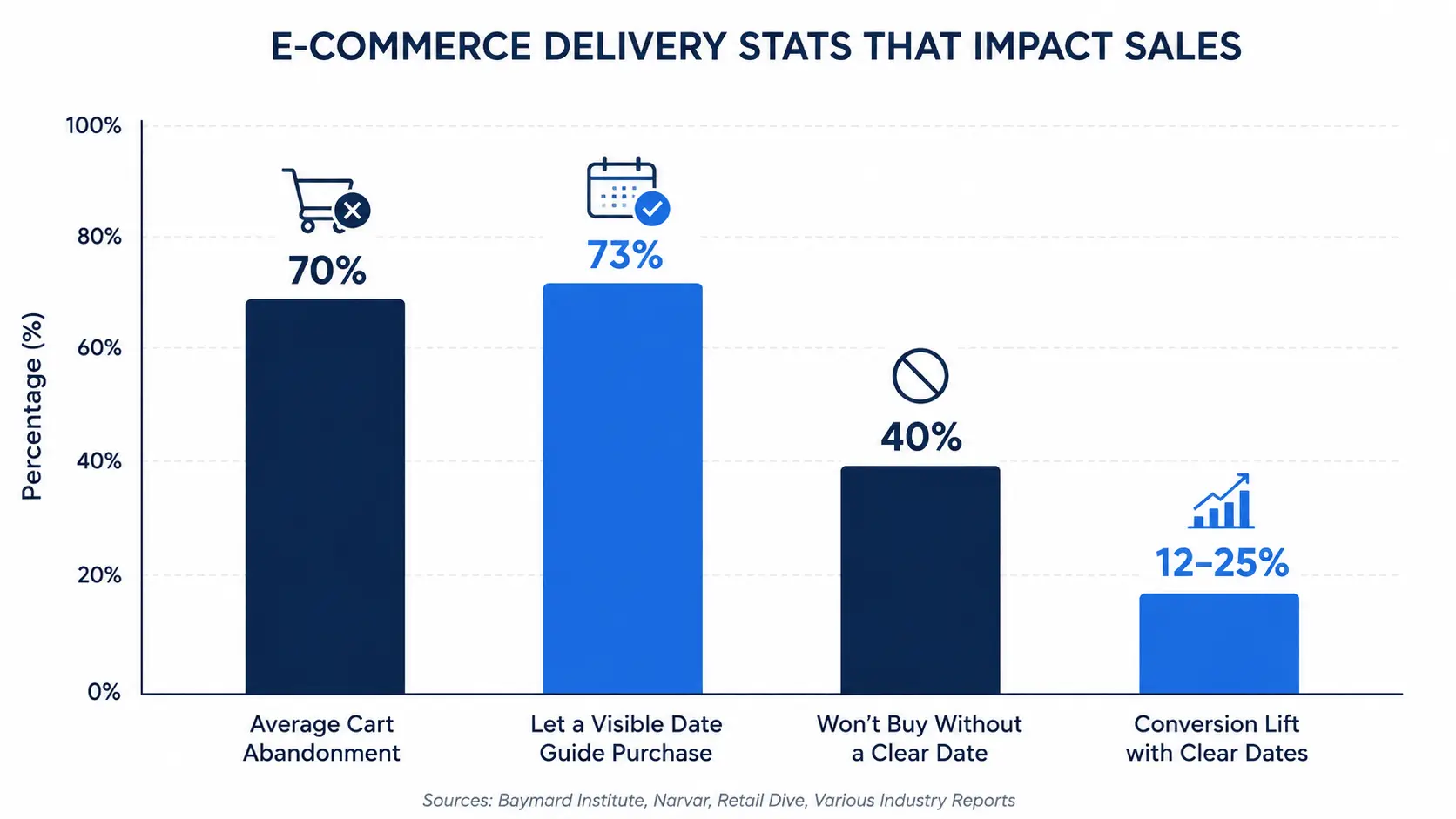
Clear delivery dates shape whether a shopper buys or leaves. According to Baymard Institute research, cart abandonment sits near 70%. Slow or unclear delivery is a top reason shoppers quit. Vague dates feed that doubt at the worst moment. Accurate Shopify delivery date rules remove that doubt for good.
The payoff is real and measurable for stores. Narvar’s 2025 shopper survey found that 73% let a visible date guide their purchase. Even more striking, 40% will not buy without a clear date. Real-world Shopify tests tie clear dates to 12–25% higher conversion.
Accurate rules also cut costly support work after the sale. 2026 checkout research shows 23% abandon over slow delivery options. Clear dates reduce “Where is my order?” tickets in every market. They also lower refunds caused by a broken delivery promise. So good rules protect both your revenue and your team.
There is a quieter benefit worth naming here too. Accurate dates build long-term trust, not just one sale. A kept promise brings shoppers back to buy again. A broken one sends them to a rival forever. Shopify delivery date rules protect that trust at scale, automatically.
The table below shows the difference at a glance:
| Aspect | One Flat Date | Rule-Based Delivery Dates |
| Accuracy | Same date for every order | Correct per product, place, and stock |
| Trust | Often broken after checkout | Honest, kept promises |
| Conversion | Doubt at the deciding moment | A clear date lifts sales |
| WISMO tickets | Many “where is my order?” | Fewer, answered upfront |
| Scales with catalog | Breaks as you grow | Handles any size cleanly |
| Setup effort | One vague setting | A default plus a few exceptions |
The Golden Principle: The Most Specific Rule Wins
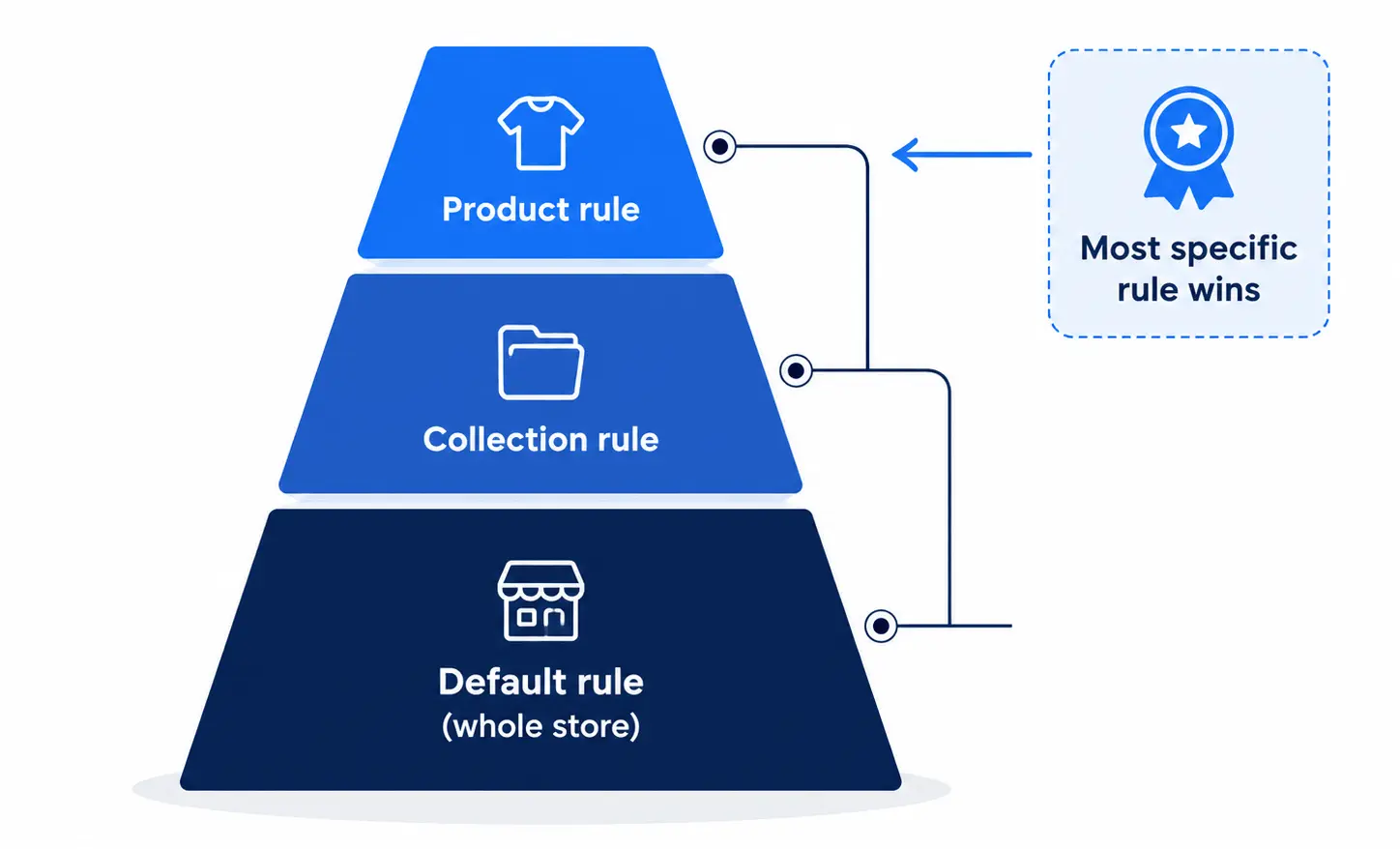
Here is the most important idea in this entire guide. Several Shopify delivery date rules can match one order at once. When that happens, the most specific rule always wins. It is not the first rule you created that wins. The precise, targeted rule beats the broad, general one.
Picture a default rule showing five days for your whole store. Then a product-wise rule shows ten days for one custom item. When a shopper views that item, the product rule wins. The more specific rule overrides the broad default cleanly. This keeps every date accurate without any conflict.
This principle lets you layer rules with total confidence. You set one broad default, then add narrow exceptions. Each exception quietly takes over only where it applies. Understanding this makes your whole rule system predictable. It is the key to mastering Shopify delivery date rules.
Why does specificity win instead of creation order? Because the narrowest rule reflects the truest delivery reality. A product-wise rule knows more than a store-wide default. So it should decide the date for that product. This logic keeps every promise as accurate as possible.
Start With One Default Rule
Every strong setup begins with a single default rule. This rule shows a sensible date for most of your catalog. It is the safety net that covers every product. No shopper ever sees a blank space where a date belongs. Your default rule is the foundation everything else builds on.
Set the default to your most common delivery window. For many stores, that is a realistic three-to-five-day range. Then you add targeted Shopify estimated delivery date rules on top. Those exceptions handle the products that differ from the norm. This simple base keeps your system clean and easy to manage.
Keep your default rule honest and slightly conservative. It is better to promise a touch more time. Under-promising and over-delivering delights shoppers every time. Your default rule sets the tone for the whole store. A trustworthy base makes every exception feel reliable too.
Product-Wise Rules
Product-wise rules set a delivery date for one specific product. They are perfect when a single item differs from the rest. A custom guitar, for example, needs a longer window than a t-shirt. Product-wise rules let that guitar show its own honest date. Everything else keeps using your default rule cleanly.
These rules shine for made-to-order and one-off items. You pick the product, then set its true lead time. The store shows that date only on that product page. Product-wise rules are precise, so they beat broader rules. That precision is exactly why the most specific rule wins.
Use product-wise rules sparingly, only where an item truly differs. You do not need one for every product you sell. A default plus a few product-wise rules covers most stores. This keeps your setup small, clean, and easy to update. Reach for product-wise rules when one product breaks the pattern.
Common product-wise rule candidates include a few clear types:
- Custom or personalized made-to-order items.
- Preorder products with a future ship date.
- Oversized or freight goods needing special handling.
Set a product-wise rule for each of these, then stop. These few rules quietly handle your genuine exceptions. Everything else stays on the default, clean and simple.
Collection-Wise Rules
Collection-wise rules set a delivery date for a whole collection. They are ideal when a group of products shares a timeline. Your “Preorder” collection, for example, may all ship next month. Collection-wise rules give that entire group one accurate date. You avoid setting the same date on every product by hand.
These rules save huge amounts of time on large catalogs. You manage one collection instead of hundreds of products. Add or remove items, and the rule follows them along. Collection-wise rules keep big stores organized and consistent. They are a smart middle ground between broad and narrow.
Collection-wise rules also pair well with your default rule. The default covers stray products outside any special collection. The collection rule then overrides it for grouped items. Because they are more specific, collection-wise rules win there. Use them whenever a clear group shares one delivery window.
Great collection-wise rule candidates include a few clear groups:
- A “Preorder” collection shipping on one future date.
- A “Made to Order” collection with a shared build time.
- A “Seasonal” collection tied to a delivery window.
Set one collection-wise rule for each such group. It then updates as products enter or leave the collection.
Product Tag-Wise Rules
Product tag-wise rules target items by their Shopify tags. Tags are flexible labels you attach to any product. This makes product tag-wise rules incredibly versatile and quick. You tag items like “made-to-order,” then set one shared date. Every tagged product shows that date, wherever it lives.
This rule type solves a tricky, common problem elegantly. A collection may mix ready-to-ship and made-to-order items. A jewelry line might hold both types side by side. Product tag-wise rules separate them without new collections. You just tag the slow items and set their longer date.
Tags are also fast to add and remove at any time. That makes product tag-wise rules perfect for temporary changes. A short supply delay on one line is easy to reflect. Tag those items, set a longer date, then untag them later. Product tag-wise rules give you precise control without structural changes.
Useful tags for product tag-wise rules include a few examples:
- “made-to-order” for slower, built-on-demand items.
- “ships-fast” for quick, in-stock products.
- “delayed” for a temporary supply issue.
Apply the tag, and the rule follows it everywhere. Remove the tag later, and the rule quietly steps aside.
Vendor-Wise Rules
Vendor-wise rules set delivery dates based on the product vendor. They are ideal for stores selling many brands or suppliers. Each vendor may ship at a different speed to you. Vendor-wise rules reflect that difference automatically on the page. So every brand shows a date that matches its real pace.
These rules are a lifesaver for multi-brand and dropship stores. One supplier may take two days, another may take ten. You set the window once per vendor, not per product. Vendor-wise rules then apply it across that vendor’s whole range. This keeps large, mixed catalogs accurate with little effort.
Vendor-wise rules layer neatly with your other Shopify delivery date rules. A product-wise rule can still override a vendor rule where needed. The most specific rule always wins in that case. Use vendor-wise rules when a supplier’s speed defines the timeline. They bring order to stores with many moving parts.
Vendor-wise rules suit these common store setups well:
- Multi-brand stores carrying many different suppliers.
- Dropship stores with supplier-driven lead times.
- Marketplaces where each seller ships separately.
Set one window per vendor, and the rule spreads across their range. Vendor-wise rules keep sprawling catalogs honest with little effort.
Inventory and Stock Status Rules
Inventory and stock status rules change the date based on stock. An in-stock item can promise a fast, near-term date. A backordered item must honestly show a longer window. Inventory and stock status rules make that switch automatically. So your dates always match what you can truly deliver.
This rule type prevents a very common broken promise. Without it, an out-of-stock item still shows a fast date. The shopper buys, waits, and then feels misled and upset. Inventory and stock status rules stop that problem at the source. They keep every promise honest, even as stock changes.
These rules react in real time as your inventory moves. When stock runs low, the date shifts to a realistic window. When stock returns, the fast date comes back automatically. Inventory and stock status rules need no manual updates from you. They quietly protect trust while your catalog keeps selling.
Inventory and stock status rules can react to several states:
- In stock: show your fast, standard delivery date.
- Low stock: keep the date, but add gentle urgency.
- Out of stock or preorder: show an honest longer window.
Each state gets a date that matches reality. That honesty stops the broken promises stock changes often cause.
Country-Level Delivery Rules
Country-level delivery rules set a date based on the shopper’s country. A domestic buyer sees a fast date for nearby delivery. An international buyer sees an honest, longer transit window. Country-level delivery rules detect the country and adjust automatically. This makes global stores feel local and trustworthy to everyone.
These rules usually rely on IP-based geolocation to detect the country. The store then matches the visitor to the right window. You set one rule per country or per region group. Country-level delivery rules then show each buyer their true date. No typing or guessing is required from the shopper.
Add a customs buffer to distant markets for extra honesty. International orders can face delays you cannot fully control. Country-level delivery rules let you build that buffer in cleanly. An honest longer date always beats a broken fast one. Use these rules whenever you ship across borders regularly.
Country-level delivery rules work well grouped into simple regions:
- Domestic: your fastest home-country window.
- Nearby regions: short international transit windows.
- Distant markets: longer windows with a customs buffer.
Grouping countries this way keeps your rule count low. You still give every market an accurate, local promise.
State and Region-Level Rules
Country-level rules are powerful, but sometimes you need finer control. Delivery times can differ within one large country too. A coast-to-coast order takes longer than a nearby state. State and region-level rules handle that difference cleanly. They set a distinct date for individual states or regions.
These rules build right on top of your country-level delivery rules. You set a broad country date, then refine it by state. The store detects the shopper’s state from their location. It then shows the matching, more specific date automatically. The most specific rule wins, so the state date applies.
You can also let shoppers pick their region themselves. A simple dropdown lets them choose country and state. The date then updates to match their exact choice. This helps when detection is uncertain, or a device is shared. State and region-level rules keep large markets accurate and fair.
Zip Code Delivery Dates Shopify Rules
Zip code delivery dates Shopify rules refine dates within a single country. Delivery speed varies a lot by ZIP or postcode. A buyer near your warehouse gets it far faster. Someone across the country waits several days longer. Zip code delivery dates Shopify rules reflect that real difference honestly.
These rules group many ZIP codes into simple delivery zones. Each zone shares one clear, accurate delivery window. A shopper enters their ZIP, or the store detects it. Zip code delivery dates Shopify rules then show the matching date. This turns a vague national average into a local promise.
Shopify has no built-in way to show ZIP-based dates. So zip code delivery dates Shopify rules need a dedicated tool. A good tool auto-detects the ZIP for zero friction. It can even block checkout for areas you do not serve. Use these rules when your delivery speed truly changes by region.
Zip code delivery dates Shopify rules usually use three simple zones:
- Local ZIPs: arriving in one to two days.
- Regional ZIPs: arriving in three to four days.
- Remote ZIPs: arriving in five to seven days.
Grouping ZIPs into zones keeps the setup simple. You avoid managing thousands of postcodes one by one.
Warehouse-Specific ETA Rules
Warehouse-specific ETA rules set dates based on the fulfilling location. Multi-warehouse stores ship each order from the smartest spot. The nearest warehouse delivers faster and cheaper to the buyer. Warehouse-specific ETA rules show the faster date on the page. So your multi-warehouse speed becomes visible to every shopper.
Without these rules, your warehouse advantage stays completely hidden. Shopify routes smartly on the back end, out of view. The storefront still shows one flat, generic date to all. Warehouse-specific ETA rules fix that gap at the customer level. They map each warehouse to its own real transit times.
These rules pair naturally with zip code and country rules. Together, they pick the nearest origin and the local date. Warehouse-specific ETA rules then display that honest, fast promise. This is where the most specific rule truly earns its keep. Use them when you fulfill from several locations at once.
Warehouse-specific ETA rules shine in these common cases:
- Two or more warehouses across one country.
- Several 3PLs serving different regions.
- The same product stocked in many locations.
In each case, the fulfilling location sets the real date. Warehouse-specific ETA rules make that speed visible to buyers.
Shipping Method-Based Rules
Shipping method-based rules show a distinct date for each shipping option. Standard shipping shows one date, and Express shows a sooner one. Overnight shows the fastest date of them all clearly. Shipping method-based rules update the date as shoppers switch methods. So every option carries its own honest, specific promise.
These rules do more than reassure hesitant shoppers at checkout. They quietly nudge buyers toward faster, paid shipping options. A shopper in a hurry sees Express arrive days sooner. That clear gap makes the upgrade feel worth the cost. Shipping method-based rules can lift your average order value.
On Shopify Plus, these rules can appear at the checkout too. Each shipping choice shows its own date beside the price. Shipping method-based rules keep that promise clear and consistent. For mixed carts, they can show the longest, honest date. Use them whenever you offer more than one shipping speed.
You can even combine speed with a gentle countdown timer. “Order within 3 hours for Express delivery” adds honest urgency. Shipping method-based rules pair that timer with a real cutoff. This drives same-day upgrades without any false pressure. Shipping method-based rules turn delivery speed into a selling point.
Multi-Language Display Rules
Multi-language display rules show the delivery date in each shopper’s language. A French visitor reads French, and a German reads German. The words and the date format both match the market. Multi-language display rules make global stores feel truly local. That local feeling builds trust and lifts international sales.
Here is a gap many merchants miss completely. Shopify’s native translation covers static theme text well. But it does not translate dynamic delivery messages automatically. So a translated store can still show an English date. Multi-language display rules close that exact gap for you.
These rules also localize the date format, not just the words. “August 14” becomes “14 août” in French, for example. Multi-language display rules handle both together, cleanly and correctly. Always review key translations with a native speaker too. Use these rules whenever you sell to more than one language.
These rules also reach the cart, checkout, and order emails. So the local date follows the shopper through the journey. Multi-language display rules keep every touchpoint consistent and clear. Pair them with country-level delivery rules for a fully local feel. Multi-language display rules turn a foreign store into a familiar one.
Cut-Off Time Rules
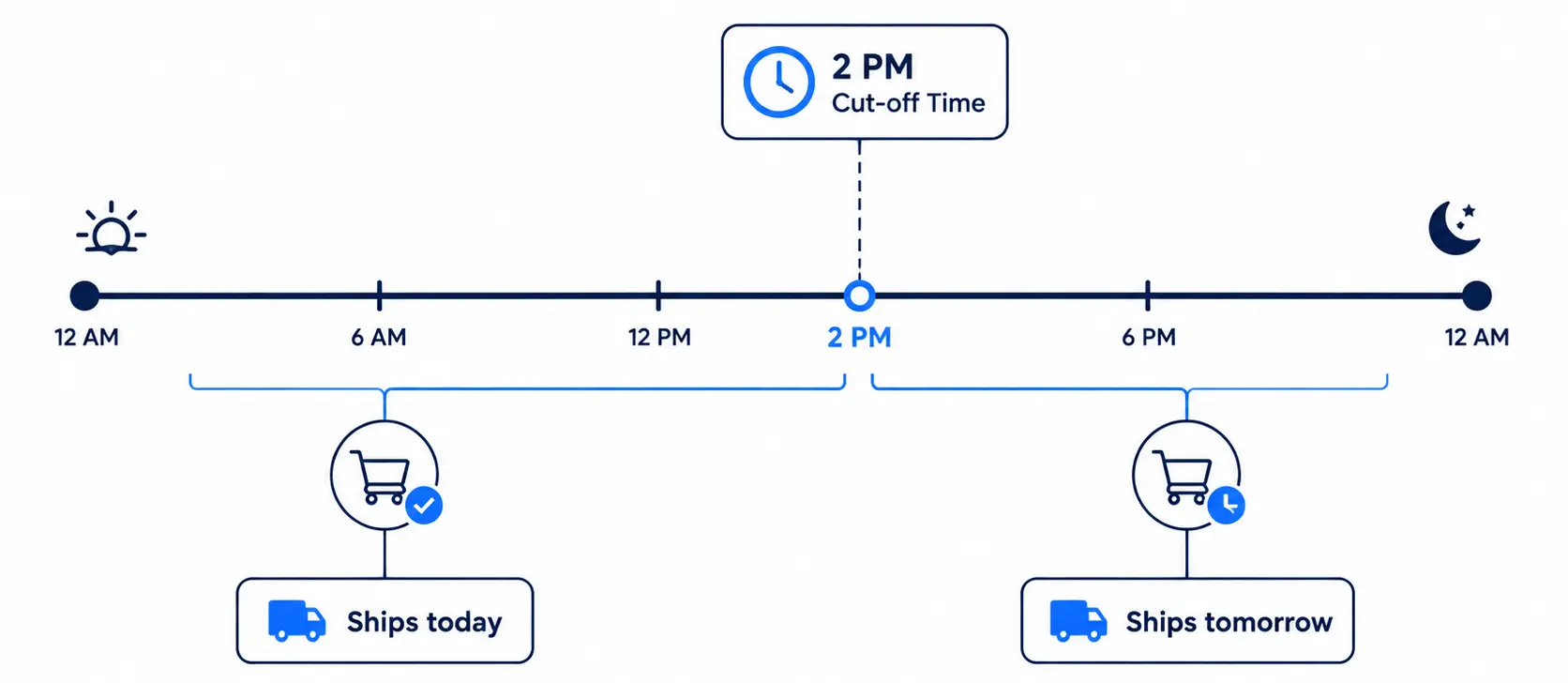
Cut-off time rules decide whether an order ships today or tomorrow. A 9 a.m. order might still ship the same day. The same order at 9 p.m. must ship the next day. Cut-off time rules make your date reflect that reality. So the promise stays honest at any hour of the day.
Without a cut-off, your dates quietly become wrong by evening. A “ships today” line at 11 p.m. is simply false. Cut-off time rules fix this by moving late orders forward. They roll any order past the deadline to the next day. This keeps same-day and next-day promises believable.
Set your cut-off to match your real packing schedule. If you stop shipping at 2 p.m., set that time. Cut-off time rules then respect it for every visitor. They pair naturally with your other Shopify delivery date rules. Accurate cut-offs are the small detail that builds big trust.
Lead Day and Preparation Time Rules
Lead day rules add your real preparation time before shipping. An order rarely leaves your door the instant it is placed. There is picking, packing, and sometimes making involved first. Lead day rules add those days to the delivery estimate. So the date reflects true prep time, not wishful thinking.
These rules matter most for made-to-order and custom items. A hand-poured candle may need two days to cure first. Lead day rules build that curing time into the date. The shopper then sees an honest window from the start. This prevents the delays that break trust after checkout.
You can set different lead days per product or rule. A ready-to-ship item may need zero extra days. A custom item may need five days before it ships. Lead day rules layer with product and tag rules cleanly. Together, they keep every prep-time promise accurate and honest.
Holiday and Off-Day Rules
Holiday and off-day rules keep your dates realistic year-round. Your team does not pack orders on weekends or holidays. Yet a naive date counts those non-working days anyway. Holiday and off-day rules skip them in the math. So a “two-day” promise never secretly lands on a Sunday.
You simply mark your weekends, holidays, and planned closures. The rule then excludes those days from every estimate. During busy seasons, this accuracy matters even more. Holiday and off-day rules protect your promises through peak rushes. They quietly keep every date honest around the calendar’s edges.
A Real Rule-Building Walkthrough
Let us build a realistic store’s rules from scratch together. Say you sell apparel, custom prints, and heavy homeware. You ship from two warehouses to several countries worldwide. Here is how your Shopify estimated delivery date rules take shape. We start broad, then layer narrow exceptions on top.
First, set one default rule of three to five days. Next, add a collection-wise rule for your “Preorder” line. Then tag custom prints and add product tag-wise rules. Add vendor-wise rules for each homeware supplier’s pace. Now your base and main exceptions are already covered.
Next, layer location on top for real accuracy. Add country-level delivery rules for your international markets. Add zip code delivery dates and Shopify rules for domestic zones. Add warehouse-specific ETA rules to reflect the nearest origin. Finally, add shipping method-based rules for Standard and Express.
One last step makes the store feel truly global. Add multi-language display rules for each language you serve. Add inventory and stock status rules to stay honest on stock. That full set of Shopify estimated delivery date rules stays lean. A default plus a dozen exceptions runs the whole store.
Now fine-tune the timing so every date stays honest. Add lead days for your custom, made-to-order items. Set a cut-off time that matches your packing schedule. Mark your weekends and holidays as off-days too. These small touches make every rule land precisely right.
Where Your Delivery Dates Should Appear
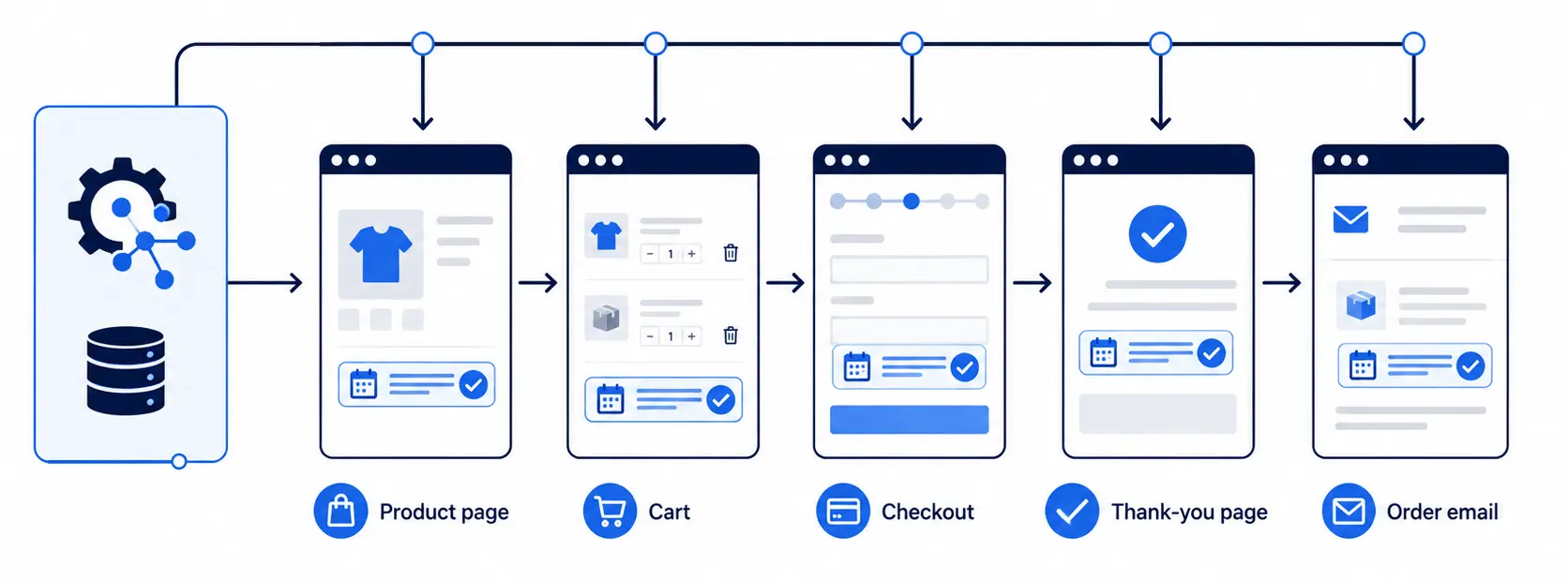
A great rule only helps if shoppers actually see it. Show your delivery dates where buyers make real decisions. These spots work best across the whole shopping journey:
- Product page, so buyers see timing before adding to cart.
- Cart page, as they review their order once more.
- Checkout, to confirm the date before paying.
- Order confirmation email, to reassure them after buying.
Consistent dates across all four build strong buyer trust. The shopper never meets a surprise or a mismatch anywhere. Your Shopify delivery date rules should apply everywhere at once. That steady clarity is what quietly lifts your conversions. Repetition across the journey turns doubt into confident action.
Handling Mixed Carts and Split Shipments
Mixed carts raise one tricky question about the date. What if items have different prep or transit times? What if two items ship from two different warehouses? Showing only the fastest date would quietly break your promise. The honest choice is to show the latest arrival date.
Your Shopify delivery date rules can handle this cleanly. The tool scans every item and its matching rule. It then shows the longest, most honest cart-wide date. On Shopify Plus, this can appear at the checkout too. This prevents confused “where is the rest?” tickets later on.
You can also show each item’s own delivery date. That way shoppers know exactly what arrives and when. Clear, split-aware dates protect trust more than a surprise. A good tool applies this logic automatically for you. Honesty about mixed carts keeps every buyer calm and informed.
Who Benefits Most From Shopify Delivery Date Rules?
Almost any growing store gains from these rules. But some feel the impact far more than others. These store types see the biggest wins from Shopify delivery date rules:
- Large catalogs mixing fast and slow items.
- Made-to-order and custom product brands.
- Multi-brand or dropship stores with many suppliers.
- Multi-warehouse stores shipping across wide regions.
- Global stores selling across many countries and languages.
For these stores, one flat date simply cannot work. Their delivery times swing by product, place, and stock. Shopify delivery date rules replace that chaos with clear accuracy. Each shopper then sees a promise built for them. The more varied your store, the more these rules help.
Rule Types at a Glance
Here is a quick recap of every rule type covered. Match each one to the situation it solves best:
| Rule Type | What It Targets | Best For |
| Product-wise rules | A single product | One-off or custom items |
| Collection-wise rules | A whole collection | Groups sharing a timeline |
| Product tag-wise rules | Tagged products | Cross-collection targeting |
| Vendor-wise rules | Products by vendor | Multi-brand and dropship stores |
| Inventory and stock status rules | Stock level | Honest dates as stock changes |
| Country-level delivery rules | The shopper’s country | International shipping |
| State and region-level rules | State or region | Large, wide countries |
| Zip code delivery dates Shopify rules | ZIP or postcode | Local precision by area |
| Warehouse-specific ETA rules | The fulfilling location | Multi-warehouse stores |
| Shipping method-based rules | The shipping option | Standard vs Express speeds |
| Multi-language display rules | The store language | Multilingual, global stores |
| Cut-off, lead day & holiday rules | Timing and calendar | Accurate business-day math |
Together, these Shopify estimated delivery date rules cover every case. Start broad, layer narrow, and let specific rules win. That simple approach keeps any store accurate and lean. You get many honest promises from just a few rules. This is the whole art of Shopify delivery date rules.
How Rules Combine: Layering for Precision
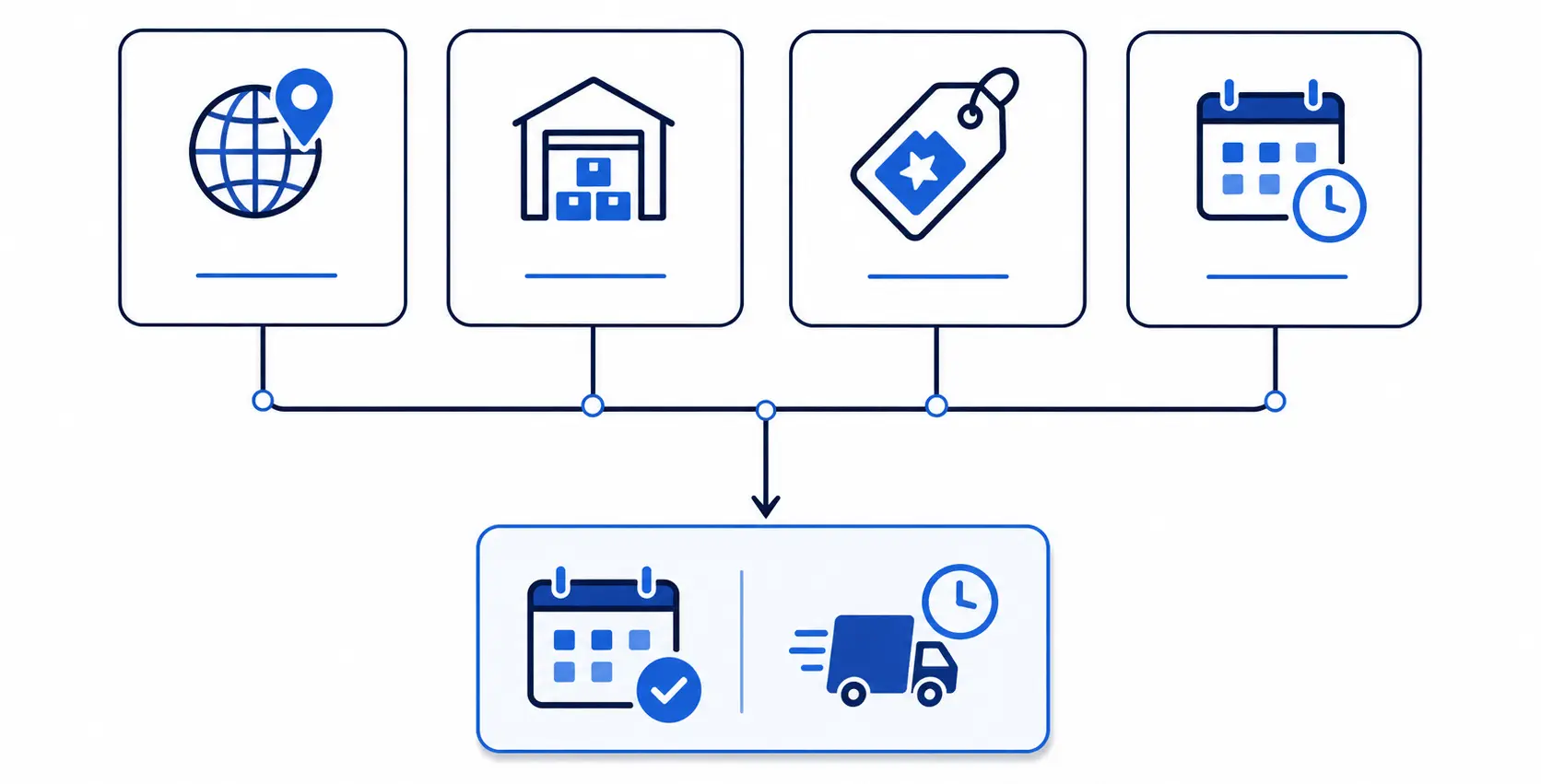
The real power appears when you layer several rules together. One order can match a country, a warehouse, and a tag. Shopify delivery date rules combine these conditions into one date. The most specific matching rule then decides the result. This layering gives you precision without endless separate rules.
Picture a heavy sofa shipping to Canada from your east warehouse. A country-level rule adds international transit time first. A warehouse-specific ETA rule reflects the fulfilling location too. A product tag-wise rule adds the made-to-order build time. Together, these Shopify delivery date rules produce one honest date.
You do not manage this layering by hand each time. A good tool resolves the winning rule automatically for you. It checks every condition and applies the most specific match. This keeps your Shopify estimated delivery date rules accurate at scale. Layering is how large, complex stores stay clean and correct.
This is also why an app beats manual code here. Resolving many overlapping rules by hand is error-prone. A dedicated tool does it instantly for every visitor. Your Shopify delivery date rules then stay correct as they grow. That reliability is what makes layering safe to use.
How Many Rules Does Your Store Actually Need?
Many merchants fear they need hundreds of separate rules. In truth, most stores need only a handful. One default rule plus a few targeted exceptions covers nearly everything. Even huge catalogs rarely need more than a dozen rules. The trick is choosing broad rule types over narrow ones.
Reach for collection-wise, vendor-wise, or tag-wise rules first. Each of these covers many products with a single rule. Product-wise rules are for rare, true one-offs only. This keeps your Shopify delivery date rules small and manageable. A lean system is easier to trust and to maintain.
A good rule of thumb helps here. If a rule would cover only one product, pause first. Ask whether a tag or collection could group it instead. Broad rules scale, while narrow ones pile up fast. Fewer, smarter rules always beat many scattered ones.
Bringing Your Delivery Date Rules to Life
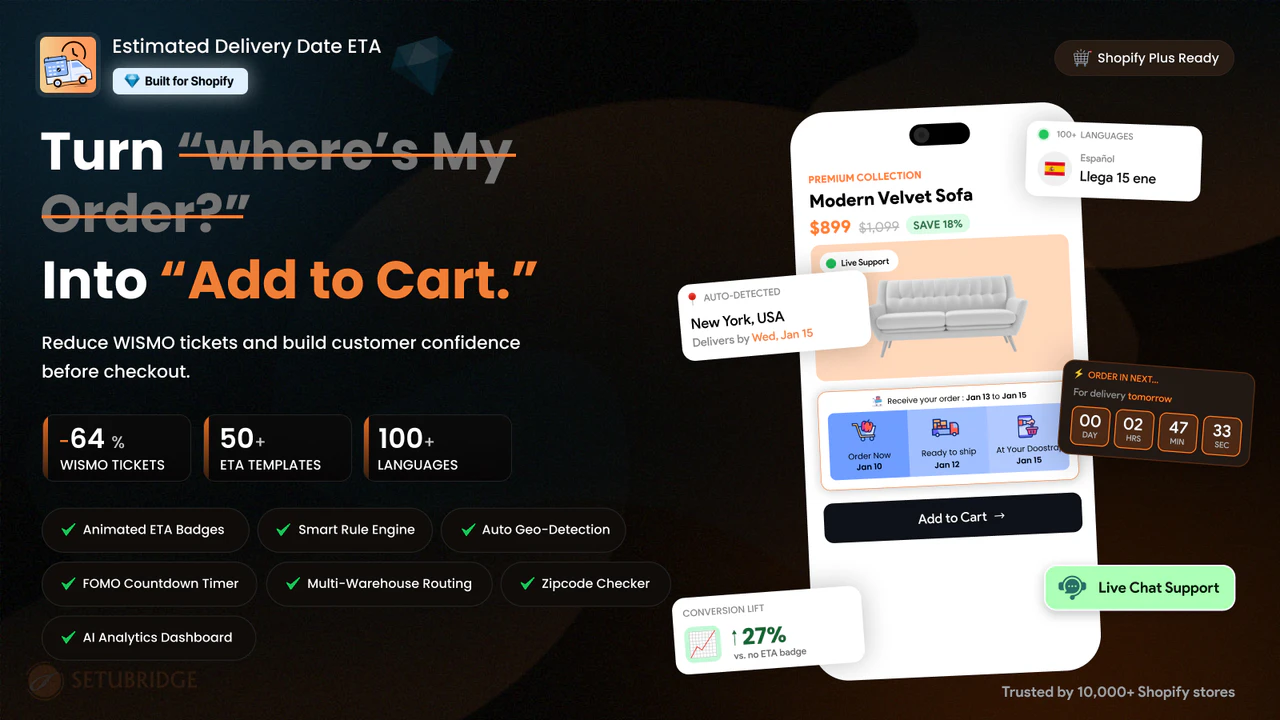
Rules decide the date, but presentation decides the impact. A clear, attractive delivery message earns far more trust. The Estimated Delivery Date – ETA app by SetuBridge runs every rule above. It shows the date with animated, customizable templates and previews. Presentation like this turns a plain date into a confident promise.
These rules can appear across the entire shopping journey. Show the date on product, collection, cart, and checkout pages. Show it again on the thank-you page and the order email. That repetition reassures the shopper at every single step. Consistent placement is what makes your rules truly effective.
A few extra touches make the date even stronger. A countdown timer adds honest urgency for faster shipping. Local time zone support keeps the date correct worldwide. A dashboard shows impressions, engagement, and saved support minutes. Together, these features bring your Shopify delivery date rules to life.
Best Practices for Shopify Delivery Date Rules
Start every setup with one solid default rule. Then add only the exceptions your catalog truly needs. Prefer broad rule types, like collection-wise or tag-wise rules. Reserve product-wise rules for genuine one-off items only. This keeps your Shopify delivery date rules lean and accurate.
Always base each date on real, honest transit times. An accurate longer date beats a fast, broken promise. Respect cut-off times, weekends, and local holidays in every rule. Show your dates on product, cart, and checkout pages together. Consistency across the journey builds trust at every step.
Review your Shopify estimated delivery date rules as your store changes. Update windows when carriers, stock, or seasons shift. Test both nearby and distant shoppers before going live. Group similar cases to keep your rule count low. A living, well-tuned system stays trustworthy month after month.
Set a simple schedule to keep rules fresh. Check them monthly, and before every busy peak season. Confirm each promised date still matches real arrival. Fix any window that has drifted out of date. This small habit keeps your whole system reliable.
Measure and Refine Your Rules
Building rules is the start, not the finish, of the work. Track how your dates affect conversion and cart abandonment. Watch whether “Where is my order?” tickets begin to fall. Compare results before and after each rule change. These simple checks show whether your rules are working.
Delivery accuracy is the metric that matters most over time. Match each promised date against when orders actually arrive. Industry data shows 77% of eCommerce pros now use AI daily. AI can even predict transit times more accurately per region. Use that insight to refine your Shopify delivery date rules.
Final Thoughts
That mug and that sofa should never share one date. Shopify delivery date rules give each product its own honest promise. They turn a single vague guess into many accurate dates. That clarity builds trust, lifts conversions, and cuts support tickets. In today’s market, this precision is expected, not a bonus.
You do not need hundreds of rules to get there. Start with one default, then layer a few smart exceptions. Let the most specific rule win, and stay honest throughout. An app can build every rule type in minutes, without code. Master your Shopify delivery date rules, and watch more carts become orders.
Begin today with one small, simple step. Set your default rule, then add your biggest exception. Test it, measure it, and add the next one. Your accurate, honest system will grow from there. That is how great Shopify delivery date rules are built.
Frequently Asked Questions
What exactly is a “rule” in the context of Shopify delivery dates?
A rule is a condition paired with a calculated delivery date, like “if this product ships from Warehouse B, add 2 processing days.” Shopify delivery date rules check each order against these conditions and display whichever date matches.
Why do store owners need rules instead of one fixed delivery estimate?
A single fixed estimate assumes every product, warehouse, and customer location is identical, which is rarely true. Rules let the estimated delivery date Shopify shows adjust automatically for real differences in stock, location, and shipping method.
Who should be setting these up? Is this only for large or multi-warehouse stores?
Any store with more than a handful of products or shipping options benefits, not just large multi-warehouse operations. Even a single-warehouse store selling both in-stock and made-to-order items needs at least two rules to stay accurate.
How many rules does a typical store actually need?
Most stores need far fewer than they expect, often under a dozen total. One default rule covers the bulk of the catalog, and a handful of targeted exceptions handle pre-orders, out-of-stock items, and any special shipping regions. Adding more rules than that usually signals overlap that could be consolidated into a single, broader exception instead.
Do rules require ongoing maintenance, or are they set-and-forget?
Once configured correctly, rules run automatically and rarely need daily attention. They still deserve occasional review, mainly around new product launches, holiday closures, or changes to shipping carriers. A quarterly check is usually enough to catch anything that’s drifted out of date.
Can rules be wrong, and how do store owners catch mistakes before customers do?
Yes, a misconfigured rule or an unexpected priority conflict can produce the wrong date. Reviewing your rule list periodically and previewing product and checkout pages after changes catches most issues before a customer ever sees them.
How do delivery date rules affect conversion rate and customer trust?
Showing an accurate delivery date at checkout has been shown to reduce cart abandonment by around 9%, since shoppers value clarity as much as speed. Vague estimates create hesitation right at the moment a customer is deciding whether to buy.
Do rules help reduce WISMO (“Where Is My Order”) support tickets?
Yes, accurate and proactive delivery estimates are one of the most effective ways to cut WISMO volume, with some brands seeing reductions of 60% to 80%. Customers who already know when to expect their order rarely need to ask, which frees up support time for issues that actually need a person.
Can a non-technical store owner manage rules without developer help?
Yes, delivery date rule apps are built for merchants, not developers, using dropdowns and conditions instead of code. Most stores can set up their first rules in under an hour, and ongoing edits take just a few minutes once the initial structure is in place.
What’s the difference between a “default rule” and an “exception rule”?
The default rule is the fallback estimate applied to your entire catalog unless something more specific overrides it. Exception rules are narrower conditions, like a product tag or a shipping zone, that take priority over the default whenever they match an order.

Shopify Expert
Dipen Panchal, Shopify Tech Lead at Setubridge Technolabs, brings over a decade of expertise as a Shopify Expert. Passionate about e-commerce growth, he specializes in UI/UX design, crafting intuitive, engaging solutions tailored for merchants and B2B clients to enhance user experiences.