You did the hard part. You found a great product, shot clean photos, and set a fair price. Then you open your analytics and watch shoppers land, scroll, and leave. It stings, because you know the product deserves better.
In a physical store, shelf tags and “Clearance” stickers guide every choice. A “Staff Pick” card tells a shopper what to try first. Online, a shopper scrolling your collection grid on a phone sees only a photo, a name, and a price. That missing context is where sales quietly slip away.
Shoppers decide in seconds. When they can’t see the deal, the stock level, or why a product fits them, they hesitate. They open new tabs, compare prices elsewhere, or abandon the cart. Shopify product badges fix this by acting as the digital shelf tag on every product card.
This guide starts with a badge workflow you can set up today. Then it explains what product badges are and how they help shoppers buy smarter. You will also learn which badge types to use, who needs them, and where the legal line sits.
Key Takeaways
- Shopify product badges answer a shopper’s silent questions right on the product card.
- Each badge should answer one question: the deal, availability, fit, trust, or what’s new.
- One or two badges per product card work better than four tags fighting for attention.
- Urgency badges must reflect real stock, real deadlines, and real prior prices to stay FTC-safe.
- Rule-based badges switch off on their own once they stop being true.
- Track click-through and add-to-cart rates to see which badges earn their space.
- Most themes only show “Sale” and “Sold out,” so most stores need more badge types.
What Are Shopify Product Badges?
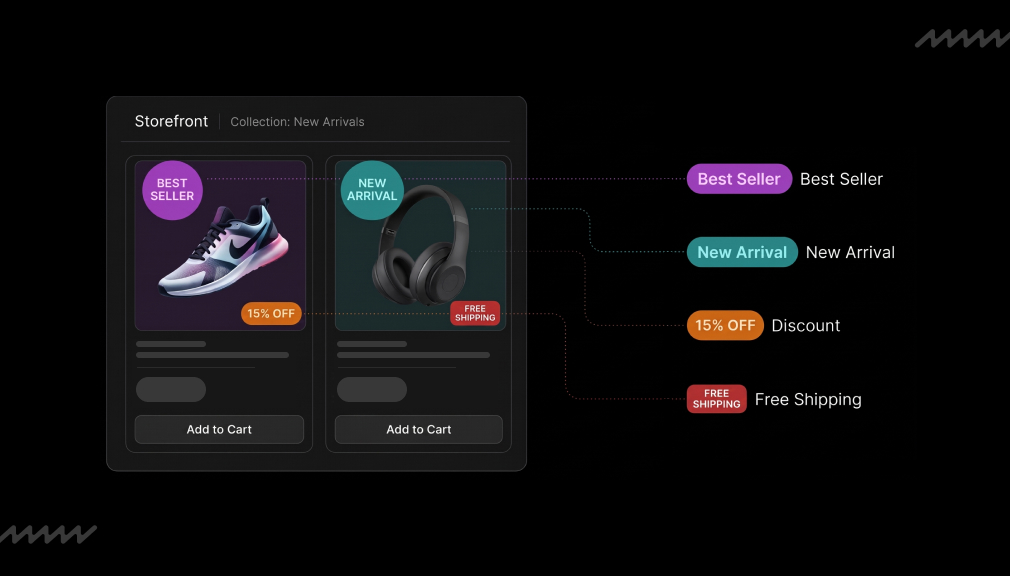
A Shopify product badge is a small visual tag on a product image or near the price. It highlights one key fact, such as a discount, stock level, or feature. Shoppers read it in under a second, often before the product title. That speed is why badges work so well on mobile collection grids.
Badges vs. Labels vs. Trust Badges vs. Banner Bars
Store owners often mix these terms up. Product badges and product labels mean the same thing: tags tied to individual products. Trust badges cover store-wide promises, such as secure checkout or free returns. Banner bars announce store-wide news, like a holiday sale or a shipping cutoff.
Where Badges Appear
Badges show up on collection grids, product pages, search results, the cart, and homepage sections. Collection grids matter most, since shoppers decide there which products to open. Most Shopify themes include only “Sale” and “Sold out” badges by default. That leaves stock, shipping, features, and social proof unsaid.
How Product Badges Help Shoppers Buy Smarter
Every badge should answer one of five silent questions a shopper asks while scanning. When the answer is visible, the shopper moves forward. When it is missing, they stop and guess. Here is how each badge type removes that guess.
“Is This a Good Deal?”
Discount badges show the savings up front, such as “Save 25%.” Shoppers don’t need to compare prices or do mental math. They also won’t scroll past a markdown hidden in small strikethrough text. Clear savings help price-sensitive shoppers act with confidence.
“Will It Be Available When I Want It?”
Low stock, back in stock, pre-order, and “Ships by” badges set honest expectations. A gift buyer needs to know if an item arrives before the holiday. A “Back in Stock” badge brings returning shoppers straight to items they wanted before. Accurate availability prevents disappointment and refund requests later.
“Is This Right for Me?”
Attribute badges like vegan, organic, waterproof, plus size, or Made in USA act as visual filters. Shoppers can sort products by eye without opening every page. This saves time for shoppers with strict needs, such as allergies or size limits. It also cuts returns caused by wrong-fit purchases.
“Can I Trust It?”
Best seller, top rated, staff pick, and warranty badges borrow social proof. They tell a new visitor that other people bought and liked the product. This lowers the risk a first-time buyer feels. It matters most for newer stores that shoppers haven’t heard of yet.
“What’s New or Worth a Second Look?”
New arrival, limited edition, and gift-ready badges help returning customers spot changes fast. Loyal shoppers don’t want to rescan your whole catalog every visit. A “New” badge points them to fresh stock in seconds. That keeps repeat visits short, useful, and more likely to end in a purchase.
The psychology behind this is simple. Too many choices create choice overload, and shoppers freeze. A badge gives the brain a quick shortcut it can trust. Less mental effort leads to faster, more confident buying decisions.
Why Shopify Product Badges Matter for U.S. Store Owners
Lost sales often start on the product card, not at checkout. Baymard Institute puts the average documented cart abandonment rate at 70.22%. Mobile is harder still, with mobile cart abandonment at 80.2% versus 70% on desktop. Small screens leave little room for long descriptions, so key facts must sit on the card.
Trust is another gap. In Baymard’s survey, 19% of shoppers who abandoned did not trust the site with card details. Clear warranty, returns, and trust badges answer that worry early. Shoppers see the promise while they are still deciding, not after.
Black Friday and Cyber Monday raise the stakes. Shoppers compare dozens of offers in one sitting. Cyber Monday cart abandonment reached 80.25% in one recent report. Clear sale and shipping-cutoff badges help your deals register before shoppers move on.
Better badges also ease daily store operations. Click-through from collection pages rises when key facts are visible. Support teams get fewer “Is this on sale?” questions. Slow-moving items get a fresh chance with a clear “Last Chance” or “Bundle Deal” badge.
Types of Product Badges and When to Use Each
Each badge type answers a different shopper question. Use this table to match badge types with the right spots on your store. Pick only the badges that reflect your store’s real selling points.
| Badge type | Shopper question | Best placement | Example text |
| Discount / sale | Is this a good deal? | Collection grid, product page | Save 30% |
| Inventory (low stock, back in stock) | Will it be available? | Product page, grid | Only 3 left |
| Pre-order / shipping | When will I get it? | Product page | Ships Nov 20 |
| Social proof (best seller, top rated) | Do other people like it? | Grid, search results | Best Seller |
| Attribute (vegan, waterproof, Made in USA) | Is it right for me? | Grid, product page | Cruelty-Free |
| New / limited | What’s new? | Grid, homepage | New Arrival |
| Promo mechanics (BOGO, free gift) | What extra do I get? | Grid, product page | Buy 1 Get 1 |
| Trust / guarantee | Is it safe to buy? | Product page, cart | 30-Day Returns |
Don’t use every badge type at once. A store with fast U.S. shipping should lead with shipping badges. A clean-beauty brand should lead with ingredient badges. Start with two or three types that match why customers already buy from you.
A Badge Workflow That Fixes Silent Product Cards
Most Shopify merchants hit the same wall. The theme shows a “Sale” tag but nothing about stock, shipping, or features. A rule-based badge app shows the right badge on the right product automatically.
DECO Product Labels & Badges
DECO Product Labels & Badges by PieLab is a Shopify app for adding product labels, badges, trust badges, and banner bars. It carries the “Built for Shopify” tag, which Shopify gives apps that meet its performance, design, and integration standards. You can start with ready-made templates for sale, low stock, BOGO, and new arrival badges. An AI generator can also create a badge from a short description.
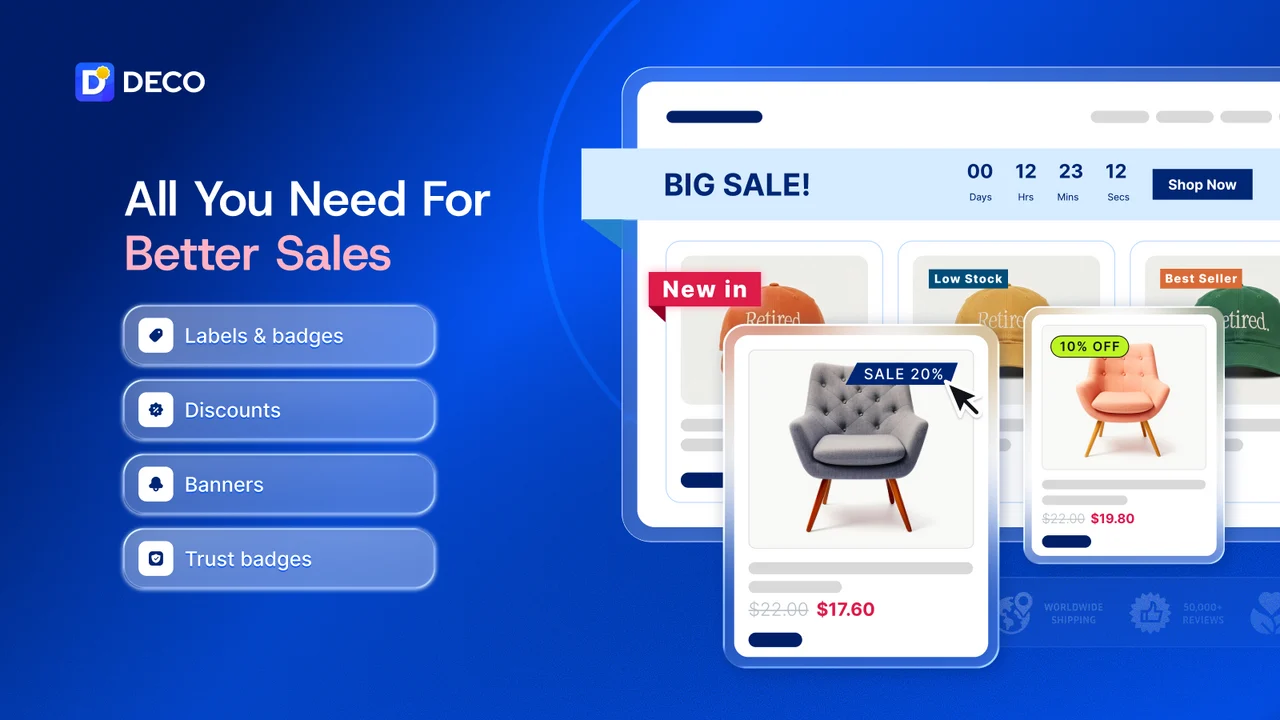
Badges display based on conditions such as variant, collection, tag, discount, or inventory, so they stay accurate as stock changes. The app calculates and shows discount amounts on sale products without manual edits. It also turns product metafields, like size or material, into labels. Scheduling, translations, and tracking help you plan promotions and measure results.
How the Workflow Fits Common Merchant Problems
The table below maps everyday store problems to a badge and the setting that handles it. Use it as a checklist when planning your first badges. Start with the problem that costs you the most sales today.
| Merchant problem | Badge that answers it | Setting to use |
| Shoppers miss sale items on collection pages | “Save 25%” discount badge | Automatic discount calculation |
| Popular items sell out without warning | “Only 3 left” low stock badge | Inventory-based condition |
| Holiday badges stay live after the sale ends | “Black Friday Deal” badge | Label and badge scheduling |
| Shoppers can’t spot key features fast | “Vegan” or “Waterproof” badge | Product metafields or tag condition |
| International visitors see English-only badges | Translated sale badge | Translation by language or country |
Which Plan Fits Your Store Problem
Plans differ by the problems they solve, not just by price. This view groups each plan by the store stage it suits. Prices come from the Shopify App Store listing and add $20 a month for Shopify Plus stores.
| Plan | Price | Best for this store problem | Features that solve it |
| Free | $0 | Testing whether badges lift clicks on a few products | Up to 4 badges on 20 products, unlimited banner bars and trust badges, performance tracking |
| Starter | $9/month | Running regular sales across the full catalog | Unlimited badges, AI generation, discount campaigns, translations |
| Growth | $19/month | Seasonal promos that must start and stop on time | Advanced conditions, scheduling, collection and language targeting, metafield labels |
| Unlimited | $39/month | Large catalogs running overlapping campaigns | Unlimited badge groups, priority settings, custom design requests |
Ratings and Reviews
On the Shopify App Store, the app holds a 4.9 out of 5 rating from 1,735+ reviews, with 97% of ratings at five stars. Merchants often mention easy setup and helpful tag-based rules. Many also note quick support for theme fixes and custom designs. These figures reflect the listing in October 2026.
Who Should Use Product Badges?
Most Shopify stores benefit from product badges. The right mix depends on your category and catalog size. Use this list to find your starting point.
- Fashion and apparel: new drops, small size availability, and sale markdowns.
- Beauty, wellness, and food: vegan, gluten-free, and certification badges that shoppers filter by.
- Electronics and home goods: warranty, compatibility, and “Ships in 24 hours” badges.
- B2B and wholesale: bulk pricing tiers, minimum order quantities, and customer-specific messages.
- Large catalogs: rule-based automation matters more than custom design.
- Small catalogs: a few hand-picked badges are enough.
A single-product store may need very few badges. Luxury brands with a minimal look may limit badges to the product page. Match badge volume to your brand style and your shoppers’ real questions.
Honest Badges Only: Staying on the Right Side of the FTC
The FTC’s 2022 staff report, Bringing Dark Patterns to Light, flags false low-stock messages as deceptive design. It flags baseless countdown timers too. Urgency is not illegal, but false urgency is. Every badge must reflect real inventory, real deadlines, and real prior prices.
Fake urgency is common online. A Princeton and University of Chicago study found 157 deceptive countdown timers on 140 of about 11,000 shopping sites. Shoppers who catch one fake badge start doubting every other claim on your store. One rule helps: if a badge would embarrass you a week later, don’t use it.
“Made in USA” badges carry their own rules. The FTC requires products to be “all or virtually all” made in the U.S. for an unqualified claim. That covers final assembly, significant processing, and nearly all parts. Check supplier details before adding this badge to any product.
Best Practices for Badge Design and Placement
Good badges are quick to read and always true. These practices keep your product cards clean and useful on any device. Apply them before you add your first badge.
- Use one or two badges per product card; more becomes visual noise.
- Keep wording to one to three words with a clear number or action.
- Use consistent colors by meaning, such as red for sale and green for eco features.
- Match your brand fonts so badges look like part of the store.
- Place badges in image corners so they never cover the product.
- Check mobile first: badges must stay readable at small sizes.
- Keep strong color contrast, and never let color alone carry the meaning.
- Automate rules by tag, collection, inventory, or discount so badges switch off when untrue.
- Schedule seasonal badges in advance and remove them on time.
How to Measure Whether Your Badges Are Working
Badges should earn their space with data. Track click-through rate from collection pages, add-to-cart rate, and conversion rate. Compare revenue on badged products against similar unbadged ones over the same period. Test one badge type at a time so you know what caused the change.
Watch for warning signs too. Badge fatigue sets in when every product carries a tag. Page speed can drop if badge images are heavy. Oversold “Best Seller” claims can push return rates up.
When You Can Add Badges Without an App
Most Shopify themes show “Sale” and “Sold out” badges automatically. Developers can build custom badges with product tags, metafields, and theme code edits. This works well for a few permanent badges, like “Handmade” on a small catalog. Each seasonal change, though, means another round of code edits.
A badge app fits better in a few clear situations. You run frequent promotions or manage hundreds of products. You need badges based on inventory, discounts, or customer tags. You also sell across several languages or markets.
Conclusion
Shopify product badges work because they answer one honest question at the moment a shopper needs it. They show the deal, the stock level, the fit, the proof, and what’s new. Start by auditing which questions your product cards leave unanswered today. Add one or two badge types that answer them, then measure results and prune what doesn’t help. Keep every badge truthful, and shoppers will trust the rest of your store too.
Frequently Asked Questions
What is a product badge on Shopify?
A product badge is a small tag on a product image or near its price. It highlights one key fact, such as a discount, stock level, or feature.
Do Shopify product badges increase conversions?
They can, when they answer a real shopper question. Badges reduce hesitation by showing key facts on the product card. Test each badge type to confirm its effect on your store.
How many badges should one product have?
One or two badges per product card work best. More than that creates visual noise and hides the product image.
Are low stock badges and countdown timers legal in the U.S.?
Yes, when they are true. The FTC treats false low-stock messages and fake timers as deceptive. Tie every urgency badge to real inventory and real deadlines.
Can I add product badges to Shopify without an app?
Yes. Most themes show “Sale” and “Sold out” badges, and developers can add more with tags or metafields. Apps make rule-based and seasonal badges easier to manage.
Do product badges slow down a Shopify store?
Lightweight text badges have little effect on speed. Heavy images and too many badges per page can add load time. Check page speed after adding new badges.

Digital Marketing Head
Vijay Chavda is the Digital Marketing Head at SetuBridge Technolabs with 14 years of expertise in driving growth strategies. Beyond marketing, he is skilled in data analysis, leveraging Power BI and Tableau to turn insights into action, blending creativity with analytics for impactful business results.