It is 11:40 PM. You are answering the same question for the ninth time today. “Does this ship to Canada?” You copy your reply from this morning and hit send.
Earlier that day, another shopper had the same doubt. They looked for an answer, found none, and closed the tab. They never emailed you.
That silent shopper is the expensive one. The first customer lands in your inbox. The second one only shows up as a flat conversion rate.
Most Shopify merchants treat the FAQ page as housekeeping. It gets written once, dropped in the footer, and never touched again. But the questions shoppers ask before buying are the same questions that quietly stall the sale.
The right Shopify FAQ app moves answers closer to the moment of doubt. Here are five Shopify FAQ and help center apps. Each entry covers what it is really built for.
Key Takeaways
- Unanswered pre-purchase questions become silent exits, not support emails.
- Place answers on the product page first, then build the help center.
- Check the metering unit before installing, since some plans scale with traffic.
- Google no longer shows FAQ rich results, so pick for shopper experience.
- Short, specific answers outperform long ones. Vague answers create new questions.
- Review your FAQ content quarterly so policies and answers stay aligned.
Shopify FAQ Apps Compared: Details the Listing Pages Do Not Highlight
Most comparisons repeat feature lists. These columns cover what changes your decision by month three.
| App | Live since | Team based in | What the plan meters | Free tier ceiling | Standout detail |
|---|---|---|---|---|---|
| HelpLab FAQ Page | 2020 | Pune, India | Number of FAQs | 10 FAQs, no branding | FAQs surface inside the Shop app |
| EasySlide Accordion | 2015 | Warsaw, Poland | Nothing (flat rate) | Trial only, 7 days | WCAG 2.0 and Section 508 accordions |
| Trusted Help Center | 2021 | Kaunas, Lithuania | FAQ placement | Full FAQ page | $79 one-time lifetime license |
| StoreFAQ | 2024 | Milton, Delaware | FAQ page views and AI chats | 100 page views | Chatbot trains on your catalog |
| D: AI FAQ Page | 2021 | Hanoi, Vietnam | Nothing (free) | Whole app is free | Helpful or not-helpful voting |
The 5 Best Shopify FAQ Apps at a Glance
- HelpLab FAQ Page, Product FAQs — clean product FAQs and answers that also show inside the Shop app.
- EasySlide Accordion Tabs & FAQ — accessibility-compliant accordions for long product descriptions.
- Trusted Help Center & FAQ — a searchable help center with a one-time pricing option.
- StoreFAQ: Product FAQ Chatbot — AI answers trained on your own catalog.
- D: AI FAQ Page — a fully free FAQ builder with helpful or not-helpful voting.
Top 5 Shopify FAQ & Help Center Apps
“All apps are personally tested by our Shopify Team”
1. HelpLab FAQ Page, Product FAQs

HelpLab FAQ Page, Product FAQs by Avocados Lab helps you build a clean, modern FAQ page fast. It also lets you add product-level FAQs right where shoppers have doubts. The app carries the Built for Shopify badge, so it meets Shopify’s highest bar for speed and design.
You can match fonts, colors, and styles to your theme without touching any code. It supports Google rich SEO snippets, so your answers can appear in search results. You can also add photos and videos inside answers to explain tricky topics clearly. It works with the Shop app and supports every language your store already uses. That mix makes it a practical FAQ page app for stores that want polish and simplicity.
What Tested Results
- The editor felt beginner-friendly, and we built a full FAQ set within minutes.
- Answers loaded quickly on our test theme, with no visible lag on mobile.
- Embedding a YouTube video inside an answer worked without any theme code edits.
- The live preview helped us match brand colors before publishing anything.
- FAQs stayed easy to read even when we stacked a very long question list.
- The Shop app integration pushed our FAQs to that surface with no extra setup.
- Rich snippet support was on by default, so we skipped manual schema work.
- Switching languages kept the formatting intact across each translated answer.
2. EasySlide Accordion tabs & FAQ
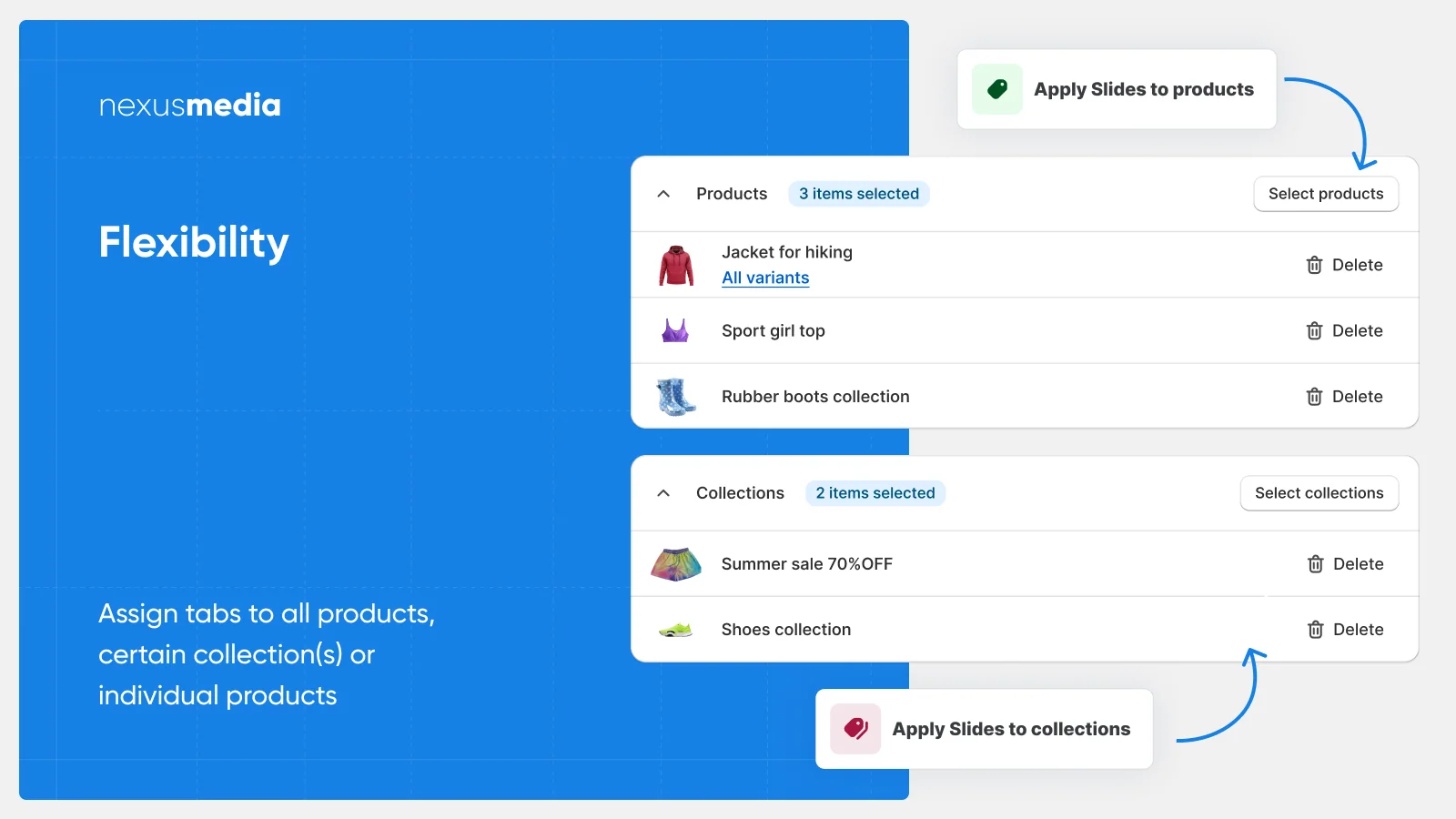
EasySlide Accordion tabs & FAQ by NexusMedia turns long text into tidy, collapsible accordions. You can build a full FAQ page or fold product descriptions into neat tabs. The app holds the Built for Shopify badge for strong speed, design, and integration. You can apply accordions to every product at once or to chosen collections only.
It also builds panels for reviews, size guides, and other third-party app content. The widgets are WCAG 2.0 and Section 508 compliant, which supports accessible browsing. That makes it a flexible FAQ and accordion app for stores with dense product pages.
What Tested Results
- Adding questions to a page auto-converted them into accordion tabs without coding.
- Assigning one shared accordion to many products saved us real setup time.
- Long product descriptions looked far cleaner once folded into collapsible sections.
- The accordions expanded smoothly on mobile, with no jumpy layout shifts.
- We slotted a size-guide panel beside reviews, and both opened cleanly.
- Keyboard navigation worked on the widgets, which matters for accessibility.
- The design controls let us match tab styling to our theme quickly.
- Installation applied to our theme without leaving leftover code behind.
3. Trusted Help Center & FAQ
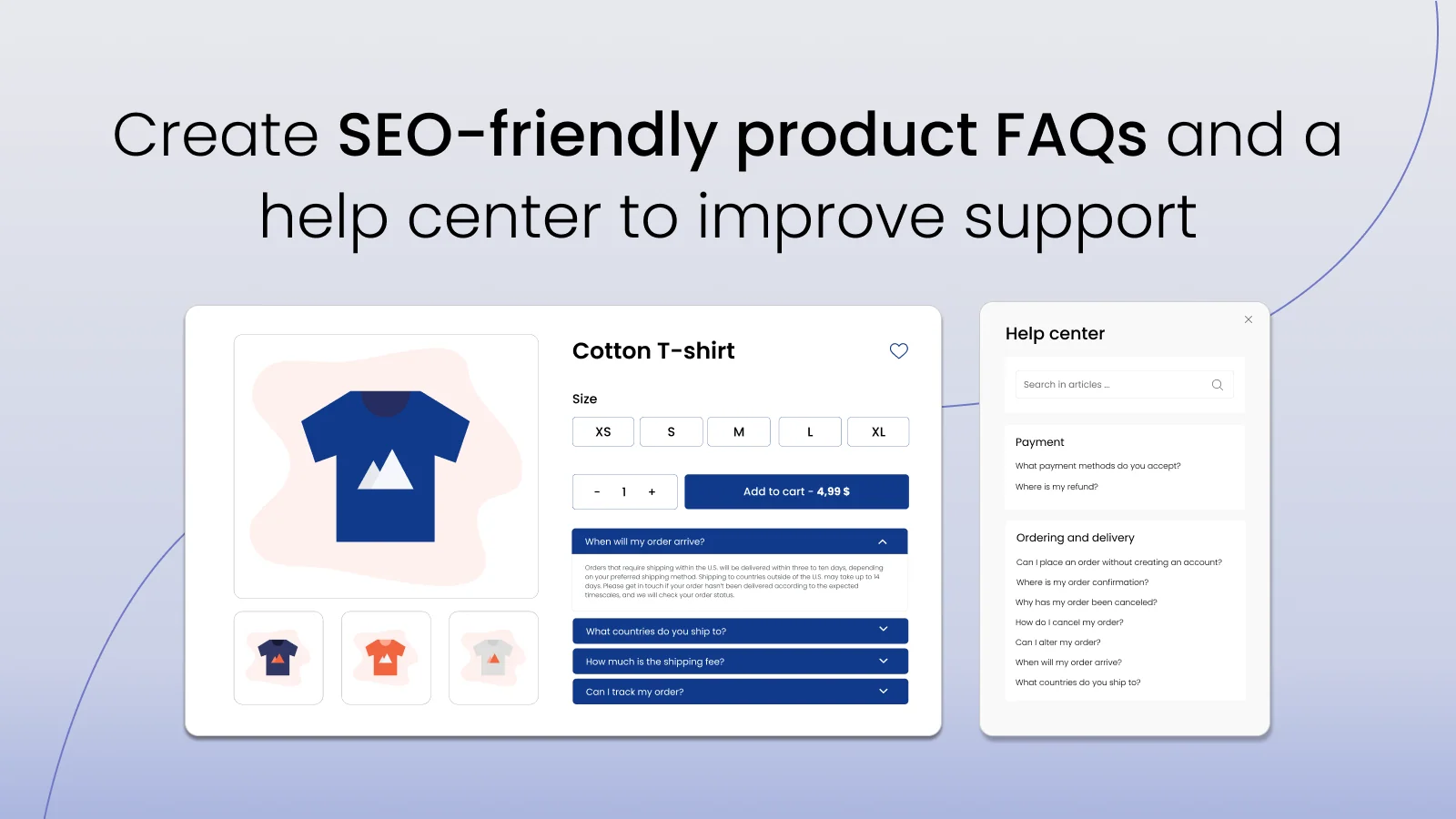
Trusted Help Center & FAQ by Trusted apps helps you create a searchable help center and FAQ page. It runs on its own, so it needs no theme edits and no coding skills. The app carries the Built for Shopify badge for performance, design, and integration. You can place your main FAQ on a clean, separate URL that is easy to share. You can also add FAQs to products, collections, blogs, and any custom page you choose.
The admin dashboard lets you format text and drop in images or videos. It supports JSON-LD schema, which helps search engines read your answers well. That makes it a solid help center and FAQ page app for growing support needs.
What Tested Results
- The separate FAQ URL made it simple to link from emails and live chats.
- Setup ran fully outside our theme, so nothing broke during install.
- We formatted answers with headings and images straight from the dashboard.
- Placing FAQs on a collection page took only a couple of clicks.
- The prepared templates gave us a usable layout before any customization.
- Search inside the help center returned the right answer on our test queries.
- JSON-LD markup was generated automatically once answers went live.
- Language translations held their layout across the pages we tested.
4. StoreFAQ: Product FAQ Chatbot
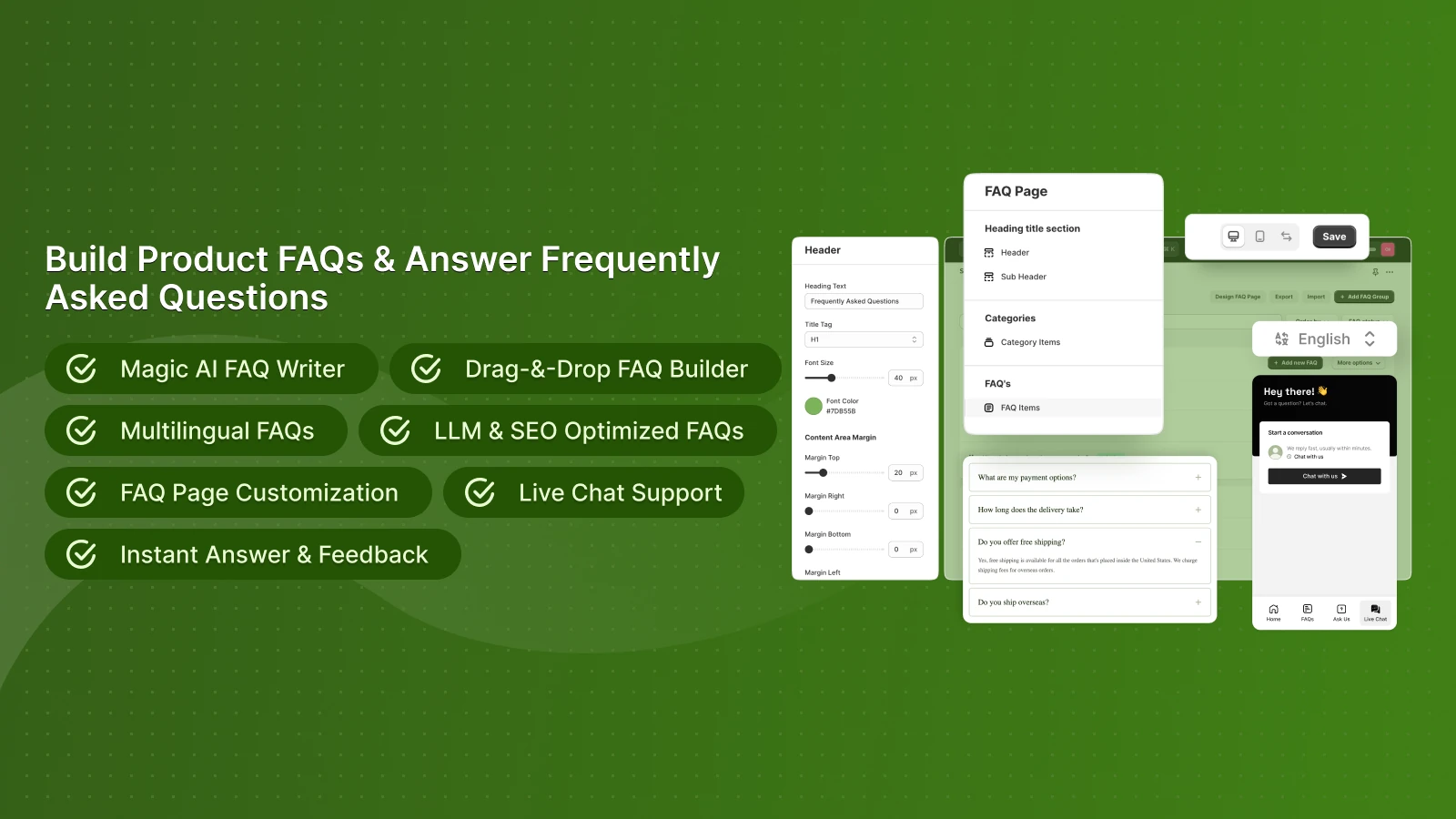
StoreFAQ: Product FAQ Chatbot by Storeware combines FAQ pages with an AI chatbot for instant help. You can write answers faster with AI and organize them using a drag-and-drop builder. The app holds the Built for Shopify badge for speed, design, and integration. You can show FAQs on the FAQ page, product page, collection page, or any custom page. It adds FAQ schema and JSON-LD to support stronger search visibility.
The AI Chatbot, Instant Answer, and Live Chat reply to shoppers in real time. You can also import or export FAQs to build a customer help center fast. That makes it a strong FAQ and support app for stores that want smart automation.
What Tested Results
- The AI drafted usable answers, which we then edited to fit our brand tone.
- The drag-and-drop builder made reordering FAQ groups quick and clear.
- The chatbot pulled answers from our FAQ content during live test chats.
- Instant Answer surfaced replies without sending shoppers to a new page.
- Importing a file of questions populated our help center in one step.
- Placing FAQs on a product page kept the page layout clean and simple.
- The multilingual setup let us serve answers in multiple languages.
- Schema markup was added automatically, so we skipped manual SEO edits.
5. D: AI FAQ Page
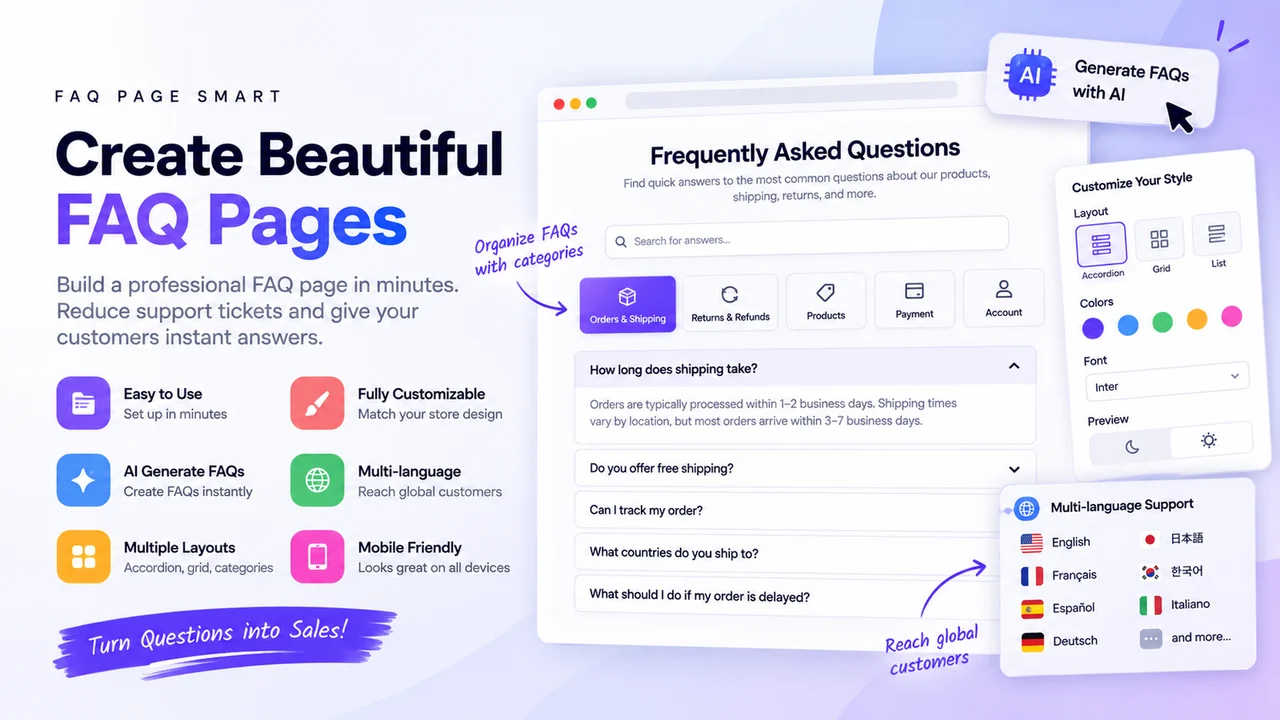
D: AI FAQ Page by DDSHOP APPS lets you build an SEO-friendly FAQ page with AI in minutes. You can show FAQs on any page, section, product, or collection you want. It ships with more than twelve FAQ page templates that you can switch between easily.
The app can generate FAQ content with AI to speed up your first draft. It supports Google FAQ Schema, so your answers can earn rich results in search. You can also run multi-language FAQs and set up more than one main FAQ page. That makes it a handy, free FAQ page app for stores that want templates and quick AI drafts.
What Tested Results
- The AI generator gave us a starter set of questions to refine.
- Switching between templates changed the whole look without breaking content.
- Adding a FAQ block to a product page took only a short setup.
- Running more than one main FAQ page helped us split topics cleanly.
- Google FAQ Schema support was simple to enable for rich results.
- The drag-and-drop editor made reordering answers straightforward.
- Multi-language FAQs kept their template styling after translation.
- Being fully free let us test every core feature without limits.
What a Shopify FAQ and Help Center App Actually Does
A Shopify FAQ app keeps your answers in one place. It then displays them on a FAQ page, product pages, collection pages, or custom pages.
Better apps group questions into categories and add a search bar. Some add AI drafting, multi-language versions, and answer analytics.
The point is not the page. It is putting the answer where the question happens.
Why Repeat Questions Cost More Than Your Time
Shoppers try to solve things alone before they contact anyone. Harvard Business Review’s research on self-service found that 81% of customers attempt to handle matters themselves first. The same research put the average cost of one live service interaction above $7 for consumer brands.
That number is only half the story. The bigger loss sits with shoppers who never contact you at all.
An unanswered question does not usually become an email. It becomes hesitation. Hesitation becomes a saved tab, and a saved tab becomes a purchase somewhere else. You never get a signal that it happened.
This is why a help center app is a conversion tool, not an admin tool. Every answer you publish removes one reason to pause.
One more thing worth knowing: Google stopped showing FAQ rich results in Search in May 2026. FAQ schema is still valid markup and still gets parsed, but the expandable snippet is gone. Choose your app for the shopper experience, not for the snippet.
Where to Place FAQs So They Actually Get Read
Footer placement is where most FAQ pages go to be ignored. Shoppers rarely leave a product page to hunt for policies.
The gap is measurable. Baymard Institute’s UX research found that 44% of sites skip return information on the product page. It also found that 13% of users abandon a site due to unsatisfactory return policies.
Three placements do the heavy lifting:
- Product page. Sizing, materials, compatibility, and care. These decide the add-to-cart.
- Near the buy button. Shipping times, returns window, and warranty. These decide the checkout.
- Dedicated help center. Order tracking, exchanges, and account issues. These reduce post-purchase tickets.
Start with the five questions your inbox repeats most. Put those on the product page first. Build the full help center after.
When Your Store Is Ready for a FAQ App
You do not need a huge catalog to justify one. Watch for these signals:
- You answer the same three questions every week.
- Your product descriptions have grown long and hard to scan.
- Shoppers ask about shipping or returns after they have already ordered.
- You sell in more than one country or language.
- You are about to run a campaign that will multiply your traffic.
If two are true, the setup time pays for itself quickly.
Guardrails: When a FAQ Page Works Against You
A FAQ page hurts when you treat it as a dumping ground. Forty vague questions are harder to use than five sharp ones. Shoppers scan rather than read, and a wall of text sends them back to search.
Do not use FAQs to hide bad news either. Burying a restocking fee inside question nineteen does not prevent the complaint. It delays it and adds a trust problem.
Keep answers short and specific. “Ships in 2 to 4 business days” beats “we ship promptly.” Vague answers create a second question, which is what you were trying to avoid.
Review your FAQs every quarter. Policies change, and an outdated answer costs more trust than no answer.
Putting It Into Practice
Pick the app that matches your real constraint, not the longest feature list. Accessibility-driven brands should look at EasySlide. Stores needing search and structure fit Trusted Help Center. High-volume catalogs suit StoreFAQ.
Then do the part that matters. List the five questions you answer most. Publish those answers where shoppers hesitate. That single hour beats any feature comparison.
Frequently Asked Questions
Do Shopify FAQ apps slow down my store?
Most load content separately from your theme, so the impact is small. Apps with the Built for Shopify badge have passed performance checks. Test page speed before and after installing.
Is FAQ schema still worth adding in 2026?
FAQPage schema is still valid, and search engines still parse it. It just no longer produces the expandable rich result in Google. Add it if your app includes it, but do not choose an app for that alone.
How many FAQs should a Shopify store have?
Start with five to ten questions drawn straight from your inbox. Add more only when a question repeats. Quality and specificity matter far more than volume.
Should FAQs go on product pages or a separate page?
Both, and they serve different jobs. Product pages need buying questions like sizing and shipping times. The separate help center handles order tracking, returns, and account issues.
Can I use a free Shopify FAQ app long term?
Yes, if your question count and traffic stay inside the free limits. Check whether the plan meters FAQs or page views. Traffic-metered plans can shift cost as your store grows.
Will an FAQ page reduce my support tickets?
It reduces repetitive ones when answers are specific and easy to find. Vague answers tend to create follow-up questions. Track which questions still arrive and update monthly.

Shopify Expert
Dipen Panchal, Shopify Tech Lead at Setubridge Technolabs, brings over a decade of expertise as a Shopify Expert. Passionate about e-commerce growth, he specializes in UI/UX design, crafting intuitive, engaging solutions tailored for merchants and B2B clients to enhance user experiences.