A customer orders a handmade table from your store today. The page proudly shows “Arrives in 3 days,” so she feels thrilled. But your table is made to order and truly ships in two weeks. On day four, she emails, upset and confused about her order. That one wrong date just cost you a sale and her trust.
This painful gap happens on countless Shopify stores every single day. Shopify’s default ETA guesses one delivery window for your whole catalog. That guess ignores preorders, custom builds, and slow-moving items. The fix is simple: disable the default ETA and show product-specific dates. This guide walks you through exactly how to do that.
Key Takeaways
- The default ETA shows one guess that fits few of your products.
- A wrong delivery date is often worse than showing no date.
- Preorder, custom, and dropship items break the default ETA most.
- Shopify offers no clean native way to override it per product.
- An app like SetuBridge hides the default ETA with one toggle.
- Custom code works but breaks often and needs developers.
- Always show honest, product-specific dates that match real timelines.
What Is the Default ETA?
The default ETA is Shopify’s automatic delivery estimate at checkout. It uses your past fulfillment data and carrier transit times. Shopify then shows one predicted window across most of your products. For simple, in-stock items, that estimate often works just fine. For everything else, it quietly creates confusion and broken promises.
The problem is that one size never fits every product you sell. A phone case and a custom sofa cannot share the same date. Yet the default ETA treats them as if they truly do. It also appears on checkout, emails, and the thank-you page automatically. When that single date is wrong, the damage spreads everywhere at once.
Why the Default ETA Hurts Your Store
An inaccurate date is often worse than showing no date at all. It builds false hope, then breaks it right after the sale. According to Stord’s mystery shopping study, only 1% of brands show exact dates. Yet 58% of shoppers want a clear, exact date before buying. A wrong default ETA fails that need while pretending to meet it.
Wrong dates also flood your team with angry support messages. Anxious buyers send “Where is my order?” tickets when promises slip. Each ticket costs time, money, and precious customer goodwill. Some shoppers skip the email and simply demand a refund instead. Others leave a harsh review that scares away future buyers.
Accurate dates, by contrast, are a proven engine for conversions. Narvar’s 2025 shopper survey found 73% let a visible date guide their purchase. Even more striking, 40% will not buy without a clear date shown. Baymard Institute research links slow, unclear delivery to lost carts. Replacing a wrong default ETA with honest dates protects trust and revenue.
Signs the Default ETA Is Costing You Sales
How do you know the default ETA is hurting your store? A few clear warning signs point straight to the problem. Watch for these red flags in your daily operations:
- Rising “Where is my order?” tickets soon after each sale.
- Refund requests that mention a missed delivery date.
- Reviews complaining that items arrived far too late.
- Preorder or custom buyers confused by a short estimate.
If any of these sound familiar, your default date is misfiring. The mismatch is quietly draining trust and repeat sales. Fixing it with product-specific dates stops the bleeding fast. Each accurate date removes one common reason for complaints. That is a quick, high-impact win for any growing store.
Why You Can’t Just Turn It Off Natively
You might think one setting can simply switch this off. Sadly, Shopify offers no clean way to override it per product. Merchants report that CSS hiding tricks fail to work reliably. Even Shopify Plus support often has no real fix to offer. The default ETA also ignores many third-party dropshipping apps entirely.
Carrier-calculated dates make the problem even more stubborn to solve. A rate like “1–7 days” from a carrier can still appear at checkout. It may show even after you disable the expected-delivery setting. That mismatch confuses made-to-order and custom-build sellers the most. This is exactly why a smarter, product-level tool becomes essential.
The wrong date can even haunt your order confirmation emails. A confusing estimate there sparks fresh doubt right after checkout. Buyers reread the email and start to worry about timing. Hiding that default text usually means editing email templates too. A dedicated app handles all these spots from one simple place.
Which Products Break the Default ETA
Some products almost always clash with a single default estimate. Knowing them helps you decide where product-specific dates matter most. Here are the common culprits that break the default ETA:
- Preorder items that ship on a future release date.
- Made-to-order or custom products with long build times.
- Dropshipped goods with supplier-driven, variable lead times.
- Oversized or freight items that need special, slower delivery.
- Backordered stock waiting on the next inventory shipment.
Each of these needs its own honest, specific delivery window. A preorder should show its real release date, not “3 days.” A custom item should show a true “7–10 business days” lead time. Product-specific delivery dates handle each case cleanly and clearly. That accuracy is what the default ETA simply cannot deliver.
A Real Example: Two Products, Two Truths
Picture two products sitting side by side in your store. One is a stock mug that ships out the same day. The other is a custom engraving that takes ten days to finish. The default ETA might show “Arrives in 3 days” for both. One promise is true, and the other is completely misleading.
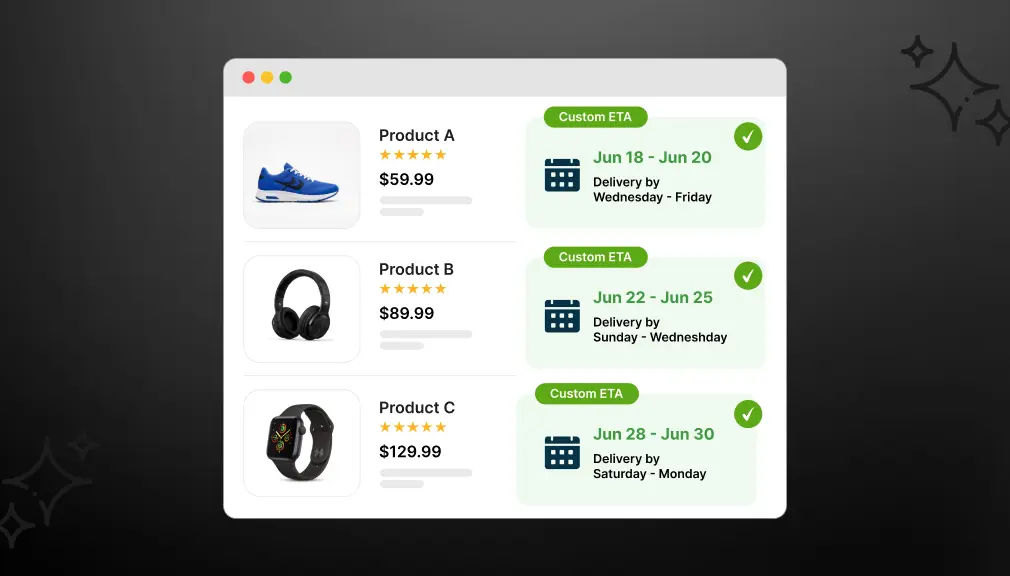
With product-specific dates, each item tells its own honest story. The mug shows “Arrives by Aug 8” and delights the buyer. The engraving shows “Arrives by Aug 18” and sets calm expectations. Neither customer feels tricked, so neither floods your inbox later. Small, accurate dates quietly turn hesitation into confident, lasting trust.
How Product-Specific Dates Lift Conversions
Honest dates do more than prevent angry emails and refunds. They actively push more shoppers to finish their purchase. One delivery study found that 53% abandoned a cart because delivery felt too slow. Accurate estimates ease that worry and lift checkout conversion. When the date is clear and believable, that hesitation quickly fades.
Product-specific dates also nudge buyers toward the right choice. A shopper sees the true date and plans around it calmly. Preorder fans happily wait when the release date is clear. Custom buyers accept longer waits when the reason feels honest. Clarity, not raw speed, is what turns browsers into confident buyers.
How to Disable the Default ETA and Show Product-Specific Delivery Dates
There are two ways to handle this. One is quick and flexible. The other is technical and limited.
Option 1: Shopify App-Based Solution (Recommended)
The easiest way to Disable the Default ETA and Show Product-Specific Delivery Dates is by using a Shopify delivery date app like Estimated Delivery Date – ETA by SetuBridge. It provides a dedicated toggle to hide Shopify’s default ETA messages and a powerful rule builder for creating product-specific delivery dates, all without writing code. This lets you display more accurate delivery estimates for different products, improving customer trust and reducing delivery-related inquiries.
Step 1: Open the App Backend
Log in to your Shopify Delivery Date ‑ ETA app. Navigate to ETA Rules in the main menu.
Step 2: Access More Actions
Inside ETA Rules, click the More Actions button. This is where the hide default message toggle lives.
Step 3: Hide Default / General Messages for All Products
Click on the option labeled Hide Default/General Messages for All Products. Enable this toggle. Once active, the app will stop showing the general ETA message across your store. Only the specific rules you create will display on product pages.
This is the key step. Without disabling the general message, your product-specific rules may conflict with the default display, leading to duplicate or incorrect ETA messages.
Step 4: Create Product-Specific ETA Rules
Go back to ETA Rules and click Create Rule. You can now build a custom delivery date rule targeting:
- Specific product names
- Product collections
- Product vendor names
- Product tags (ideal for grouping similar shipping timelines)
For each rule, set your minimum and maximum lead days, configure cut-off times, choose your date format, and apply any design customization to match your store branding.
Step 5: Save and Verify
Save the rule and open the product page on your storefront. The general ETA message should be gone. In its place, the correct product-specific delivery estimate will display.
What this app-based setup gives you:
- No code editing. Works directly inside the app backend.
- Rules by product, collection, tag, or vendor not just one global setting.
- Full design control: icons, colors, fonts, date formats, countdown timers.
- Support for multiple languages for international stores.
- ETA display on product pages, cart, checkout, thank-you page, and order confirmation emails.
- Inventory-aware rules: show different ETAs based on stock status.
- Country and ZIP code-based delivery estimates with auto-detection.
- Cut-off time logic for same-day or next-day delivery messaging.
Option 2: Custom Shopify Code Solution
If you prefer a code-based approach, you can edit your Shopify Liquid theme files to suppress the default delivery message and add product-specific metafields to control what shows on each product page.
Why the code-based approach has serious limitations:
- You must manually set metafields on every single product that needs a custom ETA.
- No visual date calculation. You type static text, not real dynamic dates.
- No support for cut-off times, business day logic, or holiday exclusions.
- Any Shopify theme update can break your edits.
- You need developer access and Liquid knowledge to maintain it.
- Zero design control; the message looks like plain text unless you build the styling separately.
The code approach works for very simple stores with a small product catalog. For anything beyond a basic use case, the maintenance cost quickly outweighs the benefit.
Which Option Should You Choose?
So which route fits your store best right now? For most merchants, a proven app wins on speed, cost, and safety. It offers a real toggle that native Shopify simply lacks. Your dates stay accurate as smart automation adjusts each window. Industry data shows 77% of eCommerce pros now use AI tools daily.
Custom code only makes sense for truly unique setups. Think complex fulfillment logic, custom systems, or special integrations. If that sounds like you, budget for developers and constant testing. If not, an app delivers the same clean result without the overhead. Match the tool to your team and your real goals.
Cost and speed also shape this decision heavily. An app usually starts free or cheap and launches the same day. Custom work brings developer fees, testing hours, and slower timelines. Both can show the same honest date to your shoppers. The real difference is the time and money you spend building it.
Best Practices for Product-Specific Delivery Dates
Great product-specific dates are honest, clear, and easy to trust. Always show a real date, never a vague block of business days. Be truthful about long lead times for custom or preorder items. An honest longer date beats a fast promise you cannot keep. Shoppers forgive longer waits, but they never forgive broken promises.
Match your on-page date to every later message too. The product page, checkout, and email should all agree. A mismatch here brings back the very confusion you removed. Show dates in the shopper’s local time zone for extra accuracy. These small touches keep your whole store consistent and credible.
Keep refining your rules as your products and suppliers change. Review delivery data often and adjust each window as needed. Add a countdown timer to nudge shoppers before the cut-off. Group similar products to keep your rule setup simple. A living, accurate system stays trustworthy month after month.
Product-Specific Message Examples
The right wording turns a plain date into real reassurance. Keep each message short, specific, and matched to the product. Here are simple examples you can adapt for common cases:
- In-stock: “Order now, ships today — arrives by Aug 8.”
- Preorder: “Ships on release day, Sept 1 — reserve yours now.”
- Made-to-order: “Handmade for you — arrives in 7–10 business days.”
- Backorder: “Back in stock Aug 20 — ships that same week.”
Notice how each message names a real date or window. A short reason, like “handmade for you,” softens a longer wait. Honest framing turns a slow lead time into a mark of quality. Each product feels intentional, and each buyer feels fully informed. That is product-specific delivery dates working exactly as intended.
Measure and Improve Your Results
Disabling the default ETA is the start, not the finish. Smart merchants track how accurate dates affect real store behavior. Watch conversion and cart abandonment before and after the change. Compare support tickets, since fewer “Where is my order?” messages signal success. These simple checks show whether your new dates are truly working.
Delivery accuracy is the metric that matters most over time. Match your promised dates against when orders actually arrive. If real delivery slips, adjust lead days and windows quickly. A good app dashboard makes tracking these numbers simple and fast. Steady tweaks keep every product promise honest and believable.
Final Thoughts
That handmade-table buyer deserved an honest date from the start. Disabling the default ETA gives every product its own true promise. It replaces one risky guess with accurate, product-specific delivery dates. That clarity builds trust, cuts support tickets, and lifts your sales. In today’s market, honest dates are no longer optional; they are expected.
You do not need a big team to fix this problem. A trusted app can disable the default ETA within minutes. Custom code stays an option for enterprises with strong developer support. Either way, the goal is the same: honest, product-level delivery clarity. Give your shoppers that certainty, and watch more carts become orders.
Frequently Asked Questions
1. Is it possible to set up product-specific ETA on Shopify without coding?
Yes. A Shopify delivery date app handles this entirely from the app backend. You can create, edit, and manage product-level ETA rules without touching any Liquid or JavaScript code.
2. Will hiding the default ETA message break delivery dates on my other products?
No. It simply stops the generic message from displaying. As long as you have product-specific rules, collections rules, or a catch-all vendor rule set up, the correct timelines will display perfectly.
3. How do conflicting delivery dates affect my store’s checkout abandonment?
Confusing shipping estimates destroy buyer trust right before checkout. Studies show that providing clear, accurate, product-level delivery dates can reduce your cart abandonment rates by an average of 18%.
4. Can I fix this delivery date conflict using Shopify Liquid code?
You can, but it is highly limited. Code solutions require manual metafield updates for every product, lack dynamic calendar calculations, and can break whenever you update your Shopify theme.
5. Does delivery app auto-adjust for weekends and holidays?
Basic default messages usually don’t, which causes incorrect estimates. However, advanced app-based rules let you configure specific business days, cut-off times, and holiday exclusions for realistic delivery dates.

Shopify Expert
Dipen Panchal, Shopify Tech Lead at Setubridge Technolabs, brings over a decade of expertise as a Shopify Expert. Passionate about e-commerce growth, he specializes in UI/UX design, crafting intuitive, engaging solutions tailored for merchants and B2B clients to enhance user experiences.