





A shopper in Paris finds your store and loves a product. Your whole store even appears in perfect French. But at the delivery details, one line stays in English. “Arrives in 5–7 days” suddenly breaks the local feeling. That small crack of doubt is enough to make her leave.
This happens on multilingual Shopify stores every single day. Shoppers want to feel at home, even in small details. A delivery date in the wrong language feels foreign and cold. Estimated delivery dates in multiple languages fix this with local clarity. This guide shows you how to display them the smart way.
Key Takeaways
- Estimated delivery dates in multiple languages show delivery info per language.
- Most global shoppers prefer buying in their own language.
- Shopify’s native translation misses dynamic delivery date messages.
- Localize the date format too, not just the words.
- An app is the best, no-code way to show multilingual dates.
- Custom code works but is costly and hard to maintain.
- Review auto-translations with a native speaker for accuracy.
What Does It Mean to Show Delivery Dates in Multiple Languages?
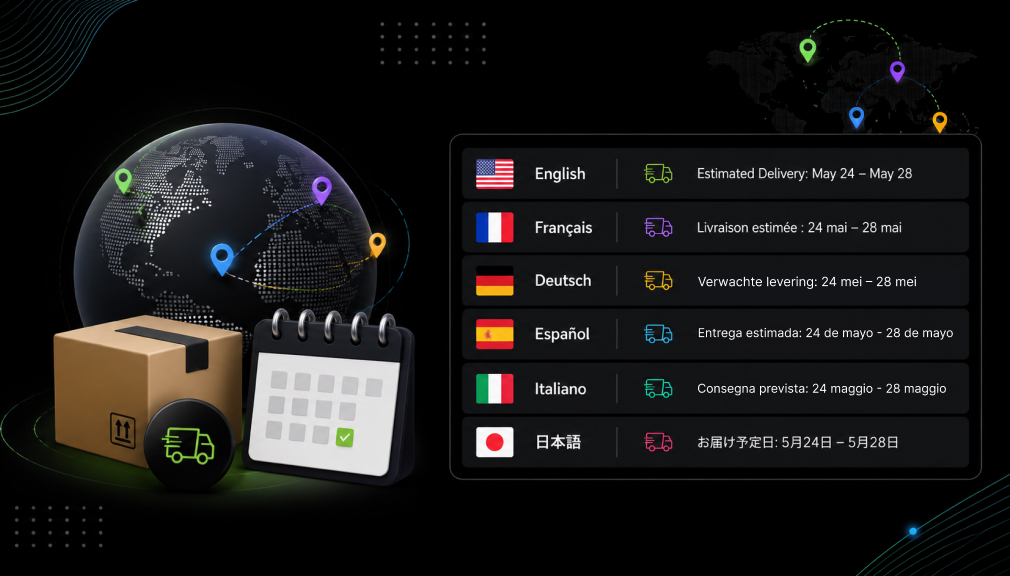
Estimated delivery dates in multiple languages show delivery info in each shopper’s language. A French visitor reads French, and a German reads German. The words and the date format both match the local language. It is more than translation; it is a feeling of belonging. That feeling turns a curious visitor into a confident buyer.
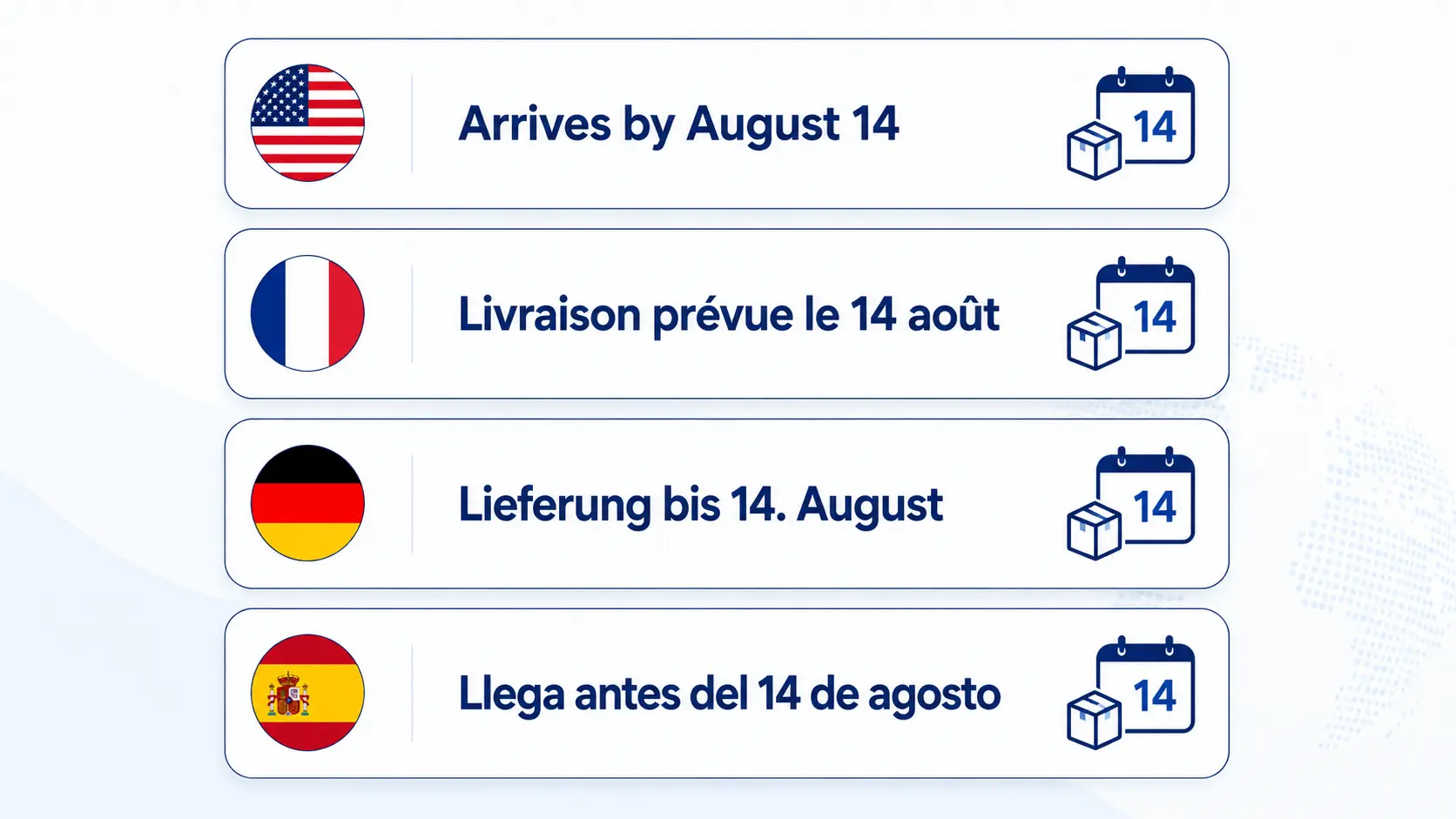
This covers both the message and how the date looks. “Arrives by August 14” becomes “Livraison prévue le 14 août.” The month, order, and phrasing all shift to feel natural. Each shopper sees a promise written just for them. That is the heart of multilingual delivery dates on Shopify.
Why Multilingual Delivery Dates Matter
Language shapes trust more than most merchants realize. According to Weglot’s localization report, 60% rarely buy from English-only sites. Around 73% prefer buying from a store in their own language. When your delivery date ignores that, doubt quietly creeps in. Speaking each shopper’s language removes that doubt at a key moment.
The impact on sales is clear and well documented. Shopify’s localization data shows a 13% conversion lift in a shopper’s own language. One 2026 localization study found that 76% prefer buying in their native language. Even more striking, 40% never buy from English-only websites.
Local delivery clarity also cuts your support work. Cross-border shopping research shows 75% want to buy in their native language. A clear date in that language answers questions before they start. It reduces confused “Where is my order?” tickets in every market. So multilingual dates protect both revenue and support time.
A Real Example: One Store, Three Shoppers
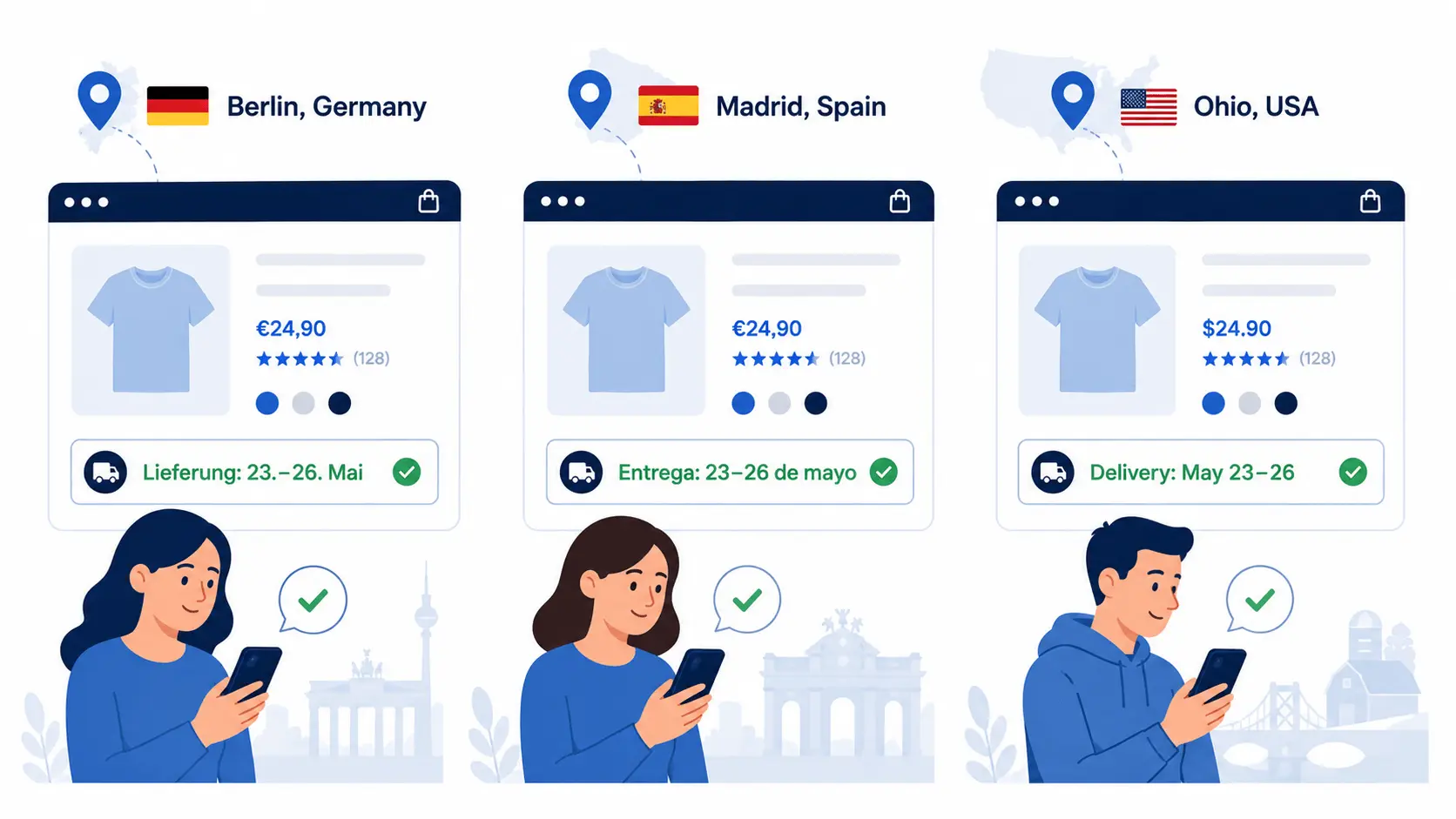
Picture three shoppers landing on the same product today. One is in Berlin, one in Madrid, and one in Ohio. Your store is translated, but the delivery date stays in English. The German and Spanish buyers pause, feeling a small disconnect. That tiny friction is enough to cool their early excitement.
Now imagine each date shown in the shopper’s own language. Berlin sees German, Madrid sees Spanish, and Ohio sees English. Every buyer feels the store was built just for them. That shared comfort turns three visitors into three orders. One small change quietly lifts trust across every market.
The Hidden Cost of a Wrong-Language Date
A date in the wrong language does more than look odd. It quietly raises doubt right before the purchase decision. Confused buyers often abandon the cart instead of guessing. Others complete the order but still worry about timing. That worry then returns as a support ticket later.
Support in a shopper’s own language matters even more. Buyers feel calmer when updates arrive in their own tongue. Clear, local delivery messages prevent many tickets before they start. They also reduce returns caused by simple date confusion. Local clarity protects both revenue and your team’s time.
The Gap Most Merchants Miss
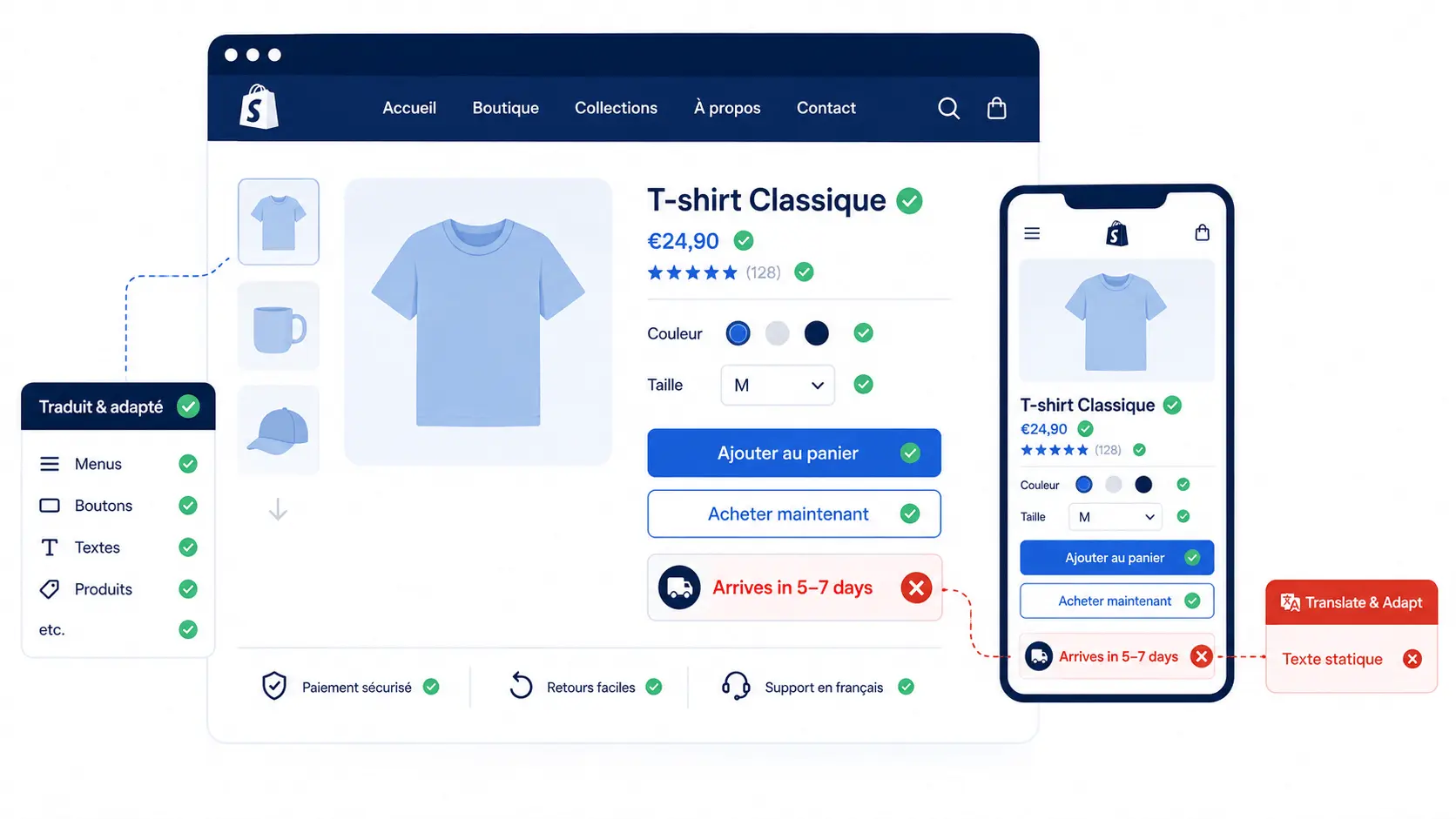
Here is the surprise that catches many store owners off guard. Shopify’s Translate & Adapt tool localizes your static theme text well. But it does not translate dynamic delivery date messages automatically. So your whole store can be French while the date stays English. That single mismatch quietly breaks the trust you built.
Shopify Markets and translation apps handle buttons, menus, and products. Delivery messages, though, are generated live from your rules. Native translation simply does not reach that dynamic content. This is why a translated store still shows an English delivery date. Closing this gap needs a tool built for the job.
It’s Not Just Words: Localize the Date Format Too
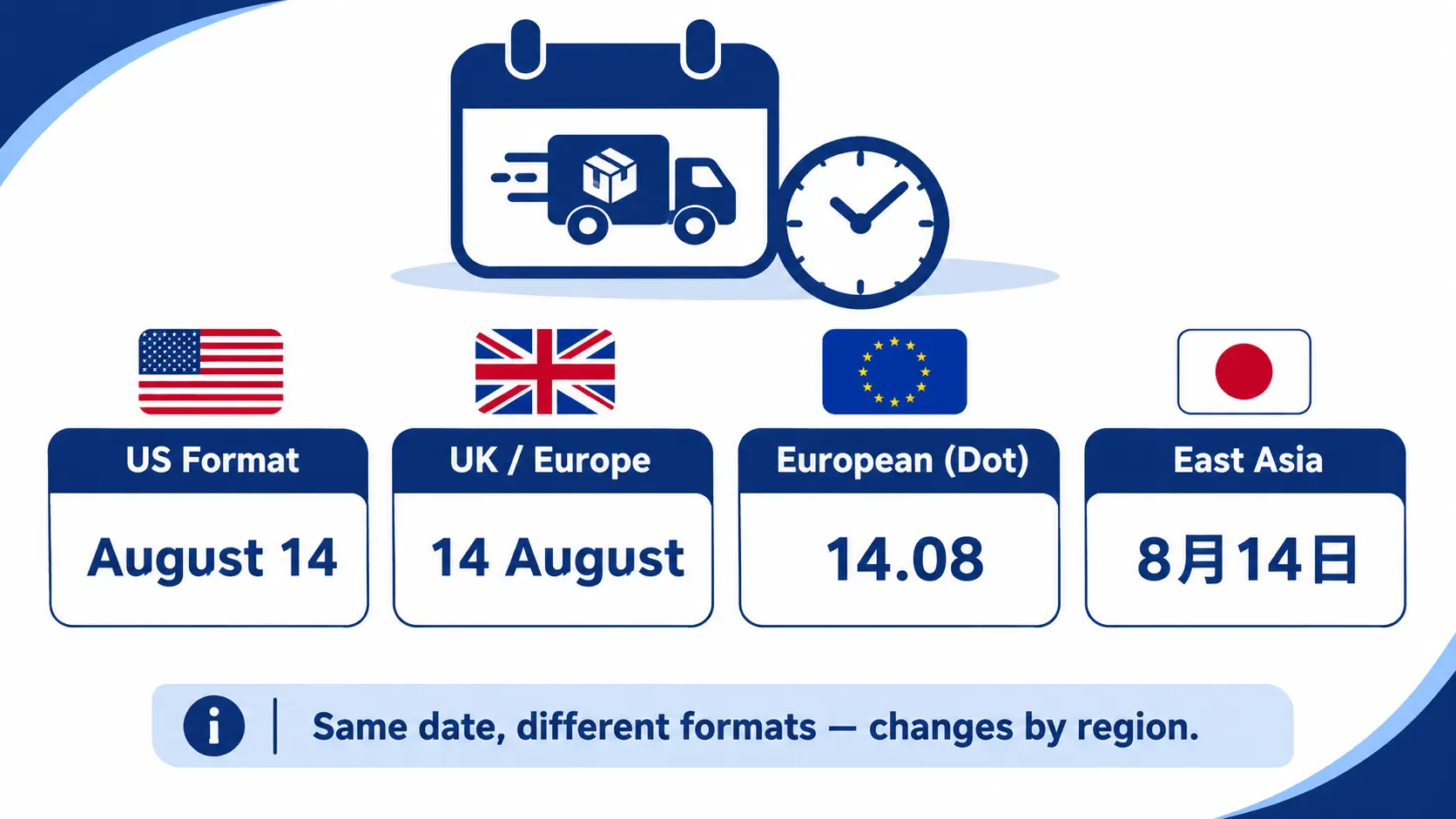
Localizing delivery dates means more than swapping words. Date formats differ a lot between different countries. Americans read “August 14,” while much of Europe reads “14 August.” Some markets use different characters or calendar styles entirely. A wrong format looks foreign and quietly weakens trust.
Getting the format right shows real care for each customer. It signals that your store understands their local habits. That small detail makes a global store feel truly local. Shoppers rarely notice a correct format, but always notice a wrong one. Good localization handles both the language and the date format.
How to Show Estimated Delivery Dates in Multiple Languages on Shopify
There are two options to show estimated delivery dates in multiple languages on Shopify: a Shopify estimated delivery date app or custom code. Both can work, but custom-coded solutions require more technical maintenance in the long-term. For most Shopify merchants, the best way to show delivery estimates in the customer’s language of choice is an app-based solution.
Option 1: Shopify App-Based Solution (Recommended)
The easiest way to Show Estimated Delivery Dates in Multiple Languages on Shopify is with a dedicated Shopify estimated delivery date app. Apps built for ETA management connect language settings directly to delivery rules, so the correct delivery message appears automatically based on the customer’s selected language. This ensures a localized shopping experience, improves customer trust, and helps international shoppers clearly understand when their orders are expected to arrive.
Here’s how this typically works, using SetuBridge’s Estimated Delivery Date & Time app as an example:
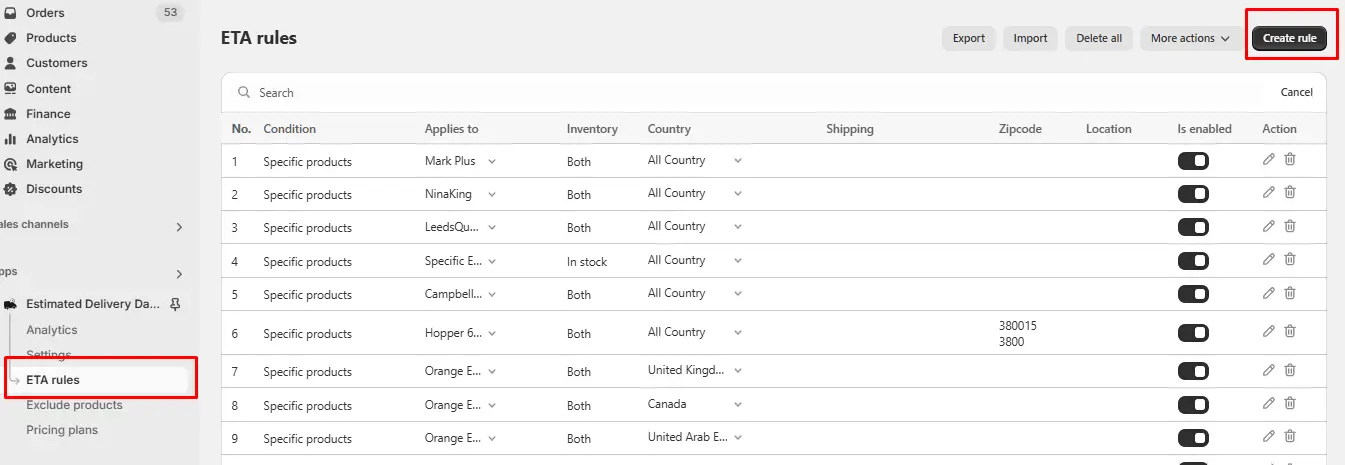
Create an ETA rule. In the app dashboard, go to ETA Rules and create a new rule for a product, collection, or shipping method.
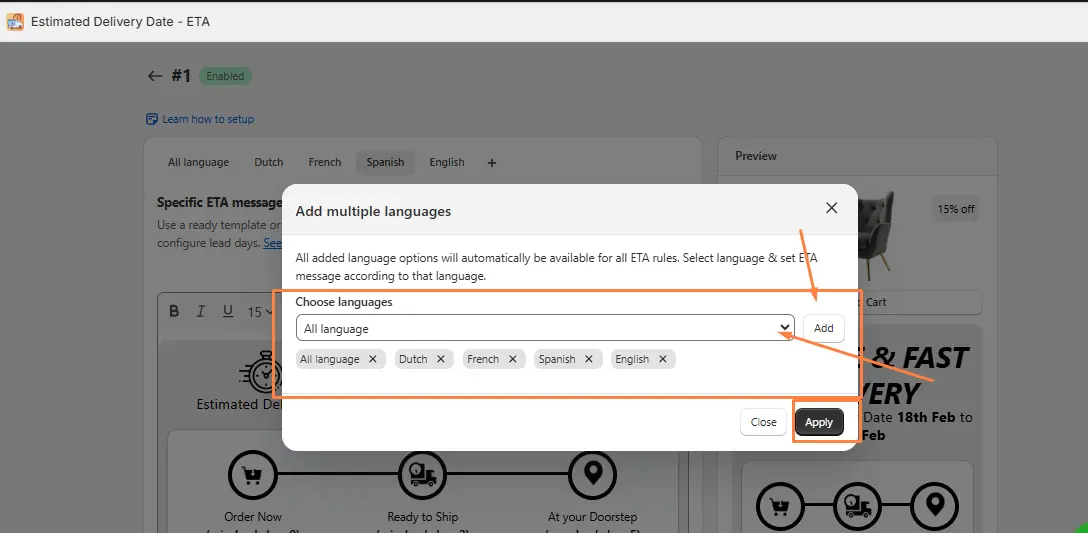
Add the languages your store supports. Within the rule, click “Add language,” select each language from the dropdown, and save the list.
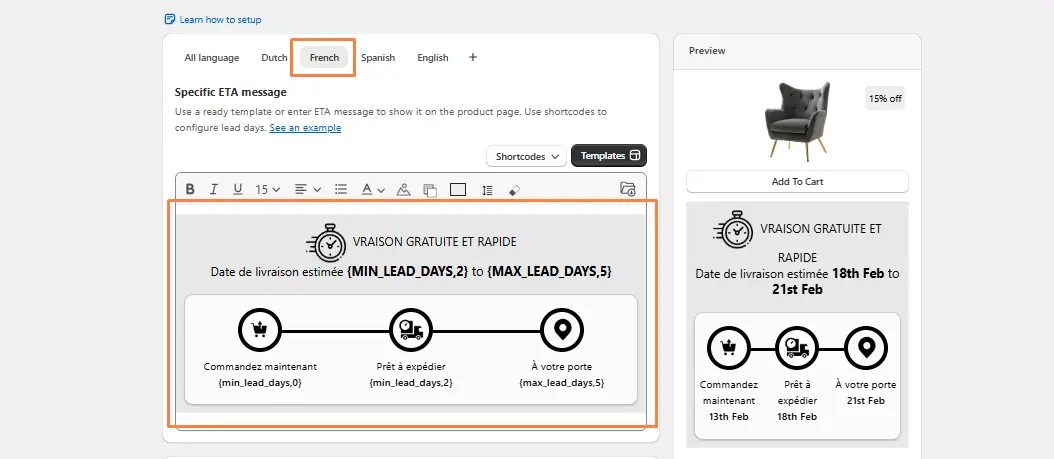
Write a translated message for each language. Enter the delivery message for every language added; for example, an English message for US customers and a separate French message for French-speaking shoppers. Lead times, icons, and text styles can be customized per language.
Save and test. Switch the storefront language to confirm that the correct message appears as a customer would see it.
For example, a store wanting a different delivery message for Spanish-speaking customers in Spain would select Spanish as the language and Spain as the country, then write the message in Spanish. From there, those shoppers see delivery information matching their language and local shipping timeline, while other customers see their own version.
Option 2: Custom Shopify Code Solution
It’s possible to build a basic version of Shopify ETA in multiple languages using Liquid and JavaScript, but this comes with real limitations.
A typical custom setup involves:
- Detecting the customer’s active language or market using Shopify’s localization object in Liquid.
- Writing conditional logic for each supported language, with separate hardcoded messages and date formats.
- Manually formatting dates in JavaScript to match local conventions (DD/MM/YYYY vs MM/DD/YYYY).
- Updating theme code whenever shipping times, cutoffs, or languages change.
This can work for a store with one or two languages and simple, store-wide shipping rules. But it becomes tricky quickly: every new language means more conditional logic, and every shipping change means editing theme code across multiple files. There’s also no built-in way to combine language-based messages with other ETA logic, like zip code-based delivery dates or product-specific lead times, without significant custom development. For most stores, the limited flexibility and maintenance burden make this a weaker long-term fit than a dedicated app.
Which Option Is Best?
So which option is best for most Shopify stores? For nearly everyone, Option 1, the app, wins clearly. It manages languages, formats, and rules without any code. It stays upgrade-safe and needs no ongoing developer time. Custom code only fits rare, highly technical setups.
So which option is best for most Shopify stores? For nearly everyone, Option 1, the app, wins clearly. It manages languages, formats, and rules without any code. It stays upgrade-safe and needs no ongoing developer time. Custom code only fits rare, highly technical setups.
Cost and time also point to the app choice. An app usually starts free or cheap and launches today. Custom translation work brings developer fees and slow testing. Both can show the same local date to your shoppers. The difference is the effort to build and maintain it.
Auto-Translate vs Human-Checked Messages
Not all translations are created equal, either. Some tools auto-translate your delivery message instantly. That speed is helpful, but the quality can vary. A machine may pick an odd or awkward phrase. So always review key messages for tone and accuracy.
Ask a native speaker to check your main markets. A quick human review catches errors machines miss. Delivery is a promise, so the wording must feel right. A trusted date in clumsy words still loses trust. Blend fast auto-translation with a careful human check.
Where to Show Multilingual Delivery Dates
A translated date only helps if shoppers actually see it. Show it where buyers make their real decisions. These spots work best for multilingual delivery dates:
- Product page, so buyers see timing before adding to cart.
- Cart page, as they review their order once more.
- Checkout, to confirm the local date before paying.
- Order confirmation email, to reassure them after buying.
Consistent, translated dates across all four build trust. The shopper never meets an English surprise anywhere. That steady clarity is what lifts global conversions. Each touchpoint reminds them the order will arrive. Repetition in their language turns doubt into confidence.
Which Languages Should You Add First?
You cannot translate into every language at once, and that is fine. Start with the languages your real visitors already use. Check your Shopify analytics for top countries and languages. Then add delivery translations for those markets first. This focused approach gives the fastest, biggest return.
Expand outward as your international orders keep growing. Add one language, test it, then move to the next. Soon your delivery dates greet each shopper in their tongue. That steady rollout keeps the whole task simple and manageable. Each new language becomes a fresh source of trust.
Delivery Message Examples in Several Languages
The right wording makes a delivery date feel local and warm. Here is one simple promise shown across several languages:
- English: “Arrives by August 14.”
- French: “Livraison prévue le 14 août.”
- German: “Lieferung bis 14. August.”
- Spanish: “Llega antes del 14 de agosto.”
Notice how the date format shifts with each language too. The day and month order changes to match local habits. Each version feels written for that specific shopper. That natural feel is what builds trust and drives sales. Small, careful details turn browsers into confident buyers.
Expand outward as your international orders keep growing. Add one language, test it, then move to the next. Soon your delivery dates greet each shopper in their tongue. That steady rollout keeps the whole task simple and manageable. Each new language becomes a fresh source of trust.
Pair each language with its local currency too. Shoppers trust a store that speaks and prices locally. Shopify Markets can handle currency besides your dates. Together, they make each market feel fully native. Local words, dates, and prices build the strongest trust.
Best Practices for Multilingual Delivery Dates
Great multilingual delivery dates feel natural, not machine-made. Match the message to the store’s active language automatically. Always localize the date format, not just the words. Keep each translation warm, short, and free of jargon. These small touches make distant shoppers feel truly understood.
Keep your dates consistent across the whole shopping journey. Show them on product, cart, and checkout pages. Pair your dates with Shopify Markets for a fully local feel. Test each language before you show it to buyers. A living, localized system stays trustworthy across every region.
Final Thoughts
That shopper in Paris deserved a delivery date in French. Estimated delivery dates in multiple languages give every buyer that comfort. They turn a plain date into a warm, local promise. That clarity builds trust, lowers doubt, and lifts global sales. In today’s market, this care is expected, not optional.
You do not need a big team to do this well. An app can show multilingual delivery dates in minutes. Custom code stays an option for large, technical teams. Either way, the goal is the same: local delivery clarity. Set them up, and watch more global carts become orders.
FAQs
1. How do I show estimated delivery dates in multiple languages on Shopify?
Use a Shopify app that lets you create ETA rules with translated delivery messages for each language your store supports. The app then displays the correct message automatically based on the customer’s selected language.
2. Can Shopify display delivery dates based on customer language?
Yes, but Shopify’s native translation tools handle static theme text and don’t automatically translate dynamic delivery date messages. A dedicated ETA app is needed to connect delivery dates to language settings.
3. What is the best Shopify app for multilingual delivery dates?
Look for an estimated delivery date app that supports adding multiple languages directly within ETA rules, alongside country-based and product-based settings. This lets you manage language and shipping logic together in one place.
4. Does Shopify support delivery date translation natively?
No, Shopify doesn’t natively translate dynamic delivery date text as part of its core platform or standard translation tools. Merchants need an app or custom code to display delivery dates in multiple languages.

Shopify Expert
Dipen Panchal, Shopify Tech Lead at Setubridge Technolabs, brings over a decade of expertise as a Shopify Expert. Passionate about e-commerce growth, he specializes in UI/UX design, crafting intuitive, engaging solutions tailored for merchants and B2B clients to enhance user experiences.