





A shopper needs a gift to arrive before a weekend trip. She finds the perfect item on your store and feels hopeful. But the page lists only “Standard” and “Express,” with no dates. She wonders, “Will either one actually arrive in time?” With no clear answer, she sighs and leaves for a rival store.
This quiet exit happens on Shopify stores all day long. Shoppers do not just want shipping names; they want arrival dates. Each shipping method needs its own clear, honest delivery estimate. Shipping Method-Based Estimated Delivery Dates give buyers exactly that clarity. This guide shows you how to add them the smart way.
Key Takeaways
- Shipping Method-Based Estimated Delivery Dates show a date for each option.
- Buyers want arrival dates, not just plain shipping method names.
- Clear dates cut cart abandonment and build lasting customer trust.
- Method dates nudge shoppers toward faster, higher-value shipping choices.
- Shopify’s native tools are limited, especially outside Shopify Plus.
- An app like SetuBridge adds method-based dates without any coding.
- Always show honest dates that update as shoppers switch methods.
What Are Shipping Method-Based Estimated Delivery Dates?
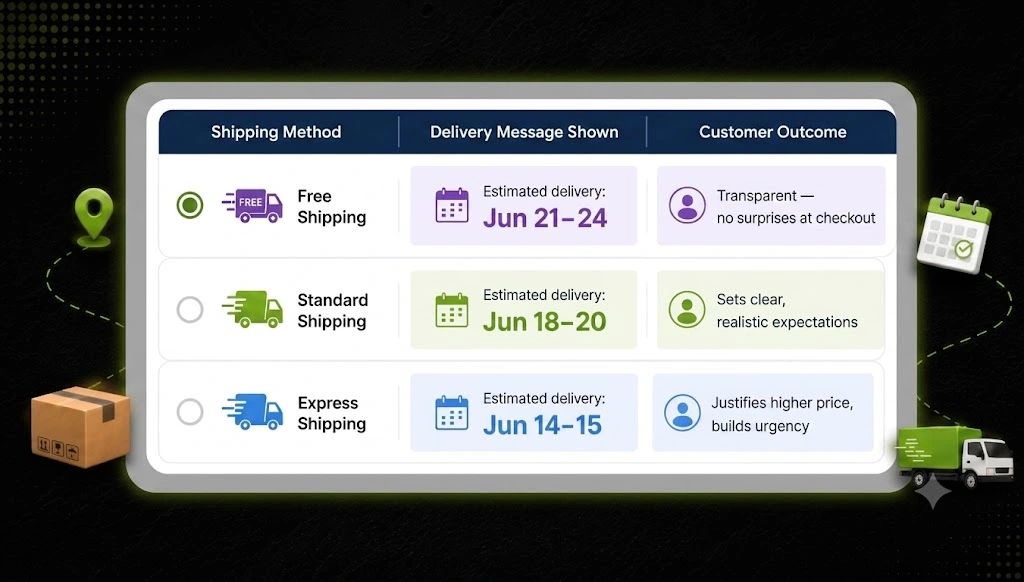
Shipping Method-Based Estimated Delivery Dates show a date for each shipping option. Standard might arrive on one day, while Express arrives much sooner. Each method displays its own honest window based on real transit times. The date then updates as the shopper switches between shipping choices. This turns a plain method name into a clear, believable promise.
Think of it as a personal answer to “When will this arrive?” A buyer sees “Standard: Aug 14” and “Express: Aug 10” side by side. They instantly weigh speed against price without any painful guesswork. That clarity appears right where the buying decision truly happens. Shipping Method-Based Estimated Delivery Dates speak the language shoppers care about.
Why Shipping Method-Based Estimated Delivery Dates Matter
Delivery clarity is now a core part of the buying decision. According to Baymard Institute research, cart abandonment sits near 70%. Shipping surprises and slow delivery rank among the top reasons buyers leave. When a method shows no date, doubt fills the silence instantly. A clear per-method date removes that doubt at the perfect moment.
Shoppers reward stores that show honest, specific delivery dates. Narvar’s 2025 shopper survey found 73% let a visible date guide their purchase. Even more striking, 40% will not buy without a clear date shown. Delivery date research adds that 53% abandon carts over slow delivery. Method-based dates answer both worries directly and build lasting trust.
The payoff shows up clearly in real store results too. Real-world Shopify tests report conversion gains of roughly 12–25%. Clear dates also cut confused “Where is my order?” support tickets. Fewer tickets free your team to focus on real growth. So method-based dates protect both revenue and your team’s time.
Mobile shopping makes this clarity matter even more today. Most eCommerce traffic now comes from small phone screens. On mobile, shoppers scan fast and abandon carts even faster. A clear date beside each method reduces that quick, impatient exit. Method-based dates keep mobile buyers moving toward the buy button.
The Upsell Advantage: Turning Speed Into Revenue
Method-based dates do more than reassure your nervous shoppers. They quietly guide buyers toward faster, higher-value shipping choices. A shopper in a hurry sees Express arriving several days sooner. That clear gap makes the upgrade feel worth the extra cost. Many buyers happily pay more once the benefit is obvious.
Without dates, Express is just a pricier line with no clear value. With dates, it becomes a real solution to a real deadline. This gentle nudge can lift your average order value nicely. It also helps shoppers who truly need speed feel understood. Everyone wins when the faster option proves its worth clearly.
Think about a simple express upgrade on many of your orders. Across a busy month, those small upgrades add up fast. The date is what makes shoppers say yes to that upgrade. It turns a vague option into a clear, worthwhile choice. Small, honest nudges like this grow revenue without any ads.
A Real Example: The Shopper in a Hurry
Picture two shoppers viewing the very same jacket today. One wants it cheap, and the other needs it by Friday. Without dates, both see only “Standard” and “Express” names. The cheap shopper hesitates, and the urgent shopper feels anxious. Neither can decide, so both may quietly leave your store.
Now add a clear date to each shipping method instead. The first shopper picks Standard, happy with “Arrives Aug 14.” The second picks Express, relieved by “Arrives Aug 10.” Both feel confident, and both complete their orders quickly. One small change just saved two very different sales.
Why Shopify’s Native Tools Fall Short
You might hope Shopify shows these dates on its own. Sadly, its native tools come with real, frustrating limits. Standard plans show little on checkout unless you use Shopify Plus. Native delivery dates also cover only the US and select European countries. They do not work with shipping rates from many third-party apps.
There is another quiet limit that surprises many merchants. You often cannot apply custom dates to your default Shopify methods. Native estimates also ignore preorders, custom builds, and dropshipped goods. For method-level control on any plan, you need a dedicated tool. This is exactly where a purpose-built app becomes essential.
Many merchants try a quick workaround that quietly fails them. They add “ships in 3–5 business days” to a policy page. Sadly, almost no one reads that page before buying anything. The delivery question stays unanswered right where it matters most. Method-based dates fix this by showing the answer up front.
How to Set Up Shipping Method-Based ETA on Shopify
The fastest, most reliable, and most maintainable way to Set Up Shipping Method-Based ETA on Shopify is with a dedicated Shopify delivery date app, especially if you’re not a developer. Apps like Estimated Delivery Date – ETA by SetuBridge automatically sync your Shopify shipping methods, let you create shipping method-based ETA rules, and customize the delivery message and display style exactly how you want, all with zero coding.
Option 1: Shopify App-Based Solution (Recommended)
The fastest, most reliable, and most maintainable way to set a delivery date is a dedicated Shopify delivery date app if you are not a developer. Apps like Estimated Delivery Date – ETA by SetuBridge do everything for you, bubble up your shipping methods from Shopify, and customize the delivery message and display style in the way you want, with 0 code.
| ✅ Why this works: A purpose-built Shopify estimated delivery date app manages rule logic, handles order cutoff times, accounts for weekends and holidays, and updates dynamically all without touching your theme code. |
Here’s how to set up shipping method-based ETA rules using the app:
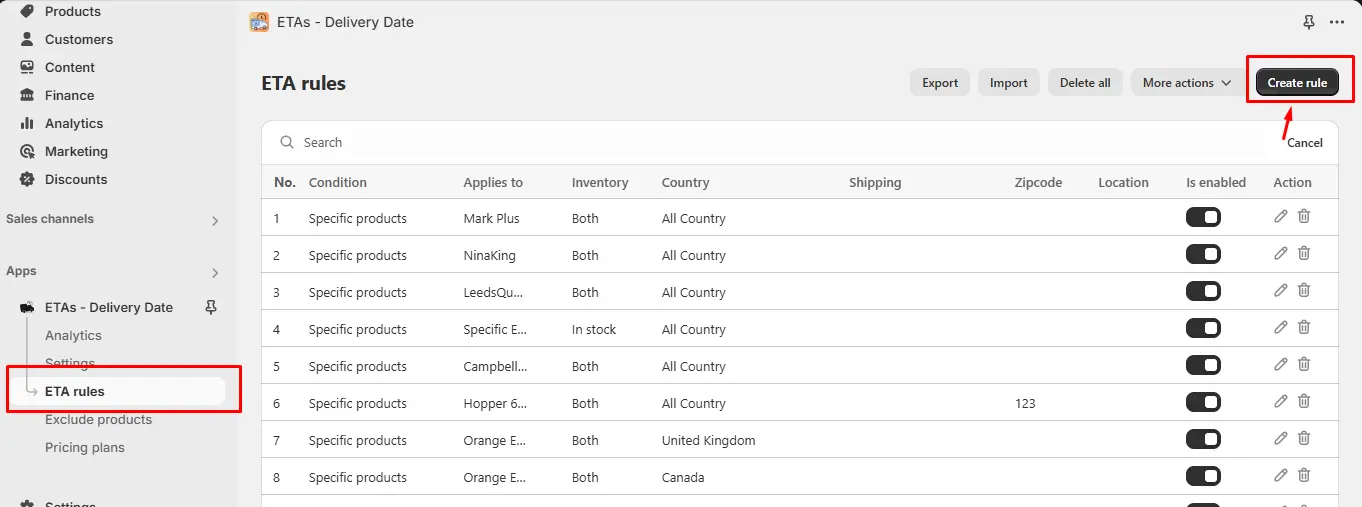
Create a Rule: In your Shopify admin, go to the app under Delivery Date – ETA from the left panel. Click Create Rule in the top right corner.
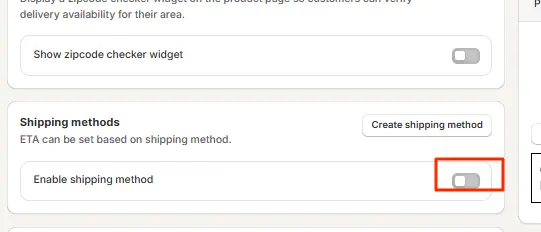
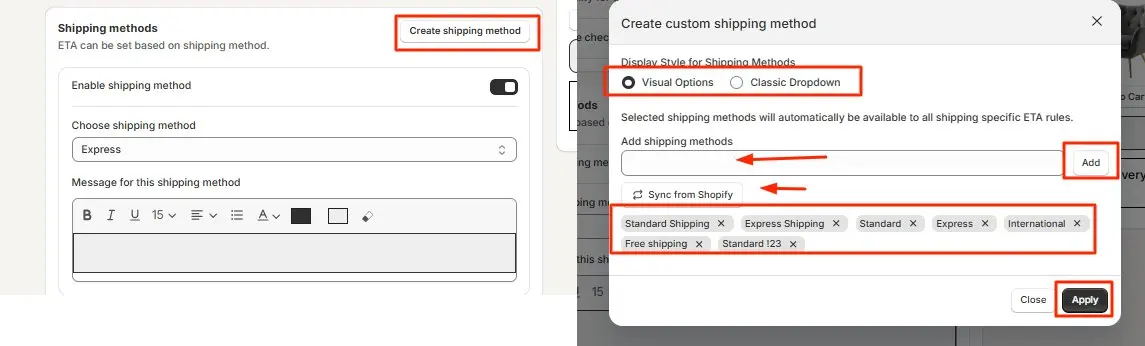
Enable the Shipping Toggle: On the rule creation screen, turn ON the Enable shipping method toggle. This activates the shipping-method-specific ETA logic for this rule.
Create & Select Shipping Methods: Click Create shipping method. A pop-up opens; choose your display style: Visual Options (icon-based selector) or Classic Dropdown. Then add your shipping methods by typing their name and clicking Add, or use Sync from Shopify to auto-import your existing rates (Standard, Express, Free Shipping, etc.). Select the ones you want, click Apply, and then choose the method from the dropdown to link it to the current ETA rule.
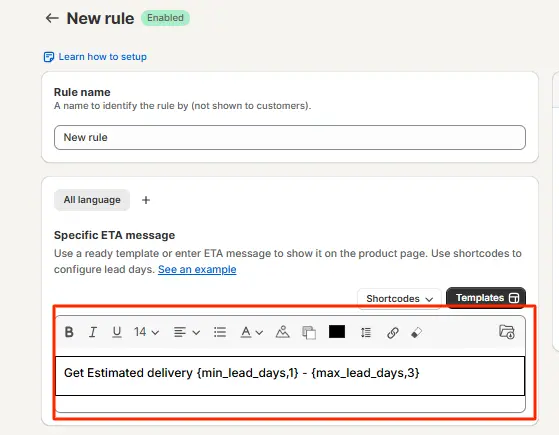
Customize the Delivery Message: Enter the delivery message for the selected shipping method. You can specify exact delivery windows, order cutoff times, or conditions such as “Order before 2 PM for next-day dispatch.” Each method gets its own unique message.
Save the Settings: Click Save. The shipping method-based ETA will now display dynamically on your product page, updating in real time as customers switch between shipping options.
The app offers two display styles for customers on the product page:
- Visual Options: shows shipping methods as clickable icon-based tiles, giving a modern, intuitive selector experience.
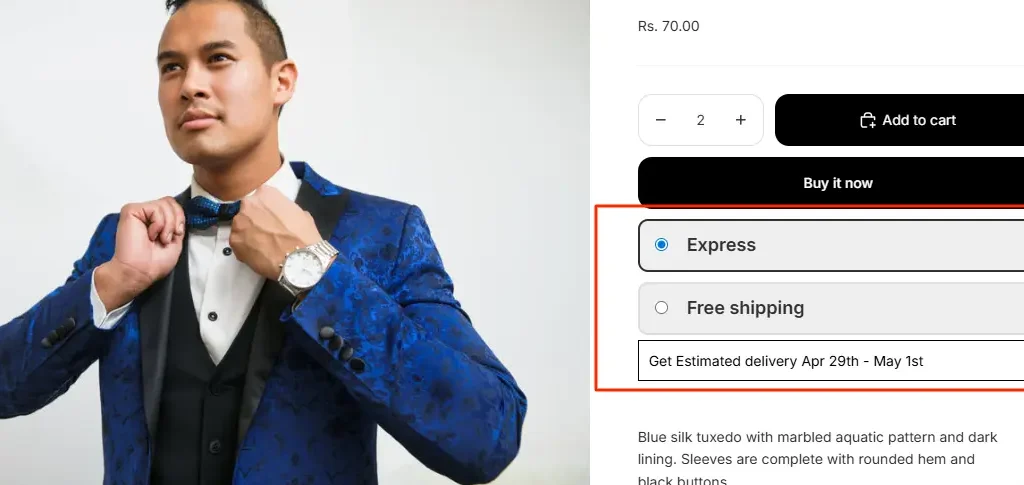
- Classic Dropdown: a familiar select menu that integrates cleanly into any theme layout.

| 📌 Shopify Plus merchants: You can also display the ETA message alongside the shipping method directly on the checkout page. Refer to the app’s checkout setup guide for Shopify Plus-specific configuration. |
Option 2: Custom Shopify Code Solution
For developers comfortable with Liquid and JavaScript, a custom implementation is possible. The approach typically involves:
- Adding a JavaScript listener to the shipping rate selector on the product page.
- Creating a conditional Liquid or JS object that maps each shipping method name to a delivery message string.
- Injecting the matched message into a DOM element near the shipping selector.
The challenge: Shopify themes vary widely. The shipping method selector often lives inside the cart or checkout, not directly on the product page, making DOM manipulation unreliable. You’d also need to manually handle order cutoff times, weekend logic, holiday calendars, and fallback states. Every theme update can break the implementation.
| ⚠️ Important: The custom code route is technically possible but has significant limitations; it’s tightly coupled to your current theme version, has no built-in fallback rules, cannot auto-sync shipping methods, and requires developer involvement for every update or shipping rate change. |
Which Option Should You Choose?
So which route fits your store best right now? For most merchants, a proven app wins on speed, cost, and safety. It handles cutoffs, holidays, and live updates all for you. Your dates stay accurate as smart automation adjusts each window. Industry data shows 77% of eCommerce pros now use AI tools daily.
Custom code only makes sense for truly unique setups. Think complex carrier logic, custom systems, or special integrations. If that sounds like you, budget for developers and constant testing. If not, an app delivers the same clean result without the overhead. Match the tool to your team and your real goals.
Cost and speed also weigh heavily on this choice. An app usually starts free or cheap and launches today. Custom work brings developer fees, testing hours, and slow timelines. Both can show the same clean date to your shoppers. The difference is the time and money you spend building it.
Where to Display Method-Based Delivery Dates
Placement decides how much your delivery dates actually help. The right spots catch shoppers exactly when doubt appears. Show your method-based dates in these key places:
- Product page, right below the price and stock line.
- Cart page, as shoppers review their order details.
- Checkout, where the final shipping choice is made.
- Order confirmation email, to reassure buyers after purchase.
Each spot answers the delivery question at a different moment. Product pages remove doubt before the add-to-cart click happens. Checkout confirms the promise as payment is about to happen. Consistent dates across all spots keep trust strong throughout. That steady clarity is what turns browsers into loyal buyers.
Best Practices for Method-Based Delivery Dates
Great method-based dates are clear, honest, and easy to trust. Place the date right below your price and stock information. Most shoppers check that spot first, so it grabs attention. Keep each message short, like “Delivered by Aug 10–13.” A clean line beats a paragraph about warehouse hours and carriers.
Make sure the date updates the moment a shopper switches methods. A static date that never changes quickly breaks their trust. Always show honest windows that you can actually meet on time. Factor in processing time, cut-off hours, weekends, and holidays. These small details keep every shipping promise believable and safe.
Keep your dates consistent across the whole shopping journey. Show them on product pages, the cart, and checkout together. Review your delivery data often and refine each window as needed. Add a countdown timer to nudge shoppers before the cut-off. A living, accurate system stays trustworthy month after month.
Test different message wording to see what converts best. A small change in phrasing can shift buyer behavior. Try “Get it by” against “Arrives by” and compare results. Keep the version that lifts sales and lowers doubt. Simple, steady testing sharpens every delivery promise over time.
Shipping-Method Message Examples
The right wording turns a plain method into real reassurance. Keep each message specific to the shipping speed it describes. Here are simple examples you can adapt for each method:
- Standard: “Standard shipping — arrives by Aug 14.”
- Express: “Express — get it by Aug 10, order within 3 hours.”
- Overnight: “Overnight — arrives tomorrow if you order by 5 PM.”
- Free shipping: “Free shipping — arrives Aug 15–17, no extra cost.”
Notice how each message pairs a method with a clear date. A gentle cutoff line adds honest urgency for the faster options. Shoppers instantly see the trade-off between speed and price. That clarity helps them choose the option that fits best. Each method feels intentional, and each buyer feels fully informed.
Measure and Improve Your Results
Adding these dates is the start, not the finish, of the work. Smart merchants track how the change affects real store behavior. Watch conversion and cart abandonment before and after launch. Note whether more shoppers now choose your faster shipping options. These simple checks show whether your dates are truly working.
Delivery accuracy is the metric that matters most over time. Match your promised dates against when orders actually arrive. If real delivery slips, adjust lead days and windows quickly. A good app dashboard makes tracking these numbers simple and fast. Steady tweaks keep every shipping promise honest and believable.
Final Thoughts
That hopeful gift shopper deserved a clear answer, not silence. Shipping Method-Based Estimated Delivery Dates give her instant clarity. They turn plain method names into honest, believable delivery promises. That clarity builds trust, lowers abandonment, and lifts your sales. In today’s market, this is no longer optional; it is expected.
You do not need a big team to deliver this experience. A trusted app can add method-based dates within just minutes. Custom code stays an option for enterprises with strong developer support. Either way, the goal is the same: honest, per-method delivery clarity. Give your shoppers that certainty, and watch more carts become orders.
Frequently Asked Questions
Q1. How do I show estimated delivery dates based on shipping methods in Shopify?
Use a Shopify delivery date app to create ETA rules for each shipping method. Customers will see dynamic delivery estimates based on their selected shipping option.
Q2. Can Shopify display different delivery dates for standard and express shipping?
Yes, but not natively on product pages. A Shopify delivery date app or custom code can display separate, dynamic delivery dates for standard and express shipping methods.
Q3. How do I calculate delivery dates for different shipping options in Shopify?
A Shopify shipping ETA app automatically calculates delivery dates using processing times, transit days, and order cutoffs, then displays accurate estimates for each shipping method.
Q4. Does Shopify support shipping method-based ETA natively?
No. Shopify does not natively display shipping method-specific delivery estimates on product pages. To show dynamic ETAs for different shipping options, you’ll need an app or custom code.

Shopify Expert
Dipen Panchal, Shopify Tech Lead at Setubridge Technolabs, brings over a decade of expertise as a Shopify Expert. Passionate about e-commerce growth, he specializes in UI/UX design, crafting intuitive, engaging solutions tailored for merchants and B2B clients to enhance user experiences.